CI/CD security streaming sounds like an enterprise DevSecOps phrase until your media app ships a broken player build, a poisoned dependency, or a leaked signing key. For streaming services, torrent-adjacent tools, IPTV dashboards, Plex-style home media utilities, and CDN-backed video platforms, the pipeline is not backstage plumbing. It is part of the product surface.
Teams think the problem is adding more scanners to GitHub Actions, GitLab CI, Jenkins, or whatever build system they use. The real problem is that streaming products have moving parts that normal web apps do not: player SDKs, transcoders, manifests, DRM integrations, container images, CDN invalidations, subtitle packages, plugin ecosystems, and release channels that users trust by default.
That changes the conversation. CI/CD security streaming is not a definition to memorize. It is an architecture and workflow problem: how do you ship fast while proving that the thing you shipped is the thing you intended to ship?
This guest post is written for the bittorrented.com audience: cord cutters, media tech hobbyists, IPTV viewers, torrent users, and builders who care about legal, safe, privacy-aware streaming. The practical question is simple: if your app, plugin, feed, container, or media service updates automatically, what prevents your pipeline from becoming the easiest attack path?
Table of contents
- Why CI/CD security streaming matters now
- The streaming delivery chain you actually need to secure
- CI/CD security streaming starts with ownership
- Threats that matter in media CI/CD pipelines
- What works: a practical secure pipeline design
- What fails: security controls that look good but break in practice
- Implementation workflow for CI/CD security streaming
- Controls for IPTV, torrent, and home media tooling
- Metrics that tell you the pipeline is safer
- Where bittorrented.com fits in the workflow
Why CI/CD security streaming matters now

Streaming releases are no longer simple deploys
A streaming product is rarely one repository and one server. Even small teams now ship web clients, mobile apps, media workers, transcoding jobs, container images, CDN rules, playlist parsers, scraper modules, authentication code, billing hooks, and sometimes community plugins.
The mistake teams make is treating all of that like a normal web deploy. They secure the app server, add a dependency scan, and call it a supply-chain program. Meanwhile, the release that users actually receive might be a Docker image pulled by a self-hosted user, an Android APK, a browser extension, a plugin zip, an IPTV playlist processor, or a nightly build linked in a forum.
If the pipeline can publish it, attackers can target that path.
Practical rule: Anything that updates a player, plugin, feed, parser, container, or media worker is part of the security boundary.
The pipeline is part of the viewing experience
Users do not think about CI/CD when they click play. They think about buffering, broken subtitles, missing channels, failed logins, and whether the app feels trustworthy. But the pipeline controls all of those outcomes.
A bad deployment can break HLS playlists. A compromised dependency can exfiltrate tokens. A leaked CDN credential can rewrite assets. A rushed hotfix can bypass review. A malicious plugin update can turn a media tool into a credential collector.
For streaming, security and reliability are tied together. The same controls that prove build integrity also reduce mystery outages. The same release discipline that stops malicious artifacts also makes rollback faster when a codec change breaks half your devices.
Legal and safe media use still needs secure delivery
Torrent and IPTV topics require care. There are legal ways to use peer-to-peer distribution, open media archives, personal backups, public-domain content, Linux ISOs, creator-owned media, and licensed IPTV services. There are also illegal and risky uses. This post is about secure engineering and safe consumption, not bypassing rights or hiding abuse.
A useful way to think about it is this: legal content does not automatically mean safe software. A legitimate IPTV app can still have a weak update channel. A home media container can still leak secrets. A torrent client plugin can still ship from a compromised build runner.
CI/CD security streaming is about the trust path from source code to user device.
The streaming delivery chain you actually need to secure
Code, containers, and media artifacts
Most teams understand source code. Fewer teams model the other artifacts that move through a streaming stack.
Common streaming pipeline outputs include:
- Web player bundles and JavaScript SDK integrations
- Android, iOS, desktop, and smart TV builds
- Docker images for media servers and workers
- FFmpeg or GStreamer wrapper binaries
- HLS and DASH packaging jobs
- Subtitle processing services
- IPTV playlist importers and normalizers
- Plugin packages for home media tools
- CDN configuration and cache invalidation scripts
- Infrastructure-as-code for storage buckets, queues, and edge rules
What breaks in practice is that only some of these get security attention. The application build may require review, while the media worker image is pushed from a side repo by one maintainer. The player release may be signed, while the plugin feed is a plain JSON file generated by a script.
That split is where real risk accumulates.
Manifests, playlists, and metadata
Streaming systems run on metadata. M3U playlists, HLS manifests, DASH MPDs, EPG data, subtitle files, thumbnails, codec metadata, and content indexes all shape what a user sees and what a player loads.
Security teams sometimes ignore these because they are not “code.” That is too narrow. A malicious or malformed playlist can trigger parser bugs, SSRF attempts, credential leaks, tracking pixels, abusive redirects, or resource exhaustion. A bad manifest can point clients to unexpected domains. A poisoned metadata feed can push users toward unsafe sources.
CI/CD security streaming needs validation for generated and imported media metadata, not just compiled binaries.
Plugins, clients, and edge updates
The riskiest systems often have the most convenient update paths. Home media tools, browser add-ons, IPTV dashboards, and torrent-related utilities frequently rely on community modules or external lists. That flexibility is useful, but it widens the trust boundary.
The practical question is not “can we support plugins?” It is “how do we constrain plugin distribution, permission scopes, signing, version pinning, and revocation?”
A plugin ecosystem without signing and revocation is not an ecosystem. It is an unbounded remote-code execution channel with friendly labels.
CI/CD security streaming starts with ownership
Map who can change what
Before buying tools, map authority. Who can merge code? Who can change a GitHub Actions workflow? Who can publish a container? Who can rotate signing keys? Who can update CDN rules? Who can change playlist import logic? Who can push a hotfix outside the normal path?
The team at vu1nz.com often frames CI/CD defense around this ownership layer because attackers do not need to “hack production” if they can quietly own the release path.
A simple authority map should include:
| Asset or action | Typical owner | Security question |
|---|---|---|
| Source repository | Engineering | Can one account merge and release alone? |
| CI workflow files | DevOps | Are workflow changes reviewed like code? |
| Build runners | Platform | Are runners ephemeral and isolated? |
| Signing keys | Security or release engineering | Can CI use keys without exporting them? |
| Container registry | Platform | Are images immutable after publish? |
| Plugin feed | Product or community team | Are packages signed and revocable? |
| CDN configuration | Infrastructure | Can deploy scripts rewrite origins? |
| Media metadata jobs | Data or media ops | Are inputs validated and logged? |
Practical rule: If one compromised developer account can change code, alter the workflow, and publish the release, you do not have a release process. You have a shortcut.
Separate build authority from release authority
Build and release are different actions. A pipeline should be able to build on every pull request, but only a controlled path should publish artifacts to users.
For streaming teams, that distinction matters because releases can have immediate user impact. A web player bundle can break playback globally. A mobile release can sit in app stores for days. A container tag like latest can update thousands of self-hosted installations. A plugin feed can push code the next time a media server refreshes.
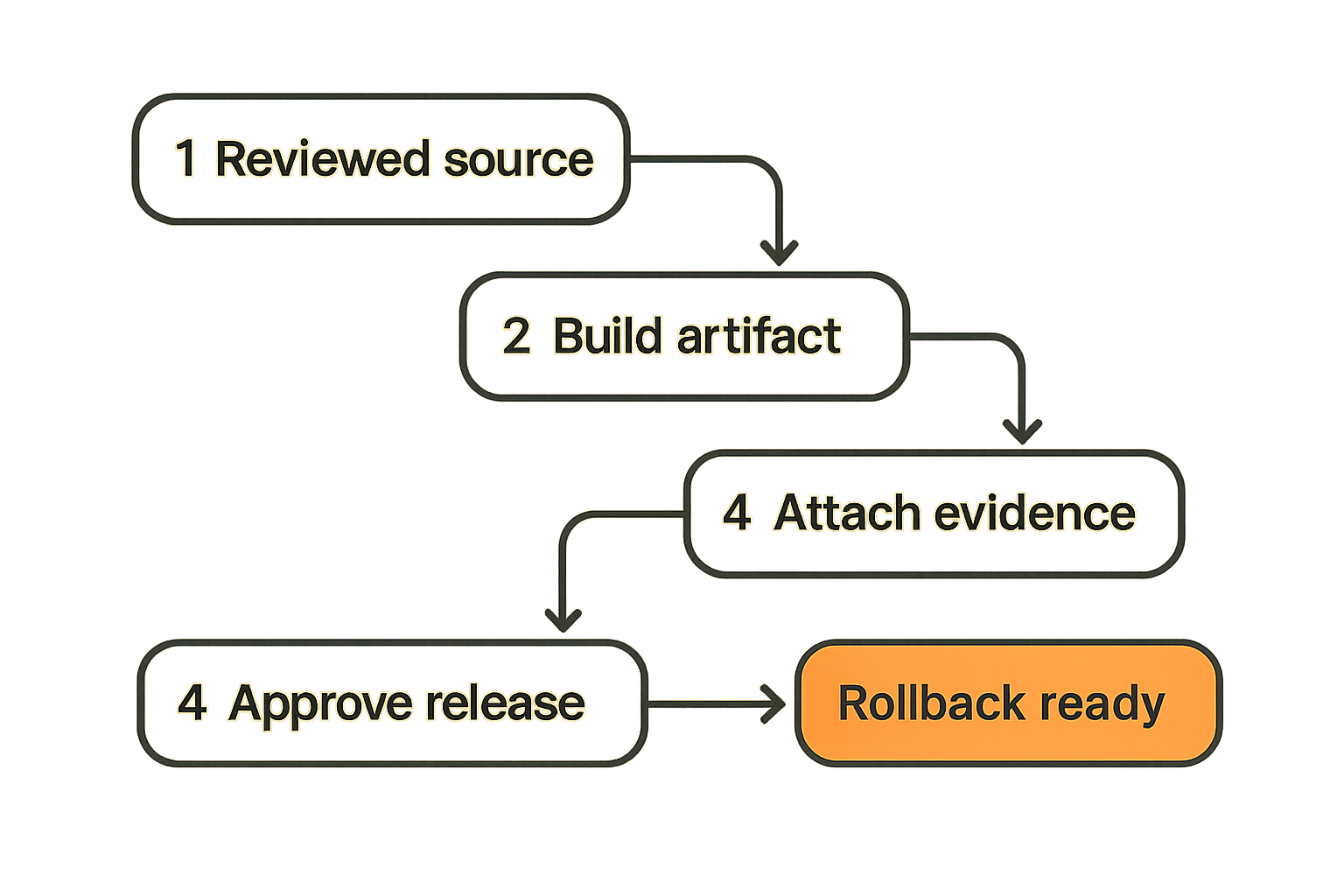
A better model is:
- CI builds from reviewed source.
- CI creates immutable artifacts.
- Security checks attach evidence to those artifacts.
- Release approval promotes the same artifact.
- Deployment verifies signatures before use.
- Rollback promotes the previous known-good artifact.
Do not rebuild during release if you can avoid it. Rebuilding creates another chance for drift.
Make rollback an owned workflow
Rollback is not an emergency mood. It is a workflow. If nobody owns it, teams improvise under pressure.
For streaming apps, rollback planning should cover:
- Reverting web player bundles
- Restoring prior container digests
- Disabling a plugin version
- Repointing a manifest generator
- Rolling back CDN rules
- Revoking exposed credentials
- Communicating to users about unsafe versions
The release owner should know which artifacts are safe to restore and how to verify them. If rollback means “find the old build on someone’s laptop,” the pipeline has already failed.
Threats that matter in media CI/CD pipelines
Dependency and package compromise
Media projects often depend on complex libraries: codecs, player frameworks, parsers, packaging tools, UI components, subtitle libraries, and API clients. Some are maintained by large communities. Others are thin wrappers last updated by a single maintainer.
The mistake teams make is treating dependency scanning as a yes/no gate. A vulnerability scanner is useful, but it does not answer every supply-chain question.
Ask:
- Is the dependency pinned by version and checksum?
- Is the package source trusted?
- Does the build fetch code during runtime?
- Can a transitive dependency change the player bundle?
- Are native binaries pulled from release pages or built internally?
- Do we know which dependency versions are in each artifact?
For torrent, IPTV, and media tooling, parser dependencies deserve special attention. Anything that handles untrusted playlists, magnet metadata, subtitles, thumbnails, EPG files, or remote manifests should be treated as exposed input-handling code.
Secret exposure and signing-key abuse
Secrets are the boring failure mode that still breaks teams. CI jobs often need registry tokens, cloud credentials, app-store credentials, CDN keys, package publishing tokens, and signing material. Streaming systems add media-specific secrets: DRM provider credentials, origin tokens, webhook secrets, license server keys, and storage bucket credentials.
What breaks in practice is scope. A test job receives production credentials because it was easier. A forked pull request can access a token. A long-lived key sits in CI variables for two years. A build log prints an environment variable. A maintainer copies a signing key to debug locally.
Practical rule: CI jobs should receive the smallest credential needed for the shortest time needed, and signing keys should be used without being exportable.
Use OIDC-based short-lived cloud credentials where possible. Store signing keys in a dedicated signing service or hardware-backed key system. Separate read, write, publish, and revoke permissions. Treat “download artifacts” as different from “publish artifacts.”
Artifact substitution and poisoned releases
Artifact substitution is simple: the source code looks fine, but the thing users get is not the thing reviewers approved.
This can happen when:
- A build runner is compromised
- A release job downloads an unverified binary
- A container tag is overwritten
- A plugin zip is replaced after approval
- A CDN asset is modified outside the pipeline
- A nightly build is published without provenance
- A manifest points clients to an attacker-controlled asset
The defense is artifact identity. Use immutable digests, signatures, provenance, and promotion workflows. If a media server pulls myapp:latest, it should resolve to a digest that was built, scanned, signed, and approved.
A comparison helps:
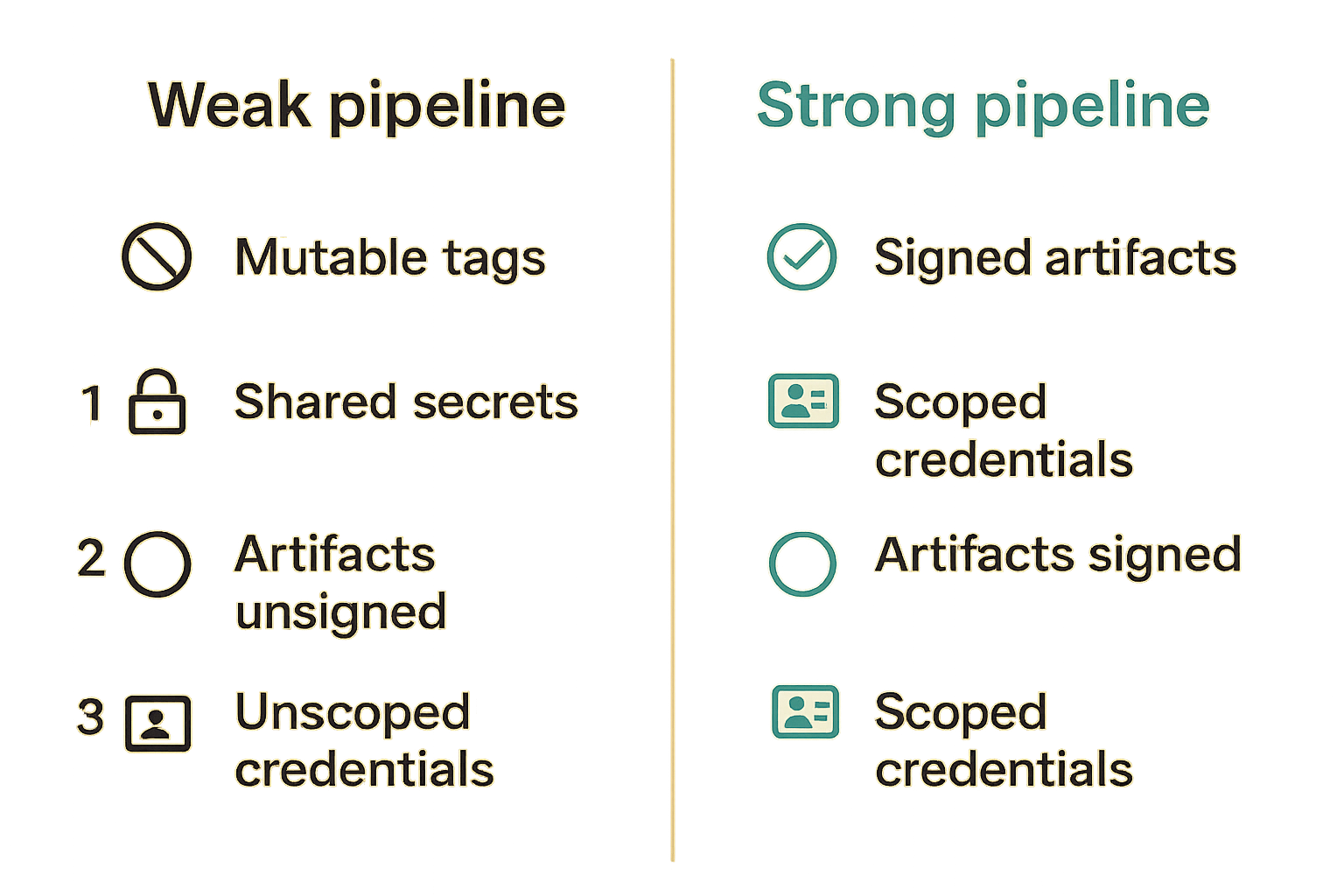
| Approach | Looks convenient | Fails because | Better pattern |
|---|---|---|---|
Mutable latest tags | Easy for users | Tag can be overwritten | Pin digest and publish release notes |
| Unsigned plugin zips | Simple distribution | Users cannot verify origin | Sign packages and verify before install |
| Manual CDN uploads | Fast hotfixes | Bypasses review and logs | Deploy through pipeline only |
| Rebuild on release | Fresh output | Creates drift from tested build | Promote immutable artifact |
| Shared publish token | Easy setup | Any job can publish | Scoped, short-lived release token |
What works: a practical secure pipeline design
Start with immutable build artifacts
The most important design choice is to stop treating builds as temporary output. Build once, name the artifact by digest, attach evidence, then promote it.
For a streaming service, that might mean:
- Container images are referenced by digest, not only tag.
- Web bundles are content-hashed and uploaded through CI.
- Mobile build artifacts are signed in a controlled release step.
- Plugin packages have checksums and signatures.
- Manifest-generation code is versioned and deployed like software.
- CDN changes are applied from reviewed infrastructure code.
A minimal release record should answer:
release:
  name: player-api-2026.06.04
  source_commit: 8fd21c9
  artifact_digest: sha256:...
  sbom: attached
  signature: verified
  build_runner: ephemeral-linux-x64
  approved_by: release-owner
  deployed_to:
    - production-web
    - media-workers
  rollback_artifact: sha256:...
You do not need a perfect platform on day one. You need a reliable chain of custody.
Use policy gates where they change behavior
Security gates should stop dangerous actions, not just generate dashboards. A gate that blocks every medium vulnerability will be bypassed. A gate that blocks unsigned production artifacts will change behavior.
Good gates for CI/CD security streaming include:
- Block release if artifact is unsigned.
- Block deploy if provenance is missing.
- Block workflow changes without owner review.
- Block production credentials in pull-request jobs.
- Block container images with critical reachable vulnerabilities.
- Block plugin publication if checksum and signature are missing.
- Block media metadata jobs that fetch from unapproved internal networks.
Bad gates include vague “security score too low” checks that nobody understands. Operators need gates they can debug at 2 a.m.
Treat media-side artifacts as release assets
Do not limit release discipline to application code. Media-side artifacts can create security and reliability problems too.
Examples:
- HLS/DASH manifest templates
- Channel lineup transforms
- EPG normalization rules
- Subtitle conversion scripts
- Thumbnail generation workers
- Transcoder presets
- Player feature flags
- CDN cache rules
If these change user behavior, put them in version control. Review them. Test them. Promote them. Roll them back.
This is where streaming teams often mature quickly. Once media ops changes go through the same release model as code, debugging gets easier. You can answer “what changed?” without searching Slack.
What fails: security controls that look good but break in practice
Scanner-only programs create alert debt
Scanners are useful. Scanner-only programs are not.
The failure pattern is predictable: a team adds dependency scanning, secret scanning, container scanning, static analysis, and license checks. Alerts explode. Developers learn which warnings can be ignored. Security starts exporting CSVs. Releases still happen through the same weak path.
What works is prioritization by exploitability and release impact. A critical vulnerability in a parser exposed to untrusted playlists should get attention before a low-impact issue in a dev-only package. A secret exposed in a forked workflow is more urgent than a theoretical lint rule.
Shared secrets turn every job into production
A CI system with shared production secrets is fragile. Every job becomes a possible production action. Every maintainer becomes one mistake away from leaking something important.
For media stacks, split credentials by environment and purpose:
- Build can read dependencies but cannot publish releases.
- Test can access test media but not production catalogs.
- Package can write to staging registries only.
- Release can promote signed artifacts.
- CDN deploy can change approved paths only.
- Revocation can disable keys and artifacts without full admin access.
This is less convenient than one global token. It is also the difference between a contained incident and a platform-wide compromise.
Manual approvals become rubber stamps
Manual approval is not bad. Empty approval is bad.
A release approver should see evidence, not vibes:
- Source commit and reviewer status
- Artifact digest
- SBOM or dependency summary
- Signature status
- High-risk changes
- Failed or waived checks
- Rollback target
- Deployment blast radius
If the approval screen only says “Deploy production? Yes/No,” people will click yes. That is not governance. That is theater.
Implementation workflow for CI/CD security streaming
Step 1: inventory the release paths
Start with a release-path inventory. Do not begin with tooling. Begin with where users receive changes.
A practical inventory sequence:
- List every artifact users or infrastructure consume.
- Identify how each artifact is built.
- Identify who can modify the build workflow.
- Identify how each artifact is published.
- Identify what credentials are used.
- Identify whether the artifact is signed.
- Identify rollback and revocation paths.
- Mark paths that bypass CI/CD.
You will usually find at least one shadow release path: a script, a manual upload, a plugin feed, a CDN bucket, a container tag, or a cron job nobody has reviewed recently.
Fix those first.
Step 2: sign and verify artifacts
Signing only helps if verification happens before trust. A signed artifact sitting next to an unsigned one is documentation, not enforcement.
For streaming teams, verification points include:
- Deployment controllers verifying container signatures
- Plugin managers checking package signatures before install
- Update clients refusing unsigned releases
- CDN upload jobs verifying checksums
- Release jobs validating provenance before promotion
- Home media containers pinning known digests
You can phase this in. Start by signing and logging. Then warn on missing signatures. Then block production promotion. Finally, enforce verification in clients and deployment systems.
Step 3: add runtime feedback loops
CI/CD does not end at deploy. Streaming systems need runtime signals because playback failures and abuse patterns show up after release.
Useful feedback loops include:
- Crash rates by version
- Playback errors by player build
- Manifest fetch failures
- Unexpected outbound network calls
- Plugin install failures
- Container image drift
- CDN origin anomalies
- Authentication or token errors after release
Feed these signals back into release decisions. If a new player bundle causes abnormal playback failures, pause rollout. If a plugin version triggers unexpected outbound domains, revoke it. If a container digest in production does not match the approved release, investigate immediately.
Controls for IPTV, torrent, and home media tooling
Protect update channels and package feeds
Many media hobbyist tools live or die by update trust. Users install a package once and assume future updates are safe. That trust deserves engineering.
For open-source or self-hosted media projects:
- Publish checksums for release artifacts.
- Sign releases where practical.
- Avoid asking users to curl random scripts into shells.
- Use reproducible build practices where feasible.
- Document official release channels.
- Warn users about unofficial mirrors and modified builds.
- Pin container digests in production guides.
For operators, avoid running media containers with broad host access unless required. Mount only the directories needed. Keep secrets out of environment dumps and logs. Separate download, library, transcode, and admin permissions.
Validate playlist and source handling
IPTV and playlist-heavy tools should treat external lists as untrusted input. Even legal, legitimate playlists can contain mistakes. Malicious lists can contain worse.
Validation should cover:
- URL schemes and allowed protocols
- Redirect behavior
- Internal IP and metadata service access
- File size and line count limits
- Encoding and malformed entries
- Suspicious tracking parameters
- Unexpected executable references
- Rate limits for refresh jobs
The goal is not to make every playlist perfect. The goal is to prevent playlist processing from becoming a network scanner, credential leak, or denial-of-service path.
Keep privacy boundaries visible
Media tools often touch sensitive information: viewing habits, library names, IP addresses, device IDs, account tokens, and sometimes payment details. CI/CD security streaming should preserve privacy boundaries during build, test, and support workflows.
Avoid using production user data in CI. Redact logs. Keep sample media synthetic or properly licensed. Do not publish debug builds that phone home more than users expect. Be clear about telemetry. For privacy-aware users, trust is not just whether the app works. It is whether the app respects boundaries when something goes wrong.
Metrics that tell you the pipeline is safer
Measure trust, not just scan counts
A useful metric changes behavior. “Number of vulnerabilities found” may help for backlog tracking, but it does not prove the release chain is safer.
Better metrics include:
| Metric | Why it matters |
|---|---|
| Percent of production artifacts signed | Shows whether releases have verifiable identity |
| Percent of deploys using immutable digests | Reduces artifact substitution risk |
| Number of release paths outside CI/CD | Finds shadow publishing workflows |
| Time to revoke a bad artifact | Measures incident readiness |
| Workflow changes reviewed by owners | Protects the build process itself |
| Secrets older than rotation policy | Finds long-lived blast radius |
| Rollbacks tested in last quarter | Proves recovery is operational |
The best teams do not try to measure everything. They measure the controls that prevent or contain the failures they actually worry about.
Track time to revoke and recover
For streaming products, revocation speed matters. If a plugin version is unsafe, how fast can you disable it? If a signing key leaks, how fast can you rotate it and publish a trusted update? If a media worker image is bad, how fast can you roll back globally?
Recovery metrics are more honest than prevention claims. Nobody can guarantee that a pipeline will never be compromised. A mature team can prove that compromise will be constrained, detected, and reversed.
Use exceptions as design feedback
Every exception tells you something. If developers constantly bypass a gate, the gate may be too noisy or poorly placed. If release managers approve risky changes without context, the evidence is weak. If media ops keeps uploading hotfixes manually, the official pipeline is too slow for real incidents.
Do not just log exceptions. Review them. Reduce them by changing the workflow.
Where bittorrented.com fits in the workflow
Security-aware media guidance helps users choose better tools
For users, the lesson is not “never install anything.” That is not realistic. The lesson is to evaluate trust paths. Where did the tool come from? How does it update? Are releases signed? Is the project transparent about containers, permissions, telemetry, and official channels?
For builders, the lesson is similar. If you want users to trust your streaming tool, show the work. Document releases. Publish checksums. Use signed artifacts. Explain permissions. Keep legal and safe use cases clear.
bittorrented.com sits in a useful place here because media users need practical guidance that does not pretend the ecosystem is risk-free. Streaming, IPTV, torrents, and home media tools can be powerful when used legally and carefully. They also require sharper security habits than many consumer apps.
Operators should document trust assumptions
Every project has assumptions. Write them down.
Examples:
- “Official containers are published only from this CI workflow.”
- “Plugin packages must be signed by this key.”
- “Playlist imports cannot access private network ranges.”
- “Release builds are promoted by digest, not rebuilt.”
- “Production credentials are never available to pull-request jobs.”
- “Rollback artifacts are retained for 90 days.”
Documentation will not save a broken pipeline, but it gives users and maintainers a shared model. It also makes audits and incident response less chaotic.
The closing CI/CD security streaming checklist
If you do nothing else, start here:
- Inventory every release path, including plugins, feeds, containers, manifests, and CDN scripts.
- Remove production secrets from non-release jobs.
- Build once and promote immutable artifacts.
- Sign release artifacts and verify signatures before deployment or install.
- Review CI workflow changes like production code.
- Validate playlist, manifest, and metadata inputs.
- Keep rollback and revocation paths tested.
- Measure artifact trust and recovery time, not just scanner output.
CI/CD security streaming is not about slowing down media teams. It is about removing blind trust from the path between code and viewer. When the pipeline is designed well, releases become easier to reason about, incidents become smaller, and users have a better chance of knowing what they are running.
Try bittorrented.com
For practical, privacy-aware guidance on streaming services, torrents, IPTV, and home media tools, Try bittorrented.com.