IPTV breaks at the worst possible time: the match starts, the stream buffers, the guide is wrong, and everyone blames the player app.
Cloud computing IPTV sounds like the fix. Move the heavy work off the home box, use cloud servers for transcoding and delivery, and stop fighting with underpowered hardware. That is partly true. It is also where many setups get more fragile, more expensive, and harder to debug.
Teams think the problem is streaming software. The real problem is state: channel availability, user access, transcoding queues, cache behavior, device compatibility, logs, retries, and support workflows.
That changes the conversation. Cloud computing IPTV is not a feature you bolt onto a playlist. It is an architecture decision for how live and on-demand media moves from source to viewer, legally, reliably, and with enough operational context to fix things when they fail.
Table of contents
- Cloud computing IPTV is a pipeline, not an app
- Why cloud computing IPTV matters in 2026
- The reference architecture for cloud computing IPTV
- Edge, cloud, and home hardware tradeoffs
- Transcoding, packaging, and quality control
- Storage, caching, and delivery economics
- Identity, access, privacy, and safe IPTV use
- Implementation workflow for a cloud IPTV build
- Failure modes that break IPTV platforms
- Where bittorrented.com fits for media tech readers
Cloud computing IPTV is a pipeline, not an app
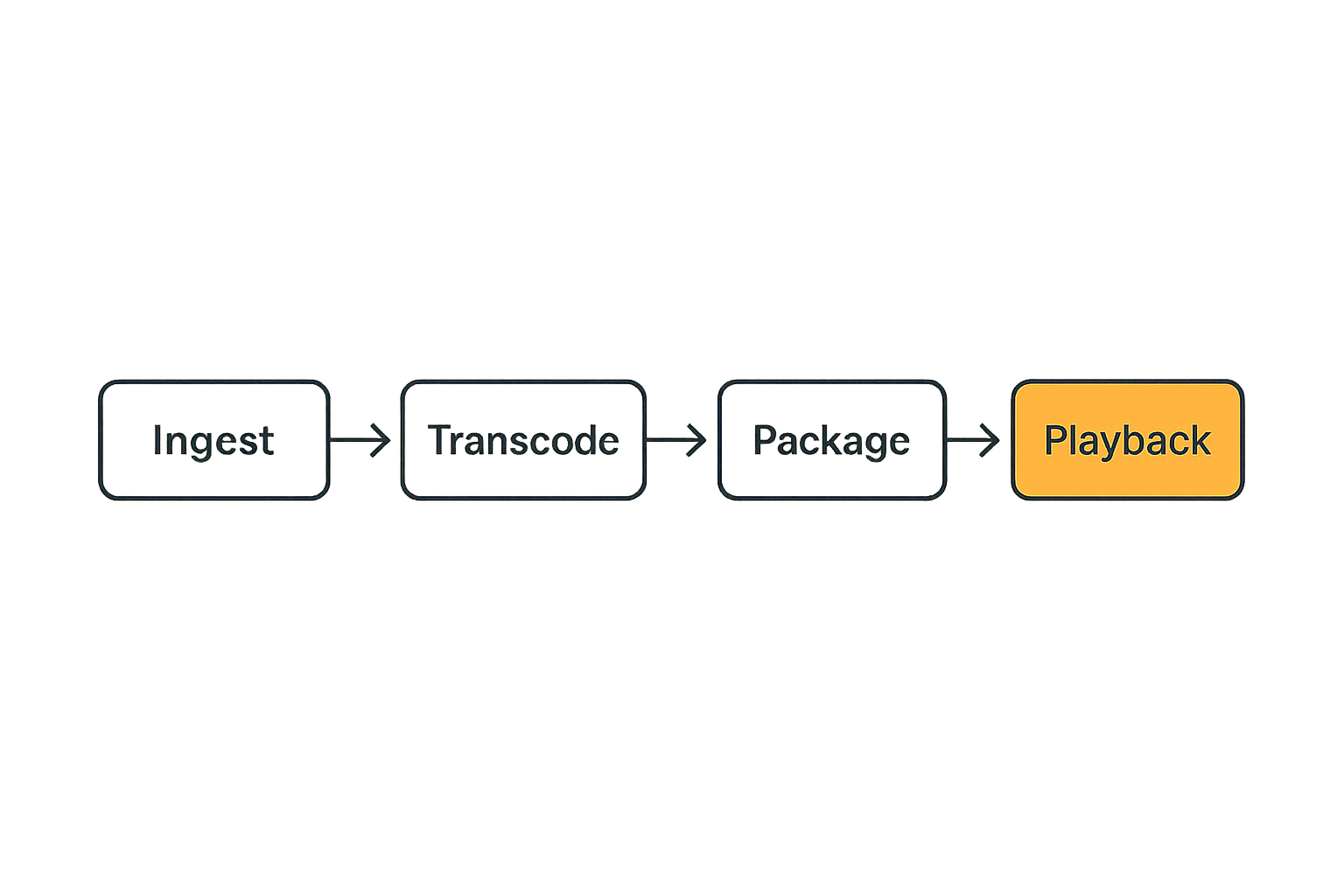
The mistake teams make is treating IPTV like a playlist with a nicer interface. That works for a small personal setup until the first real operational problem appears: a source goes offline, a token expires, a transcoder stalls, or one device cannot decode the stream format.
A useful way to think about it is simple: IPTV is a media pipeline. Cloud computing only helps if it improves the pipeline instead of hiding it.
Live ingest and channel state
Live IPTV starts with ingest. That may be a licensed live feed, a private camera source, a local tuner, a church broadcast, a school sports stream, or a permitted internal channel. The legal source matters. The pipeline should know where the feed came from, what rights apply, and who can watch it.
Channel state is more than online or offline. In practice you need to track:
- source health
- current bitrate and resolution
- last successful segment
- guide data freshness
- entitlement rules
- failover source availability
- player error rates by device
Without that state, support becomes guessing. The viewer says the IPTV channel is down. The operator does not know whether ingest failed, transcoding lagged, the CDN missed, or the user app cached a bad manifest.
Practical rule: if you cannot tell where a stream failed, cloud computing IPTV will move the failure farther away from you, not make it disappear.
Compute jobs behind every stream
Every smooth stream has compute behind it. Sometimes the compute is obvious, such as FFmpeg transcoding. Sometimes it is hidden, such as thumbnail generation, electronic program guide normalization, closed caption handling, DRM packaging, audio remuxing, or ABR ladder creation.
Cloud computing IPTV works best when these jobs are explicit. Do not just spin up a server and hope it handles everything. Define each job:
- ingest probe
- transcode
- package to HLS or DASH
- write segments
- update manifest
- purge or refresh cache
- emit health metrics
- notify control plane
The team at c0mpute.com works around decentralized compute, AI inference, FFmpeg workloads, and payment rails, which is exactly the kind of infrastructure thinking IPTV operators need when media processing becomes a queue of jobs rather than a single server process.
Why cloud computing IPTV matters in 2026
Cloud computing IPTV matters because the old model is under pressure. Home viewers use more devices, networks are more variable, and media workflows are no longer just one file on one box.
For hobbyists, the pressure shows up as a NAS running hot or a mini PC struggling with multiple transcodes. For small media operators, it shows up as support tickets, bandwidth bills, and fragile scripts. For communities and organizations, it shows up as the need to provide reliable legal streaming without hiring a full broadcast team.
Viewer expectations moved upstream
Viewers do not care whether the bottleneck is CPU, bandwidth, packaging, or DNS. They expect streams to start quickly, seek cleanly, and adapt when the network gets worse.
That expectation changes the backend. IPTV platforms need to handle multiple output profiles because devices are inconsistent. A smart TV may handle one codec. A browser may prefer another. A mobile viewer on weak Wi-Fi needs a lower bitrate option. A living room device may need stable 1080p with clean audio sync.
The practical question is not whether cloud is modern. The question is whether the architecture gives you enough elasticity and visibility to handle real viewers at real times.
Legal and operational boundaries matter
This point should be boring, but it is not optional. IPTV can be used for lawful streaming, private media, educational channels, local broadcasts, and licensed content delivery. It can also be abused. A serious architecture should make the legal boundary visible.
That means documenting sources, access rules, retention policies, and logs. If you cannot prove what a channel is, who can access it, and why, you are building risk into the workflow.
Practical rule: cloud infrastructure does not legalize a content source. It only changes where the processing and delivery happen.
The reference architecture for cloud computing IPTV
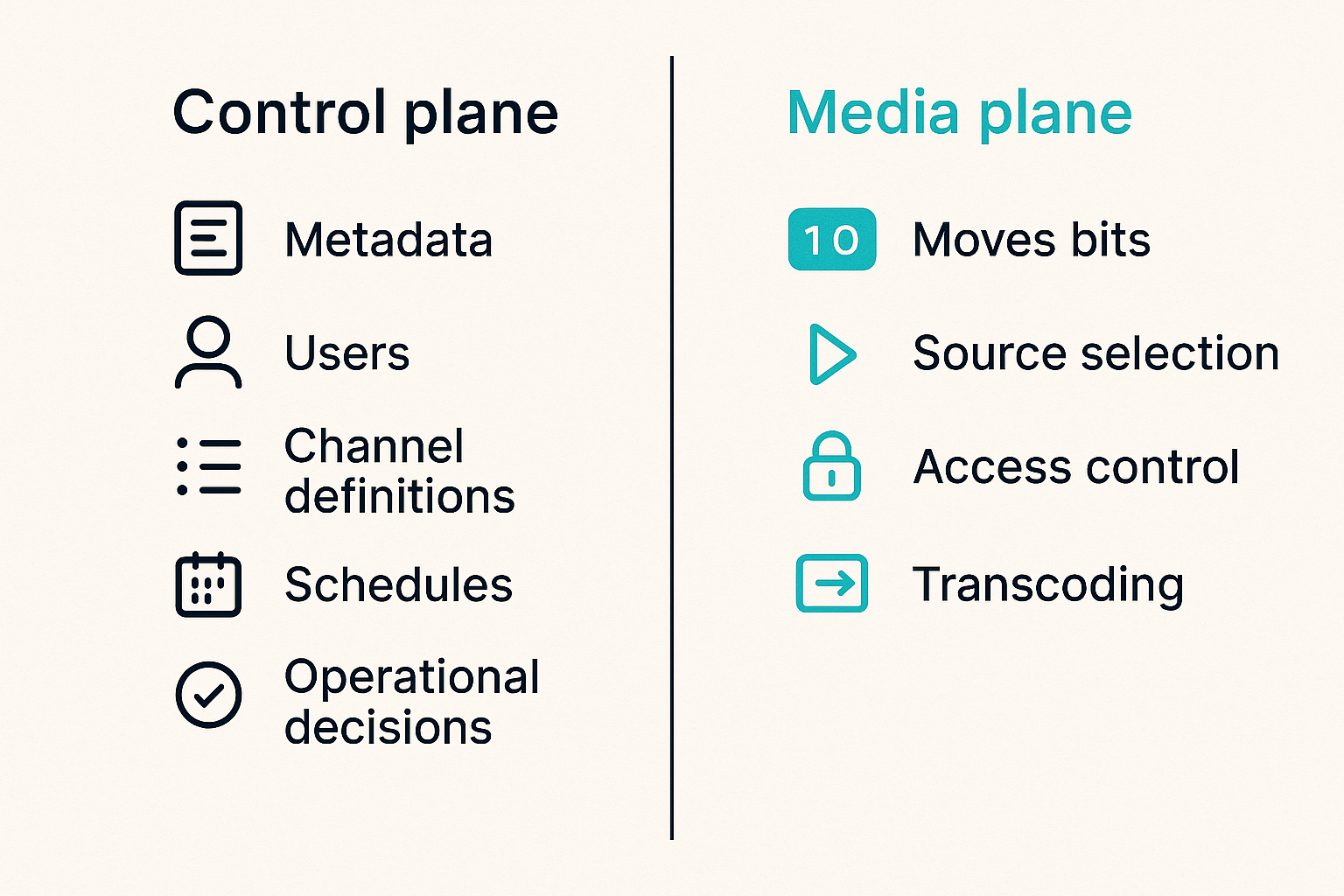
The cleanest cloud computing IPTV architecture separates the control plane from the media plane. This sounds abstract until something breaks. Then it is the difference between a quick fix and a long outage.
The control plane decides what should happen. The media plane moves bits.
Control plane
The control plane owns metadata, users, permissions, channel definitions, schedules, and operational decisions. It answers questions like:
- Is this channel active?
- Which source should be used?
- Can this viewer access it?
- Which output profiles are enabled?
- Is the transcoder healthy?
- Should the cache be purged?
- Should a backup source take over?
For a small setup, the control plane may be a database plus an admin dashboard. For a larger setup, it may include APIs, queues, event handlers, and role-based access control. The important part is that it is not buried inside the player.
A simple control record might look like this:
channel_id: local-news-hd
status: active
source_type: licensed-live-feed
profiles:
  - 1080p-6mbps
  - 720p-3mbps
  - 480p-1mbps
access:
  region: permitted-market
  account_required: true
failover:
  enabled: true
  backup_source: local-news-sd
observability:
  alert_after_segment_gap_seconds: 12
That is not fancy. It is just enough structure to stop running IPTV by memory and shell history.
Media plane
The media plane handles ingest, transcoding, packaging, segment storage, origin serving, and delivery. It should be optimized for throughput and failure isolation.
The media plane should not decide who is allowed to watch a channel. It should receive signed instructions or scoped tokens from the control plane. This separation prevents a common mess where stream URLs become permanent keys that get copied into apps, forums, and old devices.
What breaks in practice is coupling. If the same process manages users, transcodes video, writes HLS segments, and serves the player, every incident becomes a full-system incident. CPU spikes hurt login. A bad source blocks admin changes. A database delay slows manifests.
Edge, cloud, and home hardware tradeoffs
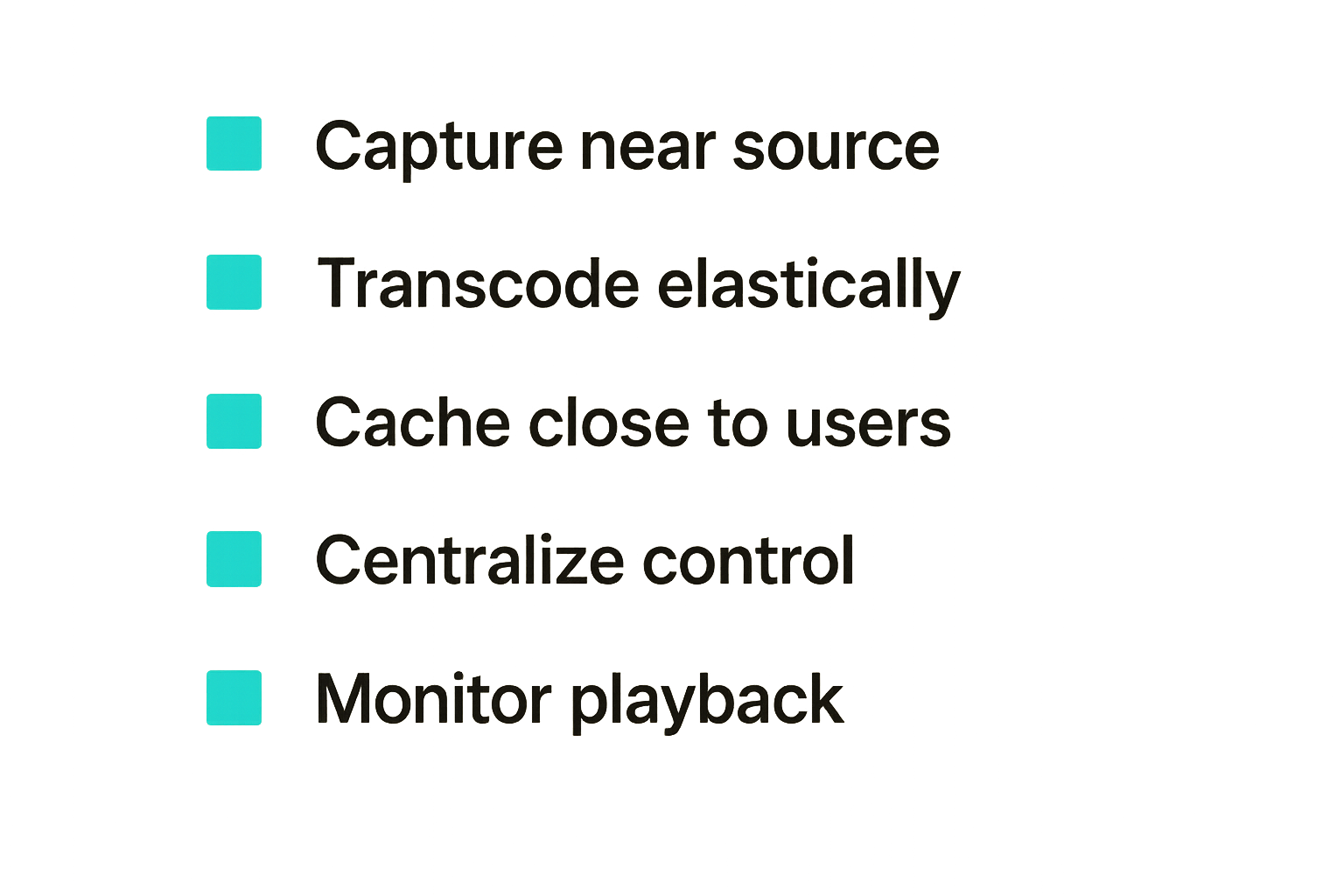
Cloud computing IPTV does not mean every workload belongs in the cloud. The best architecture often uses a mix: home or edge hardware for capture, cloud compute for bursty transcoding, and CDN or object storage for delivery.
The right answer depends on latency, cost, bandwidth, rights, and failure tolerance.
When cloud wins
Cloud wins when demand is unpredictable, compute is bursty, or viewers are geographically spread out. It also helps when you need a repeatable deployment instead of one carefully tuned home server.
Use cloud for:
- scheduled event streaming with viewer spikes
- multi-profile transcoding
- packaging to HLS or DASH
- thumbnail and preview generation
- temporary DVR windows
- distributed delivery
- centralized logging and alerts
Here is the tradeoff in plain terms:
| Workload | Home hardware | Cloud compute | Practical note |
|---|---|---|---|
| Single local stream | Usually fine | Often overkill | Keep it simple if only one household watches |
| Multiple transcodes | CPU or GPU limited | Scales better | Watch cloud GPU and egress costs |
| Live event spike | Fragile | Strong fit | Pre-warm capacity before the event |
| Private archive playback | Good if local | Good if remote users | Storage and bandwidth decide the winner |
| 24/7 channel restream | Cheap if stable | Reliable but billed | Rights and source stability matter most |
Cloud is not magic. It is rented capacity with APIs. The win is operational flexibility, not a free performance upgrade.
When local still wins
Local still wins when the stream source is local, the audience is small, or upload bandwidth is good enough. A home media server can be simpler, cheaper, and more private than a cloud workflow.
Local capture is also useful at the edge. For example, a venue may use a small encoder on-site to normalize camera input before sending a clean contribution feed to the cloud. That reduces upstream chaos.
The mistake teams make is choosing one side as a religion. A better approach is workload placement:
- capture near the source
- transcode where capacity is available
- store where access patterns justify it
- deliver from the closest reliable edge
- keep control decisions centralized
Practical rule: put each IPTV workload where it fails least painfully, not where the architecture diagram looks cleanest.
Transcoding, packaging, and quality control
Transcoding is the first place cloud computing IPTV gets expensive and the first place viewers notice mistakes. Bad transcode settings create buffering, audio drift, device incompatibility, and wasted bandwidth.
The practical question is not whether to transcode. It is when to transcode, into how many profiles, and how to validate the output before viewers become your monitoring system.
Choose ladders by device reality
Adaptive bitrate streaming works when the ladder matches actual devices and networks. Many teams overbuild ladders because they copy a default preset. More profiles mean more compute, more storage, and more cache churn.
Start with a small ladder and expand only when data supports it:
- 1080p for strong connections and large screens
- 720p for mainstream playback
- 480p for mobile or weak Wi-Fi
- audio-only if the content supports it
Codec choice is also practical. Newer codecs can save bandwidth, but device support may be uneven. H.264 remains common because it plays almost everywhere. H.265, AV1, and newer profiles can be valuable, but only if your viewer devices actually support them.
For IPTV, compatibility often beats theoretical efficiency. A lower-tech stream that plays reliably is better than an elegant codec ladder that fails on half the living room devices.
Validate output before viewers do
Quality control should be automated. You do not need a broadcast-grade lab to catch obvious failures. You need probes that check whether the stream exists, segments are arriving, manifests are valid, audio is present, and timestamps are sane.
A basic validation loop can check:
- manifest fetch success
- segment count and freshness
- bitrate within expected range
- audio track presence
- video resolution
- keyframe interval
- caption track if required
- startup time from a test player
What breaks in practice is silent degradation. The channel is technically online, but the audio is missing. Or the 1080p profile exists, but the keyframe interval causes ugly switching. Or the manifest updates, but segments arrive too slowly for live playback.
Cloud computing IPTV should make validation easier because every job can emit status. If it does not, the cloud has only added distance between you and the problem.
Storage, caching, and delivery economics
The UI is not the whole system. In IPTV, the expensive work often sits behind the player: segment storage, cache fills, origin requests, egress, and retries.
For legal live channels, time-shift playback, private archives, and VOD libraries, storage strategy matters. The wrong strategy can turn a small streaming project into a billing surprise.
Hot, warm, and archive media
Not all media deserves the same treatment. A live segment from the last ten seconds is hot. Yesterday's replay may be warm. A private archive from two years ago is cold.
Cloud computing IPTV should map storage to access pattern:
- hot: current live segments, guide data, popular thumbnails
- warm: recent replays, catch-up TV windows, event recordings
- cold: long-term archives, rarely viewed source files
The goal is not to use the cheapest storage tier everywhere. Cheap storage can have slower access, retrieval fees, or operational friction. The goal is to make the common path fast and predictable while moving less-used media out of expensive paths.
A common mistake is storing every derived output forever. If you can regenerate a rendition from a mezzanine file, maybe you do not need to keep every profile permanently. But if regeneration is slow, expensive, or legally constrained, keeping derived outputs may be safer.
Cache invalidation is a support problem
Caching makes IPTV feel fast. It also creates strange bugs. A viewer gets an old manifest. One region sees a stale guide. A revoked user still has a playable URL. A corrected segment does not appear because an edge cache kept the bad version.
Cache strategy needs rules:
- short TTLs for live manifests
- predictable segment naming
- signed URLs or tokens for access-controlled streams
- purge hooks for urgent changes
- separate cache paths for public and private media
- clear monitoring for origin versus edge errors
The support team should know whether a problem is at origin, cache, network, or device. If every buffering complaint becomes clear cache and try again, the system is not observable enough.
Identity, access, privacy, and safe IPTV use
IPTV architecture has a trust problem. Streams are easy to copy. URLs leak. Devices are shared. Some users want privacy. Operators need enough logging to stop abuse and fix incidents.
Cloud computing IPTV needs identity and access design from the beginning, not after links start circulating.
Entitlements and audit trails
Entitlements define who can watch what. For a legal IPTV service, that may mean account status, region, subscription tier, event ticket, organization membership, or private group access.
A practical entitlement model should answer:
- who requested access
- what they requested
- why they were allowed or denied
- which token was issued
- when the token expires
- which device or session used it
Avoid permanent playlist URLs for anything access-controlled. Use short-lived tokens, signed manifests, or session-bound playback. For private media, rotate credentials and make revocation real.
Audit trails are not just for compliance. They help debug support issues. If a viewer says a channel disappeared, you need to know whether their entitlement changed, the channel state changed, or the player failed.
Privacy without blind spots
Privacy-aware IPTV does not mean collecting nothing. It means collecting the minimum useful operational data, protecting it, and avoiding unnecessary exposure.
Useful data includes stream health, device class, rough playback errors, token status, and region where rights require it. Risky data includes excessive personal identifiers, raw IP logs kept forever, and third-party tracking added without a clear purpose.
A balanced privacy model:
- limits log retention
- separates account data from playback metrics where possible
- avoids exposing source URLs to clients
- encrypts sensitive credentials
- documents what is collected and why
- gives operators enough data to investigate abuse
What fails is pretending privacy and observability are opposites. You can have both if the system is designed intentionally.
Implementation workflow for a cloud IPTV build
A cloud IPTV build should move in stages. The worst path is buying tools first and discovering the workflow later.
Start with the stream lifecycle. A channel is created, tested, published, watched, monitored, updated, and sometimes retired. The platform should support that lifecycle without manual heroics.
A practical rollout sequence
Use this implementation sequence for a legal cloud computing IPTV project:
- Define permitted content sources, rights, regions, and retention needs.
- Build an ingest inventory with source type, reliability, bitrate, and failover options.
- Create a control plane record for each channel or asset.
- Standardize transcode profiles around actual device support.
- Package outputs into HLS or DASH with consistent naming.
- Put live segments and manifests behind an origin and cache layer.
- Add access control with short-lived tokens or signed URLs.
- Build probes for ingest, transcode, manifest freshness, and playback startup.
- Run a limited pilot across real devices and networks.
- Review costs, errors, support tickets, and viewer experience before scaling.
The practical question is always: what will we know when this fails? If the answer is not enough, add instrumentation before adding features.
Webhooks, retries, and observability
IPTV workflows are event-heavy. Jobs complete, fail, retry, expire, and trigger downstream work. A transcode completion may update metadata. A source failure may trigger failover. A token revocation may require cache purge.
Use queues or event handlers instead of long chains of fragile scripts. Every event should be idempotent, meaning it can be safely processed more than once. That matters because retries happen.
Example event fields:
event_type: transcode.completed
job_id: job_7f3a
channel_id: local-news-hd
profile: 720p-3mbps
input_checksum: 91bd
output_uri: origin/live/local-news/720p/index.m3u8
attempt: 2
status: success
Observability should cover the media path and business path. You need metrics for CPU, GPU, queue depth, segment gaps, startup time, error rates, token denials, cache hit ratio, and cost per channel or event.
If you only monitor server uptime, you are not monitoring IPTV. A server can be healthy while every viewer buffers.
Failure modes that break IPTV platforms
Most IPTV failures are not mysterious. They are predictable side effects of weak ownership, hidden state, and missing feedback loops.
The difference between a hobby setup and an operator-grade setup is not that one never fails. It is that one fails in ways you can see, isolate, and recover from.
What fails in production
Common cloud computing IPTV failures include:
- source URLs change with no alert
- transcoding queues grow during events
- cloud instances scale too late
- manifests update but segments lag
- cache serves stale or unauthorized content
- guide data drifts from actual channel state
- one codec breaks a popular device class
- token expiry interrupts long sessions
- logs show infrastructure health but not viewer health
- support has no channel-level incident view
The most damaging failure is usually ownership. Nobody owns the full path from source to screen. The cloud team owns servers. The media person owns streams. The app developer owns playback. The support team owns complaints. The viewer owns the pain.
What works instead
What works is a runbook tied to the architecture. For every important channel, know the source, the profiles, the origin path, the cache policy, the entitlement rule, the probes, and the rollback option.
A useful incident workflow:
- Confirm entitlement and account status.
- Check channel control state.
- Probe ingest source.
- Check transcode job and queue depth.
- Fetch manifest from origin.
- Fetch manifest from edge cache.
- Test playback on a reference device.
- Compare error rates by device and region.
- Trigger failover, purge, or profile disablement.
- Record the cause and update the runbook.
Practical rule: a good IPTV architecture turns viewer complaints into a short diagnostic path, not a group chat full of guesses.
Where bittorrented.com fits for media tech readers
bittorrented.com readers tend to be practical. You care about streaming tools, torrents, IPTV, home media servers, privacy, and what actually works on real networks. That is the right lens for cloud computing IPTV.
The topic is not cloud versus local. It is how to build or choose a streaming workflow that respects content rights, protects users, avoids fragile links, and keeps playback reliable.
A practical decision lens
Before moving IPTV workloads to the cloud, ask five questions:
- Is the content source legal and documented?
- Does cloud compute solve a real bottleneck?
- Can the system revoke access quickly?
- Can you debug source-to-screen failures?
- Do storage, egress, and transcoding costs still make sense at peak usage?
If the answer is no, start smaller. Improve source quality, normalize metadata, add monitoring, or simplify device support before adding more cloud services.
Cloud computing IPTV is strongest when it gives you cleaner workflows: elastic transcodes, better delivery, safer access control, and faster incident response. It is weakest when it becomes a rented black box with prettier dashboards.
Try bittorrented.com
For practical guides on IPTV, torrents, streaming tools, and privacy-aware home media workflows, Try bittorrented.com. If you are evaluating cloud computing IPTV in 2026, start with the architecture, then pick the tools.