Your streaming app freezes, your IPTV playlist works on one device but not another, your media server transcodes when it should direct play, and your torrent client fills a disk you forgot to monitor.
That is where computer systems technology stops being a school term and becomes the difference between a clean home media setup and a weekend of debugging. Cord cutters often think the problem is the app. The real problem is the system behind the app: network path, storage layout, codec support, identity, privacy controls, and operational discipline.
The mistake teams make is treating streaming, torrents, IPTV, and home media tools as separate hobbies. In practice, they share the same architecture problem. Video has to be acquired legally, stored safely, indexed correctly, delivered reliably, and watched on devices with very different capabilities.
That changes the conversation. The practical question is not which box or app is best. The practical question is whether your computer systems technology stack can move media through the whole workflow without creating legal risk, privacy leakage, support pain, or constant manual repair.
Table of contents
- Why computer systems technology matters for media setups in 2026
- Map the media workflow before buying hardware
- Core components of a practical home media system
- Streaming architecture is a state problem
- Torrent and download workflows need boundaries
- IPTV reliability depends on boring systems work
- Privacy and security are part of the media stack
- What works: a stable implementation workflow
- What fails: common computer systems technology mistakes
- How bittorrented.com fits into the workflow
Why computer systems technology matters for media setups in 2026
The UI is not the system
Most people evaluate a streaming or home media setup from the screen: does the app open, does the poster art load, does the video play. That is understandable, but it is incomplete. The user interface is only the last visible layer of a longer chain.
A useful way to think about it is this: every media session is a distributed systems event. A device asks for a title. A server or service checks access. Metadata is resolved. A file or stream is selected. The network decides whether the path is clean. The client decides whether it can decode the format. If one layer is misaligned, the user sees a spinner.
Computer systems technology matters because home media has become less like cable television and more like small-scale infrastructure. Even a simple cord cutter setup can include a smart TV, phone, tablet, NAS, router, streaming subscriptions, IPTV app, legal torrent client, remote access tool, and backup drive.
Practical rule: If a media problem appears random, map the system path before blaming the app.
The same film can behave differently on two devices because one supports the codec and the other needs transcoding. The same IPTV feed can work on wired Ethernet and fail over congested Wi-Fi. The same library can feel fast until a background scan competes with playback for disk I/O.
The legal and privacy baseline
For torrent users and IPTV viewers, the first architecture decision is not technical. It is legal and operational. Use lawful sources, licensed IPTV services, public domain content, open distribution projects, Linux ISOs, creator-approved downloads, and media you have rights to store or stream. Avoid systems that depend on pirated catalogs, stolen credentials, or unclear redistribution.
Privacy also needs a realistic frame. A VPN does not make unsafe behavior safe. It can reduce exposure on untrusted networks and limit some ISP visibility, but it does not fix malware, bad sources, account reuse, or illegal content. DNS filtering helps with known bad domains, but it does not replace endpoint hygiene.
The practical baseline is simple: separate identities, use strong passwords, keep services patched, avoid exposing admin panels to the public internet, and know what data each app logs.
Related reading from our network: security teams face a similar workflow problem when detection tools are disconnected from response. Media setups are lower stakes than a SOC, but the lesson is useful: signals only matter when they connect to action.
Map the media workflow before buying hardware
Inputs, processing, storage, playback
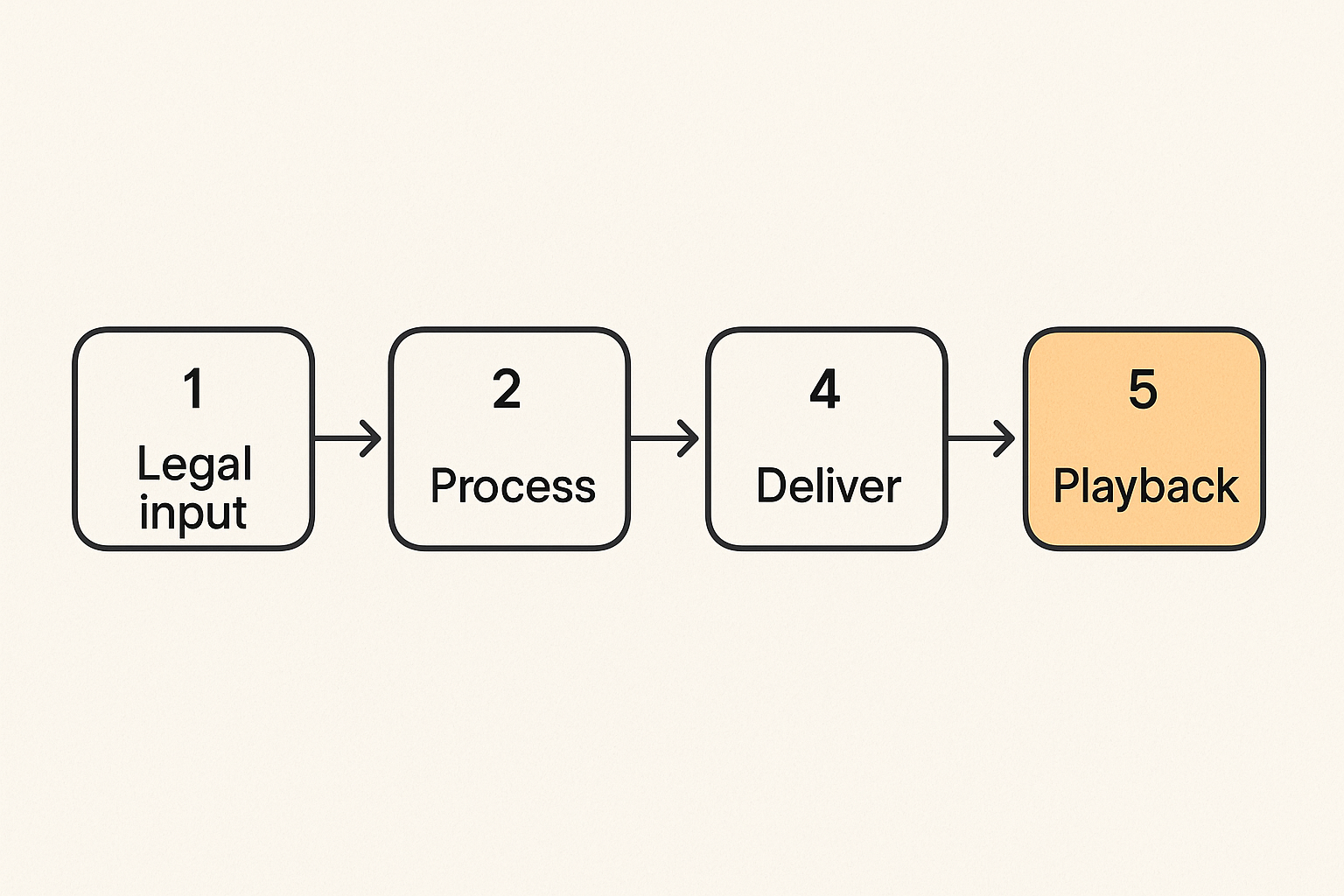
The mistake teams make is buying a bigger box before describing the job. In home media, the job is a workflow:
- Content enters the system from legal streaming services, licensed IPTV providers, personal rips where allowed, public domain archives, or authorized torrents.
- Metadata is attached so titles can be searched, filtered, and played by humans.
- Files are stored with predictable names, permissions, and capacity planning.
- Streams are served to client devices over a local or remote network.
- Playback is observed so failures can be diagnosed instead of guessed.
That workflow matters more than brand names. A cheap mini PC with enough codec support can outperform an expensive server if most clients direct play. A simple NAS can be better than a gaming desktop if it is quiet, always on, backed up, and wired to the router.
The practical question is: where does each stage live, and what can break at that stage?
| Stage | Typical tool | What breaks in practice | Better design choice |
|---|---|---|---|
| Input | Streaming app, IPTV app, torrent client | Unsafe sources, unclear rights, bad files | Use legal sources and isolate downloads |
| Processing | Media manager, scanner, subtitle tool | Bad filenames, wrong metadata, CPU spikes | Schedule scans and keep naming consistent |
| Storage | NAS, USB disk, internal SSD/HDD | Full disks, no backup, slow random I/O | Separate active downloads from library storage |
| Delivery | Media server, IPTV player, browser | Transcoding overload, Wi-Fi congestion | Prefer direct play and wired server links |
| Support | Logs, alerts, dashboards | Nobody knows what changed | Keep simple checks and change notes |
Where ownership belongs
Even if you are one person running a home setup, ownership still matters. The person who installs a tool should know how it updates, where it stores config, how to restore it, and how to turn it off without losing data.
A common failure mode is tool sprawl. One app downloads, another renames, another indexes, another streams, another monitors, and nobody remembers which container has write access to which folder. When something breaks, the operator changes three things at once and loses the ability to isolate cause.
Practical rule: Every media tool should have a known owner, data directory, update path, and rollback plan.
For a family setup, ownership can be as simple as documenting which device is the media server, which account pays for legal services, which drive is backed up, and which apps are allowed to access the library. That is computer systems technology in practical form: not abstract theory, but clear boundaries.
Core components of a practical home media system
Compute, storage, network, and clients
A home media system has four primary components.
Compute runs the applications. This might be a NAS, mini PC, desktop, single-board computer, or cloud host where legal and appropriate. The key variables are CPU, hardware decoding support, RAM, idle power, noise, and reliability.
Storage holds media, metadata, downloads, and backups. The decision is less about maximum capacity and more about layout. Active downloads should not be allowed to corrupt or fill the main library. Metadata should be backed up because rebuilding it is annoying. Critical personal files should not live only on the same disk as a media cache.
Network connects everything. Wired Ethernet for the server is still the boring answer that fixes many problems. Wi-Fi is fine for clients, but servers should not compete with phones, smart speakers, and neighbors for airtime if you can avoid it.
Clients are the playback devices: smart TVs, set-top boxes, phones, tablets, browsers, game consoles, and projectors. They decide whether a file can direct play or requires conversion. They also decide how much pain you feel from bad app support.
Why small bottlenecks become user-facing failures
Video is unforgiving. A document can load slowly and still be usable. A video stream needs sustained throughput, correct timing, and compatible formats. Small bottlenecks become visible quickly.
Common examples:
- A server with enough storage but no hardware transcoding support.
- A fast internet plan connected to a weak router.
- A good IPTV provider used through an overloaded Wi-Fi extender.
- A torrent client writing to the same disk a media server is reading from.
- A library scan scheduled during evening viewing hours.
What breaks in practice is not always the biggest component. It is the handoff between components. The disk is fine until two tasks hit it. The router is fine until multicast, IPTV, and video calls share the same band. The server is fine until subtitles force transcoding.
The fix is rarely glamorous. Wire the server. Use client-compatible formats. Put downloads and final media in separate paths. Schedule heavy jobs. Measure before upgrading.
Streaming architecture is a state problem
Playback state, accounts, and device limits
Streaming looks stateless because the user taps play. It is not. There is account state, subscription state, watch history, parental control state, device authorization state, regional availability, DRM capability, and network session state.
Cord cutters feel this when a service works on a phone but not a TV, or when a password reset signs out every device during movie night. The system is enforcing state, even if the app hides it.
For home media servers, state appears in a different form. Who watched what? Which libraries can each profile access? Are remote users allowed? Which device is currently transcoding? Are subtitles selected by default? Are watch positions synced?
The practical operator approach is to document the important state:
- Which accounts exist and who uses them.
- Which devices are authorized.
- Which apps are installed on each main client.
- Which profiles have access to adult, kids, sports, or archive libraries.
- Which services are allowed outside the home network.
This is not bureaucracy. It is how you avoid support loops when a device is replaced or an account changes.
Caching and quality adaptation
Streaming services use adaptive bitrate logic. Home media systems may not call it that, but the principle still applies. The player needs a version of the media it can receive and decode in real time.
If a client can direct play the file, the server mostly reads and sends bytes. If it cannot, the server may transcode, burn subtitles, change containers, or downscale video. That is expensive. One unexpected transcode can turn a smooth setup into a noisy, hot, stuttering mess.
Practical rule: Optimize for direct play first, then add transcoding capacity only where you actually need it.
Use test files. Check common clients. Verify audio formats as well as video formats. Many failures come from audio passthrough, subtitle handling, or container support, not the video codec alone.
For legal streaming apps, you have less control, but the same thinking applies. Device support matters. Router quality matters. DNS reliability matters. App updates matter. If one service fails on one device, compare the state path before reinstalling everything.
Torrent and download workflows need boundaries
Legal sources and safe automation
Torrents are a distribution protocol, not a permission slip. They are useful for public domain collections, open-source software, creator-approved releases, game patches, datasets, and other content where sharing is authorized. They are also abused for copyright infringement and malware distribution. Your architecture should assume source quality matters.
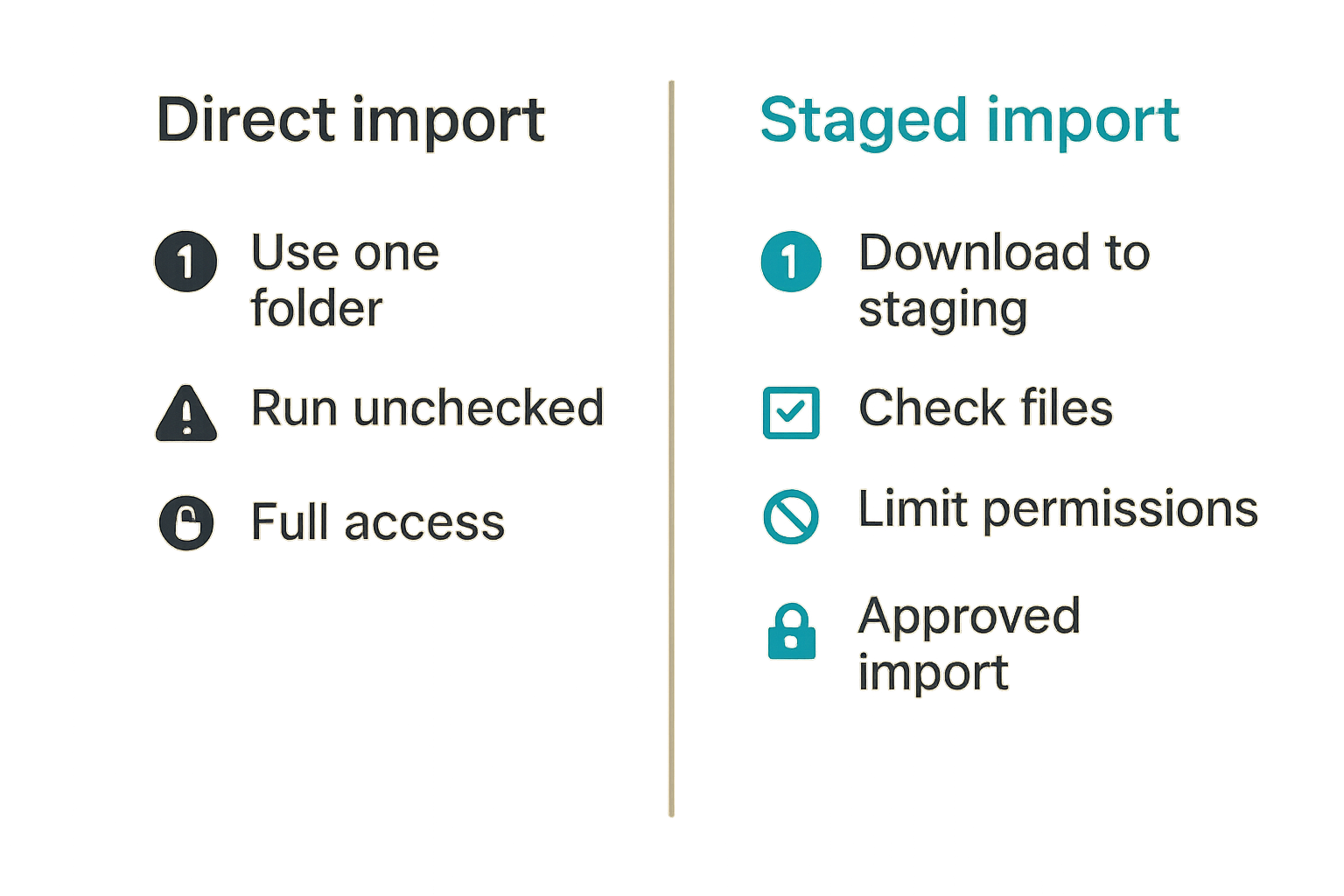
The safe workflow is to separate acquisition from the trusted library. Downloads land in a staging area. Files are checked. Only approved files move into the media library. Automation can help, but it should not remove judgment around rights, source reputation, or file safety.
A practical staging model:
- Use a dedicated download folder with quotas.
- Do not run downloaded executables from the media machine.
- Keep the torrent client updated.
- Limit permissions so the downloader cannot rewrite the whole library.
- Move approved media into a read-mostly library path.
This is where computer systems technology becomes risk control. The boundary between untrusted input and trusted library is the difference between a usable workflow and a mess.
Related reading from our network: independent professionals in remote nursing also need disciplined intake, screening, and operating workflows. The domain is different, but the operating pattern is similar: do not let unverified input flow straight into production.
Seeding, ratios, and disk pressure
Torrent clients are easy to set up and easy to neglect. Disk pressure is the usual failure. A client keeps seeding, temporary files accumulate, incomplete downloads sit forever, and suddenly the media server cannot write metadata or record live TV.
Set explicit limits:
- Maximum active downloads.
- Maximum active uploads.
- Share ratio or seeding time for lawful torrents.
- Disk quota for staging.
- Automatic pause when free space falls below a threshold.
If you seed public domain or authorized content, do it intentionally. Keep it on storage designed for it. Do not let it compete with playback during peak hours. If your router supports quality of service, prioritize interactive traffic and playback above background transfers.
The mistake teams make is confusing unlimited with reliable. Unlimited connections, unlimited upload, unlimited disk growth, and unlimited automation create instability. Good systems use limits.
IPTV reliability depends on boring systems work
Playlist hygiene and electronic program guides
IPTV reliability is not only about the provider. It is also about playlist hygiene, EPG mapping, player compatibility, and network path. A legal IPTV subscription can still feel broken if channel names drift, guide data mismatches, or the player caches old entries.
Keep a clean process:
- Store the provider details securely.
- Import playlists into one primary app first.
- Validate channel playback before adding guide data.
- Add EPG mappings in batches.
- Remove dead or duplicate channels instead of scrolling past them forever.
A bloated playlist is a support problem. Hundreds or thousands of channels sound good until search, guide load time, and favorites management become painful. Most households watch a small subset. Build favorites and categories around actual use.
Buffering is usually a path issue
When IPTV buffers, people blame the provider first. Sometimes that is correct. Often the problem is the path: Wi-Fi interference, weak router CPU, overloaded DNS, poor peering, VPN routing, packet loss, or an underpowered player.
Test in layers:
- Same channel on wired vs Wi-Fi.
- Same app on different devices.
- Same device with VPN on and off where legal and appropriate.
- Same network at different times of day.
- Same stream through a different player.
If the issue follows the channel across devices and networks, the source is likely the problem. If the issue follows the device or Wi-Fi band, your local system is likely the problem. That changes the conversation from complaining to isolating.
Do not expose IPTV portals, media dashboards, or playlist management tools directly to the internet. If remote access is needed, use a secure tunnel, VPN, or vendor-supported method with strong authentication.
Privacy and security are part of the media stack
Accounts, credentials, and exposed services
Home media hobbyists often run more services than they realize. A media server, download client, dashboard, subtitle tool, remote access tool, router admin page, NAS admin page, and smart home bridge can all become entry points.
The practical question is not whether you are an interesting target. The practical question is whether exposed services can be found, guessed, abused, or used to pivot into personal files.
Minimum controls:
- Unique passwords for every service.
- Password manager for shared household access.
- Multi-factor authentication where available.
- No default admin credentials.
- No public admin panels without strong protection.
- Regular updates for router, NAS, server, and clients.
Practical rule: If a service can change files or settings, treat it like infrastructure, not like a casual app.
Keep media permissions narrow. A playback app often needs read access, not full write access. A downloader needs write access to staging, not to backups. A metadata tool may need write access to posters and sidecar files, but not to unrelated folders.
DNS, VPNs, and realistic threat models
DNS filtering can block known malicious domains and reduce accidental exposure. It is not perfect, but it is useful. A household-friendly DNS setup can protect smart TVs and streaming sticks that rarely receive the same scrutiny as laptops.
VPNs are more nuanced. They can protect traffic on untrusted Wi-Fi, reduce some ISP visibility, and enable secure remote access to your own network. They can also slow IPTV, break streaming service terms, trigger fraud checks, and add another failure point.
Use VPNs for a defined reason, not because every forum says to. For remote access to your home media server, a private mesh VPN or secure tunnel is often better than port forwarding. For general browsing, choose providers carefully and understand that trust moves from one network operator to another.
Related reading from our network: local networks also need intake, verification, routing, and follow-up when people coordinate through AI-assisted systems. Media communities have the same trust issue in miniature: sources, recommendations, and access need verification.
What works: a stable implementation workflow
The numbered build sequence
A stable setup is built in order. Skipping steps creates hidden coupling that shows up later.
- Define the legal content sources you will use. Include streaming services, licensed IPTV, personal media, public domain archives, and authorized torrents.
- Choose the playback clients first. List the TVs, sticks, phones, tablets, browsers, and audio devices that matter.
- Pick formats that direct play on those clients. Test video, audio, subtitles, and containers.
- Choose the server hardware based on expected direct play and measured transcoding needs.
- Design storage with separate paths for staging, library, metadata, and backups.
- Wire the server to the router where possible.
- Install one media server or primary app before adding automation.
- Add download, IPTV, metadata, and monitoring tools one at a time.
- Create a simple recovery note: passwords location, config paths, backup location, and restart steps.
- Review the setup monthly for updates, disk space, failed jobs, and unused services.
This sequence is not exciting, but it works. It prevents the classic pattern where someone installs ten tools, gets one successful demo, and then spends the next month repairing permissions.
Operational checks that prevent surprises
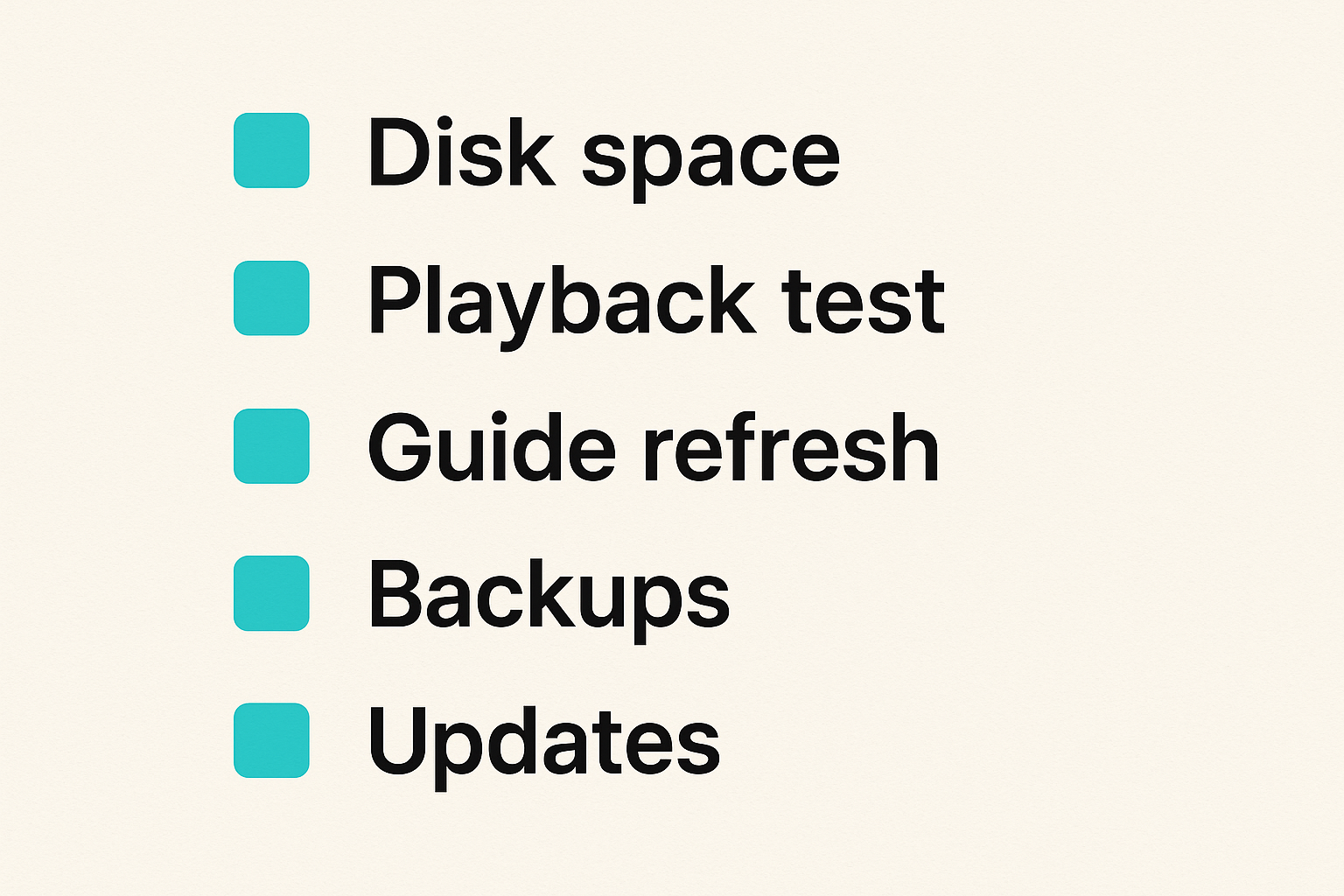
A good home media setup needs small checks, not enterprise monitoring. The goal is to catch predictable failures before they become family support tickets.
Useful checks:
- Free disk space on staging and library volumes.
- CPU usage during a known 4K playback test.
- Network throughput between server and main client.
- Failed library scans.
- Torrent client queue size and seeding limits.
- IPTV guide refresh status.
- Backup completion for configs and metadata.
- Update status for router, NAS, and server apps.
You do not need a full observability stack. A dashboard, scheduled notification, or weekly manual check can be enough. The point is to stop operating blind.
A small change log also helps. Note when you update the router, change DNS, install a new IPTV player, add a VPN, or move storage. When playback breaks, yesterday's change is often more useful than today's guess.
What fails: common computer systems technology mistakes
Overbuilding before measuring
Overbuilding feels safe. Buy a huge server, huge disks, and every app. The problem is that complexity becomes the failure mode. More containers mean more updates. More disks mean more heat and more backup planning. More automation means more places for bad assumptions to hide.
A comparison helps:
| Approach | What it feels like | What usually happens | Better move |
|---|---|---|---|
| Buy maximum hardware first | Future-proof | Idle power, noise, complexity | Test clients and formats first |
| Automate everything immediately | Efficient | Bad files and wrong metadata move faster | Stage and approve before library import |
| Port forward services | Convenient | Exposed dashboards and brute-force risk | Use secure tunnels or private VPN access |
| Use Wi-Fi for the server | Flexible | Buffering under load | Wire the server, leave Wi-Fi for clients |
| Ignore logs | Simple | Repeated guessing | Keep basic checks and change notes |
Computer systems technology rewards measurement. Play a high-bitrate file. Watch CPU. Watch network. Check whether it direct plays. Try subtitles. Try the weakest client in the house. Then decide what to upgrade.
Ignoring support and recovery
What breaks in practice is recovery. The setup works until the boot drive fails, the NAS updates, the router is replaced, or the person who built everything is not home.
Recovery does not need to be elaborate. It needs to be written down.
Document:
- Admin URLs and which password manager entry applies.
- Where app configs live.
- Which folders are backed up.
- How to restart the media server.
- How to pause downloads.
- How to disable remote access.
- How to restore metadata after a disk change.
Also decide what is not worth backing up. A cache can be rebuilt. A temporary download can be restarted. A carefully curated library database, watch history, playlist mapping, or family photo archive may be much harder to recreate.
The operator mindset is simple: if you would be annoyed to rebuild it, back it up or document it.
How bittorrented.com fits into the workflow
Guides should reduce decisions, not add noise
The internet has no shortage of advice on streaming boxes, torrent clients, IPTV apps, media servers, VPNs, codecs, routers, and storage. The problem is not lack of information. The problem is unfiltered advice with no workflow context.
A good guide should help you decide what applies to your setup. Are you watching legal streaming services only? Are you adding a home media server? Are you using authorized torrents for open content? Are you testing a licensed IPTV provider? Are you trying to make a NAS useful without turning your network into a lab?
That is where bittorrented.com should fit: practical, up-to-date guidance for people who want the system to work, not just a list of tools. The useful lens is architecture first, app second.
For example, a guide on a torrent client should discuss legal use, staging folders, disk limits, privacy expectations, and safe defaults. A guide on IPTV should discuss provider legitimacy, playlist hygiene, EPG mapping, device testing, and network troubleshooting. A guide on streaming devices should discuss codec support, app support, updates, ads, remote controls, and local network behavior.
Closing the loop on computer systems technology
Computer systems technology is the connective tissue of a modern media setup. It explains why a smart TV app issue may actually be a DNS problem, why a torrent workflow needs storage boundaries, why IPTV buffering may be a Wi-Fi path issue, and why a media server upgrade should start with direct-play testing.
The mistake teams make is chasing isolated fixes. The practical approach is to manage the workflow: legal sources, safe intake, clean storage, compatible playback, secure access, basic monitoring, and recovery notes.
If you build that loop, your streaming, torrent, IPTV, and home media tools become easier to operate. Not perfect. Not magic. Just understandable enough that when something breaks, you know where to look.
Try bittorrented.com
bittorrented.com is for readers who want practical, up-to-date guidance on streaming services, torrents, IPTV, and home media tools. Try bittorrented.com