Encrypted messaging streaming sounds like a simple feature request: put the streaming group in a private chat, turn on encryption, and stop worrying about leaks.
That is where many media communities, IPTV viewers, torrent hobbyists, and home media operators get into trouble. The chat app is visible. The workflow behind it is not. Invites get forwarded. Bots get added. Notifications expose library names. Support screenshots reveal IP addresses, account IDs, device names, or playback URLs.
Teams think the problem is choosing the most private messenger. The real problem is designing a streaming communication workflow where identity, metadata, automation, and media state are handled deliberately.
That changes the conversation. Encrypted messaging streaming is not a definition. It is an architecture decision: what should be sent, who should receive it, how long it should live, what automation can touch it, and what happens when a group, bot, or device is compromised.
Table of contents
- Why encrypted messaging streaming is a workflow problem
- Map the streaming workflow before choosing tools
- Encryption choices that matter in streaming communities
- Build notifications without leaking the library
- Identity, invites, and moderation are the real controls
- What works in encrypted messaging streaming
- What fails when teams implement it badly
- Automation, webhooks, and bots need hard boundaries
- Torrent, IPTV, and home media use cases
- Where bittorrented.com fits into the workflow
Why encrypted messaging streaming is a workflow problem
Encrypted messaging streaming usually starts with a narrow question: which app should our group use?
That question is too small. A private messenger can protect message contents in transit and at rest, depending on the app and settings. It cannot automatically fix bad operational habits. If a group posts full playlist URLs, device identifiers, screenshots with account details, or permanent invite links, encryption only protects the mistake while it is inside the chat.
The practical question is: what information should enter the chat in the first place?
As a guest contribution from the team at qrypt.chat, the bias here is simple: private communication works best when it is treated as part of a system, not as a magic wrapper around messy behavior.
Chat is not the media pipe
For most readers here, the media pipe is somewhere else. It may be a legal IPTV subscription, a home Plex or Jellyfin server, a public-domain torrent, a Linux ISO swarm, a community livestream, or a media automation stack running on a NAS.
The encrypted chat is not supposed to carry the movie, channel, or stream. It carries coordination:
- “The server is down.”
- “The new public-domain collection is seeded.”
- “The EPG update failed.”
- “The watch party starts at 8.”
- “Use the new support channel for device issues.”
The mistake teams make is treating the chat as both the coordination layer and the storage layer. That leads to link dumps, file dumps, credentials, support history, and automation logs all living in one searchable thread.
Practical rule: keep media delivery, account management, and group communication as separate systems. The chat should coordinate the workflow, not become the workflow.
The privacy boundary moves with the workflow
A useful way to think about it is that privacy boundaries move every time data crosses a system.
A server event is one boundary. A webhook is another. A bot is another. A group chat is another. A user screenshot is another. If any step expands the audience or adds unnecessary context, the boundary gets weaker.
In production, what breaks is rarely the encryption algorithm. What breaks is the handoff:
- A bot posts too much detail.
- A support user shares a screenshot without redaction.
- A group invite gets reused for months.
- An admin loses a phone but remains logged in.
- A notification includes private library names or customer labels.
Encrypted messaging streaming works when every handoff is designed to reveal the minimum useful information.
Map the streaming workflow before choosing tools
Before picking a messenger, map the workflow. This sounds slower, but it prevents the most common failure: adopting a private chat app and then recreating the same sloppy notification habits inside it.
The goal is not to build a corporate security program for a hobby media group. The goal is to answer a few operational questions before private messages start carrying sensitive context.
Identify actors, devices, and privileges
Start with the people and systems that touch the workflow.
| Actor or system | Typical role | Risk if unmanaged | Better control |
|---|---|---|---|
| Group admin | Creates channels, invites users, removes members | Permanent access, weak moderation | Separate admin account, short invite links |
| Media server | Sends status or library events | Leaks titles, paths, usernames | Event filtering and redaction |
| Bot or webhook relay | Posts alerts into chat | Becomes a privileged bridge | Narrow token scope, no command authority |
| Viewer or subscriber | Receives updates and support | Shares screenshots or links | Clear rules, expiring support threads |
| Support helper | Troubleshoots devices | Sees account or network data | Private ticket flow, redaction checklist |
Most media groups do not need complex roles. They do need clarity. If everyone can invite, forward, export, pin, and add bots, the encrypted room becomes porous.
List the events that actually need messages
Not every system event deserves a chat message. In fact, most do not.
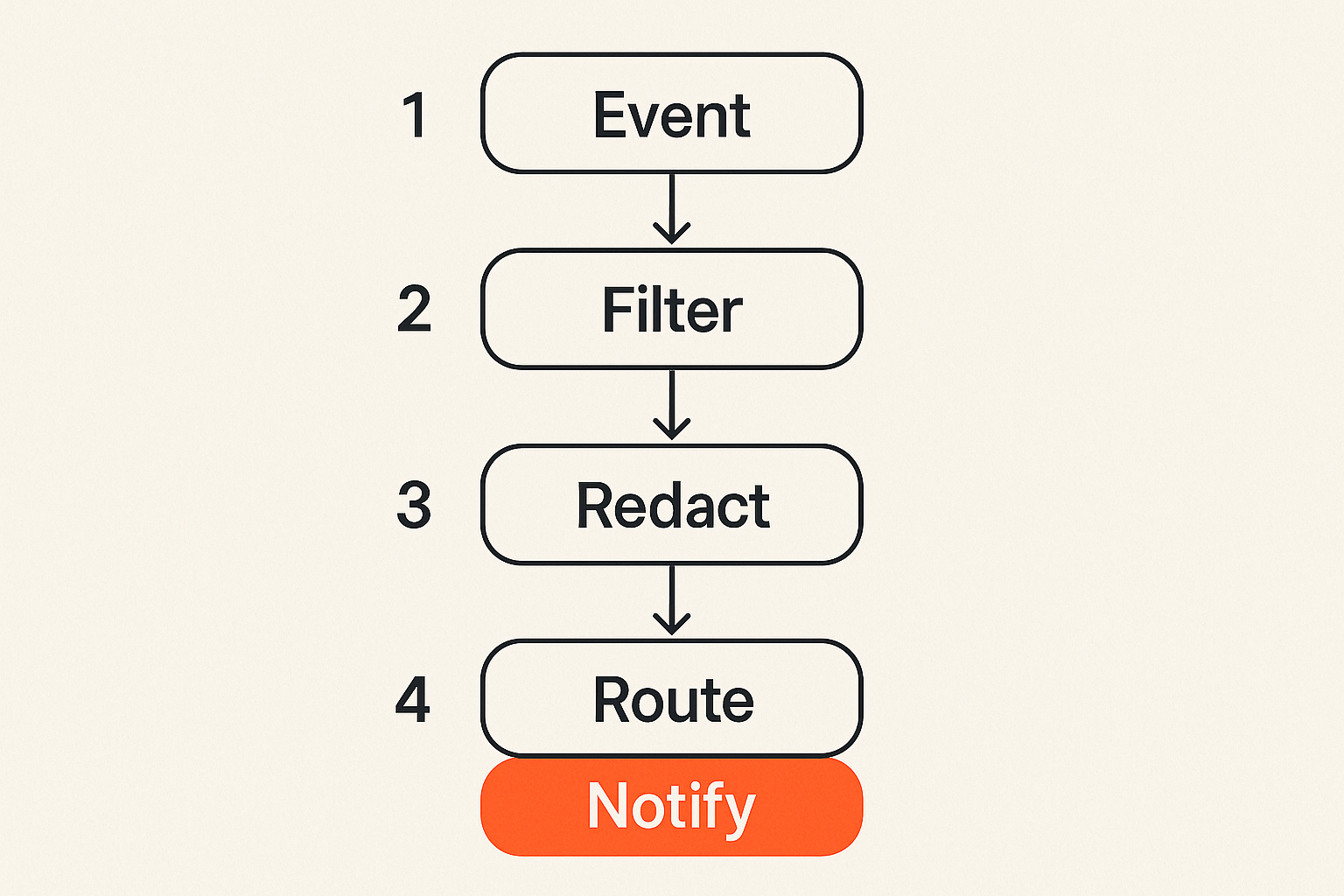
A clean encrypted messaging streaming setup usually separates events into four categories:
- User-facing alerts — downtime, maintenance, schedule changes, watch party reminders.
- Admin alerts — failed EPG updates, storage warnings, stream health checks.
- Support events — device setup issues, playback failures, account questions.
- Audit events — invite creation, bot token rotation, moderation actions.
Only the first category usually belongs in a larger group. Admin and audit events should go to a smaller operator channel. Support events should not live forever in the main room.
Practical rule: if a message would be embarrassing, confusing, or risky when forwarded to the wrong person, it does not belong in a broad streaming group.
Encryption choices that matter in streaming communities
Encryption is necessary, but it is not a complete operating model. For media communities, the difference between “encrypted” and “private enough for the workflow” is usually metadata, device behavior, and group management.
End-to-end encryption is not the whole design
End-to-end encryption means message contents are encrypted so that only participants’ devices can read them. That is useful. For private streaming coordination, it should be a baseline when possible.
But it does not answer several practical questions:
- Are group names, avatars, and membership lists protected?
- Are messages backed up unencrypted to cloud storage?
- Can users export chat history?
- Can new members see old messages?
- Can bots read everything in the room?
- What happens when a device is lost?
The mistake teams make is stopping at the label. “Encrypted” can mean transport encryption, server-side encrypted storage, end-to-end encryption, or a mix depending on the feature. Group chats, web clients, bots, and backups often have different security properties from one-to-one messages.
For streaming workflows, assume the weakest feature defines the real privacy level.
Metadata still drives real-world exposure
Even when message contents are protected, metadata can still matter. Group membership, timestamps, message frequency, device names, contact discovery, push notification previews, and file names may reveal patterns.
For a home media group, metadata might show when the server goes down or who participates in a watch party. For an IPTV support community, it might show which users are active, which regions have issues, or which device models are common. For a torrent-adjacent community distributing legal content, it might show release timing and operator activity.
None of this means “do not use chat.” It means design messages so metadata exposure is not amplified by unnecessary detail.
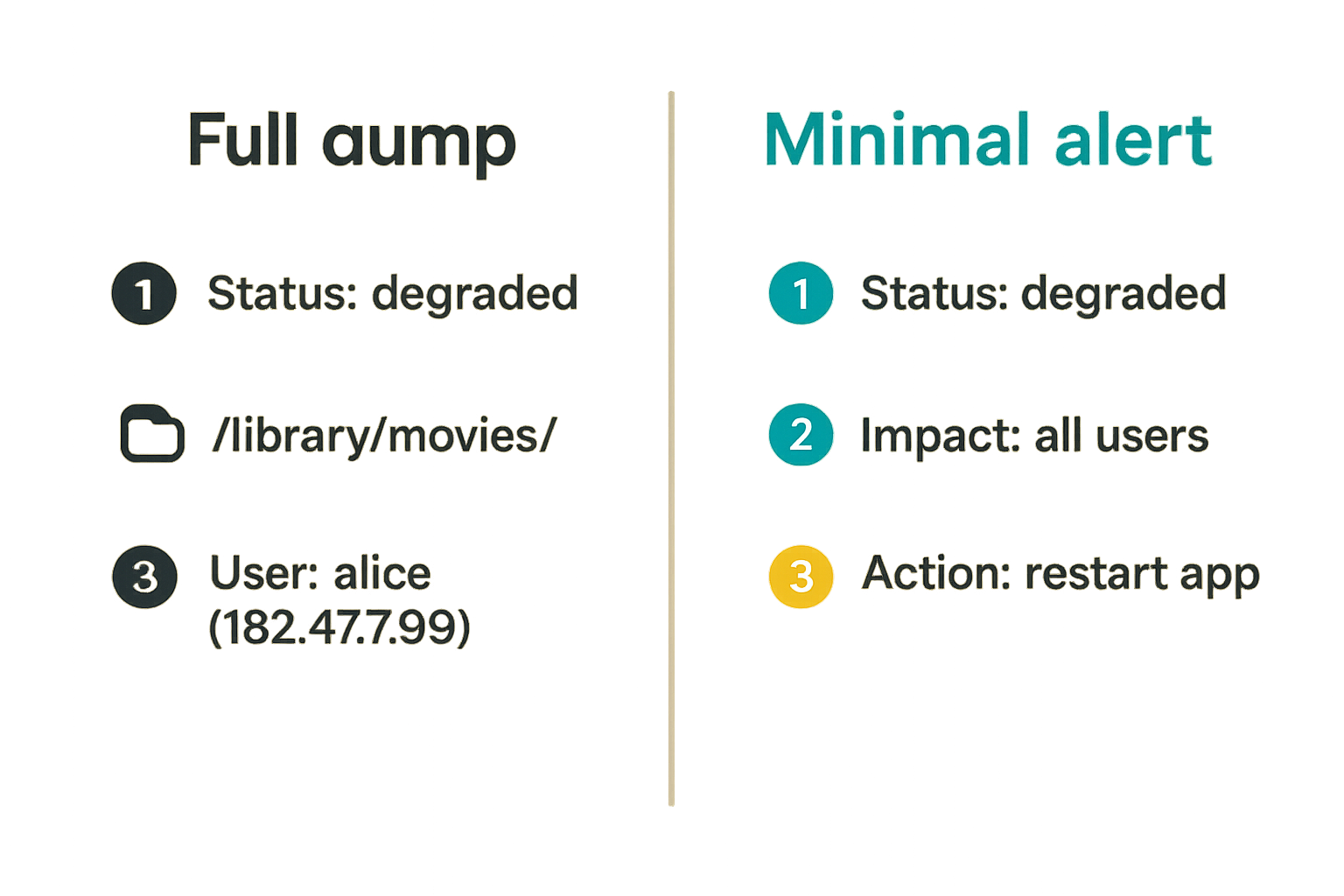
Bad alert:
{
  "event": "stream_failed",
  "user": "mike-livingroom-firestick",
  "ip": "203.0.113.42",
  "playlist_url": "https://example.invalid/private/playlist.m3u",
  "channel": "sports-package-4k",
  "error": "token expired"
}
Better alert:
{
  "event": "playback_issue",
  "scope": "admin",
  "device_class": "tv_client",
  "region": "west",
  "error_code": "AUTH_REFRESH_FAILED",
  "trace_id": "evt_7f29"
}
The second version gives operators enough to investigate without broadcasting identifiers or access paths.
Build notifications without leaking the library
Most encrypted messaging streaming problems show up in notifications. Alerts are useful because they compress system state into human-readable updates. They are risky for the same reason.
If the alert includes everything the system knows, the chat becomes a leak surface.
Send state changes, not full context dumps
A notification should tell the recipient what changed and what action to take. It should not replicate the database row.
For a media server, that means avoiding full file paths, private collection names, user labels, IP addresses, tokens, and raw URLs. For IPTV workflows, avoid playlist links, account identifiers, provider credentials, and unredacted device screenshots. For legal torrent communities, avoid private tracker-style identifiers, passkeys, or anything that links a person to a unique access token.
A good alert format is boring:
- Status: degraded, recovered, scheduled, updated.
- Scope: public group, admins, support only.
- Impact: all users, one region, one device class.
- Action: wait, restart app, check admin panel, open support thread.
- Reference: short trace ID or internal ticket ID.
That changes the conversation. Instead of debating whether a message is “safe,” you can inspect whether it follows the alert contract.
Use payload minimization as a default
Payload minimization is not just for enterprise security teams. It is practical for hobby operators because it reduces cleanup later.
Use this rule when building alerts:
Practical rule: every automated message should be safe to forward to the least-trusted member of its intended audience.
That does not mean every message is public. It means a message sent to admins should not contain secrets that would create a bigger incident if one admin’s device is lost.
A minimal alert might look like this:
Status: Degraded playback
Scope: Admins
Impact: Some Android TV clients
Action: Check stream health dashboard
Ref: evt_8142
A public group version would be even smaller:
We are seeing playback issues on some TV clients. No action needed yet. Update in 20 minutes.
Same event. Different audience. Different payload.
Identity, invites, and moderation are the real controls
Encrypted messaging streaming lives or dies on group hygiene. A private room with sloppy invites is not private for long.
This is especially true for communities around streaming tools, IPTV troubleshooting, and torrent media discussion because groups often grow informally. Someone invites a friend. A helper adds a bot. A support thread becomes a permanent room. Six months later, nobody knows who has access.
Private groups fail when invites are permanent
Permanent invite links are convenient and dangerous. They turn membership into a copy-paste problem.
If your group discusses only public information, that may be fine. If it includes server status, support context, private watch schedules, or account-related troubleshooting, permanent links are the wrong default.
Better defaults:
- Use expiring invite links.
- Limit invite creation to admins.
- Create separate rooms for public updates, admin operations, and support.
- Disable old links after membership changes.
- Remove inactive members periodically.
- Avoid posting invite links in public forums.
The mistake teams make is assuming that encryption protects a group after membership has expanded beyond control. Encryption protects against outsiders. It does not protect against everyone you invited, everyone they invited, and every device still logged in.
Revocation must be faster than forwarding
Revocation is the ability to remove access. In messaging workflows, it is usually weaker than people expect.
Removing a member may stop future messages. It may not delete screenshots, exports, notification previews, cached media, or forwarded content. That is why revocation needs to be paired with minimization.
For operational streaming groups, use a simple revocation playbook:
- Remove the member or compromised device.
- Disable any invite links they could access.
- Rotate bot tokens if they were in admin channels.
- Move sensitive coordination to a new room if needed.
- Post a short internal note about what changed.
Do not overcomplicate this. The point is speed. If the group cannot remove access quickly, do not put sensitive operational detail in that group.
What works in encrypted messaging streaming
A good encrypted messaging streaming workflow is intentionally boring. It has fewer rooms than a chaotic community, but more separation than a single mega-chat. It uses automation, but the automation is constrained. It gives viewers useful updates without turning private chat into a system log.
A reference workflow for safe media alerts
Here is a practical sequence that works for many small operators and media communities:
- Classify the event. Decide whether it is public, admin-only, support-only, or audit-only.
- Redact the payload. Remove tokens, IPs, file paths, playlist URLs, usernames, and unique identifiers.
- Choose the room. Send public status to the viewer group, diagnostics to the admin room, and one-user issues to support.
- Attach a reference ID. Use a trace ID or ticket ID instead of dumping raw logs.
- Set an expiry expectation. Support threads close; temporary rooms are archived; invite links expire.
- Review automation monthly. Remove dead bots, stale webhooks, and old admin accounts.
This sequence is not glamorous, but it handles the parts that usually break.
Operational defaults that reduce mistakes
The best defaults are the ones users do not have to remember every day.
Use these defaults where your messenger and tooling allow it:
- No message previews on lock screens for admin channels.
- Expiring messages for support rooms.
- Separate admin and viewer rooms.
- Restricted invite permissions.
- No automatic posting of raw logs.
- No secrets in pinned messages.
- Bot tokens stored outside chat history.
- A short redaction checklist for support screenshots.
For screenshots, the checklist should be blunt: hide account names, IP addresses, playlist URLs, email addresses, payment references, device serial numbers, and any unique access token.
Practical rule: if a support screenshot is useful only because it contains a secret, move the conversation to a safer support flow instead of posting it in a group.
What fails when teams implement it badly
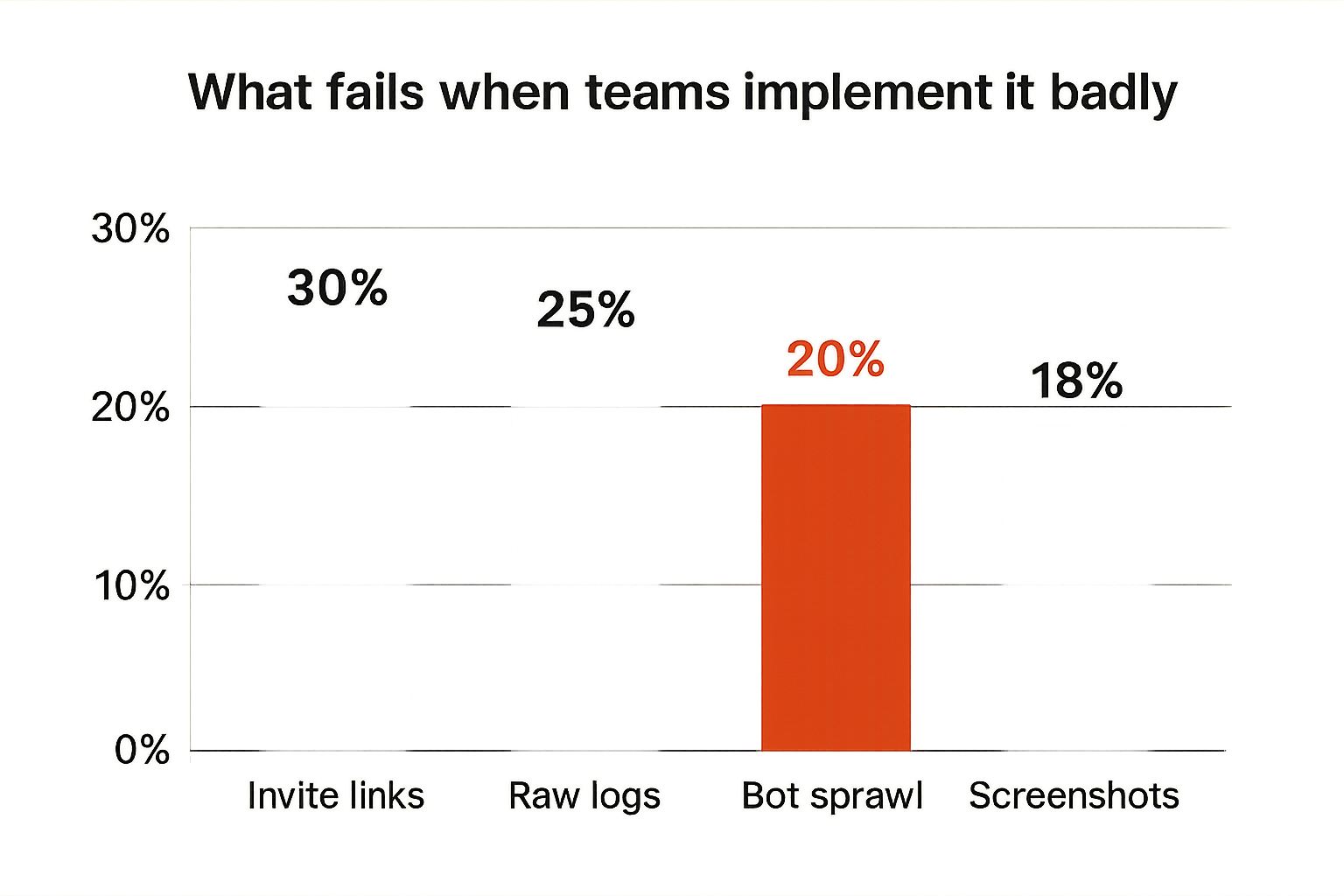
What breaks in practice is not one dramatic failure. It is a pileup of small shortcuts. Each shortcut seems harmless because the room is encrypted. Together, they turn private chat into an uncontrolled operational archive.
The chat becomes the database
This is the most common failure mode.
The group starts with status updates. Then someone pins a playlist link. Then support instructions get added. Then an admin posts a token “temporarily.” Then users search the chat for setup steps. Then nobody wants to delete anything because chat history has become documentation.
At that point, encryption is protecting a junk drawer.
What fails:
- Old instructions remain discoverable after they are unsafe.
- New members may inherit historical context they should not see.
- Sensitive links get copied into multiple rooms.
- Operators lose track of the source of truth.
- Support quality drops because nobody knows which pinned message is current.
What works instead:
- Keep documentation in a maintained page or local knowledge base.
- Use chat to announce changes, not store canonical setup data.
- Pin only non-sensitive navigation messages.
- Expire support threads after resolution.
- Use ticket IDs rather than full diagnostics in group chat.
A private chat should feel like a dispatch channel, not a filing cabinet.
Bots inherit more trust than humans
Bots are useful. They are also a common way to accidentally bypass privacy expectations.
A bot may be able to read every message in a room, post as a trusted identity, access webhook payloads, or bridge content to another service. If it is connected to a media server, it may see more operational detail than any normal member.
The failure pattern looks like this:
- A bot is added to a private group for alerts.
- The bot receives raw events.
- The bot logs those events somewhere else.
- The bot token is never rotated.
- Nobody remembers who owns the bot account.
For encrypted messaging streaming, bots should have narrow jobs. Post a redacted alert. Open a support thread. Confirm an admin action. Nothing more unless you have a strong reason.
Automation, webhooks, and bots need hard boundaries
Automation is where streaming workflows get efficient, but it is also where private messaging setups become fragile. The UI is not the whole system. State, retries, permissions, and logs matter.
Use bots as relays, not authorities
A bot should not become the authority for user identity, media access, or entitlement unless you are prepared to secure it like core infrastructure.
For most communities, the bot should be a relay:
- It receives a filtered event.
- It formats a minimal message.
- It posts to the correct room.
- It includes a reference ID.
- It does not store secrets.
- It does not expose admin commands in broad groups.
Compare the two models:
| Design | Bot role | Operational risk | Better for |
|---|---|---|---|
| Command bot | Reads commands, changes access, stores state | High if token or room is compromised | Mature teams with strong controls |
| Relay bot | Posts redacted alerts from approved events | Lower, easier to audit | Most media groups and hobby operators |
| Bridge bot | Copies messages between platforms | Metadata and context leakage | Public announcements only |
| Support bot | Opens scoped support threads | Moderate if logs are redacted | Device troubleshooting |
The relay model is usually enough. It keeps humans informed without giving chat automation control over the streaming system.
Design for retries, rate limits, and idempotency
Messaging APIs fail. Webhooks retry. Bots hit rate limits. Events arrive twice. If your automation does not handle this, your private group gets spammed during an outage.
A sane alert pipeline should include:
- Idempotency keys so the same event does not post ten times.
- Rate limits so repeated playback errors are summarized.
- Severity thresholds so minor errors do not wake everyone up.
- Backoff logic for failed message delivery.
- Dead-letter logging outside the chat for events that cannot be posted.
Example alert logic:
if event.scope == "public" and event.severity >= "major":
    message = redact(event)
    key = hash(event.type, event.region, event.window)
    if not already_sent(key):
        post_to_room("viewer-status", message)
        mark_sent(key, ttl="30m")
The important part is not the syntax. It is the control. During an outage, viewers need one clear update and a follow-up, not a flood of raw errors.
Torrent, IPTV, and home media use cases
Encrypted messaging streaming should be framed around legal, safe, privacy-aware use. The goal is not to hide abusive behavior or distribute unauthorized content. The goal is to coordinate legitimate media workflows without exposing unnecessary personal or operational data.
That distinction matters. Privacy is not a loophole. It is a way to reduce oversharing while using lawful services, open media, personal libraries, public-domain content, and properly licensed streams.
Legal torrent communities and public media distribution
Torrents are a protocol, not a category of content. Many legitimate projects use torrent distribution because it is efficient, resilient, and community-friendly. Open-source software, public-domain film archives, independent media, and large public datasets can all benefit from peer distribution.
In those communities, encrypted messaging can help with coordination:
- Announcing new legal releases.
- Coordinating seedbox maintenance.
- Reporting broken metadata.
- Organizing watch parties for public-domain films.
- Helping users verify checksums or file integrity.
The same minimization rules apply. Do not post private tracker passkeys, personal IP addresses, private server credentials, or logs that tie users to unique tokens. Keep public announcements public and operational details scoped.
IPTV support and home media operations
IPTV and home media workflows create a different set of problems. People need help with apps, EPG data, buffering, device compatibility, and network issues. Support is useful, but support threads can expose a lot.
A privacy-aware support workflow looks like this:
- Public group gets general notices: outage, maintenance, app update, known issue.
- Support room handles one user or household at a time.
- Users are told what to redact before uploading screenshots.
- Admins use reference IDs instead of asking for full credentials in chat.
- Device-specific instructions avoid account-specific links.
For home media operators, the same pattern helps. If your server sends alerts to a family or friend group, do not include internal hostnames, remote access URLs, or full library paths. “Server maintenance tonight at 10” is enough for most viewers.
Where bittorrented.com fits into the workflow
A site like bittorrented.com is most useful when it helps readers make better decisions before they wire tools together. Streaming setups are no longer just a subscription app on a TV. They are a mix of devices, networks, media servers, legal torrent tools, IPTV apps, privacy choices, and support habits.
Encrypted messaging streaming sits across all of that. It is not the flashiest part of the stack, but it affects how safely people coordinate the rest.
Use guidance sites for decisions, not secrets
The practical role for a media tech guide is to help readers understand tradeoffs:
- Which tools fit a legal use case.
- Which privacy settings matter.
- Which workflows create unnecessary exposure.
- Which support habits are risky.
- Which automation patterns are worth the complexity.
Do not put secrets into public comments, forum posts, or guide discussions. Use public resources to learn patterns, then keep private operational details inside the right system.
That sounds obvious, but many leaks start with someone asking for help and pasting too much context. A clear guide can prevent that by teaching readers what to share, what to redact, and where to move sensitive troubleshooting.
A practical checklist for readers
If you are setting up encrypted messaging for a streaming group, use this checklist before adding everyone:
- Pick separate rooms for public updates, admin alerts, and support.
- Turn on end-to-end encryption where available.
- Disable message previews for sensitive rooms.
- Use expiring invite links.
- Keep playlist URLs, tokens, and credentials out of chat.
- Redact screenshots before posting.
- Use bots only for filtered, minimal alerts.
- Review members, bots, and pinned messages monthly.
- Keep documentation outside chat and update it deliberately.
- Treat legal boundaries as part of the design, not an afterthought.
The point is not to make streaming communities paranoid. The point is to avoid turning a private chat into a permanent archive of everything that should have stayed scoped, temporary, or redacted.
Encrypted messaging streaming works when the messenger is one component in a clean workflow: lawful media sources, controlled access, minimal notifications, scoped support, and a habit of sharing less by default.
Try bittorrented.com
For practical, privacy-aware guidance on streaming services, torrents, IPTV, and home media tools, visit Try bittorrented.com.