
Id streaming sounds like a login feature until your home media setup starts failing in boring, expensive ways. One TV loses access. A playlist works on a phone but not on the set-top box. A torrent-backed library shows the wrong metadata. A shared IPTV playlist leaks beyond the devices you intended. Nobody knows whether the problem is the player, the network, the source, or the account.
Teams think the problem is authentication. The real problem is identity state across streaming workflows.
That changes the conversation. For cord cutters, IPTV viewers, torrent users, and media tech hobbyists, id streaming is not a single button that says sign in. It is the architecture that decides which user, device, session, playlist, library item, and playback request belongs together. In 2026, that matters because most serious home media stacks are no longer one app on one screen. They are a mix of streaming services, legal IPTV playlists, self-hosted media servers, torrent clients used for lawful content, mobile devices, smart TVs, VPNs, DNS rules, and automation.
The practical question is not what id streaming means in a dictionary. The practical question is how to build or operate it without turning your media workflow into a privacy problem, a support problem, or a brittle pile of device exceptions.
Table of contents
- What id streaming really means in a home media stack
- Why id streaming matters for IPTV, torrents, and apps
- The reference architecture for id streaming
- Session state and device identity
- Content sources, metadata, and access decisions
- Implementation workflow for id streaming in 2026
- Security, privacy, and abuse controls
- What breaks when id streaming is built badly
- Metrics that tell you the system is healthy
- Where bittorrented.com fits into the workflow
- Closing checklist for id streaming
What id streaming really means in a home media stack
Identity is not just login
The mistake teams make is treating identity as a username and password problem. That may be enough for a basic web app. It is not enough for media.
Media identity has more moving parts:
- The person or household using the system.
- The device making the playback request.
- The app or client version handling the stream.
- The content source being requested.
- The network path, including VPN, DNS, proxy, or local LAN.
- The rights or rules attached to the content.
- The current playback session.
- The logs needed to debug failures without exposing more than necessary.
A useful way to think about it is this: id streaming is the binding layer between user intent and media delivery. The user wants to watch a legal IPTV channel, play a public domain film, open a home media file, or browse a lawful torrent source. The system needs to answer a few questions before playback starts. Who is asking? From what device? Is this source allowed? Is this session already active somewhere else? Should this request be routed locally, remotely, or blocked?
If those questions are scattered across five apps, support gets ugly fast.
Practical rule: If you cannot explain why a device was allowed to play a stream, you do not have an id streaming workflow. You have a collection of assumptions.
The workflow view
The workflow view is more useful than the feature view. A login page is a feature. A streaming identity workflow is the chain of decisions before, during, and after playback.
A clean workflow looks like this:
- User or household identity is established.
- Device identity is registered or recognized.
- Source rules are checked.
- A playback session is created.
- Stream access is granted for a limited context.
- Playback events are logged with minimal data.
- The session expires, refreshes, or is revoked.
What breaks in practice is usually step three, four, or seven. The device signs in correctly, but the wrong playlist loads. The session starts, but the token lasts forever. The user stops watching, but the backend still thinks the stream is active. Then your concurrency limits, parental controls, privacy expectations, and support notes stop matching reality.
Why id streaming matters for IPTV, torrents, and apps
Cord cutting creates fragmented identity
Cord cutting often starts simple. Cancel cable. Add a few apps. Maybe add an antenna, an IPTV playlist, a home media server, and a torrent client for public domain files, Linux ISOs, creator releases, or other lawful content. Then the household asks for one thing the cable box used to provide badly but consistently: predictable access.
The modern setup is more flexible, but identity becomes fragmented. One app uses email login. Another uses device PINs. A media server uses local accounts. An IPTV player uses an M3U URL. A torrent client has its own web UI password. The router sees devices by MAC address. The VPN sees tunnels. The DNS filter sees domains. None of these systems automatically agree on what a household member, device, or session is.
That is why id streaming matters. It gives you a way to reason about the whole stack instead of debugging every playback issue as a one-off.
If you use live channels, keep the access boundary explicit. For example, legal playlist workflows are easier to operate when channel playback is handled through a clear live TV layer such as stream live channels from your IPTV playlists, instead of hidden inside random device-specific apps.
Related reading from our network: teams working with decentralized compute face a similar ownership problem around scheduling, validation, and retries in this Akash Network alternatives architecture guide.
The legal and privacy boundary
Id streaming should not be used to hide bad behavior or bypass content rights. It should do the opposite: make lawful use easier to manage and make unsafe sharing harder.
For IPTV, that means knowing whether a playlist is legitimate, whether credentials are meant for your household, and whether redistribution is prohibited. For torrents, that means using the protocol for legal content: open media, public domain archives, creator-approved releases, software distributions, backups, and personal libraries where you have the rights to store or access the material.
Privacy matters too. A streaming identity system does not need to collect everything. It needs enough context to secure access, debug failures, and respect user expectations.
Practical rule: Do not collect identity data because it is available. Collect it only if it changes an access decision, security decision, or support decision.
The reference architecture for id streaming
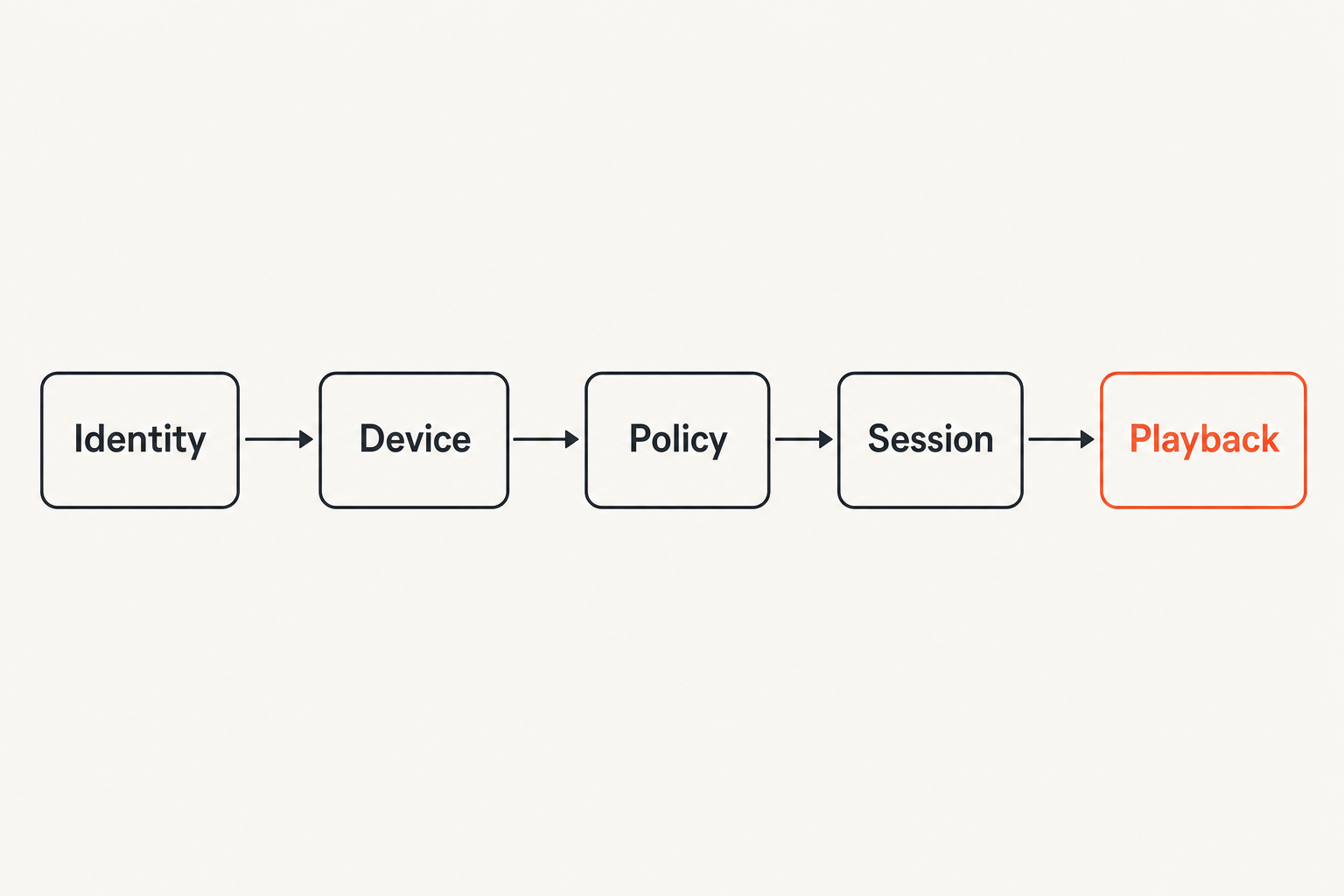
Control plane, data plane, and media plane
A practical id streaming architecture separates three planes.
| Plane | What it does | Examples | What should not happen there |
|---|---|---|---|
| Control plane | Decides who can access what | User accounts, device registry, policy rules, tokens | Long-running media transfer |
| Data plane | Moves requests and responses | API gateway, reverse proxy, playlist fetcher, metadata service | Permanent trust decisions with no expiry |
| Media plane | Delivers playback | HLS, DASH, direct file stream, local server, IPTV client | Sensitive account management |
This split matters because streaming systems have different failure patterns than normal apps. A control plane can be temporarily unavailable while an already-authorized stream continues. A media plane can buffer or transcode without knowing the user password. A data plane can enforce short-lived access without becoming a full identity provider.
The mistake teams make is putting everything into the player. The player should not be the only place that knows what access is allowed. Smart TVs, mobile apps, browser players, and set-top boxes all have different security models. Some handle tokens well. Some are bad at certificate stores. Some cache aggressively. Some leak URLs in logs. If the player becomes the policy engine, your policy becomes device-specific.
A minimal component map
A home or hobbyist setup does not need enterprise complexity. It does need clear boundaries.
A minimal id streaming stack can include:
- Identity store: household users, roles, and recovery options.
- Device registry: approved devices, nicknames, last seen time, client type.
- Source registry: IPTV playlists, media folders, legal torrent feeds, metadata sources.
- Policy engine: rules for which user or device can access which source.
- Token issuer: short-lived playback tokens or signed URLs.
- Session tracker: active playback, pause state, expiration, concurrency.
- Event log: access events, failures, revocations, admin changes.
- Support view: a readable timeline that explains what happened.
You can implement this with existing tools, a media server plugin, a reverse proxy, scripts, or a small custom service. The point is not the vendor. The point is ownership of state.
Related reading from our network: if your media dashboard or public documentation runs on cloud infrastructure, crawler visibility has its own operational workflow, covered in this Google Compute Engine and AEO guide.
Session state and device identity
What to track per session
A streaming session is not just a request. It is a temporary contract. For a limited time, a specific user on a specific device can access a specific stream under specific conditions.
Track the fields that help you operate that contract:
- Session ID.
- User or household ID.
- Device ID.
- Source ID.
- Content or channel ID.
- Start time and last activity time.
- Token expiration time.
- Client type and version.
- Approximate network context, such as local LAN or remote.
- Current status: starting, playing, paused, buffering, stopped, expired, revoked.
Do not overcomplicate the first version. Many teams skip session state because it feels like overhead. Then they cannot answer basic questions later. Is the stream still active? Did the user start two sessions? Did the device retry after a network drop? Did a token get reused from another client?
Session state lets you make those questions boring.
Practical rule: Every playback token should map to a session you can expire, revoke, and explain.
What not to fingerprint
Device identity is useful. Device surveillance is not.
A device registry should identify approved clients without building an invasive fingerprint. Use explicit registration when possible. A device code, QR login, local pairing flow, or admin-approved device list is usually better than silently combining screen size, IP address, browser plugins, and other fingerprinting signals.
Avoid treating IP address as identity. Home networks change. VPNs change egress nodes. Mobile networks rotate addresses. IPv6 privacy extensions can shift identifiers. IP context can help with risk scoring, but it should not be the account.
Good device identity is boring:
- User gives the device a name.
- System assigns a random device ID.
- Device stores a refresh credential securely if possible.
- Admin can revoke the device.
- Logs show last seen time and client type.
Bad device identity is fragile:
- Device is trusted forever because it once used the right URL.
- Playlist credentials are embedded in a client with no revocation.
- MAC address is assumed to be stable across all networks.
- User agent strings decide policy.
Content sources, metadata, and access decisions
IPTV playlists and entitlement checks
IPTV workflows are often where id streaming gets messy. M3U playlists and EPG data are easy to move around. That is convenient, but it also means credentials can sprawl across phones, TVs, laptops, and backup drives.
A better pattern is to treat playlists as sources, not identities. The playlist does not prove who the viewer is. It is a content source with its own rules. Your identity layer decides which registered users and devices can request channels from that source.
At minimum, track:
- Playlist source name.
- Provider or origin notes.
- Renewal or rotation schedule.
- Allowed household or user group.
- Channel categories exposed to each profile.
- Whether the playlist URL contains credentials.
- Where credentials are stored.
If a playlist URL includes credentials, do not paste it into every device forever. Put it behind a controlled layer when you can. Issue short-lived stream access downstream. Rotate secrets when a device is lost or sold. Keep provider terms in mind.
Torrents, magnet links, and lawful libraries
Torrent workflows have a different identity problem. The protocol is decentralized, but your home media experience still needs state. Which user added the item? Is the content lawful for your use? Where is it stored? Which library should index it? Should it be visible to kids? Should it seed? Should it be removed after a ratio or time limit?
When browsing decentralized discovery surfaces, separate search from entitlement. For example, a DHT view such as browse DHT torrents on BitTorrented can help with discovery, but your local workflow still needs rules for legality, safety, storage, malware scanning, and library visibility.
For lawful torrent use, id streaming should connect the dots:
- User requests or adds an item.
- Source and rights context are recorded.
- Download client handles transfer.
- Scanner checks file type and risk.
- Library indexer adds metadata.
- Access policy decides who can stream it.
- Playback session records usage.
The mistake teams make is assuming the media file itself is the whole story. It is not. The operational story includes who added it, why it is allowed, where it lives, and how it is exposed.
Implementation workflow for id streaming in 2026
Step by step rollout
Do not rebuild the whole media stack in one weekend. That is how you end up with half-migrated accounts, broken TV apps, and a partner asking why the old setup worked better.
Use a staged rollout:
- Inventory sources. List streaming apps, IPTV playlists, media servers, torrent clients, folders, metadata tools, VPNs, DNS filters, and playback devices.
- Define identities. Decide whether you model people, profiles, households, guests, and admin users separately.
- Register devices. Give each approved device a stable name and owner.
- Classify sources. Mark each source as subscription app, legal IPTV, local file library, lawful torrent workflow, live stream, radio, or test source.
- Add session tracking. Start with basic logs before enforcing complex policy.
- Introduce short-lived access. Replace permanent shared URLs where practical.
- Add revocation. Make it easy to remove a device, rotate a playlist secret, or kill a session.
- Review logs. Check that logs answer support questions without exposing unnecessary viewing details.
- Document recovery. Write down how to restore access after a device reset, router change, or credential rotation.
This order matters. If you start with tokens before inventory, you will protect the wrong things. If you start with logs before privacy boundaries, you may collect too much. If you start with device rules before source classification, everything becomes an exception.
Testing before daily use
Testing id streaming is not just checking whether one movie plays. You need to test edge cases that happen in real homes.
Run these tests:
- Start playback on a TV, then disconnect Wi-Fi.
- Rotate a playlist credential and confirm old devices fail cleanly.
- Revoke a tablet and confirm it cannot refresh access.
- Use a VPN and confirm policy behaves as expected.
- Try two simultaneous sessions from the same profile.
- Pause playback for an hour and resume.
- Restart the media server during playback.
- Clear app storage and re-pair the device.
- Attempt access from an unregistered browser.
The goal is not perfect security theater. The goal is predictable failure. A good system fails closed where it should, fails understandable where it can, and gives the operator enough information to fix the issue.
Security, privacy, and abuse controls
Least data that still works
Security and privacy are not opposites here. Good architecture supports both by reducing unnecessary data movement.
Keep sensitive data in the control plane. Do not push account secrets into every player. Do not store raw playlist credentials in notes apps. Do not log full magnet links, private tracker URLs, or signed stream URLs unless you have a specific reason and retention policy.
A practical privacy model separates four categories:
| Data type | Keep? | Why | Retention idea |
|---|---|---|---|
| Device registration | Yes | Access and revocation | Until device removal |
| Session events | Yes, minimal | Debugging and abuse control | Short rolling window |
| Raw credentials | Avoid or encrypt | Source access | Rotate and restrict |
| Detailed viewing history | Optional | User features only | User-controlled where possible |
The least-data approach also makes migration easier. If your system is not stuffed with unnecessary identifiers, changing media servers, IPTV players, or network gear is less painful.
Rate limits, revocation, and logs
Abuse controls do not need to be dramatic. They need to exist.
For id streaming, the core controls are:
- Rate limit login and device pairing attempts.
- Limit session creation per user, device, or source.
- Expire playback tokens quickly.
- Bind tokens to session and source context.
- Revoke devices from one place.
- Rotate upstream credentials when needed.
- Alert on impossible patterns, such as many new devices in a short time.
- Keep admin changes in an audit log.
Logs should explain decisions. A useful log line says a registered living room TV requested channel X from source Y, received session Z, and stopped after inactivity. A bad log line dumps a full credentialed URL and still does not say which rule allowed it.
Related reading from our network: buying or replacing tools has the same workflow issue, and this software review sites buying workflow is a useful adjacent model for separating claims from operational fit.
What breaks when id streaming is built badly
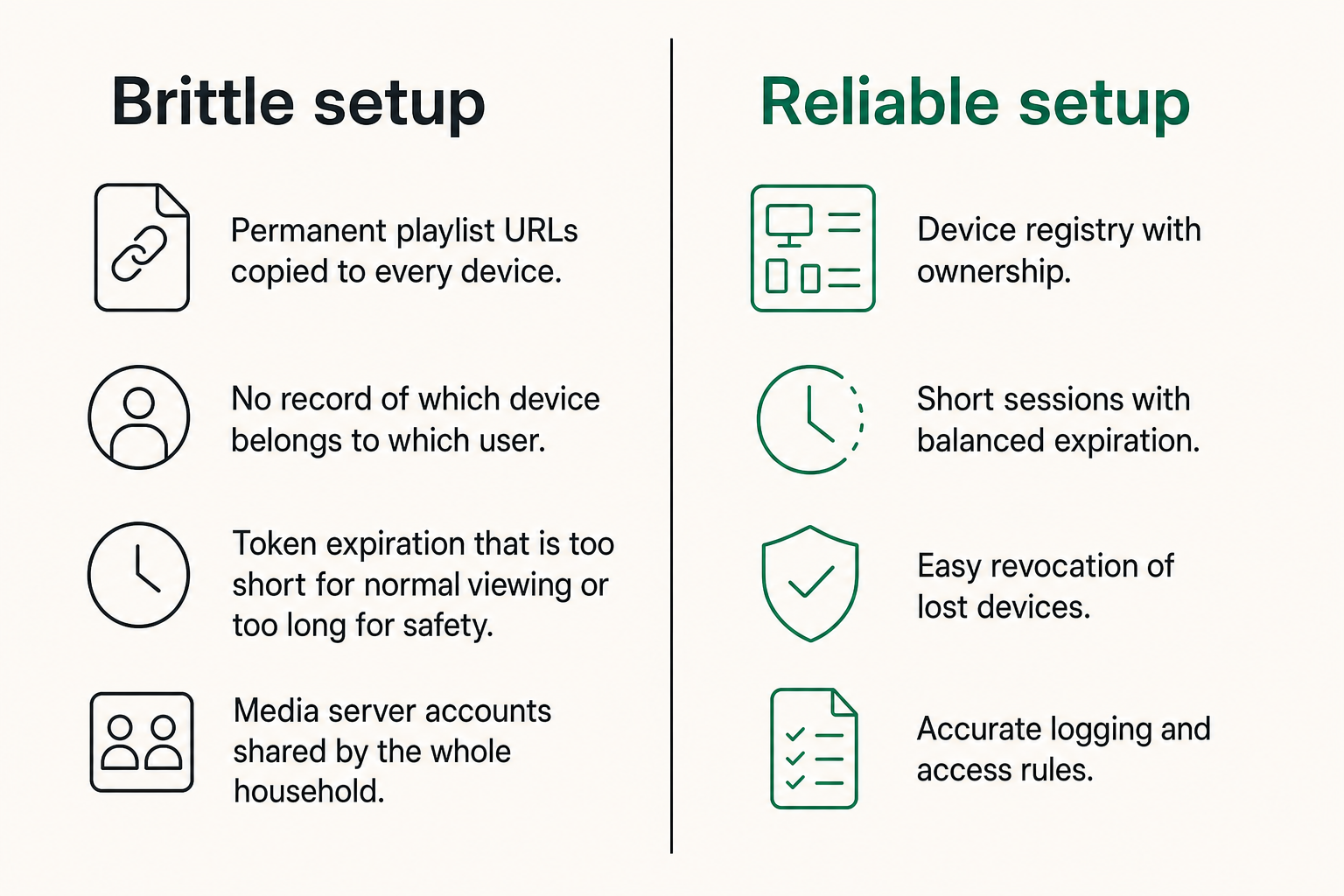
Common failure modes
Bad id streaming rarely fails all at once. It fails as small irritations that become normal.
Common failure modes include:
- Permanent playlist URLs copied to every device.
- No record of which device belongs to which user.
- Token expiration that is too short for normal viewing or too long for safety.
- Media server accounts shared by the whole household.
- Torrent downloads visible to every profile by default.
- VPN changes treated as account compromise every time.
- Smart TV apps that cache stale credentials.
- Logs that are either empty or dangerously verbose.
- No clean way to revoke a lost device.
- Metadata mismatch causing the wrong access rule to apply.
What breaks in practice is trust. The household stops trusting the system because access feels random. The operator stops trusting the logs because they do not match reality. The admin stops enforcing rules because exceptions are faster.
Once that happens, people route around the system. They share direct URLs. They disable pairing. They use one account everywhere. They keep old playlist files as backups. Every workaround becomes another identity leak.
What works and what fails
| Approach | What works | What fails |
|---|---|---|
| One shared account | Fast setup | No accountability, weak revocation, poor profiles |
| Device-only access | Simple for TVs | Breaks with replacements, travel, app resets |
| IP-based access | Useful for local LAN hints | Fails with VPNs, mobile networks, ISP changes |
| Short-lived sessions | Safer playback control | Needs refresh and good error handling |
| Source-aware policy | Better legal and privacy boundaries | Requires inventory and maintenance |
| Central device registry | Clean revocation and support | Needs pairing workflow users can follow |
The practical answer is usually a hybrid. Use user or household identity for policy, device identity for trust, source identity for rights context, and session identity for playback control. Do not ask one identifier to do every job.
Practical rule: If one identifier controls login, device trust, content rights, and playback sessions, it will eventually be overused and under-secured.
Metrics that tell you the system is healthy
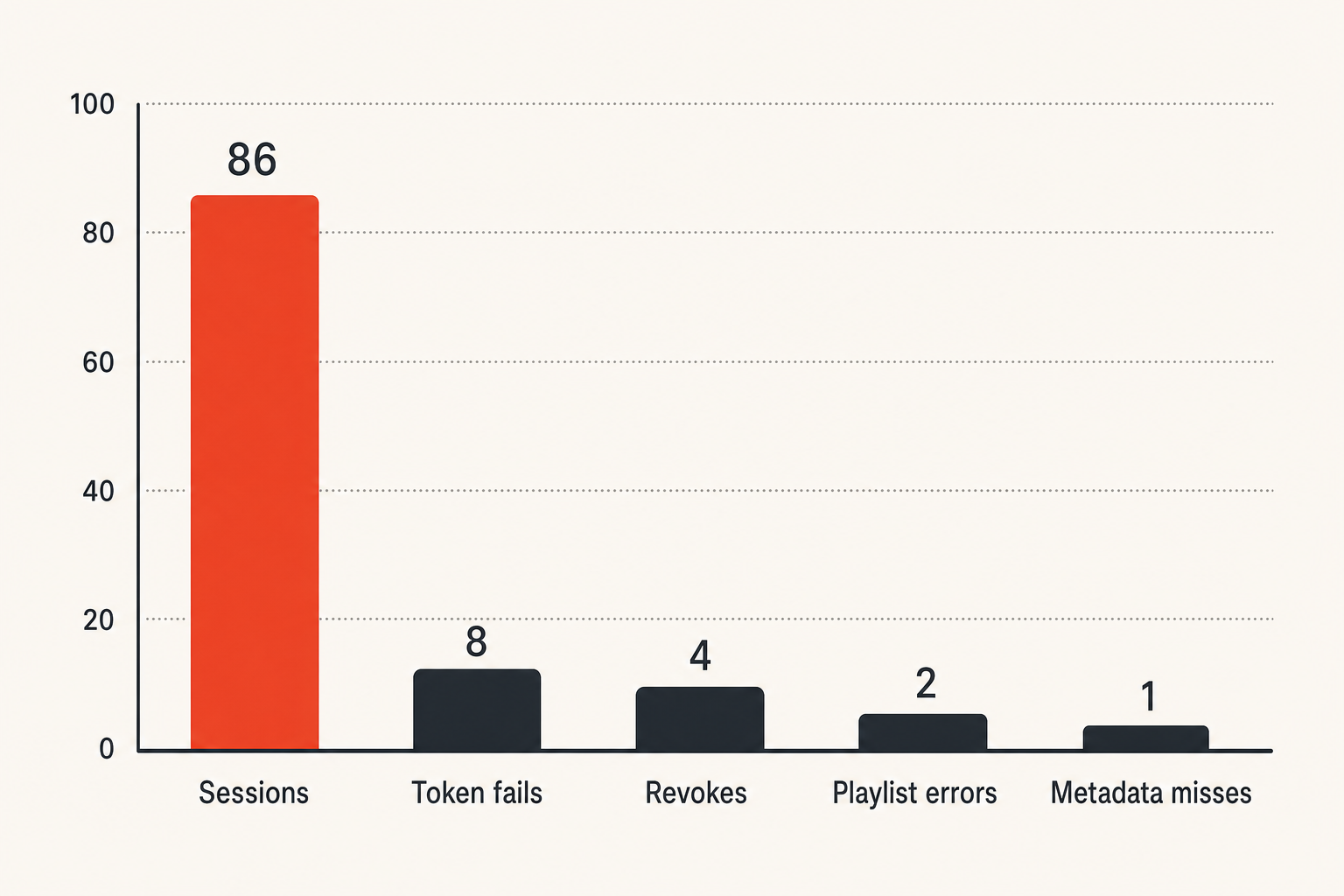
Operational metrics
You do not need a full observability department to run a better home media workflow. You do need a few counters that tell you whether id streaming is healthy.
Track these metrics:
- Successful session starts.
- Failed session starts by reason.
- Token refresh failures.
- Device pairing attempts.
- Revoked device access attempts.
- Playlist fetch failures.
- Metadata match failures.
- Average startup time by client type.
- Buffering incidents by source.
- Concurrent sessions by user or household.
The important part is reason codes. A failed playback event should not just say failed. It should say expired token, revoked device, source unavailable, unsupported client, playlist credential rejected, content not allowed, or network timeout.
That changes the conversation from the stream is broken to the session token expired during refresh on one TV model. One is a complaint. The other is an actionable defect.
Support signals
Support signals are the human version of metrics. Even if you are only supporting your own household, repeated complaints tell you where architecture is leaking.
Watch for phrases like:
- It works on my phone but not the TV.
- I signed in yesterday and now it forgot me.
- The playlist disappeared again.
- The wrong episode showed up.
- The VPN breaks everything.
- Why is this device still connected?
- I cannot tell which app I am supposed to use.
Each complaint maps to an id streaming component. Phone versus TV is often device registration or client capability. Forgotten login is token refresh. Playlist disappearance is source state. Wrong episode is metadata. VPN breakage is network policy. Unknown connected device is registry hygiene.
The mistake teams make is treating these as user education problems. Sometimes they are. More often, they are architecture feedback.
Where bittorrented.com fits into the workflow
Use it as a media discovery and playback layer
Bittorrented.com is useful when you want practical, up-to-date guidance and tools around streaming services, torrents, IPTV, and home media without pretending the UI is the whole system. The important fit for id streaming is that discovery, playback, and source browsing should be treated as parts of a workflow, not isolated tabs.
For a media hobbyist, the site can sit in the layer where you evaluate sources, understand IPTV and torrent workflows, and connect those choices to safer home media operations. That does not remove your responsibility to use legal sources, secure your devices, and respect content rights. It gives you a clearer operating model.
A good product fit here is architectural. You still decide what sources you trust. You still manage your network. You still choose your media server and clients. But the workflow becomes easier to reason about when live TV, torrent discovery, streaming context, and home media guidance are not scattered across unrelated notes.
Product fit, not lock in
The wrong way to think about bittorrented.com is as a magic replacement for your whole stack. The better way is as a practical layer in a broader stack: browse, compare, understand, and connect media workflows while keeping ownership of your devices, sources, and privacy model.
That distinction matters. Lock in encourages sloppy identity because the platform wants every decision inside one account. A workflow-oriented layer encourages clearer boundaries. It helps you ask better questions: is this source legal, how is access controlled, where do credentials live, how do sessions expire, and what happens when a device is lost?
For readers coming from torrent, IPTV, or home media experimentation, this is the difference between tinkering and operating. Tinkering asks whether it plays. Operating asks whether it will still play safely next month.
Closing checklist for id streaming
The practical checklist
Id streaming is not hype. It is a practical way to stop media access from becoming a pile of permanent URLs, shared accounts, stale devices, and unhelpful logs.
Use this checklist before you scale your setup:
- Define users, households, profiles, and admins.
- Register devices explicitly.
- Classify content sources and legal boundaries.
- Avoid permanent credentialed URLs on clients.
- Issue short-lived playback access where possible.
- Track sessions with clear expiration and revocation.
- Keep logs useful but minimal.
- Test VPN, travel, device reset, and network failure cases.
- Make support timelines readable.
- Review source rules when playlists, libraries, or devices change.
The practical question is simple: can your system explain who accessed what, from where, under which rule, without collecting more data than it needs? If yes, your id streaming workflow is probably on the right path. If no, fix the architecture before adding more apps.
Closing the loop matters because id streaming is the layer that keeps IPTV, torrents, streaming services, and home media tools from drifting into chaos.
Try bittorrented.com
You are writing for readers who want practical, up-to-date guidance on streaming services, torrents, IPTV, and home media tools. Try bittorrented.com.