Your streaming setup stops working at the worst possible time. The match starts buffering. The IPTV playlist loads half the channels. A torrent finishes, but the media server cannot see the file. The TV app works, the phone app does not, and nobody knows whether the problem is Wi-Fi, DNS, codec support, storage, or the source.
That is where information technology becomes practical. Not corporate IT. Not buzzwords. The everyday architecture behind how media moves from a source, across your network, through apps and devices, into a reliable viewing experience.
Teams think the problem is finding the best app, fastest VPN, cheapest IPTV provider, or most powerful media server. The real problem is building a workflow where sources, network, identity, storage, playback, privacy, and troubleshooting all fit together.
That changes the conversation. The practical question is not What tool should I install? It is What system am I actually operating at home, and where does it break?
Table of contents
- Information technology is the stack behind cord cutting
- Map the media workflow before buying tools
- Information technology decisions that shape streaming quality
- Torrent workflows should be treated like data pipelines
- IPTV workflows need state, not just playlists
- Home media servers are small IT systems
- Privacy and security controls that actually matter
- Troubleshooting information technology means observing state
- What works and what fails in practice
- Where bittorrented.com fits into the workflow
Information technology is the stack behind cord cutting
Why the living room became an IT environment
Cord cutting used to mean replacing cable with one or two streaming apps. In 2026, many homes run a mixed environment: paid streaming services, free ad-supported channels, legal torrents such as public domain archives or Linux distributions, IPTV playlists, NAS storage, media servers, smart TVs, mobile devices, browser players, and sometimes remote access.
That is no longer just entertainment. It is a small information technology environment with endpoints, networks, data flows, user accounts, permissions, updates, logs, and failure modes.
The mistake teams make is treating each media problem as isolated. They buy another streaming box when the real issue is weak Wi-Fi. They blame the IPTV player when the playlist has stale channel IDs. They reinstall a media server when the database lost permissions to a mounted folder.
A useful way to think about it is: your home media setup has a control plane and a data plane. The control plane is search, playlists, metadata, accounts, indexes, watch history, and configuration. The data plane is the video, audio, subtitles, and files moving across the network. Most breakage happens when people optimize one plane and ignore the other.
The real boundary is content, network, device, and account
A clean setup starts by separating four boundaries:
- Content: where the stream, file, or channel originates.
- Network: how data reaches your home and moves inside it.
- Device: where decoding, display, storage, or transcoding happens.
- Account: who is allowed to access what, from where, and under which terms.
When those boundaries are clear, troubleshooting gets much easier. If one TV cannot play 4K but the same file works on a laptop, the source is probably fine. If every device buffers at the same time, look at network path, ISP congestion, DNS, or the upstream service. If only one user profile fails, look at account permissions or app state.
Practical rule: Do not change tools until you can say which boundary is failing. Source, network, device, and account are different problems.
Legal and safe use is an architecture choice
Torrent and IPTV technology are protocols and distribution methods. They are not automatically lawful or unlawful by themselves. The same is true of web downloads, cloud storage, and streaming. The important part is whether you have the right to access and distribute the content.
Your architecture should make legal and safe use the default. That means using legitimate sources, respecting licensing terms, avoiding suspicious playlists, scanning downloaded files where appropriate, and keeping media tools updated. If a setup depends on anonymous links, unknown installers, hardcoded credentials, and constant provider hopping, the risk is not theoretical. It is built into the workflow.
For adjacent context on how private systems handle identity and metadata, Related reading from our network: end-to-end encrypted messaging architecture. Media stacks are different, but the same lesson applies: privacy is not a button; it is a design constraint.
Map the media workflow before buying tools
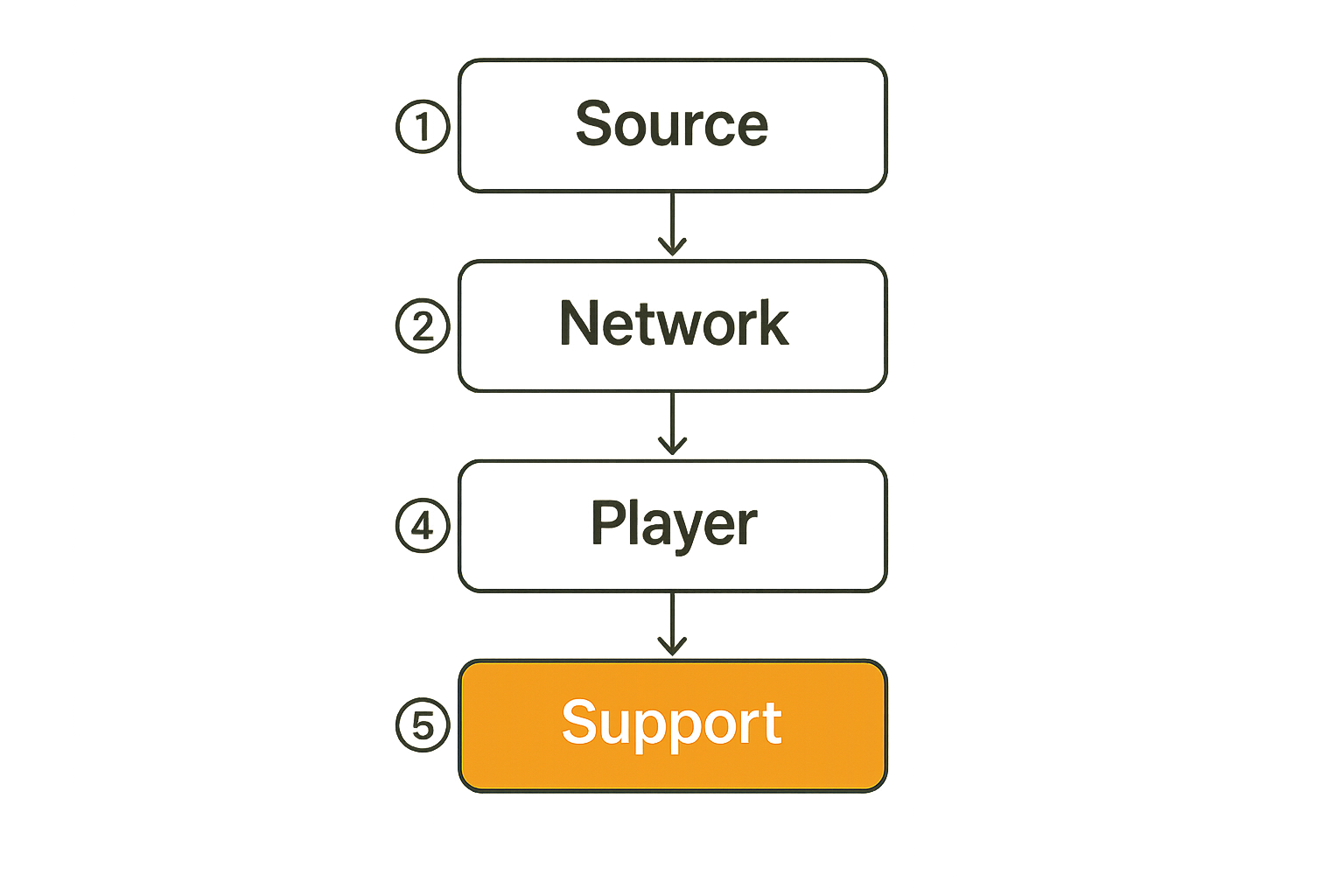
Start with the path a file or stream takes
Before installing another player or switching providers, map the path. For streaming, the path might be:
- You discover a title or channel.
- The app resolves a catalog entry or playlist URL.
- DNS and routing connect to the source.
- The source sends a manifest or media segments.
- The player buffers, decodes, and renders.
- Watch state, subtitles, and history are saved.
For torrents, the path is different:
- You identify a legitimate torrent source.
- The client reads metadata and finds peers.
- Pieces download and verify.
- The file completes and lands in a folder.
- A media server scans, identifies, and indexes it.
- A player streams it locally or remotely.
For IPTV, the path is different again:
- The player loads a playlist.
- Channel groups and names are parsed.
- EPG data is matched.
- A channel stream is requested.
- Playback starts or fails.
- State is cached until the playlist changes.
What breaks in practice is that people mix these workflows together. They expect a playlist to behave like a streaming subscription, a torrent folder to behave like a curated library, or a smart TV app to behave like a server.
Separate browsing, fetching, playing, and storing
A stable home media stack usually has four jobs:
| Job | What it does | Common tools | Failure signal |
|---|---|---|---|
| Browsing | Search, catalogs, feeds, playlists | Apps, indexes, guides | Missing or stale results |
| Fetching | Downloads or stream requests | Torrent clients, IPTV players, APIs | Timeouts, bad sources, no peers |
| Playing | Decode and render media | TV apps, set-top boxes, browsers | Buffering, unsupported codec |
| Storing | Keep files and metadata | NAS, media server, database | Missing files, broken libraries |
The practical question is whether one tool is doing all four jobs or whether you have clear handoffs. All-in-one tools are convenient, but they hide state. Modular tools are flexible, but they create integration points.
Neither approach is automatically better. The failure mode is pretending there are no handoffs.
Write down who owns each failure
Even in a household, ownership matters. If the TV app fails, who checks the network? If the media server library looks wrong, who checks file naming? If a subscription app refuses login, who checks account status?
This sounds formal, but it can be simple. Keep a note with:
- Router model and admin URL.
- DNS provider.
- Wi-Fi network names.
- Media server address.
- Storage mount paths.
- IPTV playlist source and refresh cadence.
- Backup location.
- Devices allowed remote access.
Practical rule: If you cannot write down the path, you cannot troubleshoot the path. Architecture begins as a plain-language map.
Information technology decisions that shape streaming quality
Bandwidth is only one variable
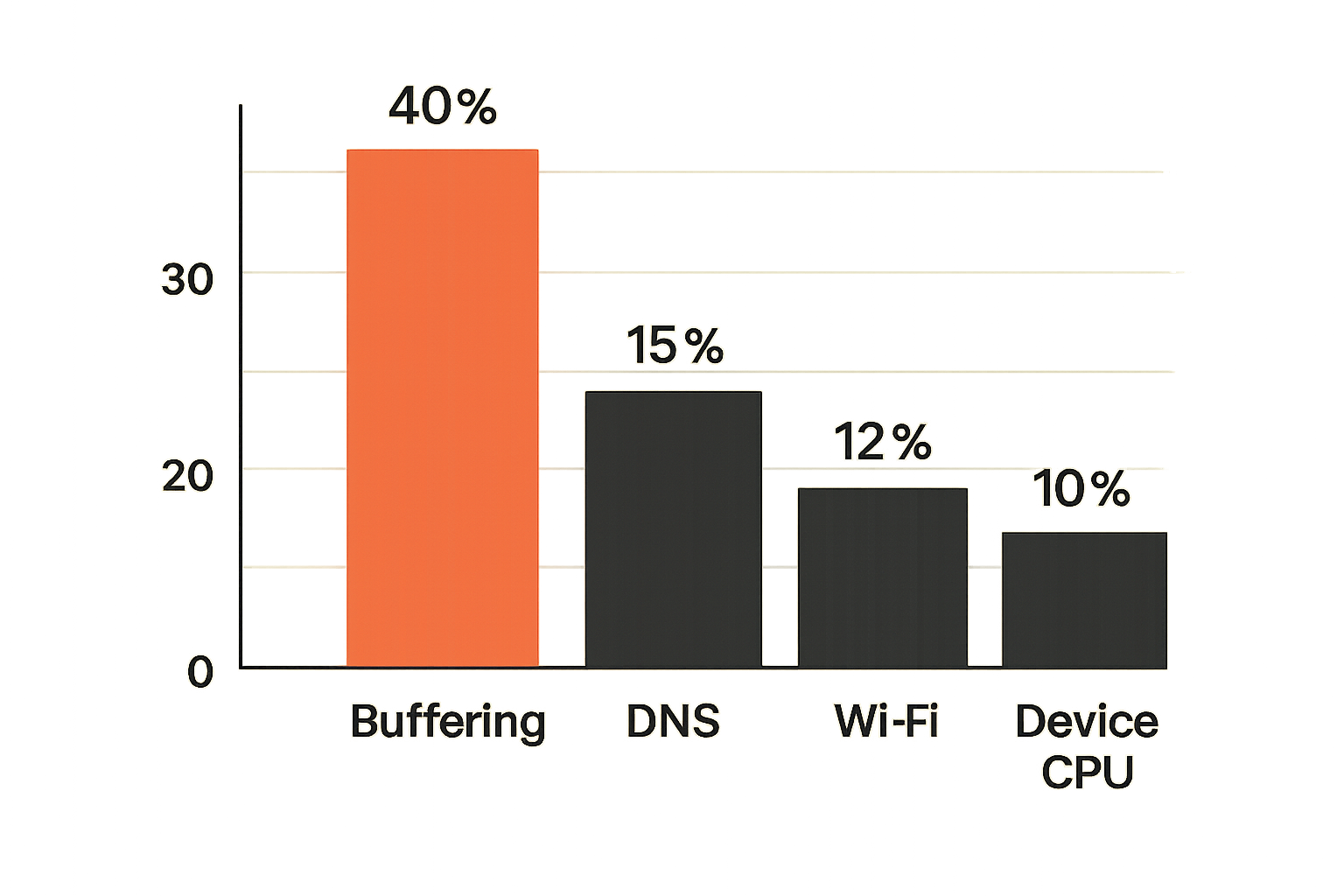
Most people diagnose buffering with one question: Is my internet fast enough? Sometimes that is the answer. Often it is not.
Streaming quality depends on throughput, latency, jitter, packet loss, Wi-Fi signal, device CPU, codec support, app behavior, source reliability, and congestion between networks. A speed test can look fine while a specific stream performs badly because the route to that source is poor or the device cannot decode the format cleanly.
A useful baseline is to test from multiple devices and locations:
- Wired laptop near the router.
- Phone on Wi-Fi.
- TV or streaming box.
- Same app on mobile data, if available.
- Same content at a lower resolution.
If only one device fails, bandwidth is not the main issue. If everything fails at peak hours, look upstream. If lower resolution works consistently, capacity or decoding may be involved.
DNS, routing, and peering change the experience
DNS does not just turn names into addresses. It can influence which CDN endpoint or regional service node your device reaches. Bad DNS, stale caches, ISP routing problems, and peering congestion can all look like app failure.
For most home users, the goal is not exotic networking. It is predictability. Choose a reputable DNS provider, configure it at the router if possible, and avoid stacking multiple DNS-changing tools without knowing which one wins.
The same applies to VPNs. A VPN can be useful for privacy on untrusted networks or reducing direct exposure, but it can also add latency, break local discovery, trigger streaming service restrictions, or route traffic through a congested endpoint. Do not assume it makes every media workflow better.
Device limits matter more than people admit
A cheap streaming stick may handle one app perfectly and struggle with another. A smart TV may have an underpowered processor, old app runtime, limited memory, or poor codec support. A NAS may store files reliably but struggle to transcode several streams.
This is where information technology discipline helps. Treat playback devices as endpoints with capabilities, not interchangeable screens.
| Decision | Good default | What fails |
|---|---|---|
| 4K playback | Use a device with hardware decode for your formats | CPU-bound decoding and stutter |
| Wi-Fi | Prefer wired Ethernet for fixed TVs where possible | Random buffering from interference |
| Transcoding | Avoid it unless the server is sized for it | Server overload during remote playback |
| App updates | Keep players current but avoid blind beta installs | Old bugs or unstable new builds |
| Storage | Use reliable disks and monitored mounts | Library corruption and missing files |
A practical home setup is not about buying the most expensive device. It is about matching the device to the job.
Torrent workflows should be treated like data pipelines
Use torrents for legitimate distribution, not shortcuts
BitTorrent is efficient because it distributes load across peers. That makes it useful for legal content distribution: open-source software, public domain media, creator-authorized releases, research datasets, and other files shared with permission.
The legal boundary matters. Do not use torrent workflows to access copyrighted material without rights. Besides the obvious legal issue, unauthorized sources are more likely to carry misleading filenames, malware, broken encodes, and bad metadata. That creates both ethical and operational risk.
If you are browsing decentralized torrent metadata, understand what you are looking at and verify legitimacy before downloading. Tools that expose DHT discovery can be useful for understanding the ecosystem, but browsing DHT torrent metadata is not the same as having permission to download or redistribute a file.
Metadata quality controls the rest of the workflow
Torrents are data pipelines with verification built in, but file usability depends on metadata around the file: name, folder structure, codec, subtitles, edition, language, and release notes. Your media server can only organize what it can identify.
The mistake teams make is allowing random filenames into the library and expecting automation to fix everything. Automation works best when inputs are boring.
A practical folder pattern might look like this:
/media
  /movies
    /Title Name (Year)
      Title Name (Year).mkv
  /shows
    /Show Name
      /Season 01
        Show Name - S01E01.mkv
  /downloads
    /incomplete
    /complete-review
Keep an intermediate review folder if you care about quality. That gives you a place to verify the file, rename it, scan it, check subtitles, and move it into the library only when it is ready.
Completion is not the same as usability
Torrent clients report download completion. Media workflows need more than completion. The file may be complete but encoded in a format your TV cannot play. It may include multiple audio tracks your player chooses incorrectly. It may be missing subtitles. It may have permissions that prevent the media server from reading it.
Implementation sequence for a safer legal torrent workflow:
- Choose legitimate sources only.
- Download into an incomplete directory outside the media library.
- Verify completion and file integrity.
- Scan files with a reputable security tool where appropriate.
- Confirm codec, audio, subtitles, and naming.
- Move approved files into the library path.
- Trigger a media server scan.
- Test playback on the weakest device you use.
Practical rule: A download is not finished when the torrent client says complete. It is finished when the intended player can use it safely and reliably.
IPTV workflows need state, not just playlists
A playlist is a source list, not an operations layer
Many IPTV setups start with an M3U playlist. That is fine, but a playlist is not a full operations layer. It does not guarantee channel uptime, accurate names, valid EPG mapping, consistent logos, regional rights, or long-term reliability.
If you use IPTV, use legitimate providers and playlists. Be careful with random lists that promise everything for almost nothing. They often break, disappear, or create security and legal exposure.
The practical question is how your player handles state. Does it cache the playlist? How often does it refresh? Can you remove dead channels? Can you map EPG entries? Can you group favorites? Can you fall back when a stream fails?
For readers comparing live channel workflows, live TV IPTV playlists are a useful example of why discovery, playback, and state should be treated as separate layers.
EPG, logos, groups, and channel IDs need governance
The user-facing IPTV experience depends heavily on metadata. A channel without an EPG entry feels broken even if the stream works. Duplicate channel names create confusion. Logos can drift. Group names can become messy.
A small governance checklist helps:
- Prefer stable channel IDs over display names.
- Keep one canonical EPG source per provider when possible.
- Remove duplicates instead of tolerating clutter.
- Review favorites after playlist refreshes.
- Keep adult, regional, or experimental groups separated.
- Do not store provider credentials in shared screenshots or exported configs.
Related reading from our network: standards, protocols, schemas, and conventions. The article is about AI systems, but the same idea applies to IPTV metadata: conventions are what keep tools from interpreting the same data differently.
Retries and fallbacks beat manual refreshing
Manual refreshing is the IPTV equivalent of rebooting the router: sometimes useful, often overused. A better workflow uses clear retry and fallback behavior.
Ask these questions:
- Does the player retry a failed segment or fail immediately?
- Does it expose useful error messages?
- Can it switch to a backup source for the same legal channel?
- Does it distinguish authentication failure from stream timeout?
- Does it refresh EPG independently from playlist data?
What breaks in practice is silent failure. The player says cannot play, but you do not know whether the URL expired, the source is down, DNS failed, the codec is unsupported, or your account is blocked. Choose tools that expose enough state to make decisions.
Home media servers are small IT systems
Indexing is a database problem
A home media server looks like a friendly library. Under the hood, it is a database, file scanner, metadata resolver, transcoder, access-control system, and web server. Treat it that way.
Indexing issues usually come from predictable causes:
- File names do not match the expected pattern.
- Folder permissions changed.
- Storage mounts are not available at boot.
- Metadata providers return ambiguous matches.
- The library database is stale or corrupted.
- A file moved before the scan completed.
Do not solve every indexing issue by rebuilding the whole library. First check whether the server can see the path, whether the file is named correctly, and whether a manual match fixes the record.
Storage layout determines future pain
Storage decisions feel boring until they hurt. Mixing incomplete downloads, finished media, backups, and temporary transcodes in one folder creates confusion. Using one external drive with no backup creates a single point of failure. Mounting network storage inconsistently causes missing libraries after reboot.
A clean layout separates intent:
/storage
  /media-library
  /downloads-incomplete
  /downloads-review
  /server-config-backup
  /transcode-temp
For NAS or mini-PC setups, document mount paths and user permissions. If your media server runs in a container, make sure the container path and host path are clearly mapped. Many frustrating library issues are just path translation mistakes.
Backups protect configuration, not only media
People back up media files and forget the configuration that makes the library usable. Server settings, user accounts, watched status, custom posters, playlists, metadata edits, and plugin configs may matter more than a replaceable public domain file.
Back up:
- Media server database.
- Configuration directories.
- Playlist exports.
- Custom metadata.
- Router configuration, if possible.
- Notes about storage paths and DNS settings.
Test restore before you need it. A backup that cannot be restored is just a comforting file.
Privacy and security controls that actually matter
Do not confuse privacy with invisibility
Privacy-aware media use means reducing unnecessary exposure, choosing trustworthy sources, limiting data leakage, and understanding tradeoffs. It does not mean assuming a VPN, private browser window, or alternate DNS provider makes everything invisible.
For streaming services, account activity is still visible to the provider. For torrents, peer-to-peer traffic exposes participation to peers unless routed through privacy tools, and those tools introduce their own trust model. For IPTV, provider-side logs and app telemetry may still exist.
The mistake teams make is adding privacy tools without asking what threat they are reducing. Public Wi-Fi snooping, ISP-level visibility, malicious apps, account compromise, and shady content sources are different problems.
Segment risky devices from trusted devices
Smart TVs, cheap Android boxes, old tablets, and experimental media tools should not all sit on the same trusted network as laptops, work devices, and private storage. Network segmentation is one of the most useful home IT controls.
You do not need enterprise gear. Many modern routers support guest networks or IoT networks. Put less trusted devices there. Keep NAS admin panels, router dashboards, and personal computers on the trusted network. Allow only the access required for playback.
Practical rule: If a device does not need to administer your network or storage, do not place it where it can.
Authentication and updates are boring for a reason
Use strong passwords, avoid password reuse, enable multifactor authentication where supported, and remove accounts you no longer use. Keep media servers, torrent clients, IPTV apps, routers, and browser extensions updated.
The boring controls prevent the predictable failures: exposed admin panels, default credentials, outdated plugins, malicious app sideloads, and compromised accounts.
Related reading from our network: selling digital products as a workflow. It is a commerce article, but the operational lesson is similar: the visible interface is only a small part of the system; support, state, and trust boundaries do the real work.
Troubleshooting information technology means observing state
Symptoms are not root causes
Buffering is a symptom. Missing subtitles are a symptom. Wrong poster art is a symptom. Playlist failed is a symptom. The root cause lives in state: network conditions, source availability, metadata mapping, account permission, device capability, storage access, or app cache.
A useful troubleshooting approach is to gather state before changing things:
- What changed recently?
- Which devices are affected?
- Does the problem happen on wired and wireless?
- Does the same file or stream work elsewhere?
- Is the issue time-based?
- Are logs available?
- Is storage mounted and readable?
- Are credentials valid?
Most home media troubleshooting gets worse because people change five variables at once. They reboot the router, update the app, change DNS, reinstall the player, and refresh playlists. If the problem disappears, they still do not know why.
Use a repeatable triage sequence
Use the same sequence every time:
- Identify the asset: title, channel, file, playlist, or app.
- Identify the scope: one device, one app, all devices, one user, one network.
- Test the source: does it work from another device or network?
- Test the network: wired vs Wi-Fi, DNS, latency, packet loss.
- Test the endpoint: codec support, app version, storage access, CPU load.
- Check account and authorization: login, subscription status, terms, regional rights.
- Check logs or error messages.
- Change one thing.
- Retest and record the result.
This is basic information technology hygiene, and it works because it narrows the blast radius.
Keep a small change log
A change log can be a note on your phone. Keep entries like:
2026-07-08: changed router DNS to provider A
2026-07-10: updated media server to version X
2026-07-12: moved library path from /mnt/media to /storage/media-library
2026-07-15: refreshed IPTV playlist and remapped EPG
When something breaks, this log is often more useful than another forum thread. It tells you where to look first.
What works and what fails in practice
What works
The setups that hold up over time usually share the same traits:
- Legal sources are separated from unknown or experimental sources.
- The router, DNS, storage, and media server settings are documented.
- Fixed playback devices use wired networking where practical.
- Incomplete downloads never land directly in the main library.
- IPTV playlists have refresh rules and metadata cleanup.
- Media server configuration is backed up.
- Privacy tools are chosen for specific risks, not vibes.
- Troubleshooting changes one variable at a time.
A workflow-first setup may look less exciting than a pile of apps, but it creates fewer mystery failures.
What fails
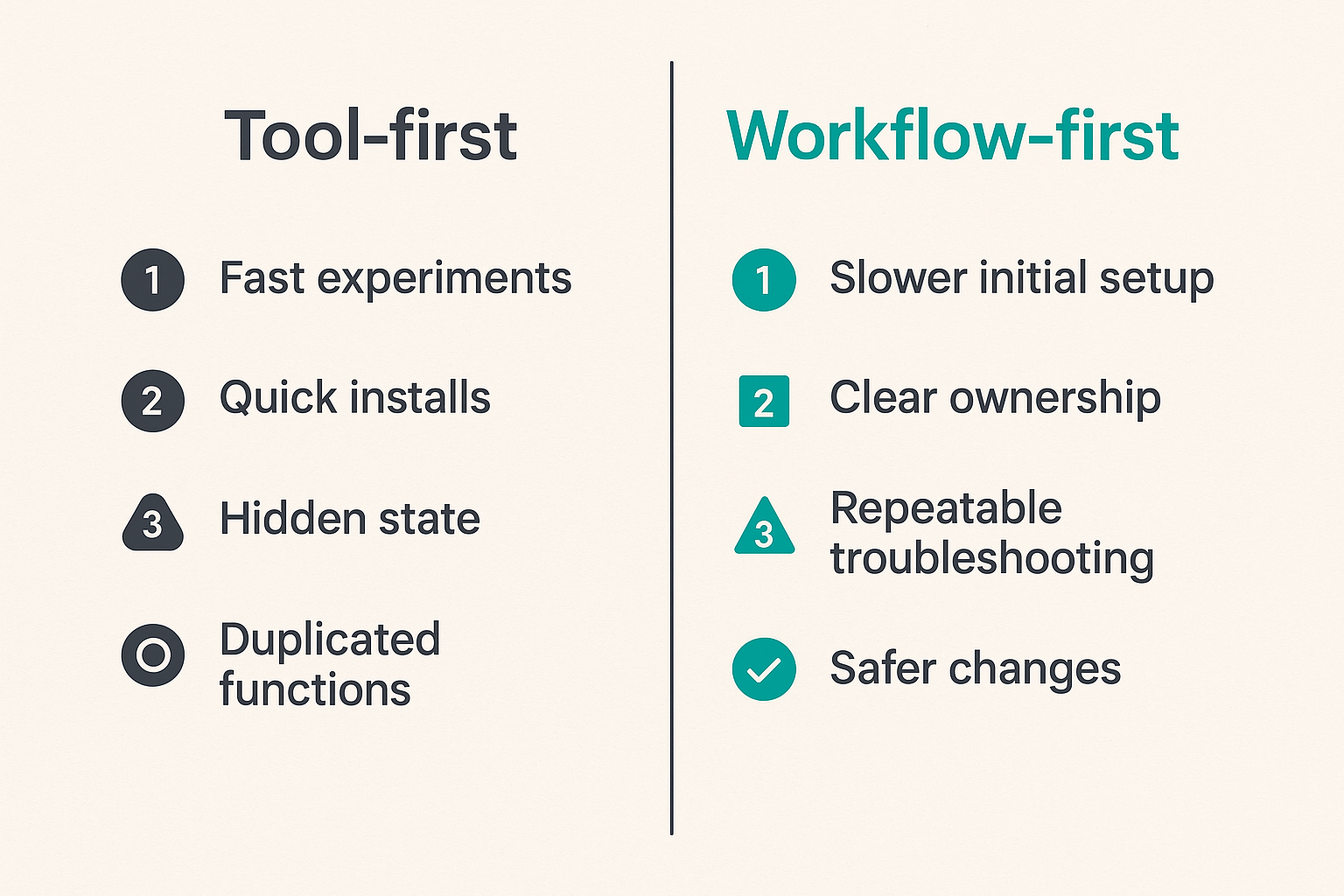
Tool-first setups fail in predictable ways. The person running the setup keeps adding apps, scrapers, lists, plugins, DNS tools, VPN profiles, and browser extensions. Each solves a narrow annoyance. Together, they create an environment nobody understands.
Comparison:
| Approach | Short-term result | Long-term result |
|---|---|---|
| Tool-first | Fast experiments, quick installs | Hidden state, duplicated functions, fragile fixes |
| Workflow-first | Slower initial setup | Clear ownership, repeatable troubleshooting, safer changes |
| Provider hopping | Temporary access | Unstable playlists, legal risk, support problems |
| Source governance | Fewer questionable sources | Better reliability and lower security exposure |
| Manual fixes | Immediate relief | No memory of what changed |
| Logged changes | Slight overhead | Faster recovery when something breaks |
The mistake teams make is judging a setup by how fast it works on day one. The better test is how calmly you can fix it on day ninety.
Common failure modes
Watch for these patterns:
- All-in-one app dependency: one app handles search, downloads, playback, and library state. When it breaks, everything breaks.
- No trusted source policy: users cannot tell legitimate sources from risky ones.
- Wi-Fi overconfidence: every fixed device streams wirelessly even when Ethernet is available.
- Router as mystery box: nobody knows DNS, DHCP reservations, or guest network rules.
- Unreviewed downloads: files move straight into the library with bad names or wrong permissions.
- IPTV metadata drift: EPG and playlist IDs no longer match.
- No backup of configs: rebuilding means starting from memory.
- Privacy theater: tools are installed without understanding what they protect.
What breaks in practice is not one dramatic outage. It is slow entropy. A playlist gets messier. A library accumulates bad matches. A router setting changes. A device stops receiving updates. Six months later, the setup feels haunted.
Where bittorrented.com fits into the workflow
Use guides without turning your setup into tool sprawl
Good media guidance should help you make decisions, not just collect apps. For cord cutters, torrent users, IPTV viewers, and home media hobbyists, the useful lens is architecture: source legitimacy, playback path, network behavior, storage state, privacy controls, and recovery steps.
That is the editorial lane for bittorrented.com. The goal is practical, current guidance on streaming services, torrents, IPTV, and home media tools, framed around legal, safe, and privacy-aware use. Not hype. Not magic boxes. Not pretending the UI is the whole system.
Use guides as inputs to your own architecture. When you read about a new app or workflow, ask:
- Which job does it perform?
- What state does it store?
- What credentials does it need?
- What happens when it fails?
- Can I remove it cleanly?
- Does it improve the workflow or just add another layer?
Closing the loop on information technology
Information technology for cord cutters is not about making your home feel like an enterprise network. It is about borrowing the parts of IT that prevent avoidable pain: maps, boundaries, logs, backups, source policies, endpoint awareness, and repeatable troubleshooting.
Teams think the problem is choosing the perfect streaming app, torrent client, IPTV player, or media server. The real problem is operating a small media system where content, network, device, account, storage, and privacy decisions interact.
If you treat that system casually, it becomes fragile. If you treat it like a workflow, it becomes understandable. That is the difference between constantly chasing fixes and knowing where to look when something breaks.
Information technology is the quiet layer behind streaming, legal torrents, IPTV, and home media in 2026. Build the layer well, and the visible experience gets simpler.
Try bittorrented.com
bittorrented.com is for readers who want practical, up-to-date guidance on streaming services, torrents, IPTV, and home media tools. Try bittorrented.com.