Information technology used to sound like something that lived in an office rack, behind a help desk ticket, or inside a corporate cloud account. Now it lives under your TV, on your router, in your IPTV playlist, inside your torrent client, and across the apps your household expects to work every night.
Teams think the problem is choosing the right streaming app, torrent client, IPTV player, or media server. The real problem is operating a small media technology stack without treating it like one.
That changes the conversation. If you are a cord cutter, torrent user, IPTV viewer, or home media hobbyist in 2026, the practical question is not just what app should I install. It is how do sources, devices, storage, network rules, privacy controls, metadata, playback, and support routines fit together without turning the living room into a permanent troubleshooting session.
The mistake teams make is treating home media like a collection of shortcuts. What breaks in practice is state: what you watched, where the file came from, whether the playlist is licensed and current, which device is buffering, which DNS rule is blocking thumbnails, which download is legal to keep, and who owns the fix when it fails.
Table of contents
- Why information technology matters to cord cutters in 2026
- Map the home media architecture before picking tools
- Choose legal sources and define trust boundaries
- Design the network like media infrastructure
- Make streaming state reliable
- Use torrents safely and legally
- Operate IPTV as a workflow, not a file
- Troubleshoot with signals instead of guesses
- What works and what fails in home media IT
- Where bittorrented.com fits into the workflow
Why information technology matters to cord cutters in 2026
The media stack moved into the home
Cord cutting did not remove complexity. It moved complexity from the cable provider into the home.
A typical setup now includes subscription apps, free ad-supported streaming, a media server, a NAS or USB drive, a torrent client for legal public-domain or creator-distributed files, an IPTV player for licensed live channels, a smart TV, phones, tablets, set-top boxes, browser extensions, router rules, DNS filters, VPN profiles, and account sharing constraints.
That is information technology. Not enterprise IT with a ticket queue, but the same core concerns: systems, identity, access, data flow, reliability, change management, and incident response.
A useful way to think about it is this: your home media environment is a small distributed system with impatient users. The users may be family members instead of employees, but the failure pattern is similar. Nobody cares that the DNS resolver is down. They care that the match will not load.
Teams think the problem is content access
Many cord cutters start from the wrong layer. They ask where to get content, which app has the best interface, or which client supports the newest codec. Those questions matter, but they do not define the system.
Teams think the problem is access. The real problem is control.
Can you tell which source is legal and licensed? Can you separate streaming accounts from local files? Can you restore the library if a drive fails? Can you explain why one IPTV channel buffers while another plays cleanly? Can you keep privacy tools enabled without breaking legitimate services? Can you avoid mixing personal files, public torrents, and paid subscriptions into one undocumented pile?
The mistake teams make is optimizing for the fastest setup. Fast setup feels good for one weekend. Operational clarity still matters six months later.
The practical question is operations
The practical question is: what operating model lets you enjoy streaming, torrents, IPTV, and home media without creating a fragile mess?
You do not need enterprise overhead. You do need a few rules:
- Know where content comes from.
- Know where state lives.
- Know what device owns playback.
- Know what network path the stream uses.
- Know what you will check first when it fails.
Practical rule: If you cannot describe the path from source to screen in one minute, you do not have a media setup. You have a pile of dependencies.
This is where information technology becomes useful to normal cord cutters. It gives you a way to reason about the stack before the next failure.
Map the home media architecture before picking tools
Sources are not the same as libraries
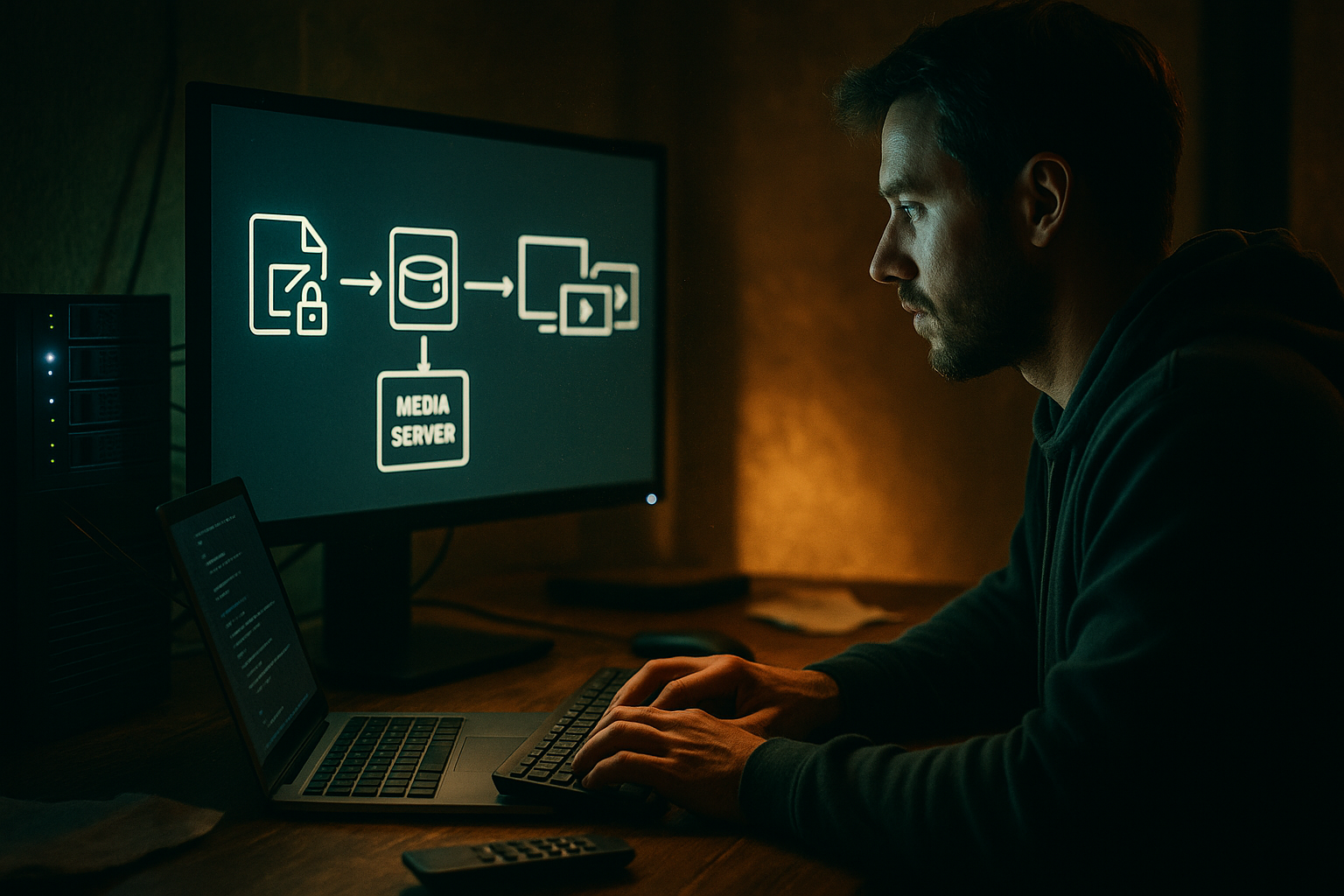
A source is where media originates. A library is the organized version you can browse, search, back up, and play.
That distinction prevents a lot of bad decisions. A licensed streaming service is a source, but you do not own the catalog. A legal torrent can be a source, but only after you verify the rights and understand what you are downloading. An IPTV playlist is a source pointer, not a durable library. A ripped personal disc or creator-provided file may become part of your local library if you store, name, and back it up properly.
Separate these layers:
- Source: subscription app, public-domain torrent, licensed IPTV provider, creator website, personal media.
- Ingest: download, sync, import, scan, playlist refresh.
- Library: folder structure, metadata, thumbnails, indexes.
- Playback: TV app, browser, mobile app, set-top box.
- State: watch progress, favorites, user profiles, logs.
What breaks in practice is when a temporary source is treated like permanent ownership. A playlist URL changes. A streaming service drops a title. A torrent disappears from public availability. If the household expected all of that to behave like a stable library, the system feels broken even when each component is doing exactly what it promised.
The network is part of playback
Most people troubleshoot video playback at the app layer. They reinstall the app, clear cache, change players, or buy another device. Sometimes that works. Often it avoids the real problem.
Media is network-sensitive. Wi-Fi congestion, weak router CPU, ISP peering, DNS latency, multicast handling, buffer size, SMB performance, and device power-saving modes can all look like app failure.
For home media, the network is not background plumbing. It is part of the playback pipeline.
A simple architecture map should include:
- Internet connection and modem.
- Router and firewall rules.
- DNS resolver and filtering layer.
- Wi-Fi bands and wired Ethernet paths.
- Storage location.
- Media server location.
- Playback device type.
- External services used for metadata, guide data, and account login.
Related reading from our network: teams building AI systems face similar architecture language problems when they confuse protocols, schemas, and conventions, which is why this piece on standards as contracts in AI systems is useful adjacent reading.
Clients need predictable state
A client is not just a screen. It is the place where state becomes visible.
If the TV app shows one library, the tablet shows another, and the browser cannot resume playback, the issue may not be the content. It may be inconsistent state between clients.
State includes:
- Login sessions.
- Watch progress.
- Subtitles and audio preferences.
- Favorite channels.
- Recently played items.
- Local cache.
- Offline downloads.
- Device-specific transcoding settings.
A useful way to think about it is that every client should be disposable. If a streaming stick dies, you should be able to replace it without rebuilding the household media environment from memory.
Practical rule: Devices should be replaceable. Libraries, playlists, credentials, and watch state should not depend on one fragile device.
Choose legal sources and define trust boundaries
Licensed streaming is a managed dependency
Licensed streaming services are convenient because they handle hosting, rights, identity, delivery, subtitles, recommendations, and device apps. They are also managed dependencies you do not control.
That means they can change catalogs, alter account policies, remove device support, raise prices, or enforce regional licensing rules. None of that is a reason to avoid them. It is a reason to design around the dependency honestly.
For each subscription, track:
- Who owns the account.
- What devices are authorized.
- Whether downloads are available.
- Which household members use it.
- What content is unique to that service.
- What happens if the subscription is canceled.
The mistake teams make is treating subscriptions like infrastructure. They are closer to vendor services. Useful, powerful, and subject to change.
Legal torrents need provenance
Torrents are a distribution method, not a legal category. The same protocol can distribute open-source software, public-domain films, creator-approved releases, large datasets, and also unauthorized material. The operational question is provenance.
Before adding a torrent to your home media workflow, ask:
- Who published it?
- Do they have the right to distribute it?
- Is the license clear?
- Is the file what it claims to be?
- Is the hash or magnet link from a trusted source?
- Do you need to keep records for later?
For public torrent discovery and metadata exploration, use tools like DHT torrent browsing carefully and keep the rule simple: discovery does not equal permission.
Practical rule: A torrent client should not be a legal decision engine. Verify rights before ingesting anything into your library.
IPTV playlists need source control
IPTV is similar. An M3U playlist is only a pointer list. It does not prove licensing, reliability, quality, or support.
For IPTV viewers, the trust boundary should be explicit:
- Paid licensed provider playlists go in one profile.
- Free official channels go in another.
- Test playlists stay isolated.
- Unknown playlists do not get merged into the household default.
If you maintain licensed M3U playlists, a dedicated live workflow such as streaming live channels from IPTV playlists can help keep channel browsing separate from your local file library.
Do not let IPTV become a mystery file named latest.m3u that everyone depends on. Put a date on it. Keep the provider name. Save the original URL if permitted. Track whether EPG data comes from the same provider or a separate guide source.
Design the network like media infrastructure
Router quality beats app tweaking
A weak router makes every media app look worse than it is.
In production home setups, the router is often the hidden bottleneck. It may be handling Wi-Fi, NAT, firewall rules, DNS forwarding, parental controls, ad blocking, VPN routing, IoT devices, smart TVs, game consoles, video calls, and large downloads at the same time.
If 4K streaming fails while local playback works, do not immediately blame the streaming app. Check whether the router is overloaded, the Wi-Fi channel is crowded, or another device is saturating upload bandwidth.
What works:
- Wire the media server if possible.
- Wire the main TV if possible.
- Keep 2.4 GHz for low-bandwidth devices.
- Use 5 GHz or 6 GHz for high-throughput playback.
- Avoid stacking multiple VPN and DNS filters without testing.
- Reboot on a schedule only if you understand why it helps.
What fails:
- Buying another streaming stick before checking Wi-Fi.
- Running a media server over weak Wi-Fi.
- Letting cloud backup saturate upload during live streams.
- Treating ISP speed-test results as proof that LAN playback is healthy.
DNS and privacy tools can break media
Privacy-aware users often add DNS filters, tracker blockers, VPNs, secure DNS, browser isolation, and firewall rules. Good. But media apps use many supporting domains for login, thumbnails, subtitles, DRM, analytics, guide data, and playback authorization.
Block too aggressively and the app may partially fail. The homepage loads, but thumbnails vanish. Login works, but playback authorization fails. IPTV channels play, but EPG data disappears.
The practical question is not privacy or usability. It is how to test privacy controls without guessing.
Use an allowlist workflow:
- Enable the privacy control.
- Reproduce the media action.
- Check DNS and firewall logs.
- Identify blocked domains tied to required function.
- Allow the minimum needed domain.
- Retest from the same device.
- Document the exception.
Practical rule: Privacy controls should be observable. If you cannot see what they block, you cannot safely tune them.
Storage placement changes performance
Local media performance depends on where files live and how clients access them.
A USB drive attached to a low-power router is simple, but may be slow. A NAS is better, but needs maintenance. A desktop media server is flexible, but consumes power and may go to sleep. Cloud storage sounds convenient, but can introduce latency, bandwidth limits, sync errors, and account risk.
For home media, storage decisions should consider:
- Throughput for large files.
- Random access for seeking.
- Backup strategy.
- Noise and power draw.
- Filesystem compatibility.
- Permission model.
- Whether clients need transcoding.
The mistake teams make is putting storage wherever it is easiest to plug in. That is fine for testing. It is not a durable architecture.
Make streaming state reliable
Catalogs need stable identifiers
A catalog is only useful if items stay identifiable over time.
If filenames change randomly, folders are inconsistent, or metadata tools cannot match content, your library becomes brittle. This is especially common when people mix personal files, public-domain downloads, open licensed material, and temporary test files in the same folder.
Use a naming convention that makes intent obvious:
/media
  /movies
    /public-domain
    /personal-archive
    /creator-licensed
  /shows
  /music
  /iptv-recordings-if-licensed
  /incoming-review
Keep an incoming-review folder. Nothing should move into the main library until you have verified rights, file integrity, naming, and metadata.
Related reading from our network: independent operators in other fields run into the same need for proof, delivery records, and repeatable workflows, as shown in this guide to an AI-assisted freelance workflow.
Metadata is an operational dependency
Metadata feels cosmetic until it fails.
Posters, titles, episode numbers, channel names, EPG entries, subtitles, audio labels, and release years determine whether people can use the system without asking the household administrator for help.
If metadata comes from external services, treat those services as dependencies. If the metadata provider is down or changes matching behavior, your library may look broken.
What works:
- Keep original filenames until verification is complete.
- Store local artwork for important library items.
- Review automated matches before bulk applying changes.
- Avoid merging unrelated sources into one flat folder.
- Keep a small notes file for unusual items.
What fails:
- Blind automatic renaming.
- Overwriting metadata without backups.
- Letting every client scrape independently.
- Depending on one obscure plugin for the whole library.
Watch history should survive device churn
People underestimate watch history. It is not just convenience. It is state that makes a multi-device setup feel coherent.
If you replace a TV, reset a streaming stick, or move from one player to another, users expect progress and favorites to survive. If they do not, trust in the whole setup drops.
Keep state as high in the stack as possible. Server-side watch state is better than device-only watch state. Account-level favorites are better than local-only favorites. Exportable playlists are better than app-only lists.
For important media workflows, know the answer to these questions:
- Where is watch progress stored?
- Can it be exported?
- Is it per user or global?
- Does it sync across clients?
- What happens when a client cache is cleared?
The practical question is not whether a device is good today. It is whether the system survives device replacement.
Use torrents safely and legally
Verify rights before you download
Torrenting is efficient because it distributes bandwidth across peers. That is also why users need to be deliberate. You are not just pulling from one server. You may also upload pieces to others, depending on your client settings and the swarm.
For legal and safe torrent use, build a review step:
- Prefer official publisher pages.
- Look for explicit license terms.
- Save the source page or license note.
- Verify file names and hashes when available.
- Scan files before opening.
- Keep executable files out of media folders.
Public-domain films, Linux distributions, open datasets, creator-approved releases, and freely licensed media can all be legitimate use cases. Unauthorized copies of commercial works are not made legitimate by being easy to find.
The mistake teams make is treating magnet links like bookmarks. A magnet link is not a permission slip.
Limit exposure without breaking function
Privacy matters, but privacy theater does not help.
For torrent workflows, understand what your client exposes: IP address, peer connections, listening ports, file names, client version, and seeding behavior. Configure intentionally.
Practical controls include:
- Use a dedicated torrent client profile.
- Separate incoming downloads from the main library.
- Disable automatic execution or preview of downloaded files.
- Bind the client to the intended network interface if using a VPN.
- Keep logs long enough to troubleshoot, not forever.
- Patch the client regularly.
Do not confuse privacy with anonymity guarantees. VPNs can reduce exposure to peers and ISPs, but they introduce another provider into the trust chain. Read policies, test leak behavior, and avoid clients or plugins you do not understand.
Seed responsibly and document intent
Seeding is part of how torrents work. For legitimate torrents, seeding can support distribution. For files you do not have rights to distribute, seeding can increase legal risk.
Set policy before emotion takes over:
- Seed open-source and creator-approved files according to your bandwidth budget.
- Do not seed files with unclear rights.
- Keep legitimate torrent files in a labeled folder.
- Document why an item is permitted if it stays in the library.
A simple README in each source folder can prevent future confusion:
Source: Example creator site
License: Creative Commons BY 4.0
Downloaded: 2026-07-09
Notes: Approved for redistribution with attribution
This is not bureaucracy. It is memory for the system.
Operate IPTV as a workflow, not a file
Playlist lifecycle matters
IPTV playlists change. Channels move, links expire, providers rotate endpoints, logos break, and categories drift.
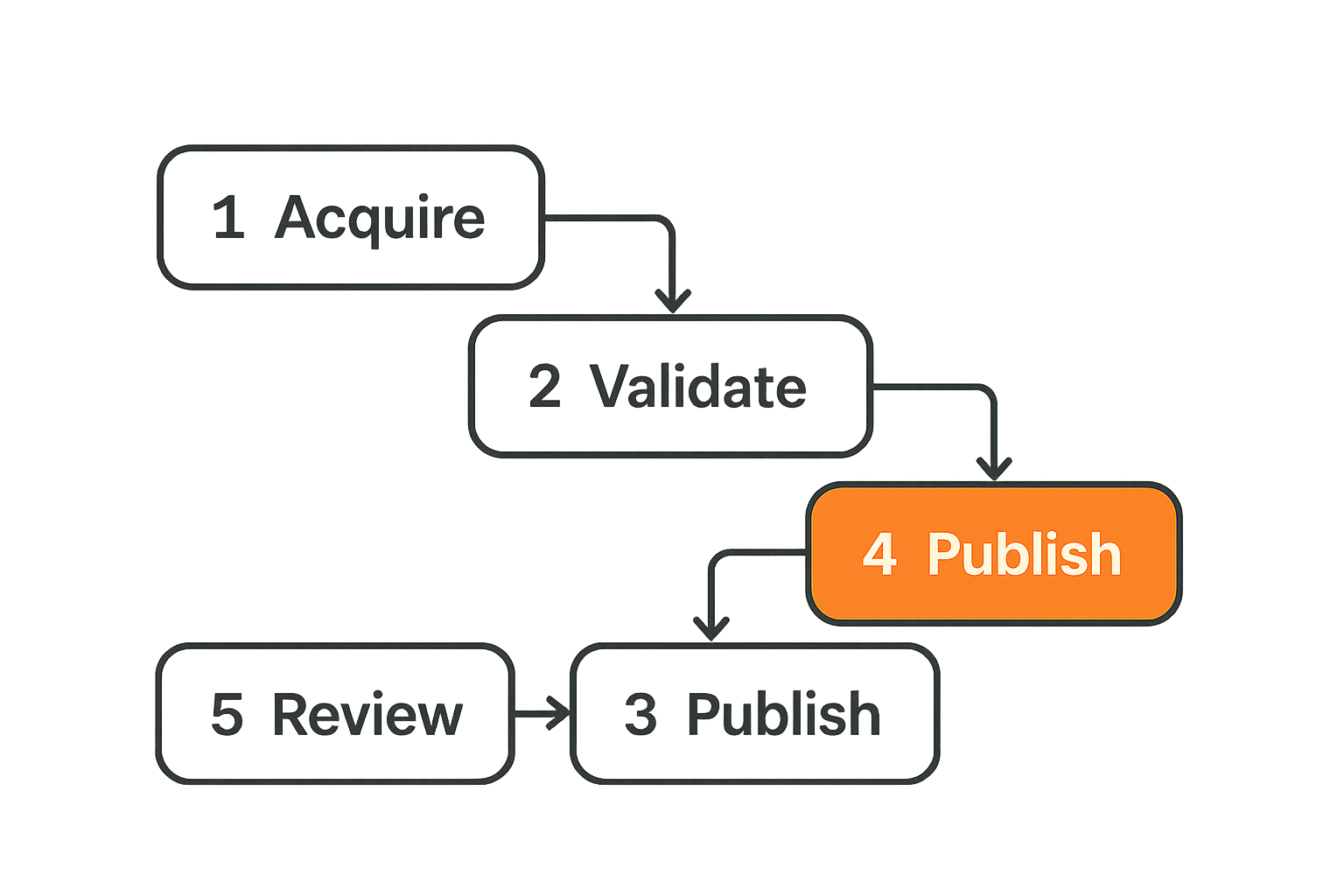
If the whole household depends on one playlist, manage it like a lifecycle:
- Acquire playlist from a licensed or official source.
- Save the original URL or file with date and provider name.
- Validate syntax before importing.
- Test sample channels across categories.
- Attach or verify EPG data.
- Publish to the household player profile.
- Review failures on a schedule.
That is the difference between a hobby file and an operational workflow.
The mistake teams make is editing playlists directly inside a player app with no backup. One bad import can wipe working channel groups or favorites.
EPG data is part of the product
An IPTV channel list without guide data is technically usable but operationally weak. People do not want to inspect raw channel names. They want to know what is on now, what is next, and whether the guide is trustworthy.
EPG data introduces another dependency:
- It may come from the IPTV provider.
- It may come from a third-party guide source.
- It may require channel mapping.
- It may update on a different schedule than the playlist.
- It may fail while streams still work.
Track EPG separately from playback. If a channel plays but the guide is wrong, that is a metadata issue, not a stream issue.
Buffering is usually a chain problem
Buffering is the symptom everyone sees and the diagnosis everyone gets wrong.
It can be caused by provider capacity, ISP routing, Wi-Fi interference, device CPU, unsupported codec, weak player buffer settings, DNS latency, VPN overhead, or local network congestion.
Do not troubleshoot buffering by changing five things at once. Change one variable:
- Same channel, different device.
- Same device, different network.
- Same network, different player.
- Same player, wired instead of Wi-Fi.
- Same channel with VPN off, if legal and safe for your use case.
- Different channel from same provider.
Related reading from our network: local coordination has similar failure patterns, where unclear ownership creates recurring problems; this operating model for a supreme community local network is a useful analogy for assigning responsibilities.
Troubleshoot with signals instead of guesses
Collect the few metrics that matter
You do not need a full observability stack for a living room. You do need enough signal to avoid guessing.
Track these basics:
- Internet download and upload speed during failure.
- Wi-Fi signal strength on the playback device.
- Whether the media server is transcoding.
- CPU and memory on the server.
- Disk activity during playback.
- DNS blocks around the failure time.
- Player error messages.
- IPTV channel and timestamp.
- Torrent client status and file integrity.
A small notes file is often enough:
2026-07-09 20:15
Device: Living room TV
Issue: IPTV sports channel buffering
Network: Wi-Fi 5 GHz
Other apps: Subscription streaming OK
Test: Same channel on phone over Wi-Fi also buffers
Likely: Provider or upstream path, not TV app
Next: Test later and compare another channel from provider
This is information technology at the right scale. Not overbuilt. Not blind.
Common failure modes
Most home media failures repeat. The names change, but the patterns are stable.
Common failure modes include:
- DNS filter blocks login or thumbnails.
- VPN route breaks local media discovery.
- Media server sleeps during playback.
- NAS drive fills up silently.
- Torrent client downloads into the live library before review.
- IPTV playlist refresh removes favorites.
- EPG source shifts channel IDs.
- Smart TV app falls behind codec support.
- Router QoS prioritizes the wrong device.
- Cloud sync locks files during playback.
What breaks in practice is ownership. Nobody knows whether the fix belongs to the app, the router, the playlist, the server, or the source.
Practical rule: Before changing tools, classify the failure as source, network, storage, metadata, client, or state.
A repeatable troubleshooting workflow
Use a fixed sequence. It saves time and prevents accidental damage.
- Define the symptom in one sentence.
- Identify the affected source: streaming app, local file, torrent workflow, or IPTV channel.
- Test another device on the same network.
- Test another source on the same device.
- Check network health: Wi-Fi, router load, DNS, VPN, ISP.
- Check storage and server health if local media is involved.
- Check metadata or EPG if browsing is wrong but playback works.
- Review recent changes: app updates, router rules, playlist refreshes, library scans.
- Change one variable and retest.
- Document the fix.
The last step matters. Without documentation, every recurring issue becomes a new mystery.
What works and what fails in home media IT
Comparison table for home media IT choices
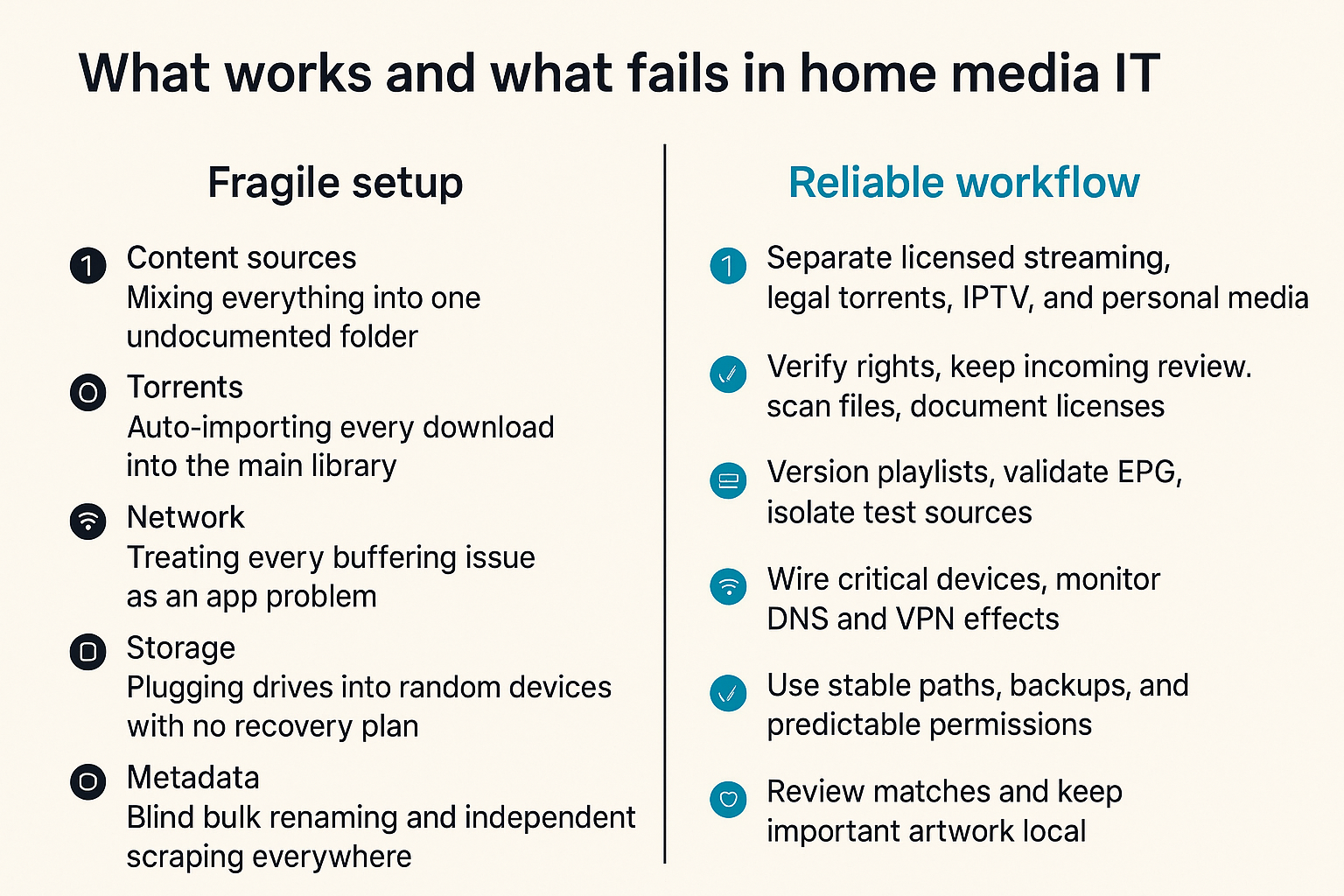
The difference between a fragile setup and a reliable one is rarely one expensive device. It is the operating model.
| Area | What works | What fails |
|---|---|---|
| Content sources | Separate licensed streaming, legal torrents, IPTV, and personal media | Mixing everything into one undocumented folder |
| Torrents | Verify rights, keep incoming review, scan files, document licenses | Auto-importing every download into the main library |
| IPTV | Version playlists, validate EPG, isolate test sources | Editing one mystery M3U file directly in the player |
| Network | Wire critical devices, monitor DNS and VPN effects | Treating every buffering issue as an app problem |
| Storage | Use stable paths, backups, and predictable permissions | Plugging drives into random devices with no recovery plan |
| Metadata | Review matches and keep important artwork local | Blind bulk renaming and independent scraping everywhere |
| Clients | Make devices replaceable and sync state centrally | Keeping favorites and progress trapped on one TV |
| Troubleshooting | Follow a sequence and document fixes | Changing five settings and hoping one worked |
That changes the conversation. The best setup is not the one with the longest app list. It is the one where failures are easy to isolate.
Operational checklist
Use this checklist before you call a setup finished:
- Legal sources are labeled and separated.
- Torrent downloads land in an incoming review folder.
- IPTV playlists have provider names and dates.
- EPG source is documented.
- Main TV and media server use wired Ethernet where possible.
- DNS and VPN exceptions are logged.
- Storage has a backup plan.
- Metadata can be rebuilt or exported.
- Watch state is not trapped on one device.
- A troubleshooting note file exists.
This is not about making home media feel corporate. It is about avoiding the same avoidable failures every month.
What breaks when teams implement it badly
Bad implementation usually looks convenient at first.
Someone installs three IPTV apps, imports five playlists, points a media server at a downloads folder, enables a DNS blocker, adds a VPN, sets the NAS to sleep, lets each client scrape metadata separately, and calls it done.
For a week, it feels powerful. Then the guide is wrong, channels duplicate, a legal download is mixed with unverified files, the TV cannot find the server, thumbnails vanish, and nobody knows what changed.
The failure is not lack of tools. The failure is lack of boundaries.
A useful way to think about it is that every media setup needs four separations:
- Legal separation: verified versus unverified sources.
- Operational separation: testing versus household default.
- Storage separation: incoming versus library.
- State separation: device cache versus durable account or server state.
If you keep those boundaries, you can use simple tools well. If you ignore them, advanced tools just make the mess faster.
Where bittorrented.com fits into the workflow
Discovery should stay separate from ownership
A site like bittorrented.com is most useful when you treat discovery, browsing, and access workflows as part of the architecture, not as a replacement for judgment.
Discovery helps you find what exists. It does not automatically answer whether you should download, save, redistribute, or merge something into your personal library. That legal and operational decision still belongs to you.
This separation matters for torrents, IPTV, and streaming sources. Browse, verify, then ingest. Do not collapse those steps.
Use the site as an operations layer
For readers managing streaming services, torrents, IPTV, and home media tools, bittorrented.com can sit in the workflow as a practical navigation layer: search, browse, check live options, and stay aware of media-tech changes without pretending that the UI is the whole system.
The architecture still matters:
- Keep legal review outside the player.
- Keep playlists versioned.
- Keep local libraries clean.
- Keep privacy controls observable.
- Keep troubleshooting notes close to the devices people use.
Information technology is the discipline that connects those pieces. In 2026, cord cutting works best when you treat media as a system: source, trust, network, storage, metadata, playback, and support.
Try bittorrented.com
bittorrented.com is for readers who want practical, up-to-date guidance on streaming services, torrents, IPTV, and home media tools. Try bittorrented.com and build your information technology workflow around legal, safe, privacy-aware media use.