
SNY streaming looks simple until the game starts buffering in the third inning, the login token expires, or the app decides your location is wrong.
Most cord cutters treat live sports like another on-demand app. Open a service, search for the channel, press play. That works for movies. It is weaker for regional sports networks, where rights, authentication, blackout rules, device support, network quality, and account hygiene all collide at exactly the wrong time.
Teams think the problem is finding an SNY stream. The real problem is operating a reliable, legal live TV workflow around SNY streaming.
That changes the conversation. The practical question is not only which service carries SNY. It is how you build a setup that survives game-day load, device quirks, provider authentication, WiFi instability, privacy tools, and the normal mess of home media systems in 2026.
Table of contents
- SNY streaming is a workflow problem
- What SNY streaming actually needs in 2026
- The legal routes for SNY streaming
- Build a home media architecture around SNY streaming
- Device selection and playback reliability
- Privacy security and account hygiene
- Buffering troubleshooting and diagnostics
- A practical SNY streaming implementation workflow
- Common failure modes in SNY streaming
- Where bittorrented.com fits
- Closing checklist for SNY streaming
SNY streaming is a workflow problem
SNY is not difficult because video is difficult. Video delivery is a solved problem when the content is on demand, the rights are global, and nobody cares if playback starts three seconds later. Regional live sports are different. The system has to decide whether you are allowed to watch, where you are, which device you are using, which provider relationship proves your access, and whether the stream can stay stable in real time.
Live sports exposes weak media setups
The mistake teams make is testing their setup when nothing important is happening. A movie plays fine at 11 p.m. on a quiet network, so the household assumes a live game will be fine. Then everyone gets home, phones reconnect, a console downloads an update, the TV app reloads, and the stream drops to a lower bitrate.
Live sports is less forgiving because the viewer knows when something is wrong. A freeze during a movie is annoying. A freeze during a pitch, goal, replay review, or postgame show breaks the point of watching live.
A useful way to think about it is that SNY streaming has four dependencies:
- Legal access to the channel or event
- A device that the provider supports well
- A network path with enough stable throughput and low jitter
- A fallback plan when one layer fails
If one layer is weak, the rest of the setup looks worse than it is.
The legal boundary matters
For cord cutters, torrent users, and IPTV viewers, the boundary matters. Torrents are a protocol. IPTV is a delivery method. Neither automatically means legal or illegal. The issue is rights and authorization.
SNY streaming should be handled through legitimate access: a supported TV provider, an authorized streaming bundle that carries the network where available, or another lawful route that matches your location and subscription status. Unofficial sports streams are unreliable for a reason. They disappear, inject aggressive ads, misrepresent quality, and often put your device and account security at risk.
Practical rule: If a stream cannot explain why you are authorized to watch it, do not build your media setup around it.
What SNY streaming actually needs in 2026
SNY streaming in 2026 is less about finding a single magic service and more about matching rights, account state, device support, and network behavior. That is why two people in the same city can have different results. One is authenticated through a supported provider on a wired Apple TV. The other is using an old smart TV app over weak WiFi with an expired login. Same channel goal, different operating reality.
Entitlement before playback
Entitlement is the part viewers do not see until it breaks. Before playback, the app or service has to decide whether your account can access the content. That decision can include:
- Provider subscription status
- Regional availability
- Device permissions
- Location checks
- App version support
- Session validity
When people say the stream is broken, they often mean entitlement failed. The player may show a generic error because it cannot expose every rights or authentication condition to the viewer.
This is why you should separate access problems from video problems. If the app refuses to start playback, that is not the same failure as buffering after five minutes. Treat them differently.
Latency and reliability beat feature count
A service can have a clean guide, unlimited DVR marketing, and a nice app store rating but still be poor for your home. The better test is boring: does it start quickly, hold bitrate, keep audio in sync, resume after sleep, and recover after a network hiccup?
Related reading from our network: Streaming SaaS architecture is a useful adjacent breakdown because live content delivery depends on ingest, packaging, authorization, playback state, and operational recovery, not just a play button.
For SNY streaming, prioritize reliability over novelty. You want fewer moving parts between your account and the screen.
The legal routes for SNY streaming
There is no universal answer that applies to every location and provider relationship. Regional sports rights change, bundles change, and availability can differ by ZIP code. The practical approach is to map your legal access path first, then optimize the playback stack.
TV provider authentication
The classic path is TV provider authentication. You subscribe through a cable, satellite, fiber, or approved live TV provider, then use that account to authenticate in a supported app or website. This can work well if your provider relationship is stable and the app supports your device.
What breaks in practice is session management. Apps log users out. Provider portals fail. Password managers autofill the wrong account. Household members reset credentials without telling anyone. None of this is glamorous, but it is the real reason game-day streaming fails.
Keep a simple record of:
- Which provider account is used
- Which email owns the login
- Which devices are authorized
- Which household member can reset credentials
- Whether two-factor authentication is enabled
Live TV streaming bundles
Some cord cutters prefer live TV streaming bundles because they replace the traditional box with an app-based service. This can be cleaner, but only if the bundle actually carries SNY for your location and plan. Do not assume a national channel list applies to your region.
If you are comparing live TV workflows more broadly, a channel-first interface like BitTorrented live TV is useful for thinking about playlists, guides, and playback flow. The same operational idea applies even when your actual SNY access comes from an authorized provider app: the channel is only one object in a larger system.
Out of market and blackout limits
Sports rights are intentionally fragmented. Out-of-market packages, league apps, RSNs, national broadcasts, and local blackouts can overlap in confusing ways. The mistake teams make is assuming a VPN, DNS switch, or random app will make rights boundaries disappear.
That is not a reliable plan. It may also violate service terms. The durable workflow is to understand which service is legally allowed to show the game in your location, then build around that service.
Practical rule: Solve rights and location first. Troubleshooting playback before confirming access wastes time.
Build a home media architecture around SNY streaming
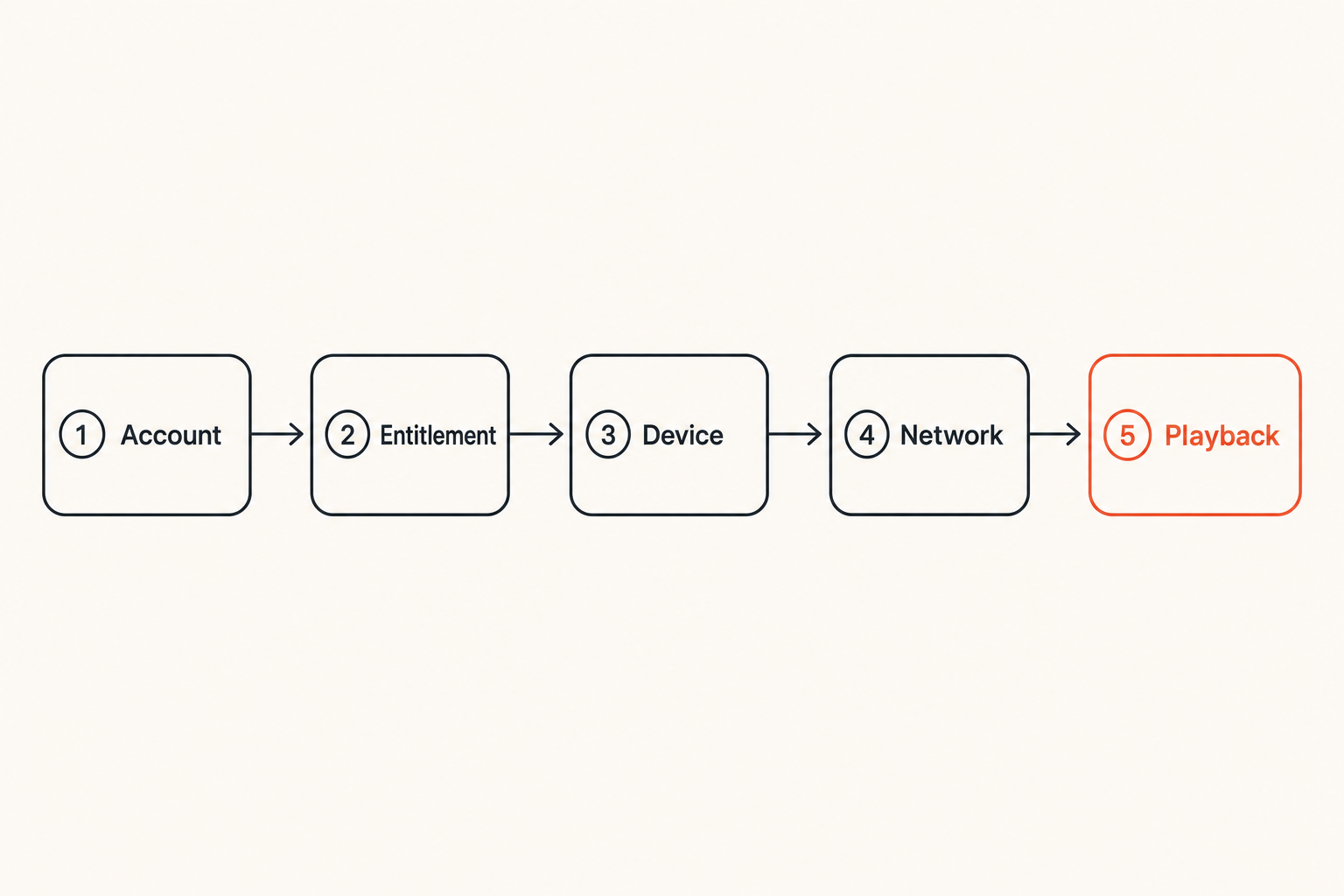
A home media architecture sounds too formal until you miss the first inning because the TV app updated itself and logged out. Architecture simply means deciding which components are responsible for access, playback, network transport, fallback, and support.
Network path and device choice
Your SNY streaming path is not just internet to TV. It is closer to this:
Provider account -> entitlement service -> streaming app -> device decoder -> home router -> WiFi or Ethernet -> display and audio chain.
Every step can fail. The easiest wins are usually local:
- Use Ethernet for the main sports screen when possible
- Keep the streaming device updated before game day
- Avoid overloaded 2.4 GHz WiFi for live HD video
- Reboot the router on your schedule, not during the game
- Disable aggressive power saving on devices that sleep badly
A wired streaming box often beats a premium smart TV app because the box gets better updates and has fewer vendor-specific playback issues.
IPTV playlists versus authorized apps
IPTV playlists are not inherently suspicious. Many legal services, internal home channels, public broadcasters, and personal media workflows use playlist-style delivery. The difference is authorization. A random playlist that includes premium regional sports channels without a legitimate subscription is not a stable or safe foundation.
For legal IPTV hobbyists, treat playlists as a structured playback layer, not a rights bypass. Good playlist hygiene includes clear source labels, expiration awareness, EPG matching, and removal of dead or unauthorized entries.
Comparison table:
| Approach | Strength | Weakness | Best use |
|---|---|---|---|
| Authorized provider app | Clear rights and support path | App quality varies | Primary SNY streaming |
| Live TV bundle app | Cord cutter friendly | Regional availability varies | Cable replacement |
| Legal IPTV playlist | Flexible and portable | Requires source discipline | Public, owned, or authorized streams |
| Unofficial sports stream | Easy to find | Unsafe, unstable, legally risky | Avoid |
Where torrents do and do not belong
Torrent users often understand distributed systems better than casual streamers. That helps with home media, backups, Linux ISOs, public domain video, creator-approved releases, and large legal files. It does not make unauthorized live sports redistribution acceptable.
Use torrent workflows where rights allow it. Keep them separate from SNY streaming access. If you browse DHT metadata, use it for legal discovery and technical awareness; BitTorrented DHT browsing is relevant when you want to understand torrent discovery without pretending it replaces licensed live TV.
Device selection and playback reliability
The player matters. Live sports exposes weak decoding, bad refresh-rate handling, poor WiFi antennas, and app neglect faster than on-demand video does.
Smart TVs and streaming sticks
Smart TV apps are convenient, but they are tied to the TV vendor update cycle. A good TV panel can have a mediocre app platform. Streaming sticks and boxes are easier to replace, easier to reset, and often better supported by live TV providers.
For a primary SNY screen, evaluate devices by operational behavior:
- Does the app stay logged in?
- Does it resume cleanly after sleep?
- Does it support your provider?
- Does it handle 60 fps sports smoothly?
- Can you force a network reconnect quickly?
The cheapest device is not always cheaper if you spend every game troubleshooting it.
Browser and mobile playback
Browser playback is useful as a diagnostic tool. If the TV app fails but the browser works on the same account, you likely have a device or app issue. If both fail before playback, suspect entitlement, provider authentication, or regional availability.
Mobile playback adds another variable: carrier network location and app permissions. Location services, private relay features, VPN profiles, and mobile data routing can all affect access decisions. Test on WiFi and mobile data separately before assuming the provider is wrong.
Audio video sync and frame pacing
Sports makes sync problems obvious. The bat crack should match the swing. Announcers should not react before the play. Frame pacing should look natural during pans across the field.
Common fixes:
- Match device output to the content frame rate when supported
- Disable unnecessary motion smoothing on the TV
- Test stereo output if surround introduces delay
- Update HDMI cables only if there are actual signal issues
- Restart the app after changing display settings
Do not chase exotic fixes before checking the basic display chain.
Privacy security and account hygiene
SNY streaming involves accounts, location, payment relationships, and devices that may be shared across a household. Privacy and security are not side issues. They decide whether your legal access keeps working.
VPNs are not magic unblockers
VPNs are useful privacy tools. They are not a universal sports rights solution. Many streaming services detect VPN endpoints, require location verification, or restrict playback when the network path does not match expected behavior.
The practical question is what you are trying to protect. If you use a VPN for general browsing, you may need split tunneling or an app-level exception for authorized streaming services. If you use DNS filtering, make sure it is not blocking entitlement, analytics, or playback domains required by the app.
Practical rule: Privacy tooling should reduce risk without breaking legitimate access. If your VPN turns every game into a support ticket, redesign the path.
Protect logins and profiles
Account hygiene is boring until it fails. Use a password manager, enable two-factor authentication where supported, and avoid sharing provider credentials beyond the household rules allowed by your service.
Keep recovery options current. If an old email account owns the provider login, fix that before the season starts. If a family member controls the billing account, make sure someone knows how to renew payment or reauthorize devices.
Related reading from our network: secure messaging workflows covers a different domain, but the operational lesson is similar: identity, verification, records, and safe communication matter whenever access depends on trusted accounts.
Avoid sketchy add ons
Unofficial browser extensions, APKs, Kodi add-ons, and miracle sports apps are common failure points. Some are just low quality. Others are hostile. They may inject ads, steal sessions, request unnecessary permissions, or route traffic through unknown infrastructure.
For a dedicated sports device, install less. Fewer apps mean fewer background processes, fewer update conflicts, and fewer security questions. Keep the device boring.
Buffering troubleshooting and diagnostics
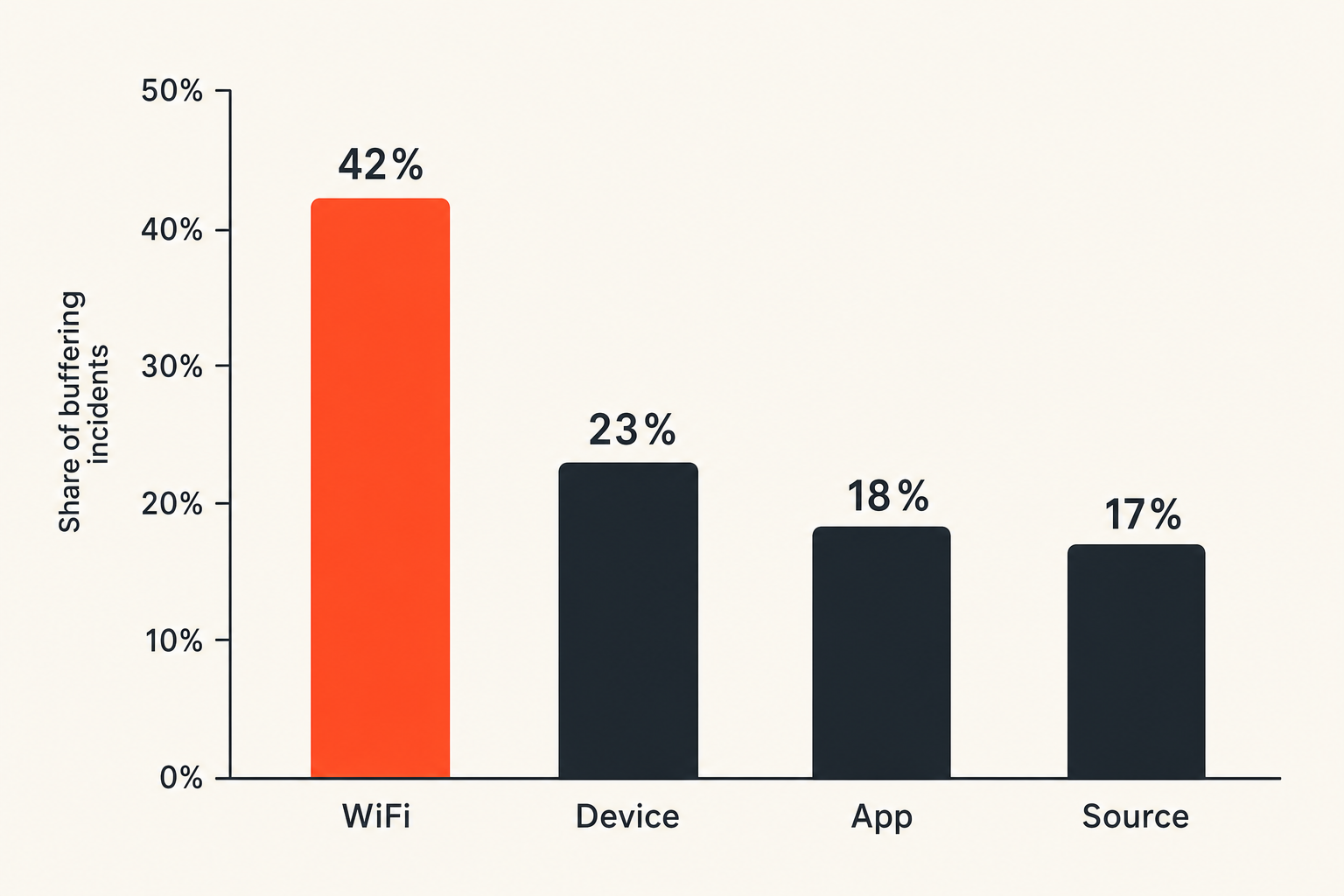
Buffering is not a single problem. It is a symptom. Treating every playback issue as bandwidth failure leads to bad fixes. You need a small diagnostic workflow that separates access, local network, device decoding, and source-side problems.
Measure the path
Start with simple observations:
- Does playback start at all?
- Does it fail on one device or all devices?
- Does it fail on WiFi but work on Ethernet?
- Does another live channel work in the same app?
- Does on-demand content work while live fails?
- Does mobile data behave differently?
You do not need enterprise monitoring in a house, but you do need evidence. Write down the failure pattern. It prevents random button pressing.
A basic game-day diagnostic sequence:
- Confirm the provider account is logged in.
- Confirm the channel or game is available in your location.
- Test playback on the primary device.
- Test the same account on a browser or phone.
- Switch from WiFi to Ethernet or move closer to the router.
- Restart only the failing app or device first.
- Restart the router last, unless the whole network is degraded.
Fix WiFi before blaming the app
WiFi is often the hidden cause. Signal bars do not tell you enough. Interference, mesh handoff, weak backhaul, and crowded channels can all create jitter that hurts live streams.
For a primary sports room, prefer:
- Ethernet to the streaming box
- A mesh node with wired backhaul
- 5 GHz or 6 GHz WiFi for capable devices
- Router placement away from TVs, cabinets, and metal
- Separate guest networks for visitors during games
The mistake teams make is upgrading the streaming service while leaving the same bad wireless path in place.
Know when the source is the problem
Sometimes the app, provider, CDN, or upstream feed is the problem. If multiple devices, networks, and accounts report the same issue at the same moment, stop tearing apart your home network.
Related reading from our network: fleet response workflows is from the security world, but the same operating pattern applies: define triggers, isolate scope, assign ownership, and avoid making random changes before you know what failed.
A practical SNY streaming implementation workflow
A good setup is repeatable. You should not reinvent it every game. Build once, test before the season, and keep a fallback.
Step by step setup
Use this implementation sequence:
- Pick the legal access route. Confirm your provider or live TV bundle carries SNY for your address and plan.
- Choose the primary device. Favor a supported streaming box with Ethernet or strong WiFi.
- Install only required apps. Avoid clutter on the sports device.
- Authenticate early. Log in, verify provider access, and test the actual channel.
- Set display basics. Confirm resolution, refresh behavior, and audio output.
- Stabilize the network. Use Ethernet or improve WiFi before game day.
- Create a fallback path. Keep a browser, tablet, or second device ready.
- Document the login owner. Know who can reset credentials or fix billing.
- Re-test after app or router updates. Updates change state.
- Run a pregame check. Do it before the broadcast window, not during first pitch.
This is not overengineering. It is the minimum operational discipline for live sports when the household has cut the cord.
State checks before game time
State is what breaks in practice. The app was logged in last week. The router was fine yesterday. The provider account was active last month. Live systems punish stale assumptions.
Pregame checks should cover:
- Account logged in
- Channel visible in guide
- Playback starts
- Audio works through the real speaker setup
- Remote batteries are not dead
- Network is stable
- Backup device is charged
Once this becomes routine, SNY streaming stops feeling fragile.
Common failure modes in SNY streaming
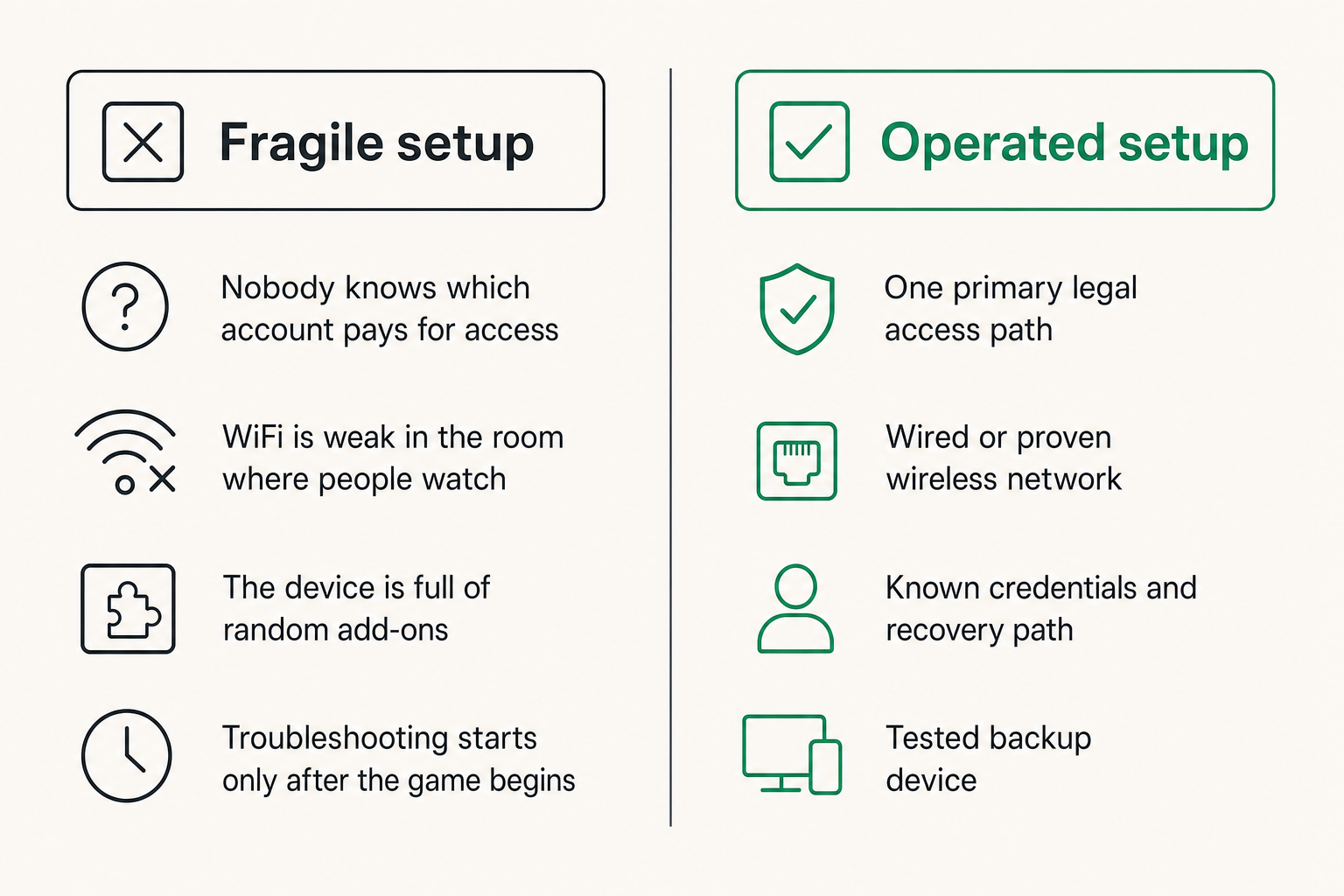
Most failures are predictable. They come from unclear ownership, too many unsupported tools, or assuming the UI represents the whole system.
What fails
Fragile setups usually have the same shape:
- Nobody knows which account pays for access
- The main TV uses an abandoned app version
- VPN or DNS tools are enabled globally with no exceptions
- WiFi is weak in the room where people watch
- The household relies on unofficial links as a fallback
- The device is full of random add-ons
- There is no second screen ready
- Troubleshooting starts only after the game begins
The most damaging pattern is mixing legal and questionable sources in one interface. It creates confusion, risk, and support noise. When something fails, nobody knows whether the issue is rights, app quality, network health, or a bad source.
What works
Reliable setups are not flashy. They are clean:
- One primary legal access path
- One primary device
- Wired or proven wireless network
- Minimal app surface area
- Known credentials and recovery path
- Tested backup device
- Clear separation between licensed live TV and other media workflows
That changes the conversation from where can I find a stream to how do I keep my authorized stream working.
Where bittorrented.com fits
bittorrented.com is built for readers who deal with the messy overlap between streaming services, torrents, IPTV, and home media tools. That does not mean treating every source as interchangeable. It means understanding the architecture and making safer choices.
Use it as a media operations layer
For cord cutters and media hobbyists, the useful layer is organization: live TV awareness, torrent discovery for legal content, home media context, and practical workflow thinking. You can use BitTorrented to reason about how channels, playlists, sources, and playback tools fit together without turning SNY streaming into a rights guessing game.
If you want a broader starting point for streaming, torrents, books, music, and live TV workflows, BitTorrented is the home base for that mixed media audience.
Keep legal content separate from discovery
The product-fit point is simple: discovery, playback, and authorization are different jobs. A good media setup does not blur them.
Use authorized services for SNY streaming. Use torrent and IPTV tools where they are legal, labeled, and appropriate. Keep private credentials out of random add-ons. Keep your main sports device clean. Keep experiments away from the setup your household depends on.
That is the operator mindset. The UI is not the whole system. State, trust, access, and support are the real work.
Closing checklist for SNY streaming
SNY streaming should be boring by the time the game starts. If you are still deciding which account works, whether the VPN should be on, or why the TV app is asking for activation, the workflow is not ready.
Operator checklist
Before relying on any setup, confirm:
- You have a legal access route for your location
- Your provider or bundle actually includes SNY
- The primary app supports your device
- The device is updated and authenticated
- The network path is stable under real household load
- Privacy tools do not break entitlement or playback
- A fallback device is ready
- Credentials and recovery options are known
Final decision rule
The best SNY streaming setup is not the one with the most apps. It is the one with the fewest surprises.
Choose a legal source. Put it on a reliable device. Stabilize the network. Separate IPTV and torrent experimentation from licensed live sports. Test before game time. That is how SNY streaming becomes a dependable part of a cord-cut home media workflow instead of a recurring support problem.
Try bittorrented.com
You are writing for readers who want practical, up-to-date guidance on streaming services, torrents, IPTV, and home media tools. Try bittorrented.com