
A torrent file safety checklist usually appears after something already went wrong: a fake movie file, a suspicious archive, a subtitle that should not be executable, or a media PC that suddenly behaves like a lab machine nobody wants to touch.
Teams think the problem is finding a better antivirus button. The real problem is that torrent intake is often treated like a casual download instead of a workflow with state, trust boundaries, and cleanup.
That changes the conversation. In 2026, cord cutters and home media hobbyists are not just clicking files. They are moving content across phones, NAS boxes, streaming sticks, IPTV apps, torrent clients, media servers, and shared household networks. One bad assumption can turn a living-room media setup into a messy incident response job.
The practical question is not whether torrents are good or bad. Torrents are a distribution mechanism. The practical question is whether your process can separate legal, expected, inspectable media from risky payloads before they reach the devices you rely on.
Table of contents
- Torrent File Safety Checklist Is an Operating Workflow
- Build a Safe Intake Lane Before You Download
- Verify the Source Before You Trust the Torrent File
- Inspect Torrent Metadata Before Any Payload Runs
- Torrent File Safety Checklist for Malware and Payload Risk
- Privacy and Network Controls That Actually Matter
- Legal and Content Legitimacy Checks Are Security Controls
- What Breaks When Teams Treat Safety as a One-Time Scan
- A Practical Torrent File Safety Checklist You Can Reuse
- Automate the Boring Parts Without Losing Control
- Product Fit: bittorrented.com as a Safer Media Workflow Companion
- Closing: Make the Torrent File Safety Checklist a Habit
Torrent File Safety Checklist Is an Operating Workflow
Why checklists beat instincts
Most torrent mistakes are not sophisticated. They are boring. Someone downloads from a source they barely checked. A file extension is hidden. An archive gets opened because the expected movie was not visible. A media server watches the wrong folder and indexes junk automatically.
The mistake teams make is assuming experience solves this. Experience helps, but it is not a control. Tired people click. Family members click. Automation clicks faster than everyone.
A useful way to think about it is airport baggage handling. The torrent file or magnet is not the trip. It is the label and routing instruction. The payload still needs inspection before it enters the trusted area.
Practical rule: Treat every torrent as untrusted intake until the source, metadata, payload, and destination have each passed a separate check.
Legal source context comes first
A safety checklist starts with legitimacy, not malware scanning. If the content is not clearly legal for you to download, archive, or share, you have already created a risk that no scanner can remove.
For media hobbyists, good use cases include public-domain films, Linux ISOs, open media projects, creator-distributed files, personal backups, and rights-cleared files shared by the owner. If you cannot explain why the file is lawful in your situation, do not let technical controls become an excuse to continue.
That framing matters because illegal or deceptive sources also tend to have worse operational hygiene. The same places that mislabel content often mislabel payloads.
The safety decision has to be repeatable
A checklist is useful only if it survives normal behavior. If it requires ten manual tools and twenty minutes per file, people will bypass it. If it is too vague, every download becomes a debate.
Your process should answer four questions quickly:
- Is the source expected and lawful?
- Does the torrent metadata match the claimed content?
- Is the payload safe to store and open?
- Where is the file allowed to go next?
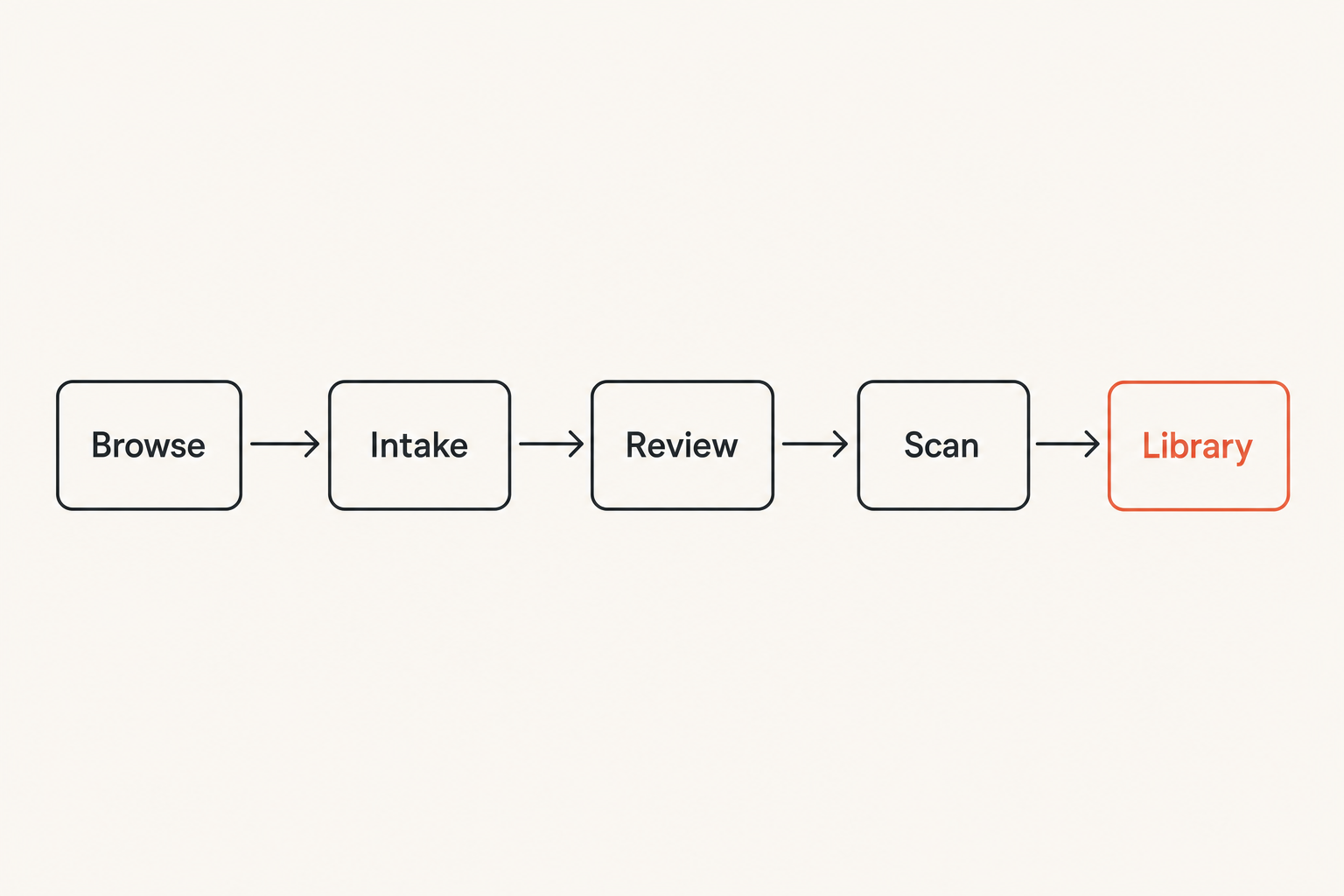
That turns torrent safety from a vibe into an intake pipeline.
Build a Safe Intake Lane Before You Download
Separate browsing from downloading
Do not browse random torrent indexes from the same browser profile you use for banking, email, password management, or admin dashboards. This is basic compartmentalization, but many home setups ignore it.
Use a separate browser profile for media discovery. Disable unnecessary extensions. Do not sign into personal accounts from that profile. If a site behaves aggressively, close it and move on. Do not troubleshoot sketchy pop-ups for entertainment.
The goal is not paranoia. The goal is to prevent accidental cross-contamination between your media workflow and your real identity.
Use constrained clients and directories
Your torrent client should not have broad access to your home directory. Give it an intake directory and a completed directory. If possible, run it under a user account that cannot write to documents, photos, password stores, or system paths.
A simple structure works:
| Area | Purpose | Access level |
|---|---|---|
| Intake | Active incomplete downloads | Torrent client writes here |
| Review | Completed but untrusted files | User and scanner inspect here |
| Library | Trusted media only | Media server reads here |
| Quarantine | Suspicious or rejected files | No media indexing |
What breaks in practice is that teams point the media server at the completed-downloads folder. That makes the torrent client part of production. It should not be.
Keep private media libraries out of the intake path
Your library is where trusted content lives. Your intake lane is where untrusted content lands. Mixing them makes cleanup harder and increases the chance that a malicious or malformed file is indexed, transcoded, previewed, renamed, synced, or backed up.
If you use a NAS, create a dedicated share for torrent intake. If you use a desktop, keep intake outside synced cloud folders. If you use a media server, make imports explicit rather than automatic for new sources.
Practical rule: A file should earn its way into the media library. The download finishing is not the same as the file being trusted.
Verify the Source Before You Trust the Torrent File
Prefer official or rights-cleared sources
The strongest signal is not the number of seeders. It is whether the publisher intended the file to be distributed that way. Official project pages, creator posts, public-domain catalogs, open-source release pages, and verified community mirrors are safer starting points than anonymous uploads with inflated claims.
Seeder count can indicate availability. It does not prove safety, legality, or authenticity. Popular bad files can still be popular.
Ask a boring question first: why should this source have this file?
Read metadata like an operator
Torrent metadata gives you early clues. Look at the name, tracker list, file tree, sizes, dates when available, comments where available, and whether the contents match the claim.
For example, a full-length video that is only a few megabytes is suspect unless it is a text file, trailer, or placeholder. A music album packaged as an executable installer is suspect. A PDF collection with scripts, shortcuts, and unknown binaries deserves rejection or sandbox review.
If you are exploring decentralized metadata, public swarm discovery tools such as Browse DHT Torrents on BitTorrented can be useful for understanding what is visible in the network, but visibility is not validation. DHT discovery tells you something exists. It does not tell you that you should download it.
Treat magnets and DHT results differently
A torrent file gives you metadata before download. A magnet link may require the client to fetch metadata from peers first. That is normal, but it changes your review point.
With magnets, wait for metadata to load before committing bandwidth or storage. Inspect the file list before starting selected files. If your client starts immediately without giving you a review window, change that setting.
The practical question is not whether magnets are unsafe. It is whether your client gives you a pause point before payload transfer.
Inspect Torrent Metadata Before Any Payload Runs
Check file names extensions and sizes
File names are weak signals, but they are still signals. Turn on file extension visibility in your operating system. A file named like a movie but ending in .exe, .scr, .bat, .cmd, .js, .vbs, .msi, .apk, or .lnk is not a movie.
Also check double extensions. Names like video.mp4.exe are designed for people who do not display extensions. On some systems, Unicode tricks and long filenames can hide the real ending, so inspect properties when in doubt.
Expected media extensions include formats such as .mp4, .mkv, .webm, .flac, .mp3, .ogg, .srt, and .vtt. Even then, expected does not mean safe. It just means the file passed the first sanity check.
Watch archive nesting and executable bait
Archives are not automatically malicious, but they reduce visibility. A torrent claiming to be a single public-domain film but containing multiple password-protected archives should fail the checklist. Password-protected archives also reduce the usefulness of scanning before extraction.
Be skeptical of messages like install this codec, run setup to view, or open the included player. Modern media players do not require random executable codecs from a torrent payload.
Practical rule: If a media torrent requires installing software from inside the torrent, reject it.
Use sample files without executing anything
Some torrents include samples. That can be useful, but treat samples as untrusted files too. Open media only with a patched, reputable player. Do not enable macros, scripts, plugin installation, or automatic subtitle fetching from unknown sources.
If your player or OS prompts you to install anything, stop. The file did not pass review.
Torrent File Safety Checklist for Malware and Payload Risk
Scan before move before play
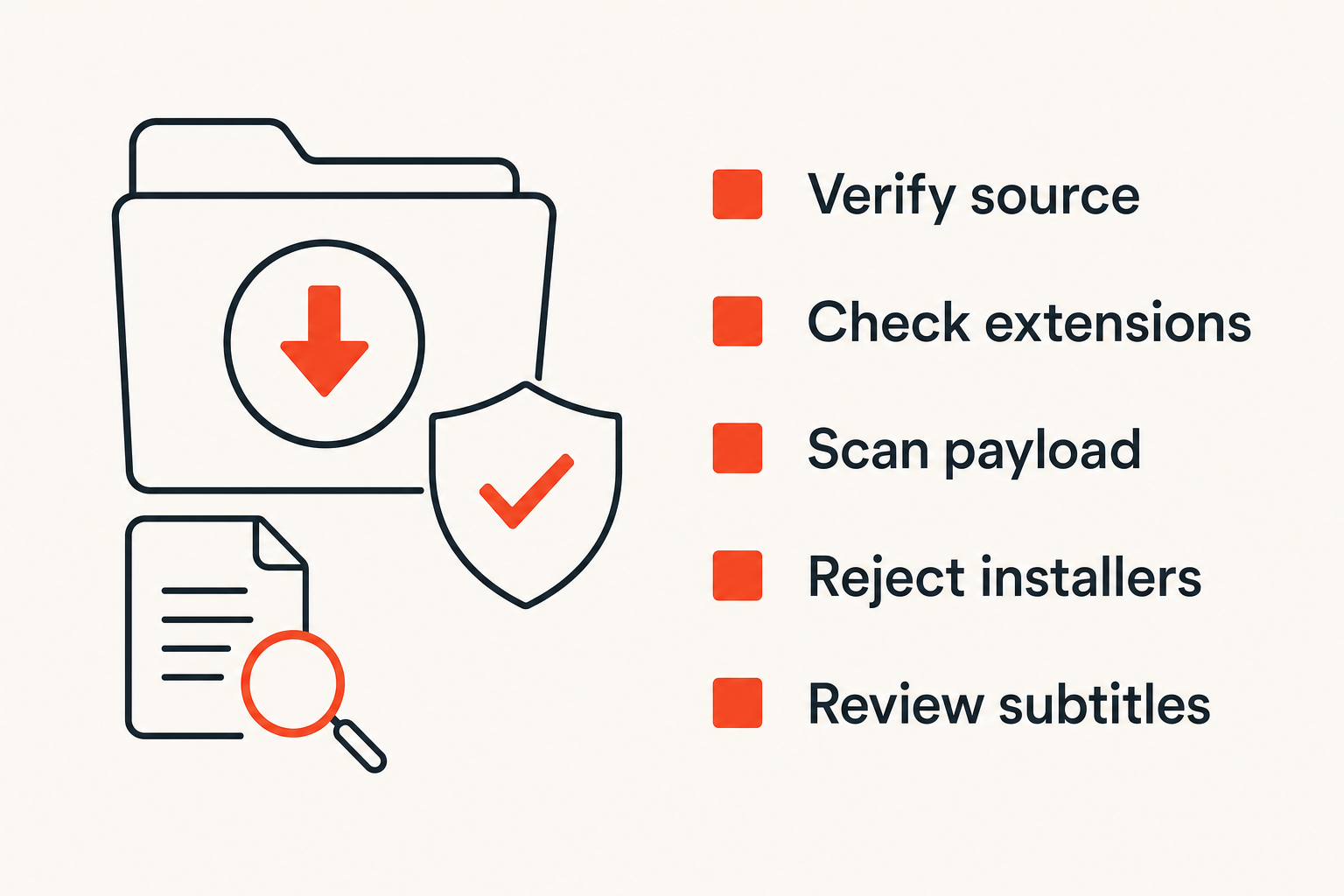
Scanning is not the whole process, but it is still part of the process. Use local endpoint protection and, when appropriate, a reputable multi-engine scanning service for small files. Be careful uploading private or sensitive files to third-party scanners because uploads may be retained or shared with security vendors.
The operating sequence matters:
- Download into intake.
- Let the client finish and verify pieces.
- Move to review, not library.
- Scan the completed payload.
- Inspect file tree and extensions again.
- Only then move approved media to the library.
Do not scan a half-finished file and assume the completed file inherits the result. Scan the final payload.
Never install codecs players or updates from a torrent
This is one of the easiest rules to enforce. Media torrents should not be software delivery channels unless you intentionally downloaded software from an official, legal source and can verify it separately.
If you need a codec, get a reputable media player from its official site or your operating system package manager. If you need firmware, app updates, IPTV apps, or plugins, use official distribution paths.
The mistake teams make is allowing convenience to override provenance. That is how a simple movie night becomes endpoint cleanup.
Handle documents scripts and subtitles carefully
Subtitles are text, but subtitle parsers and media players have had vulnerabilities over time. Keep players updated. Prefer plain subtitle formats from known sources. Avoid bundled subtitle executables, installers, or scripts.
Documents also need caution. PDFs, office files, ebooks, and compressed collections can carry active content or exploit malformed parsers. Use readers that sandbox content where possible. Disable macros. Do not open unknown documents on the same machine you use for sensitive work.
Privacy and Network Controls That Actually Matter
Separate identity network and media accounts
Privacy is mostly about reducing unnecessary linkage. Do not use your primary email account for random media forums. Do not reuse passwords. Do not mix admin accounts with media accounts. Do not expose your NAS or torrent client dashboard to the open internet.
For home networks, segment where practical. A guest or media VLAN can keep streaming boxes, test machines, and hobby gear away from laptops used for work or banking. Even without VLANs, separate user accounts and restricted shares help.
Understand VPN limits without pretending they solve everything
A VPN can change what your ISP sees and can protect traffic on hostile networks. It does not make illegal downloads legal. It does not validate torrent contents. It does not stop you from opening malware. It does not fix a torrent client with a remote-control interface exposed to the internet.
Use VPNs as one privacy layer, not as a moral or technical force field. Also check for DNS leaks, client binding, and kill-switch behavior if privacy is part of your threat model.
A practical setup binds the torrent client to the intended network interface where supported. If the VPN drops, the client should not silently continue over another interface.
Disable risky client behaviors you do not need
Torrent clients are powerful. Power creates footguns. Review settings rather than accepting defaults forever.
Consider disabling or restricting:
- Automatic opening of downloaded files.
- Automatic moving into watched library folders.
- Remote web UI access from untrusted networks.
- Plugins you do not use.
- Running scripts after completion unless you wrote and reviewed them.
- Broad write access to shared storage.
The practical question is simple: what does the client need to do, and what can you remove?
Legal and Content Legitimacy Checks Are Security Controls
Rights-cleared does not mean risk-free
A legal file can still be malicious, mislabeled, corrupted, or unsafe for your setup. Treat legality as the first gate, not the final verdict.
For example, a creator may distribute a large media pack by torrent. That can be legitimate and efficient. You still verify the source, compare checksums if provided, inspect the file tree, scan the payload, and place the content correctly.
Good sources often provide extra validation: hashes, release notes, official announcements, mirrors, or signed packages for software. Use those signals when available.
IPTV and torrents need different trust checks
IPTV safety is not identical to torrent safety. IPTV playlists can contain channel URLs, logos, EPG links, and endpoints that change over time. Torrents contain metadata that maps to files distributed by peers. Both need legitimacy checks, but the failure modes differ.
For legal IPTV playlists, verify the playlist source, inspect URLs, avoid credentials from unknown sellers, and be careful with apps that request excessive permissions. If your workflow includes live channels, a legal playlist viewer such as Stream live channels from your IPTV playlists belongs in the same safety model: source first, permissions second, playback third.
That changes the conversation from is this app cool to do I trust this feed, this app, and this network path?
Keep records for shared households and labs
If multiple people use the same media setup, keep lightweight records. You do not need enterprise bureaucracy. You need enough context to answer what was downloaded, from where, by whom, and why it was considered legitimate.
A simple text note beside the library entry can work:
| Field | Example |
|---|---|
| Source | Official creator page or public-domain archive |
| Date added | 2026-08-31 |
| License note | Public domain or creator permitted sharing |
| Review result | Scanned, extensions checked, moved to library |
| Owner | Household member or lab user |
This is especially useful for home labs, classrooms, shared apartments, and anyone maintaining a media server for more than one person.
What Breaks When Teams Treat Safety as a One-Time Scan
Failure mode one the download folder becomes production
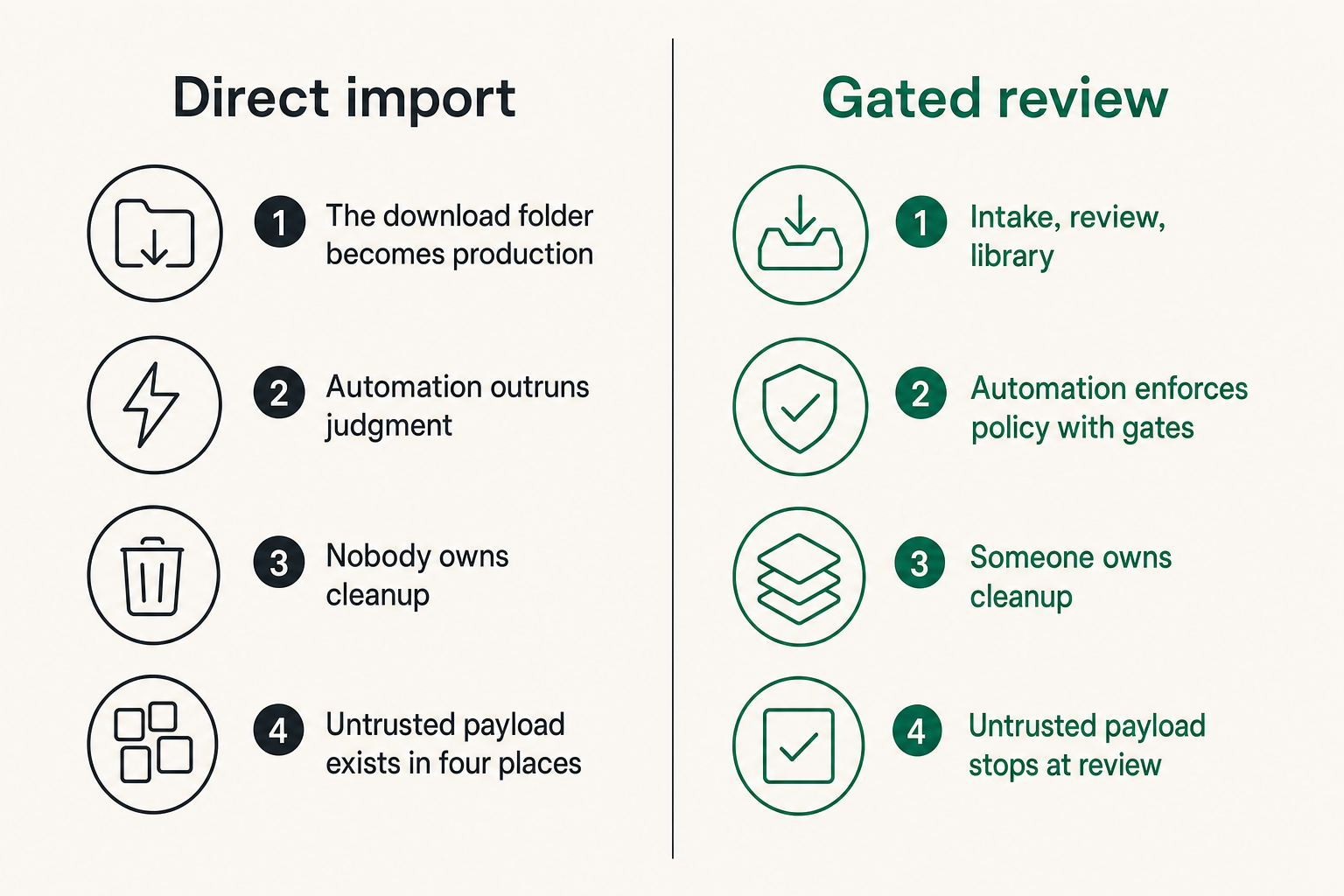
The most common breakage is architectural. The torrent client downloads into a folder watched by the media server. The media server indexes immediately. A streaming box displays the file before anyone reviews it. A backup job copies it overnight. Now the untrusted payload exists in four places.
At that point, deletion is not cleanup. You need to find copies, thumbnails, transcode caches, metadata entries, subtitle downloads, and backups.
The fix is boring and effective: intake, review, library. Three zones. No shortcuts.
Failure mode two automation outruns judgment
Automation is useful when it enforces policy. It is dangerous when it hides decisions. Watch folders, auto-labeling, auto-extraction, auto-renaming, and auto-imports can move files faster than a person can inspect them.
This is not an argument against automation. It is an argument for gates. Automation should collect signals and stop at review when something is new, weird, large, executable, archived, password-protected, or from a source you have not approved.
Failure mode three nobody owns cleanup
Bad downloads create residue. Partial files, trackers, logs, previews, thumbnails, extracted archives, duplicate names, and broken library entries pile up. If nobody owns cleanup, the next review gets harder.
Set retention rules. Delete rejected payloads. Empty quarantine on a schedule after you are sure you do not need it for troubleshooting. Keep the review folder small enough that suspicious files stand out.
Practical rule: Safety improves when untrusted storage is temporary, boring, and easy to inspect.
A Practical Torrent File Safety Checklist You Can Reuse
Pre-download checks
Use this before you add the torrent or magnet to the client:
- Confirm the content is legal for you to download and share in your location and context.
- Prefer official, creator-approved, open-source, public-domain, or rights-cleared sources.
- Check whether the source has a history, reputation, release notes, hashes, or comments that make sense.
- Avoid torrents that promise commercial releases, paid content, or live channels without clear authorization.
- Inspect available metadata before transfer where possible.
- Reject torrents that require a custom player, codec installer, password, survey, or external executable.
This first gate catches many problems before they touch your machine.
Download-time checks
During download, limit exposure:
- Use a client profile with restricted storage access.
- Download into an intake folder, not the library.
- Review file lists before selecting files.
- Avoid auto-extracting archives.
- Avoid running completion scripts on untrusted downloads.
- Keep the client and OS patched.
- Monitor unusual behavior, such as unexpected file types appearing mid-download.
If the torrent metadata changes after magnet resolution and no longer matches the claim, stop it.
Post-download checks
After completion, slow down:
- Verify the client reports completion and piece integrity.
- Scan the completed payload.
- Inspect extensions with hidden extensions disabled.
- Reject executables, scripts, shortcuts, unknown installers, and password-protected archives unless you intentionally downloaded that type from a verified source.
- Open media only in patched, reputable players.
- Move approved files into the library manually or through a controlled import job.
- Delete rejected files and clear related temporary artifacts.
This is the core torrent file safety checklist in operational form. It is not glamorous. It works because it creates friction at the right points.
Automate the Boring Parts Without Losing Control
A numbered workflow for safer intake
Here is a practical implementation sequence for a home media setup:
- Create three folders: intake, review, and library.
- Configure the torrent client to write only to intake and completed review.
- Disable automatic file opening and automatic extraction.
- Turn on file extension visibility on review machines.
- Configure endpoint scanning for the review folder.
- Configure the media server to watch only the library folder.
- Add a manual approval step for new sources, archives, documents, and unusual extensions.
- Move approved media to the library using a script or file manager.
- Log source, date, and license context for shared libraries.
- Schedule cleanup for intake, review, quarantine, and transcode caches.
The point is not to build an enterprise SOC in your living room. The point is to avoid a design where every completed download becomes trusted by default.
Where automation helps
Automation is good at repetitive checks:
- Detecting executable extensions.
- Flagging archives and password-protected files.
- Moving completed downloads from intake to review.
- Running scans on completed files.
- Rejecting known junk patterns.
- Creating logs.
- Notifying you when manual review is needed.
A small script can enforce obvious rules. For example, your import job can refuse to move files with risky extensions into the library. It can also require a license note for shared folders.
Comparison matters here:
| Approach | What works | What fails |
|---|---|---|
| Fully manual | Human judgment, flexible review | Inconsistent, easy to skip |
| Fully automatic | Fast, repeatable movement | Can import bad files quickly |
| Gated automation | Repeatable checks plus human approval | Requires initial setup and discipline |
The best home workflow is usually gated automation.
Where manual review still matters
Manual review matters when context matters. A scanner cannot tell whether your download is lawful. It may not understand why a file size is strange for a specific release. It may not know whether an uploader is impersonating a creator.
Keep humans in the loop for:
- New sources.
- Unusual file trees.
- Software downloads.
- Documents and ebooks.
- Archives.
- Anything requesting credentials, installation, or external steps.
Security is not only detection. It is also deciding what should exist in your environment.
Product Fit: bittorrented.com as a Safer Media Workflow Companion
Search discovery and live viewing in one operating model
bittorrented.com is useful when you treat discovery, streaming, torrents, IPTV, and home media as parts of one workflow instead of isolated tabs. The site is written for readers who want practical, up-to-date guidance on streaming services, torrents, IPTV, and home media tools without pretending the UI is the whole system.
That operating model fits this checklist. You are not just finding files. You are deciding what is lawful, what is trusted, what is isolated, what gets scanned, and what becomes part of a home media library.
The same discipline applies whether you are testing a torrent workflow, building a media dashboard, or checking an IPTV playlist. Source, state, permissions, playback, and cleanup all matter.
Adjacent architecture lessons from outside media
Media workflows have more in common with other technical systems than people assume. Related reading from our network: Cloud Computing Crypto: The Settlement Layer High-Risk Merchants Keep Ignoring is about payment settlement rather than torrents, but the shared lesson is that the visible interface is not the whole risk surface.
Related reading from our network: Screen Sharing in Software Development: The Workflow Problem Behind the Green Button makes a similar point for collaboration tools: the button is easy, but control handoff, trust, and failure handling are where systems break.
Related reading from our network: Scipy Optimization Minimize for AEO: Prioritize Content AI Crawlers Can Cite is from a different niche, but the prioritization lesson applies here too. Fix the highest-impact gates first: source legitimacy, intake isolation, file inspection, and controlled import.
What works and what fails
What works:
- Treating torrent intake as untrusted by default.
- Keeping legal legitimacy as the first gate.
- Separating intake, review, and library storage.
- Using scanners as one signal, not the whole decision.
- Making media server imports explicit.
- Keeping privacy controls realistic.
What fails:
- Using seed count as proof of safety.
- Opening archives to see what happens.
- Installing bundled codecs or players.
- Letting automation import everything.
- Exposing client dashboards.
- Keeping rejected files forever because cleanup feels optional.
The practical result is a calmer media setup. Fewer surprises. Faster troubleshooting. Less risk that a bad download spreads across every device that can see the library.
Closing: Make the Torrent File Safety Checklist a Habit
A torrent file safety checklist is not a poster you read once. It is a workflow you build into the way files move.
Start with legality. Verify the source. Inspect the metadata. Isolate the download. Scan the completed payload. Review before playback. Move only approved content into the library. Clean up what fails.
Teams think the problem is unsafe torrents. The real problem is unsafe trust boundaries. Once you fix those boundaries, torrent file safety becomes less about panic and more about repeatable operations.
Try bittorrented.com
You are writing for readers who want practical, up-to-date guidance on streaming services, torrents, IPTV, and home media tools. Try bittorrented.com.