Computer systems technology sounds like a school subject until your stream buffers during a live match, your media server transcodes itself into a furnace, or your IPTV playlist breaks five minutes before someone in the house wants to watch TV.
Teams think the problem is picking the right app. The real problem is designing a small media system that has clients, storage, network paths, identity, privacy boundaries, indexing, updates, and support.
That changes the conversation. For cord cutters, torrent users, IPTV viewers, and home media hobbyists in 2026, computer systems technology is not abstract theory. It is the difference between a setup you can trust and a pile of apps that only works when you are sitting next to it.
The practical question is simple: what has to be designed so legal streaming, permitted torrent use, IPTV playlists, and home media libraries behave like one reliable workflow instead of five disconnected hobbies?
Table of contents
- Computer systems technology is a media workflow problem
- Map the stack before buying hardware
- Computer systems technology starts with network design
- Storage architecture decides how painful your library becomes
- Torrent workflows need legal and technical boundaries
- IPTV and live TV are stateful systems
- Automation should remove chores, not judgment
- Security and privacy are system properties
- Implementation workflow for computer systems technology at home
- Where bittorrented.com fits in the media stack
Computer systems technology is a media workflow problem
Computer systems technology is easiest to understand when you stop treating it as a list of components. A home media setup is not just a router, a streaming box, a torrent client, and a hard drive. It is a workflow that moves requests, files, metadata, network traffic, credentials, and user expectations through a chain.
Why 2026 media setups fail differently
Older setups failed because the file was missing or the cable was bad. Modern setups fail because the path is complicated. A single viewing session may touch a smart TV app, Wi-Fi mesh node, DNS resolver, VPN tunnel, remote playlist, transcoder, media database, subtitle provider, and storage volume.
What breaks in practice is not usually one obvious component. It is the handoff between components. The TV can decode one format but not another. The NAS is awake but the share is not mounted. The VPN is connected but DNS is leaking or routing the wrong traffic. The IPTV playlist loads but the EPG is stale.
The operator view beats the app-first view
The mistake teams make is starting with the app store. They install a player, a downloader, a server, a VPN, another player, and three plugins. Then they try to troubleshoot the pile.
An operator starts with questions:
- Where does content legally come from?
- Where is it indexed?
- Where is it stored?
- Which devices need access?
- Which traffic must be private?
- What happens when a service, playlist, disk, or client fails?
That changes the conversation from preferences to architecture. If you want the broader version of this framing, our earlier guide to computer systems technology for streaming, torrents, IPTV, and home media covers the same stack from a 2026 media-hobbyist angle.
What belongs in the system boundary
A useful way to think about it is to draw a box around everything that affects playback reliability or household risk. That includes the router, DNS, VPN, streaming apps, media server, storage, indexers, playlist sources, device accounts, parental controls, backups, and update process.
Practical rule: if a component can break playback, leak data, consume bandwidth, or create a support problem for the household, it belongs inside the media system boundary.
Once it is inside the boundary, you can make a deliberate decision about it instead of discovering it during an outage.
Map the stack before buying hardware
Hardware upgrades are tempting because they feel concrete. More RAM. Bigger SSD. Faster Wi-Fi. New streaming box. Sometimes those help. Often they hide the real issue for a month.
Client devices are not equal
A smart TV, Apple TV, Android TV box, phone, tablet, browser, and mini PC do not behave the same way. They differ in codec support, app quality, subtitle handling, Wi-Fi antennas, DRM support, remote-control ergonomics, and update policy.
For a home media stack, the best client is not the one with the longest feature list. It is the one that plays your normal content without forcing the server to transcode constantly. If the client can direct play your common video and audio formats, the rest of the system gets simpler.
The network path matters more than the logo
A premium streaming device on a bad network path is still a bad experience. The path from source to screen may include public internet, ISP modem, router, mesh node, switch, Wi-Fi hop, VPN, DNS resolver, and local server.
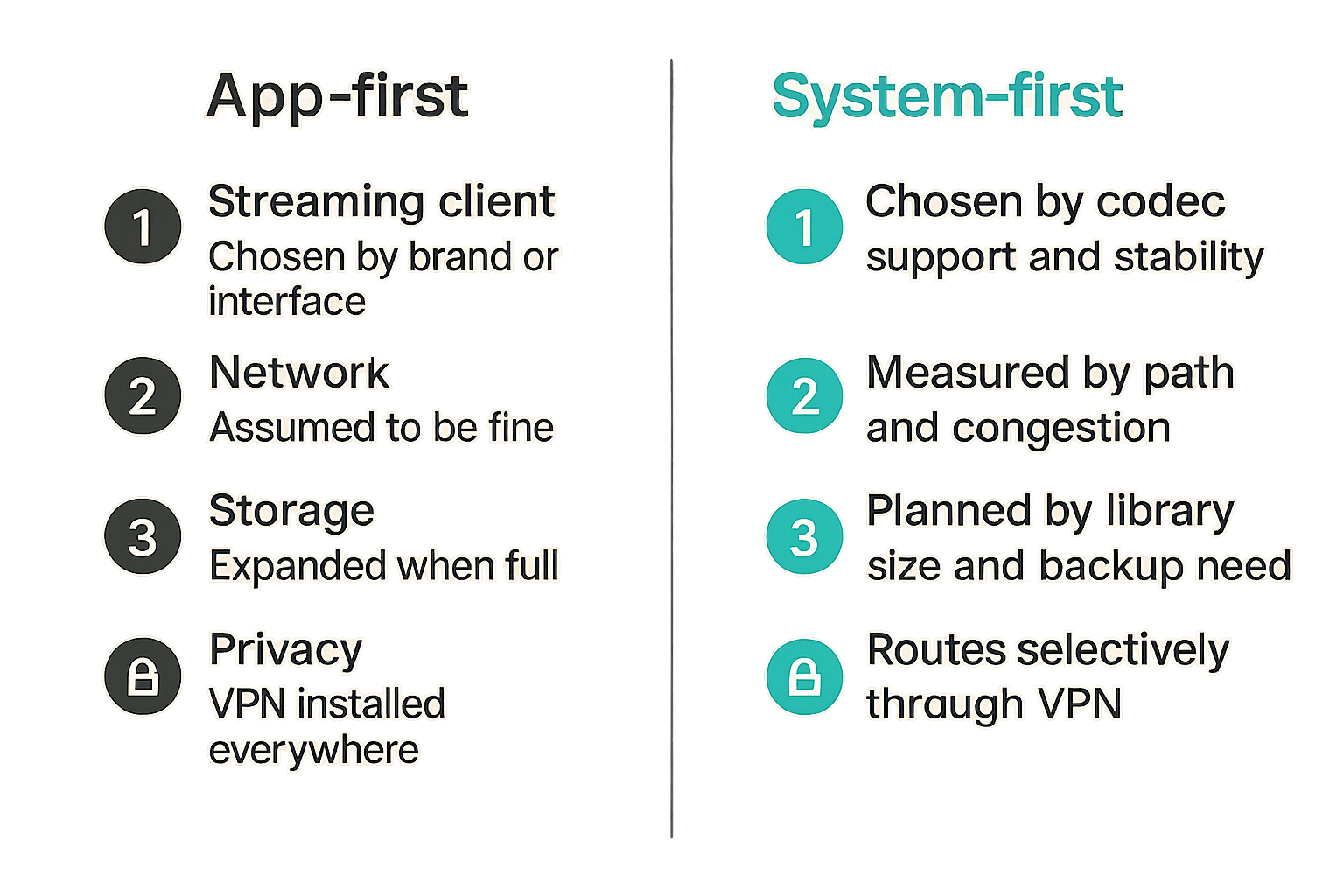
Here is the practical comparison:
| Decision area | App-first setup | System-first setup |
|---|---|---|
| Streaming client | Chosen by brand or interface | Chosen by codec support and stability |
| Network | Assumed to be fine | Measured by path and congestion |
| Storage | Expanded when full | Planned by library size and backup need |
| Privacy | VPN installed everywhere | Routes separated by traffic type |
| Support | Fix when someone complains | Logs, alerts, and rollback paths |
The system-first setup is less glamorous. It is also less likely to ruin a Friday night.
Storage and catalogs are separate decisions
Storage is where bytes live. A catalog is how people find things. Mixing them up creates messy libraries.
You can store legal public-domain media, personal recordings, licensed downloads, and home videos on the same disk, but they may need different folder rules, metadata policies, and retention. The catalog should expose what viewers need without turning your file structure into a dumping ground.
Computer systems technology starts with network design
Network design is the unsexy part of computer systems technology, but it decides whether the rest of the stack feels premium or fragile. Media traffic is bursty, latency-sensitive enough to annoy people, and unforgiving when multiple household members compete for the same uplink.
Wired backhaul beats heroic Wi-Fi
Wi-Fi is fine for many clients. It is not magic. If your media server, NAS, or primary streaming device can use Ethernet, use Ethernet. If your mesh nodes support wired backhaul, wire them. You are not trying to win a benchmark. You are trying to reduce variables.
The usual household pattern looks like this:
- Wired: NAS, media server, primary TV, core switch, router.
- Wi-Fi 6 or better: tablets, phones, secondary TVs.
- Guest Wi-Fi: visitors and untrusted devices.
- IoT network: cheap smart devices that do not need access to storage.
Practical rule: put stable infrastructure on wires and save Wi-Fi for mobile clients. Troubleshooting becomes dramatically easier when the backbone is boring.
DNS, VPN, and privacy need explicit routing
Many users treat VPN as a big on-off switch. That creates problems. Some streaming services dislike VPN egress. Some IPTV sources may perform poorly through distant routes. Some torrent use cases may require stronger privacy controls, especially where legally permitted sharing is involved.
The better design is traffic-aware routing:
- Streaming apps that require local region behavior use normal WAN.
- Privacy-sensitive discovery or transfer traffic uses the correct tunnel.
- Smart TVs stay on restricted network segments.
- DNS is controlled at the router, not randomly per device.
- Leak checks are run after router, app, and VPN updates.
Related reading from our network: security teams face a similar signal-and-routing problem in AI content threat detection workflows, where the value comes from triage paths rather than one magic tool.
IPTV traffic exposes weak assumptions
IPTV viewing is a good stress test because it is live. A movie buffer can hide short problems. A live channel cannot hide much. If your playlist source is slow, DNS is flaky, Wi-Fi is congested, or the player handles retries badly, live TV makes it obvious.
For users who organize legal playlists and live channels, a dedicated page like live TV streaming from IPTV playlists is useful only when the local stack also handles routing, refresh, and playback cleanly.
Storage architecture decides how painful your library becomes
Storage starts simple and becomes political. Everyone has opinions about naming, folders, duplicates, subtitles, versions, and what should be kept. If you do not make rules early, the library becomes an archaeological dig.
Local storage is fast until it is unmanaged
Local disks are great for performance and control. They are also easy to abuse. A home media server with one giant downloads folder will eventually become slow, confusing, and risky to modify.
Separate storage zones help:
- Inbox: temporary arrivals and manual review.
- Library: approved media with naming rules.
- Archive: rarely accessed but retained files.
- Config: app settings, databases, playlists, and scripts.
- Backup: copies of irreplaceable data and configuration.
The inbox is where judgment happens. The library is where consistency matters.
Metadata is operational data
Metadata is not decoration. Titles, seasons, years, posters, EPG mappings, subtitles, audio tracks, and watched states affect whether people can use the system without asking you for help.
Bad metadata creates support tickets inside the house. The wrong version appears. A show is split into two entries. Subtitles are mismatched. A child profile sees something it should not. A live channel has no guide data.
Metadata deserves backup and review just like files do. If your media server database is lost, rebuilding it may take longer than restoring the media itself.
Backups are for configuration, not just files
Many people back up media files and ignore configuration. That is backwards for replaceable content and dangerous for custom systems. Your router config, VPN settings, media server database, playlist mappings, naming rules, scripts, and container compose files are what make the stack yours.
A simple backup policy:
backup_targets:
  router_config: monthly
  media_server_config: weekly
  playlist_mappings: weekly
  automation_scripts: on_change
  irreplaceable_media: nightly
  replaceable_media: best_effort
The exact schedule matters less than the discipline. Test a restore before you need one.
Torrent workflows need legal and technical boundaries
Torrent technology is neutral. How it is used matters. For a safe and sustainable media setup, the boundary should be explicit: use torrents for legal content, public-domain material, open-source distributions, creator-approved releases, personal distribution, and other permitted uses.
Separate legal source discovery from downloading
Discovery is where many messy decisions begin. A clean workflow separates browsing, validation, downloading, and library import. Do not let every magnet link or file land directly in the main library.
A sane flow looks like this:
- Discover a legal or permitted source.
- Validate the source, title, size, and expected format.
- Download into an isolated inbox.
- Scan and inspect before import.
- Move into the library only after naming and metadata checks.
This is slower than clicking everything. It is also the difference between an intentional media system and a liability.
Bandwidth rules prevent household failure
Torrent clients can saturate upload, create too many connections, and make the whole house feel broken. The fix is not to yell at the client. The fix is policy.
Set upload caps below your real upstream capacity. Limit active jobs. Schedule heavy transfers outside household peak hours. Keep seeding rules aligned with legal and community expectations for the content you are allowed to share.
Practical rule: any background transfer system needs bandwidth ceilings, connection limits, and a schedule. If it can run unattended, it can also break the network unattended.
DHT and indexing require hygiene
DHT, trackers, and indexes are discovery mechanisms, not trust engines. Treat results as untrusted until validated. Watch for mismatched names, suspicious sizes, odd archives, executable files, and uploads with no reputation context.
The mistake teams make is automating discovery before they understand trust. Automation should accelerate known-good patterns, not blindly import whatever matches a keyword.
IPTV and live TV are stateful systems
IPTV looks like a playlist, but operationally it behaves like a stateful service. URLs expire. Channel names change. EPG IDs drift. Providers reorganize groups. Players cache old data. A live TV setup fails when state is not refreshed and reconciled.
Playlist lifecycle is the first failure point
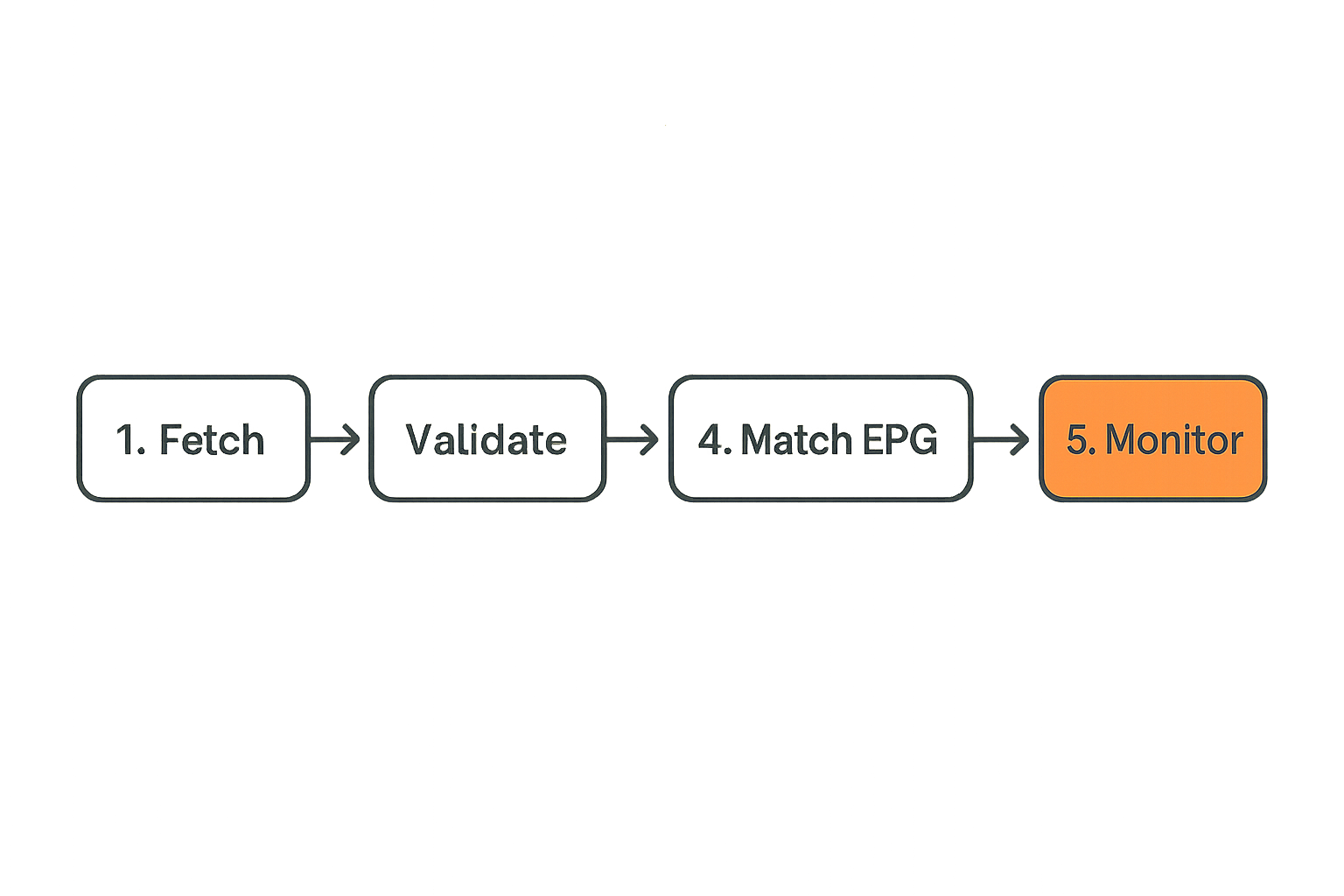
A playlist has a lifecycle: fetch, validate, normalize, categorize, publish to clients, refresh, and retire broken entries. If you skip that lifecycle, you get duplicate channels, dead streams, and confusing groups.
A basic IPTV maintenance workflow:
- Fetch the playlist from a legal source.
- Validate channel URLs and remove dead entries.
- Normalize names and groups.
- Match channels to EPG identifiers.
- Publish the cleaned playlist to players.
- Log failures for review.
This mirrors payment and data systems more than casual TV browsing. Related reading from our network: publishers and merchants dealing with AI content blockchain payment architecture run into the same state, reconciliation, and settlement mindset, even though the domain is different.
EPG data is part of the product
Without guide data, live TV becomes channel roulette. EPG data is not optional if other people use the setup. It turns streams into something browsable.
Useful EPG rules:
- Prefer stable channel IDs over display names.
- Keep local overrides for frequently mismatched channels.
- Refresh guide data on a predictable schedule.
- Monitor missing guide percentages after playlist updates.
- Keep a rollback copy of the last known-good playlist.
Buffering is usually a chain problem
When IPTV buffers, users blame the player. Sometimes that is right. More often the problem is upstream capacity, poor routing, stale DNS, overloaded Wi-Fi, device decoding limits, or playlist source instability.
Do not troubleshoot live TV by changing five things at once. Test one channel on wired Ethernet, then another player, then another DNS path, then another device. Work from the stable core outward.
Automation should remove chores, not judgment
Automation is where home media systems either become pleasant or dangerous. The right automation removes repeated chores. The wrong automation imports bad data, hides errors, and makes the stack harder to reason about.
Use rules for routing, naming, and cleanup
Good automation is boring:
- Move completed downloads from inbox to review.
- Rename approved files using a consistent pattern.
- Remove temporary files after import.
- Refresh metadata after library changes.
- Alert when storage crosses a threshold.
- Pause heavy jobs during peak household hours.
Bad automation makes trust decisions it is not qualified to make. It grabs the first match, imports it, deletes the original, and tells you everything succeeded.
A safer rule pattern:
media_rules:
  auto_import: false
  require_review: true
  max_parallel_downloads: 2
  pause_window: 18:00-23:00
  notify_on:
    - failed_scan
    - low_disk_space
    - metadata_mismatch
Transcoding policy should be boring
Transcoding is expensive. It uses CPU, GPU, power, and patience. If every playback session transcodes, you either have the wrong client formats, the wrong client devices, or the wrong server expectations.
A practical policy is to optimize for direct play first. Keep common formats that your main devices can decode. Use hardware acceleration only when supported and stable. Avoid real-time 4K transcoding as a default design goal unless you enjoy building a small data center.
Notifications should explain state
Notifications that say failed are not helpful. A useful alert says what failed, where, when, and what to do next.
Better examples:
- IPTV playlist refresh failed at DNS lookup.
- Media import stopped because disk free space is below 10 percent.
- VPN route changed after reconnect; leak check required.
- EPG match dropped for 14 channels after source update.
Related reading from our network: the workflow discipline in remote nursing jobs with AI-assisted operations is a useful adjacent example because independent operators also need repeatable checks, documentation, and escalation paths.
Security and privacy are system properties
Security is not a plugin. Privacy is not a toggle. In a media stack, both are properties of the whole system: devices, accounts, routes, logs, apps, storage, and user behavior.
Separate identities and devices by risk
Do not use the same account pattern everywhere. Keep admin accounts separate from viewing accounts. Use household profiles where supported. Put cheap IoT devices on a restricted network. Avoid giving smart TVs broad access to local storage if they only need a media server endpoint.
For services that require accounts, use unique passwords and multi-factor authentication where available. For local dashboards, do not expose admin panels directly to the public internet. If you need remote access, use a VPN or a properly secured gateway.
Logs should help without becoming a liability
Logs are useful when something breaks. They can also reveal viewing habits, source URLs, IP addresses, usernames, and device names. Keep enough logs to troubleshoot but not so much that the system becomes a diary of the household.
Good log hygiene:
- Rotate logs automatically.
- Avoid storing secrets in plain text.
- Restrict admin log access.
- Redact tokens from shared screenshots.
- Delete old debug logs after incidents.
Common failure modes to design around
Most bad home media implementations fail in predictable ways:
- One flat network where every device can see everything.
- No backup of media server databases or router config.
- Torrent client with unlimited upload and connection counts.
- IPTV playlists pushed straight to players without validation.
- VPN installed but never leak-tested after updates.
- Smart TV apps expected to handle every codec and subtitle format.
- Automation deleting files before import is confirmed.
The fix is not paranoia. It is design. Small boundaries prevent small errors from becoming whole-system failures.
Implementation workflow for computer systems technology at home
This is where computer systems technology becomes useful. You take the abstract stack and turn it into an implementation sequence that can be built, tested, and maintained.
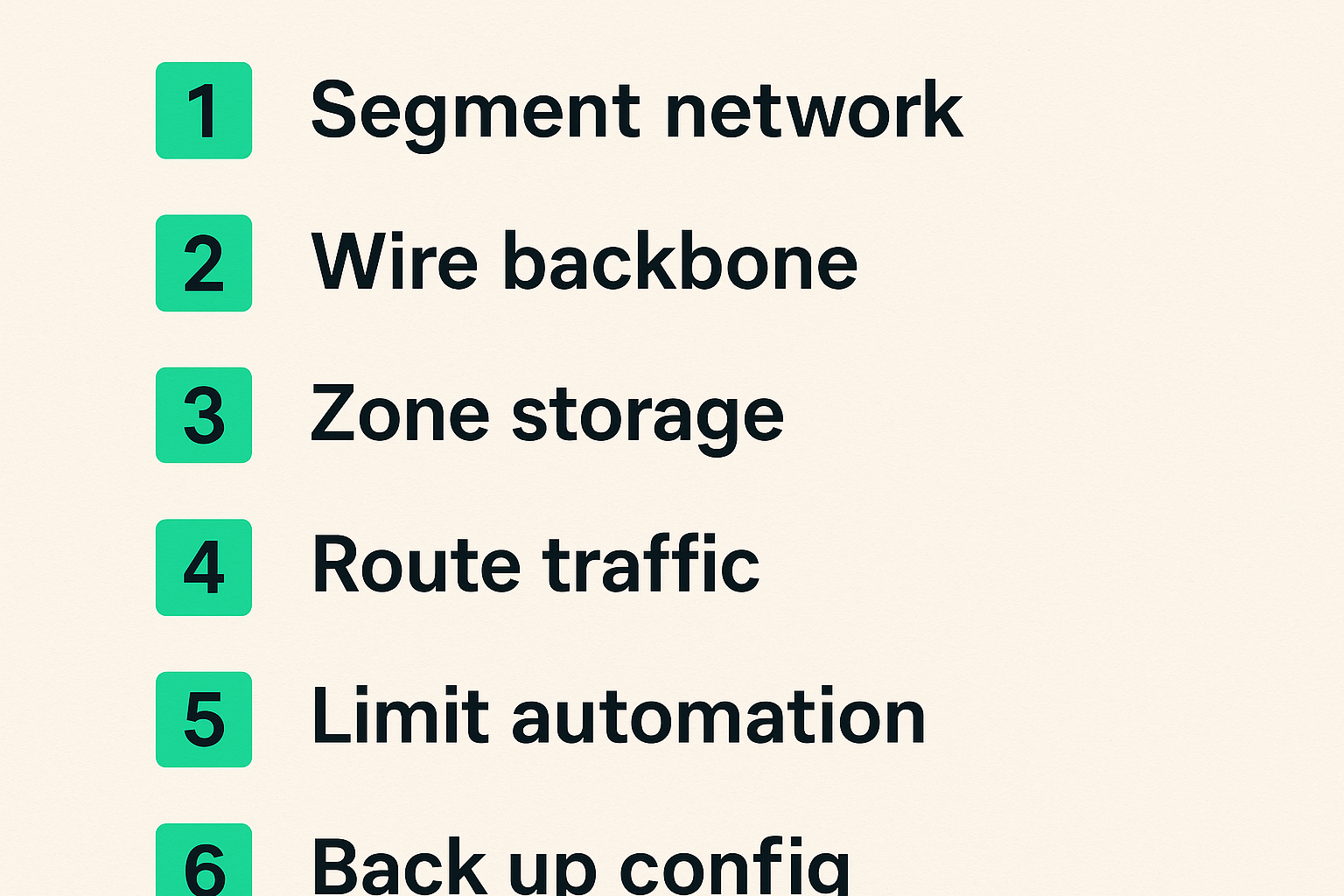
Step-by-step build sequence
Use this order if you are rebuilding or cleaning up a media setup:
- Inventory devices, apps, accounts, storage, and network gear.
- Decide what content sources are allowed and legal for your household.
- Segment the network into trusted, guest, and IoT zones.
- Wire the router, switch, NAS, server, and primary TV where possible.
- Configure DNS and VPN routing by traffic type.
- Create storage zones for inbox, library, archive, config, and backup.
- Install media server and player clients with direct-play testing.
- Add IPTV playlist validation and EPG mapping if you use live TV.
- Add torrent workflow controls for permitted content only.
- Automate low-risk chores after manual workflow is stable.
- Back up configuration and test restore.
- Document the normal fix path for the household.
Do not skip inventory. You cannot secure or simplify a system you have not named.
What works in practice
What works is usually boring:
- One primary media server instead of five half-configured ones.
- Ethernet for infrastructure.
- Clear folder rules.
- Manual review before library import.
- Limited automation with visible logs.
- Direct-play client selection.
- Backups of configuration and metadata.
- Playlist validation before IPTV publishing.
The goal is not to build the most complex stack. The goal is to build one that behaves predictably when you are tired, busy, or away from home.
What fails in practice
What fails is usually hidden complexity:
- Installing tools before deciding ownership.
- Letting every app manage its own copy of metadata.
- Treating VPN as a universal fix.
- Ignoring upstream bandwidth.
- Mixing temporary downloads with the permanent library.
- Trusting playlist and torrent labels without validation.
- Updating everything at once with no rollback path.
Practical rule: complexity is acceptable only when it has an owner, a log, and a rollback path. Otherwise it is just future support work.
Where bittorrented.com fits in the media stack
A media discovery site should not pretend to be your whole architecture. The UI is not the system. The system is what happens before and after discovery: validation, playback, privacy, storage, and support.
Discovery is not the same as custody
Discovery helps you find streams, live channels, books, music, movies, or torrent-related resources. Custody is what you store, download, play, retain, delete, or share. Those are different responsibilities.
That distinction matters for legal and privacy-aware use. Treat discovery as the start of a workflow, not permission to skip source checks. If a source is not legal for your situation, do not use it. If a file or stream looks suspicious, do not import it into a trusted environment.
A practical product fit
bittorrented.com fits best as a discovery and browsing layer for readers who already think in systems: cord cutters comparing options, IPTV viewers organizing legal playlists, torrent users looking for permitted content workflows, and home media hobbyists trying to reduce chaos.
The product fit is architectural, not magical. Use it alongside your own rules for legality, privacy, routing, validation, and playback. That is how a media stack stays useful without pretending the front end solves everything.
Closing checklist
Before you call your setup done, check the fundamentals:
- Can the main TV play common files without transcoding?
- Can IPTV playlists be refreshed and rolled back?
- Are legal torrent workflows isolated from the main library until reviewed?
- Is upload bandwidth capped?
- Are DNS and VPN routes intentional?
- Are admin panels protected?
- Can you restore the media server config?
- Does someone else in the house know the basic recovery path?
Computer systems technology is not about making media more complicated. It is about making the complexity visible enough to control. In 2026, that is the practical edge for streaming, torrents, IPTV, and home media.
Try bittorrented.com
You are writing for readers who want practical, up-to-date guidance on streaming services, torrents, IPTV, and home media tools. Try bittorrented.com.