
Django streaming sounds simple until the first user scrubs forward, the worker memory spikes, and your support inbox fills with complaints that the file works locally but not in the browser.
Teams think the problem is sending bytes from Python to a video tag. The real problem is designing a media workflow where identity, permissions, metadata, byte ranges, cache behavior, background jobs, and player state all agree.
That changes the conversation. Django can be a very good control plane for a streaming media application. It is usually a poor place to push every byte of every movie, IPTV replay, audiobook, or large legal torrent download through application workers.
The practical question is not whether Django streaming works. It does. The practical question is where Django should own the workflow, where the web server or object store should own delivery, and how you prevent a hobby project from turning into a fragile support queue.
Table of contents
- Django streaming is an architecture decision, not a view helper
- Legal content and source boundaries come first
- Choose the delivery model before writing Django code
- The request path that usually works
- Range requests, seeking, and player behavior
- State, jobs, and media preparation
- IPTV and torrent-adjacent workflows
- What fails in production
- Observability and operations
- Where bittorrented.com fits
- Django streaming implementation checklist
Django streaming is an architecture decision, not a view helper
Django gives you StreamingHttpResponse, FileResponse, authentication middleware, ORM models, admin screens, background task integration, and a mature ecosystem. That is enough to build a useful media control plane.
It is not enough to ignore the physics of streaming. A two-hour video is not a JSON response. A live playlist is not a static page. A media player does not politely download from byte zero to the end. It requests ranges, retries segments, changes quality, and exposes every small backend mistake as buffering.
What teams think they are building
The mistake teams make is treating django streaming as a feature ticket:
- Add upload model.
- Add video view.
- Return StreamingHttpResponse.
- Put a video tag on the page.
- Ship.
That demo may work on localhost. It may even work for a small MP4 on a fast LAN. Then someone uses Safari, seeks to minute 42, opens three tabs, or watches over a weak Wi-Fi connection. The view that looked clean becomes a worker pinning problem.
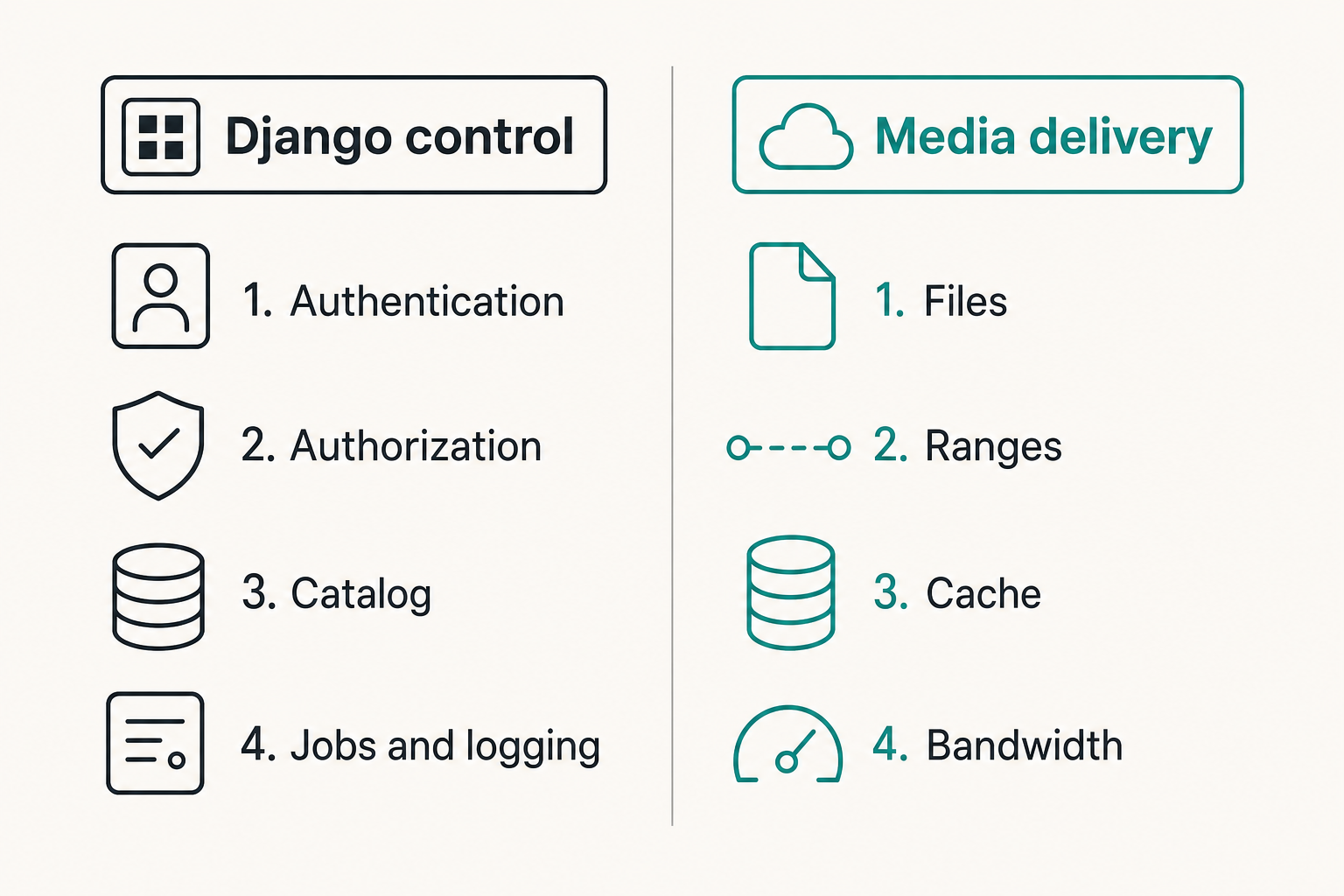
A useful way to think about it is this: Django should decide whether a user is allowed to watch something. It should not automatically be the component that delivers every byte.
The real system boundaries
A production streaming workflow has at least five boundaries:
- Identity: who is making the request.
- Authorization: what content they may access.
- Catalog state: what the system knows about the media.
- Delivery path: which service transfers bytes.
- Operational state: what happened when playback failed.
Django is strong at the first three and good at the fifth if you log deliberately. The fourth is where you need discipline.
Practical rule: Put Django in charge of decisions. Put the most boring, efficient byte-serving layer in charge of delivery.
For a small home media dashboard, that delivery layer may be Nginx using X-Accel-Redirect. For a larger app, it may be object storage with short-lived signed URLs. For adaptive video, it may be an HLS packager and CDN. The design choice matters more than the import statement.
Legal content and source boundaries come first
Before codecs and buffering, decide what your app is allowed to serve. This is not a legal lecture. It is an operations requirement. If your source boundaries are vague, your deletion workflow, abuse handling, privacy posture, and user permissions will also be vague.
Personal libraries, public domain media, and licensed IPTV
Good django streaming projects usually start with clear source categories:
- Personal backups and home media you are allowed to store.
- Public domain films, lectures, podcasts, and archives.
- Licensed IPTV playlists and legal live streams.
- Internal training videos or private organizational media.
- User-uploaded content with explicit terms and moderation.
Each category has different retention, sharing, and access rules. A public domain documentary can be cached aggressively. A private family video should have stricter access controls. A licensed IPTV URL may be a reference that your app organizes, not a file your app owns.
If you are designing live channel browsing, a dedicated legal IPTV workflow is different from generic file streaming. For example, readers who organize M3U playlists can use live TV playlist browsing as a reference point for how channels, names, and playback links become a navigable catalog rather than a pile of URLs.
Torrent metadata is not a permission model
Torrent workflows add another trap. A magnet link, info hash, or DHT result is metadata. It does not prove that you have rights to download, store, stream, or redistribute the content.
What breaks in practice is that teams model torrent discovery as if discovery equals entitlement. It does not. Your app should separate:
- Search or discovery metadata.
- User intent and user-provided source.
- Content verification.
- Local storage status.
- Playback permission.
This separation also protects the architecture. If a user removes a source, your catalog should know whether the media is still locally available, whether derived thumbnails must be deleted, and whether playback URLs must be revoked.
Choose the delivery model before writing Django code
The delivery model determines almost everything else: headers, storage, cache behavior, worker count, error handling, and cost. Pick it early.
Direct StreamingHttpResponse
Direct StreamingHttpResponse is useful when you need application-level streaming of generated data or small controlled streams. It can work for previews, audio snippets, exports, logs, and low-volume internal media.
It is less attractive for large video libraries. Long-lived responses tie up server resources. If your workers are synchronous, they are occupied while the client slowly reads. If your file iterator is inefficient, memory usage becomes unpredictable.
A minimal direct response looks clean:
from django.http import StreamingHttpResponse

def stream_file(request, path):
    def chunks():
        with open(path, 'rb') as handle:
            while True:
                data = handle.read(1024 * 1024)
                if not data:
                    break
                yield data
    return StreamingHttpResponse(chunks(), content_type='video/mp4')
The problem is not that this is wrong. The problem is that this is incomplete. It does not handle range requests, permissions, storage abstraction, disconnects, throttling, or caching.
HLS or DASH through a media server
For real video streaming, HLS or DASH is often the better model. Instead of one large file, media is segmented into smaller pieces with a manifest that players understand. This improves seeking, quality adaptation, CDN behavior, and retry handling.
Django can still own the catalog, permissions, ingest state, and signed manifest access. But the segment delivery can be handled by Nginx, a CDN, object storage, or a media server.
This is where the UI stops being the system. The user sees a play button. Underneath, your app manages manifests, segment paths, token expiry, player compatibility, and cleanup.
Related reading from our network: teams evaluating decentralized media job placement face similar scheduling and retry tradeoffs in Akash Network alternatives for compute builders, especially when transcoding and validation are moved away from the primary app server.
External object storage and signed URLs
Object storage is the cleanest option for many teams. Django authenticates the user, checks authorization, creates a short-lived signed URL, and redirects the player or client to the object store.
Benefits:
- Django workers do not push the media bytes.
- Object storage handles range requests well.
- URLs can expire.
- Storage logs can be correlated with Django access logs.
- The architecture scales without rewriting the app.
The tradeoff is state. You must track object keys, variants, thumbnails, duration, content type, and cleanup. You also need to avoid leaking permanent bucket paths in places where users can share them.
Practical rule: If the media file is larger than a normal web response and does not need per-byte transformation, prefer redirecting to a delivery layer over streaming through Django.
The request path that usually works
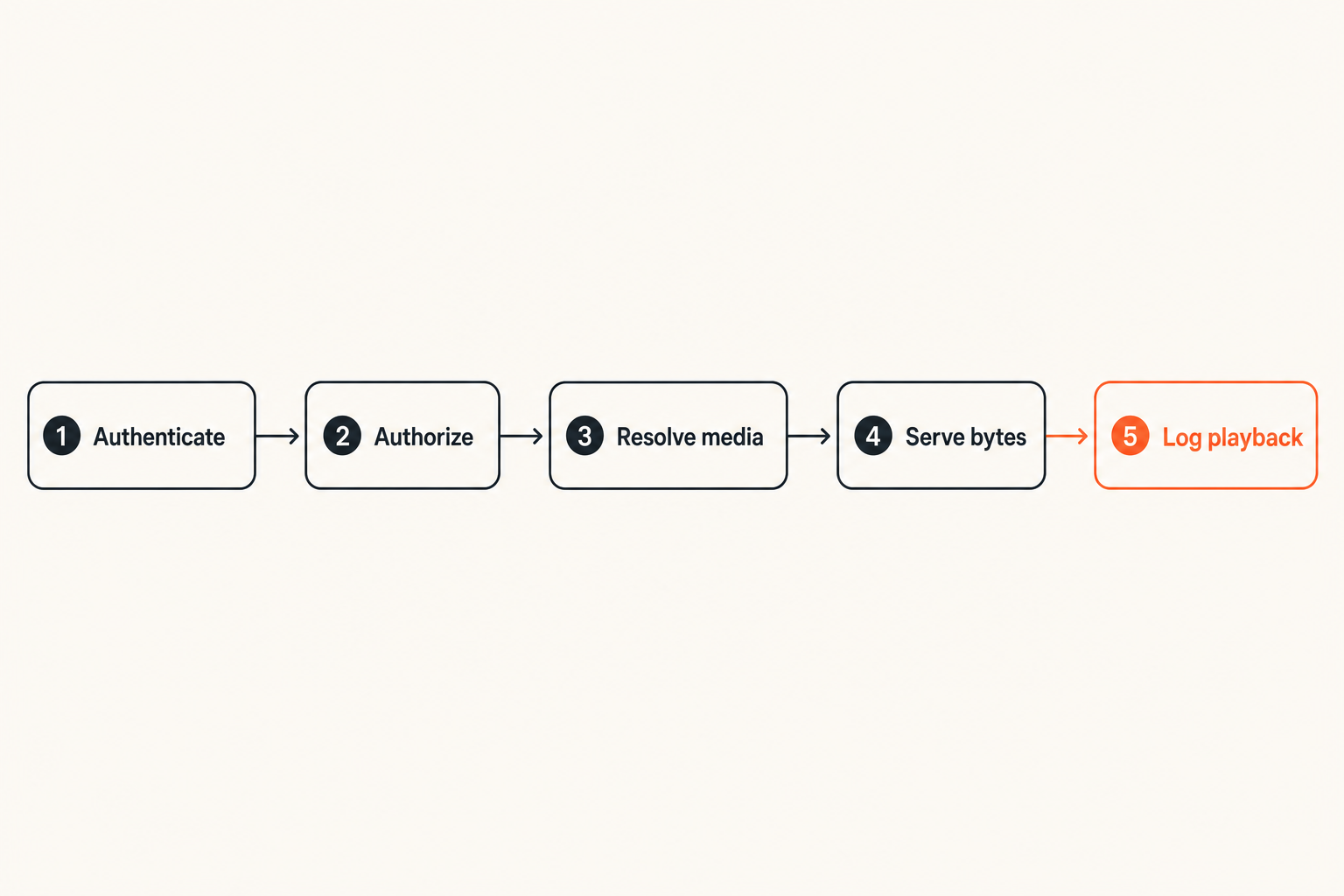
A reliable django streaming architecture has a request path that is explicit. There should be no mystery about who checks identity, who resolves media, who signs the URL, and who logs the result.
Control plane in Django
The control plane is the part Django should own:
- Authenticate the request.
- Load the media record.
- Check ownership, subscription, household, or library permission.
- Verify the asset is available and processed.
- Select the correct rendition or source.
- Create a signed delivery URL or internal redirect.
- Log a playback attempt with enough context to debug later.
That sequence is boring by design. Boring is good here. You want permission checks and media state transitions to be understandable six months later.
A common model split looks like this:
MediaItem
  title
  source_type
  owner_id
  visibility

MediaAsset
  media_item_id
  storage_key
  codec
  container
  duration_ms
  status

PlaybackSession
  user_id
  media_item_id
  asset_id
  delivery_method
  started_at
  last_error
This gives support and operations something to inspect. Without a session record, you only have browser complaints.
Data plane at the edge
The data plane should be optimized for bytes. It can be Nginx, Caddy, object storage, a CDN, or a media server. The important property is that it knows how to serve files and ranges efficiently.
For Nginx, Django can authorize the request and respond with an internal header such as X-Accel-Redirect. The browser receives media bytes from Nginx, not Python.
For object storage, Django can return a signed URL:
GET /watch/123
Django checks access
Django creates short-lived object URL
Browser requests object URL with Range header
Object store returns 206 Partial Content
That changes the failure mode. Instead of worker starvation, you debug URL expiry, object permissions, and player requests. Those are usually better problems.
Where ASGI fits
ASGI matters when you have concurrent long-lived connections, WebSockets, async metadata APIs, or real-time status updates. It does not magically make large file delivery free.
If you stream large files through an async Django stack without thinking about backpressure, storage drivers, and process limits, you can still overload the app. Async changes concurrency mechanics. It does not remove bandwidth, disk, or client behavior from the equation.
Use ASGI for:
- Playback status updates.
- Live ingest dashboards.
- WebSocket progress events.
- Queue status and transcoding notifications.
- Lightweight async APIs.
Do not use ASGI as an excuse to avoid a proper delivery layer.
Range requests, seeking, and player behavior
Seeking is where naive media delivery gets exposed. The player asks for a specific byte range. Your server either understands it or the experience feels broken.
Why naive streaming breaks seeking
A browser video element often sends headers like:
Range: bytes=10485760-
It expects a 206 Partial Content response with Content-Range and the correct byte length. If your view always returns 200 OK from the start of the file, the player may refuse to seek, restart playback, or buffer forever.
This is also why small local demos lie. A short clip on a fast connection may appear fine even without range support. A longer file makes the problem obvious.
Implementing safe byte serving
If you must serve bytes from Django, implement range handling carefully or use a library that does it correctly. At minimum, you need to validate:
- The requested range is syntactically valid.
- Start and end positions are within file size.
- The response status is 206 when partial.
- Content-Length matches the actual bytes sent.
- Content-Range is accurate.
- Unsatisfiable ranges return 416.
This is not glamorous code. It is the difference between a media app and a download endpoint with a play button.
A safer pattern is still to let Nginx or object storage handle the range behavior after Django authorizes access. Those systems have already been beaten up by years of browser and media-player edge cases.
Cache headers and content types
Media cache headers need intent. Do not copy static asset settings blindly.
For public media, long cache lifetimes can be reasonable. For private media, signed URLs and shorter cache windows are safer. For HLS manifests, cache too long and users may miss updated segments. Cache too short and you increase request load.
Content type also matters. A wrong MIME type can produce inconsistent playback across browsers and devices. Store it in your asset metadata after ingest rather than guessing on every request.
Practical rule: Treat headers as part of the playback contract. Status code, Content-Type, Content-Length, Content-Range, and cache policy are not optional details.
State, jobs, and media preparation
The streaming view is the visible part. The operational burden sits in background work: ingest, verification, transcoding, thumbnails, metadata extraction, cleanup, and retries.
Ingest and verification
Ingest should create state before it creates expectations. A user should not see a playable item until the system has verified that the asset exists, is readable, and has the minimum metadata required for playback.
A practical state machine might be:
uploaded -> verifying -> ready
uploaded -> verifying -> rejected
ready -> processing -> ready
ready -> deleting -> deleted
Avoid a single boolean like is_ready for everything. It hides too much. A file can be uploaded but not scanned. Scanned but not transcoded. Transcoded but missing thumbnails. Ready for direct download but not HLS playback.
Transcoding and thumbnails
Transcoding is where many Django projects become unstable because the web app and CPU-heavy media work are deployed as if they are the same workload.
Separate them. Use a queue. Run media workers with explicit CPU, memory, and disk limits. Store outputs as separate assets linked to the original media item.
What works:
- A job table or task queue with durable status.
- Workers that can crash without losing the workflow.
- Output variants stored with codec and resolution metadata.
- Explicit cleanup when a job is canceled.
- Logs linked to the media item and job id.
What fails:
- Running ffmpeg inside a web request.
- Writing temporary files with no retention policy.
- Overwriting originals during conversion.
- Treating all codecs as browser-safe.
- Hiding transcoding errors behind a generic failed message.
Idempotency and retries
Media jobs fail for normal reasons: bad input, disk pressure, network timeout, worker restart, unsupported codec, expired source URL. Retrying everything blindly is expensive and sometimes destructive.
Make jobs idempotent. A retry should not create duplicate assets, orphan segments, or conflicting rows. Use deterministic output keys or a job attempt model.
A simple approach:
- Create a media job with a stable id.
- Write outputs to a temporary prefix.
- Verify output files and metadata.
- Promote outputs to the final prefix.
- Mark the job complete.
- Schedule cleanup for temporary files.
Related reading from our network: privacy-sensitive teams face similar record, attachment, and workflow boundaries in secure messaging for tax communication, which is a useful adjacent model for thinking about who can see what and how long artifacts should live.
IPTV and torrent-adjacent workflows
Many readers in this space are not only building upload-and-play systems. They are organizing IPTV playlists, legal torrent metadata, personal archives, and home media tools. The architecture still comes back to the same issue: references, rights, state, and delivery should not be collapsed into one blob.
Playlists as references, not ownership
An M3U playlist entry is a pointer. It might include a channel name, logo, group, and stream URL. Your app can parse and organize it, but that does not mean your app owns the content or should cache it indefinitely.
For licensed streams, your Django app can manage:
- Playlist import.
- Channel grouping.
- User favorites.
- EPG metadata.
- Availability checks.
- Playback handoff.
Do not silently convert every remote stream into stored local media unless you have the rights and retention workflow to do that. The support and compliance burden changes immediately.
DHT search and magnet handling
DHT and magnet workflows should be treated as discovery and user-directed retrieval, not a universal content license. If your app lets users browse decentralized metadata, keep the metadata layer separate from playback availability.
A practical catalog might show that a result exists, but only mark it playable after a user-provided, lawful source has been retrieved, verified, and stored under the user account. For readers exploring the metadata side, DHT torrent browsing shows why discovery, titles, hashes, and availability need to be handled as separate states rather than mixed into a single download button.
This is not just caution. It is better engineering. Separate states make deletion, audit, retries, and user support possible.
Privacy and network hygiene
Media apps expose habits. What someone watches, searches, stores, or streams can be sensitive. Even a small home tool should avoid leaking more than necessary.
Practical hygiene:
- Use HTTPS for remote access.
- Avoid logging full signed URLs.
- Store only the metadata you need.
- Rotate tokens and expire playback links.
- Keep admin panels off the public internet when possible.
- Separate guest, household, and admin permissions.
- Be cautious with third-party playlist sources.
Related reading from our network: community-run networks have similar trust and routing problems, and running a local community network is a useful adjacent lens for permissions, roles, and follow-up when media access is shared among real people.
What fails in production
The failures are rarely mysterious. They are usually predictable design shortcuts that worked during the demo.
Memory pressure and worker starvation
If every playback request occupies a Django worker for minutes, concurrency collapses quickly. Slow clients make it worse because the server holds the connection while the user receives bytes slowly.
Common symptoms:
- Admin pages become slow during playback spikes.
- Login requests queue behind media responses.
- Gunicorn workers restart under memory pressure.
- Health checks fail while users stream large files.
- Background task APIs time out because web workers are busy.
The fix is architectural. Move byte serving out of the app path, cap worker responsibilities, and separate media delivery from control APIs.
Broken cleanup and abandoned jobs
Media workflows create artifacts: uploaded originals, transcodes, HLS segments, thumbnails, temporary chunks, logs, and failed outputs. If cleanup is not part of the design, storage becomes a landfill.
The mistake teams make is only deleting the database row. That leaves the files. Or they delete files first and leave dangling catalog entries. Both create support problems.
Use deletion as a workflow:
- Mark the media item deleting.
- Revoke active playback links.
- Stop queued jobs.
- Delete derived assets.
- Delete originals if policy allows.
- Confirm storage deletion.
- Mark the item deleted.
This is slower than a single delete call. It is also how you avoid ghosts in the library.
Support tickets caused by invisible state
Users do not report architecture problems. They say the video buffers, the channel disappeared, the file plays on VLC but not on the site, or the search result does nothing.
If your admin cannot answer the following questions, support will be guesswork:
- Which asset did the user try to play?
- Which browser or client requested it?
- Did authorization pass?
- Was the object URL generated?
- Did the delivery layer return 200, 206, 403, 404, or 416?
- Was a transcoding job still running?
- Did the source disappear?
Django is excellent for building this support surface. Use it.
Observability and operations
Django streaming needs media-specific observability. Generic request latency is not enough because the slowest part of playback may be outside Django.
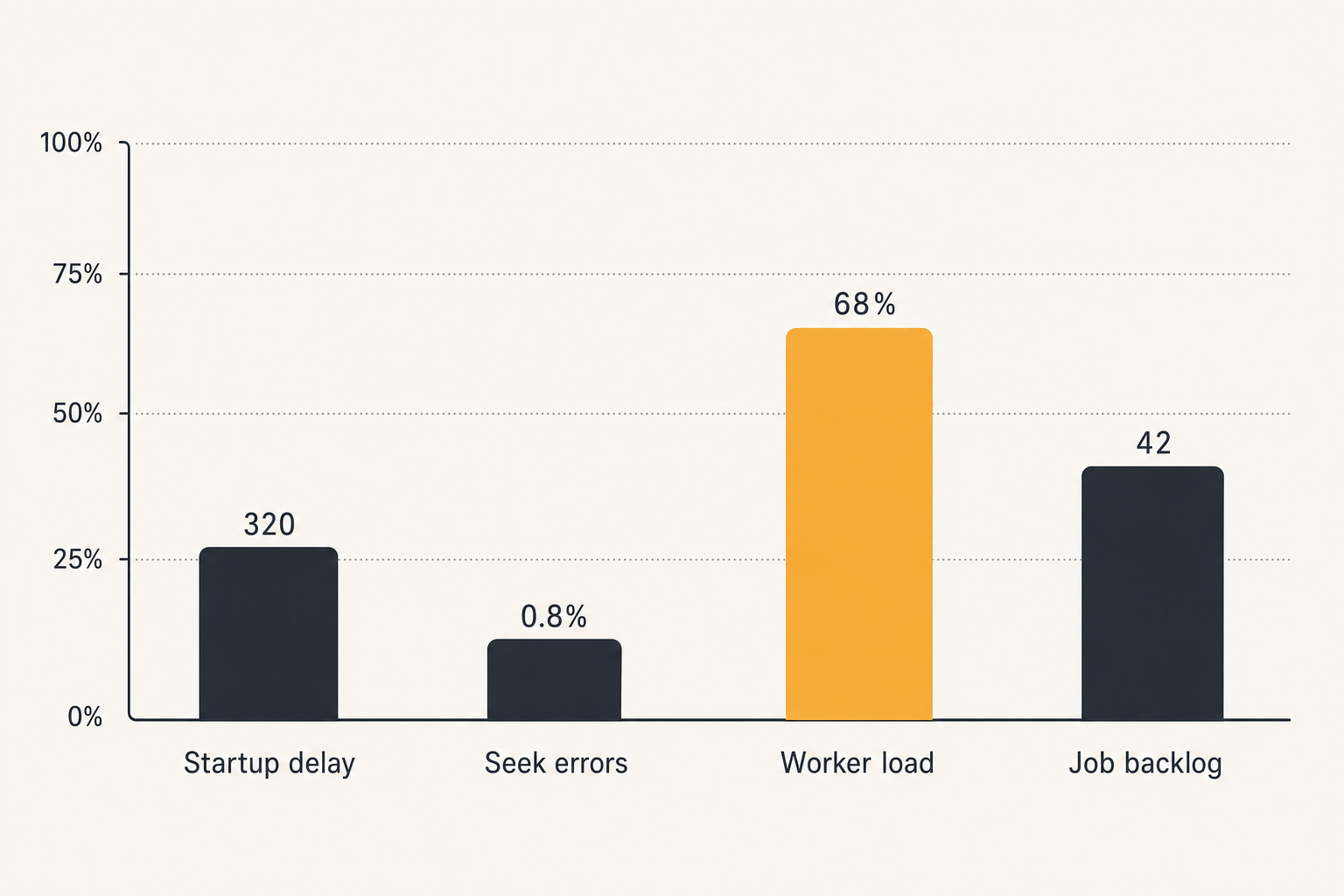
Metrics that matter
Track the metrics that explain user experience:
- Playback start attempts.
- Startup delay by delivery method.
- 206 response rate for seekable files.
- 403 and 404 rates for signed URLs.
- HLS manifest errors.
- Segment fetch failures.
- Transcoding queue depth.
- Job retry count.
- Storage cleanup backlog.
- Worker CPU and memory.
A chart of normal values is more useful than a dashboard full of vanity counters. If startup delay increases after you change object storage regions, you want to know before users complain.
Runbooks for playback complaints
A playback runbook should be short enough to use while annoyed. Start with the session id or media item id, then check the path.
Example runbook:
- Confirm user identity and access policy.
- Open the playback session record.
- Check selected asset and rendition.
- Verify asset status is ready.
- Confirm signed URL or internal redirect was created.
- Check delivery logs for status and byte range.
- Test the asset with a known compatible player.
- If transcoding is involved, inspect job logs.
- Record the root cause on the session.
This closes the loop. The next time the same issue appears, it is not a mystery.
Comparison table for common architectures
| Approach | What works | What fails | Best fit |
|---|---|---|---|
| Direct Django StreamingHttpResponse | Simple control, easy prototype, good for generated streams | Worker starvation, weak seeking unless implemented carefully | Low-volume internal tools |
| Django plus Nginx internal redirect | Django keeps auth, Nginx serves bytes efficiently | Requires server config and path discipline | Self-hosted media libraries |
| Django plus object storage signed URLs | Scales delivery, strong range support, lower app load | URL expiry and bucket policy must be correct | Larger libraries and remote users |
| Django plus HLS media pipeline | Better seeking, adaptive playback, CDN-friendly | More jobs, manifests, segments, and cleanup | Video-first applications |
| Django only with ffmpeg in request path | Quick demo | Timeouts, CPU spikes, broken retries | Avoid in production |
The table is deliberately blunt. There is no universal winner. There is only the model whose failure modes you are willing to own.
Where bittorrented.com fits
Django streaming is relevant to anyone building or evaluating media tools, but not everyone needs to build the whole stack. Sometimes the right move is to learn from a working media workflow before writing code.
A practical reference point for media workflows
bittorrented.com is written for readers who want practical, up-to-date guidance on streaming services, torrents, IPTV, and home media tools. That matters because media architecture is full of half-truths. A player UI is not a streaming system. A playlist parser is not a rights model. A torrent hash is not a playback guarantee.
For builders, the useful product-fit angle is architectural: browse how media categories, live streams, torrent-adjacent discovery, and home media topics are separated. That separation is the same principle you want in your Django app.
When to build and when to browse
Build your own Django streaming system when you need custom accounts, private libraries, workflow automation, ingest policies, or integration with your home network.
Browse existing tools and references when your goal is discovery, comparison, or learning how media workflows are organized. If you are also designing wake-on-LAN, NAS access, or home streaming reliability, the prior guide on wake tech for torrent, IPTV, and home media architecture is adjacent because it treats media access as an end-to-end workflow rather than a single app feature.
The practical point is simple: do not build a brittle streaming stack just to rediscover that media systems are state machines.
Django streaming implementation checklist
If you are starting now, keep the first version narrow. The goal is not to clone every streaming platform. The goal is to avoid design decisions that trap you later.
Build sequence
A reasonable implementation sequence:
- Define legal source categories and retention rules.
- Create MediaItem, MediaAsset, and PlaybackSession models.
- Implement upload or source registration without playback first.
- Add verification jobs and explicit asset status.
- Choose delivery: Nginx internal redirect, signed object URL, or HLS.
- Add playback authorization and session logging.
- Verify range behavior with real browsers.
- Add thumbnails and metadata extraction.
- Add cleanup workflows.
- Add dashboards for sessions, jobs, and delivery errors.
- Only then add richer UI features like favorites, playlists, and recommendations.
This order forces the hard decisions early. It also keeps Django in the role where it is strongest: workflow ownership.
Security checklist
Use this as a minimum bar:
- Require authentication for private media.
- Check object ownership on every playback request.
- Use short-lived signed URLs or internal redirects.
- Never expose raw server file paths.
- Avoid logging secrets, tokens, or full signed URLs.
- Validate playlist imports and remote sources.
- Restrict admin access.
- Rate-limit expensive endpoints.
- Scan or verify uploads before marking them playable.
- Use clear deletion and retention policies.
Practical rule: If a playback URL can be copied, forwarded, or cached, design the expiry and permission model before users depend on it.
Closing thoughts on django streaming
Django streaming is not a magic method. It is a set of decisions about where state lives, who serves bytes, how players seek, what content is allowed, and how operators debug failure.
Teams think the problem is X: make Django return video bytes. The real problem is Y: build a media workflow where Django controls identity, authorization, catalog state, jobs, and observability while a purpose-built delivery layer handles the heavy stream.
If you keep that boundary clean, django streaming can be boring in the best possible way. If you blur it, every buffer spinner becomes an architecture review.
Try bittorrented.com
You are writing for readers who want practical, up-to-date guidance on streaming services, torrents, IPTV, and home media tools. Try bittorrented.com