Wake tech sounds like a small hardware feature until your media stack starts acting like a part-time data center. The NAS sleeps. The mini PC misses a scheduled recording. The IPTV app opens before the tuner proxy is ready. Your torrent client is offline when a legal Linux ISO, public-domain film, or creator-distributed file is supposed to finish syncing.
Teams think the problem is power saving. The real problem is coordination.
For cord cutters, torrent users, IPTV viewers, and home media hobbyists, wake tech is the control layer that decides when devices should be asleep, when they should wake, who is allowed to trigger them, and how the rest of the media workflow knows the system is actually ready. That changes the conversation. You are not buying a magic switch. You are designing state management for a living room, a NAS, a router, a server, and a few apps that do not always agree.
The practical question is simple: how do you keep media available without leaving every box running all day? In 2026, the answer is not one feature. It is a small architecture: wake-on-LAN, scheduled jobs, HDMI-CEC, app health checks, playlist refreshes, privacy boundaries, and human override paths that are boring enough to survive real use.
Table of contents
- Wake tech is an operating model, not a gadget
- What wake tech has to control in a media stack
- The reference architecture for wake tech in 2026
- Trigger design: when should devices wake
- Torrent and library workflows without always-on sprawl
- IPTV and live TV workflows that do not miss the first minute
- Wake tech security and privacy controls
- Implementation workflow: build wake tech in layers
- What breaks in practice
- Where bittorrented.com fits
Wake tech is an operating model, not a gadget
Why the old always-on model is breaking
The mistake teams make is treating wake tech as a BIOS checkbox. Enable wake-on-LAN, send a magic packet, call it done. That works for a lab demo. It does not work when the home media stack includes a router, a managed switch, a NAS, a mini PC, an IPTV client, a torrent client, a guide updater, and phones that move between Wi-Fi and cellular.
The old answer was to leave everything running. That was simple, but it created its own problems: wasted power, noisy rooms, faster disk wear, more patching surface, and more services exposed for no reason. Many home media operators now want a quieter setup that still feels instant from the couch.
Wake tech is the compromise. It gives you near-on-demand availability without pretending every device must behave like a cloud service.
The legal and safety boundary matters
A useful way to think about it is this: wake tech should automate access to media you are allowed to use, not blur the line around sourcing. Torrent tooling is a protocol and workflow layer. IPTV is a playlist and streaming layer. Both can be used for lawful content, creator distribution, public-domain media, personal backups, and licensed services. They can also be abused.
Your architecture should make the safe path the default. Keep approved sources explicit. Avoid automation that blindly grabs unknown content. Log what automation did. Do not design a system where a random message, sketchy feed, or unknown playlist can wake machines and start moving data.
Practical rule: If a source is not trusted enough to run unattended, it is not trusted enough to trigger wake automation.
The operator view of wake state
From an operator view, there are more states than on and off:
- Asleep: powered down enough to save energy, but reachable by a wake method.
- Waking: packet sent or timer fired, but services are not ready.
- Booted: the OS is up, but apps may still be starting.
- Healthy: required services respond and storage is mounted.
- Streaming: user traffic or scheduled media jobs are active.
- Draining: no new work starts, existing work finishes.
- Sleep-ready: the stack can safely suspend again.
What breaks in practice is skipping the middle states. If your app assumes awake means ready, users get empty libraries, failed channel starts, corrupted scans, and support problems that look random.
What wake tech has to control in a media stack
Clients, servers, storage, and network gear
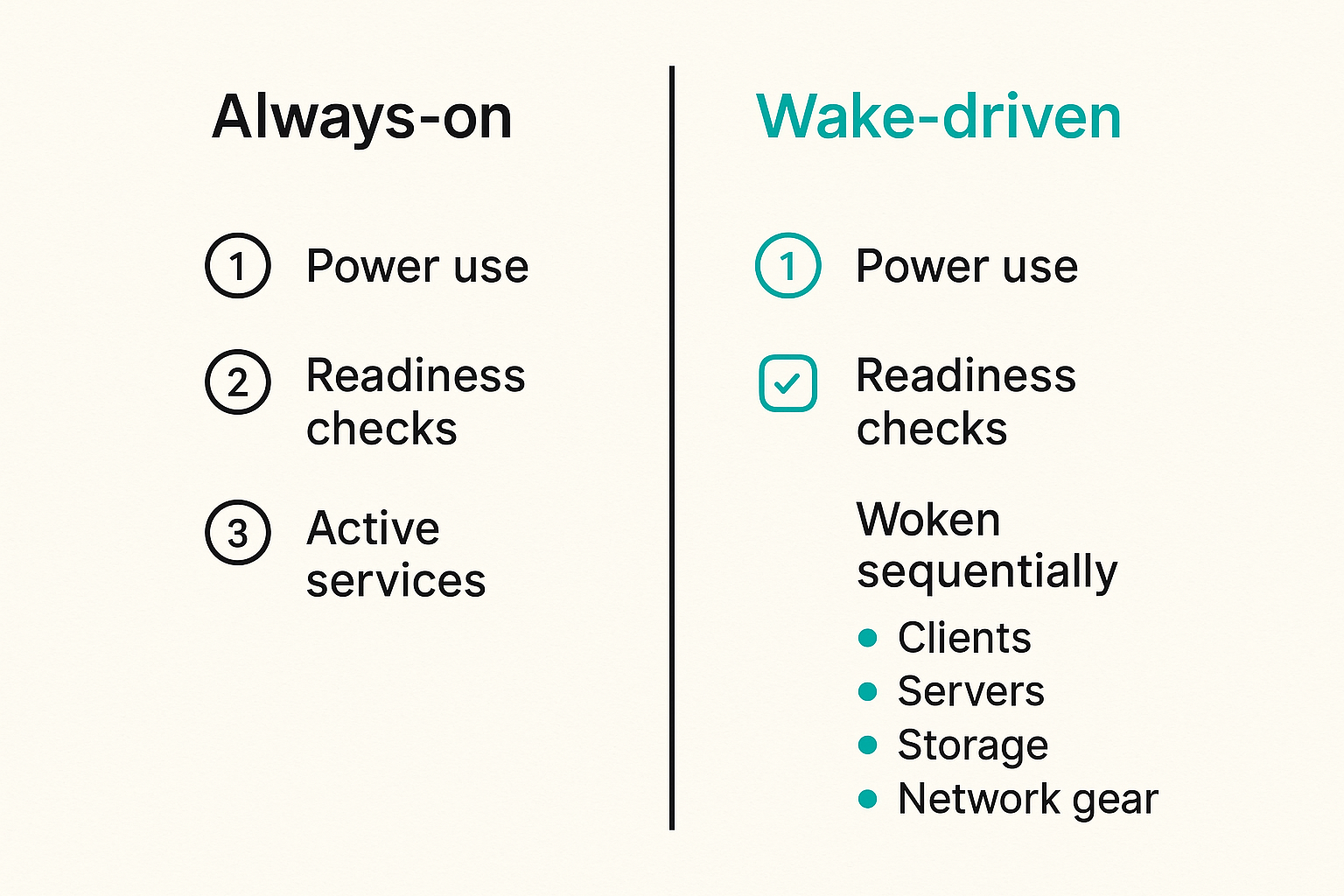
A home media stack has four classes of components, and each wakes differently.
Clients are TVs, streaming boxes, tablets, phones, and browsers. They create demand. Servers are mini PCs, home lab boxes, DVR apps, indexers, library managers, and torrent clients. Storage is the NAS, USB disk, or local SSD where media and metadata live. Network gear is the router, access point, switch, VPN gateway, and sometimes a tuner or IPTV proxy.
The practical question is not whether each device supports wake. The practical question is which component is allowed to wake which other component, and what proof it needs before proceeding.
For example, a TV app should not need admin rights to the NAS. It should request playback from a media service. The media service can decide whether storage must wake, whether the library is stale, and whether the request should wait, fail, or show a cached page.
The difference between asleep and unavailable
Users do not care whether a device is asleep, booting, offline, or blocked by a firewall. They see one thing: unavailable.
Operators need the distinction. An asleep NAS is expected. A NAS that woke but did not mount its media share is a fault. A media server that is healthy but cannot reach the guide database is a partial outage. A VPN route that blocks local discovery is a network design issue.
This is why wake tech needs visible state. At minimum, track:
- Last wake request time
- Last successful health check
- Last media scan
- Active stream count
- Active download or sync count
- Next scheduled job
- Last sleep or suspend reason
Always-on versus wake-driven media
| Area | Always-on stack | Wake-driven stack |
|---|---|---|
| Startup latency | Low | Medium unless pre-warmed |
| Power use | Higher | Lower |
| Failure visibility | Often hidden until something crashes | Exposed through wake and health states |
| Security surface | More services reachable for longer | Smaller active window if designed well |
| Complexity | Simple at first | Requires orchestration |
| Best fit | Heavy daily use, shared households | Mixed use, quiet homes, scheduled viewing |
Wake-driven media is not always better. If your household streams from the server all day, sleep automation may create more friction than value. But many cord cutters have predictable viewing windows and long idle periods. For them, wake tech is a reasonable operating model.
The reference architecture for wake tech in 2026
Separate the control plane from the media plane
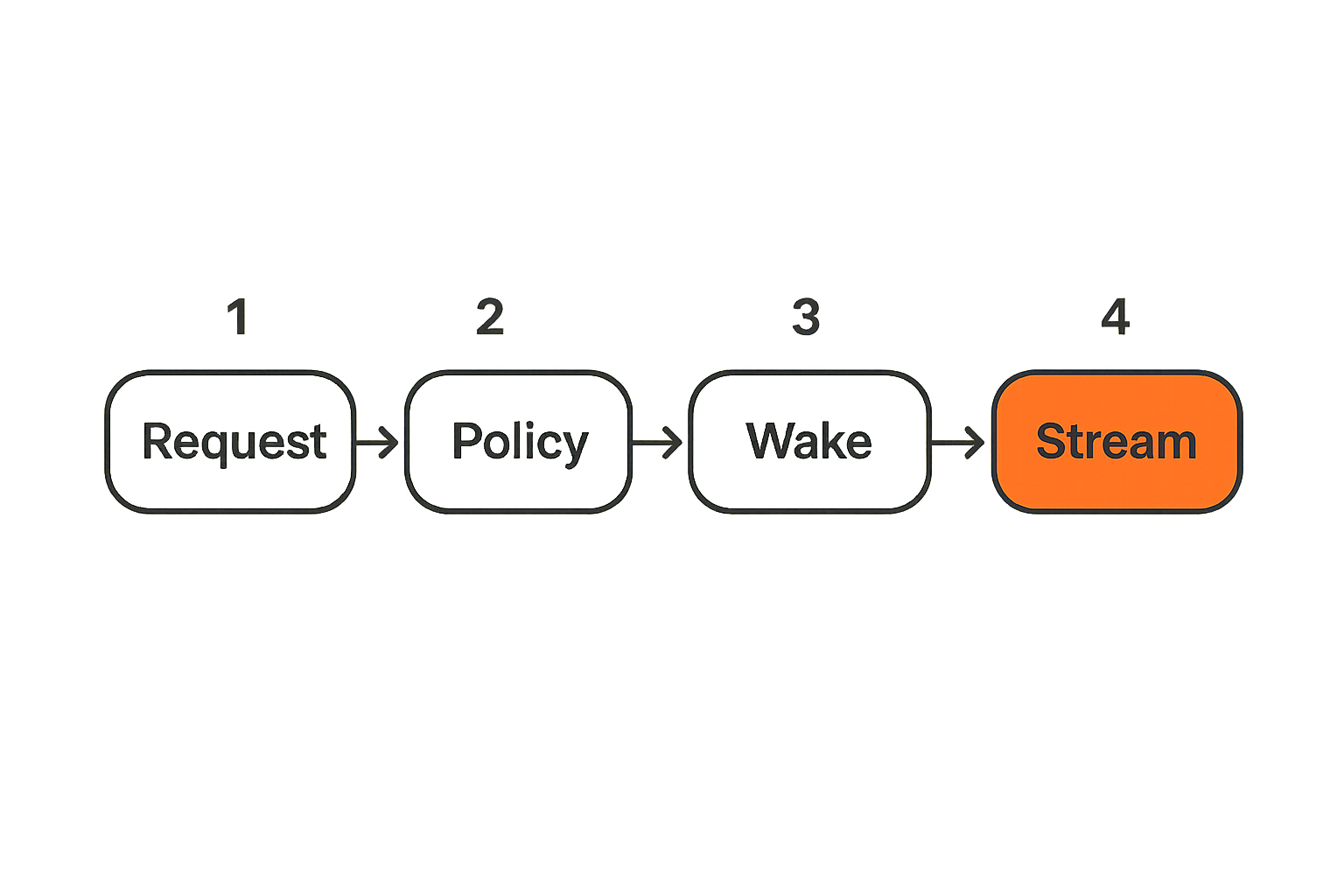
The clean pattern is to split the control plane from the media plane.
The control plane decides what should wake, when, and why. It can be a home automation server, a small always-on device, router scripts, a lightweight dashboard, or a scheduled job runner. It does not stream movies. It does not store the library. It sends wake requests, checks readiness, and coordinates tasks.
The media plane does the heavy work: streaming, transcoding, downloading lawful torrents, recording, indexing, scanning, and serving metadata.
That separation keeps the always-on footprint small. A low-power controller can stay available while the larger server sleeps. It also creates a safer permissions model. The controller needs limited wake and health-check access, not full access to every media file.
Use health checks before you show content
A wake packet is not a readiness signal. A scheduled power-on event is not a readiness signal. A ping reply is barely a readiness signal.
A proper health check should verify the dependency chain:
- Host responds on the network.
- Required ports are listening.
- Storage paths are mounted.
- Media database is reachable.
- IPTV proxy or tuner service responds.
- Torrent client API responds, if used.
- Recent jobs are not stuck.
Only then should the user interface offer a normal playback path. Before that, show a waking state with an honest progress message.
Practical rule: Do not show a playable item until the service that owns playback has passed its own health check.
Make wake requests idempotent
Idempotency means the same request can run more than once without creating duplicate side effects. Wake tech needs this because phones reconnect, apps retry, routers drop packets, and users press buttons twice.
A good wake request says: ensure media-server-1 is awake for purpose playback until at least 23:30. If the server is already waking, the request attaches to the existing state. If it is already healthy, the request returns success. If it fails, the result is recorded once.
A bad wake request says: send packet, start scan, refresh guide, restart app. Run that twice and you get race conditions.
Related reading from our network: teams building local automation face similar event and credential problems in Mac tools for AI agent builders, even though the media use case is different.
Trigger design: when should devices wake
User-initiated wake for the living room
Living room wake is the most visible flow. Someone opens an app, visits a local dashboard, or selects a library. The system should wake only the components needed for that action.
A practical flow looks like this:
- User opens the media entry point.
- Entry point checks cached status from the controller.
- If the server is asleep, the controller sends wake-on-LAN.
- The UI shows waking, not an empty library.
- Health checks verify app, storage, and metadata readiness.
- The UI switches to browse or playback.
- An idle timer starts after streams end.
The mistake teams make is letting every client send magic packets directly. That works until you have stale MAC addresses, VLAN boundaries, guest Wi-Fi, and no audit trail. Centralize the wake decision.
Scheduled wake for recordings and refresh jobs
Scheduled wake is for jobs that must happen before users arrive: guide refresh, playlist validation, library scan, recording window, backup, or legal torrent seeding window.
Do not schedule everything at the same minute. A NAS waking, disks spinning up, a VPN reconnecting, an EPG download starting, and a media scan running together can overload the slowest box. Stagger the sequence.
For IPTV and DVR-style workflows, wake the system early enough that guide and playlist checks finish before the show starts. For library workflows, scan after files finish moving, not while the download client is still writing.
Event-driven wake for library automation
Event-driven wake is useful, but it is also where systems get messy. A new file appears. A trusted RSS feed updates. A user adds a public-domain torrent. A webhook says a creator release is available. The system wakes the downloader or library server.
The practical rule is to filter events before wake, not after. Validate source, category, schedule, network state, and household quiet hours before bringing devices online.
Practical rule: Wake automation should be harder to trigger than manual playback, not easier.
Torrent and library workflows without always-on sprawl
Keep legal sourcing explicit
Torrent workflows should be designed around content you are allowed to download and share: Linux distributions, public-domain films, open media archives, creator-published files, internal datasets, and personal backups where permitted. Wake tech should not hide the sourcing decision.
Keep allowlists for trusted trackers, RSS feeds, folders, or manual approval queues. If you browse distributed content through DHT, keep the discovery step separate from the automation step; for example, use a manual review path when you browse DHT torrents instead of letting unknown results wake machines and enqueue downloads automatically.
This is not only about legality. It is about reliability. Unknown sources create bad metadata, incomplete files, malware risk, and support noise.
Stage downloads before the media server scans
A media server should not scan a file that is still being written. That sounds obvious, but many home stacks get it wrong.
Use a staging area:
- Downloader writes to incomplete.
- Completed files move to staging.
- Verification runs in staging.
- Naming and metadata rules run.
- Files move into library.
- Media server scan starts.
This avoids half-imported items and broken thumbnails. It also lets you wake only the downloader first, then storage, then the media server.
A useful way to think about it is a pipeline, not a folder. Each stage owns one decision. The wake controller coordinates the sequence.
Avoid waking the whole house for one file
Not every media action needs the full stack. If a user adds one legal torrent from a laptop, the NAS may not need to wake immediately if the downloader has local scratch space. If a phone checks whether a file exists, the metadata cache may be enough. If a nightly job only validates names, the transcoder can stay asleep.
Granular wake saves power and reduces failure blast radius. It also makes troubleshooting easier because fewer components change state per action.
IPTV and live TV workflows that do not miss the first minute
Refresh playlists before people start watching
IPTV failures often look like playback problems, but the root cause is stale state. The playlist changed. The token expired. The EPG is old. The channel proxy is still starting. The player opens and gets a bad stream URL.
For legal IPTV sources and licensed playlists, schedule refresh jobs before normal viewing windows. Validate the playlist, remove dead entries from the active view, and keep the last known good copy available. If you use a browser-first flow, a page that lets you stream live channels from your IPTV playlists should sit behind readiness checks, not pretend every channel is healthy at all times.
Warm the guide and channel proxy
The first minute matters. Users tolerate a server waking if the interface is honest. They do not tolerate clicking a live channel and missing the opening segment because the stack did not warm the guide.
Warm these pieces early:
- EPG cache
- Playlist parser
- Channel logo cache
- Proxy process
- DNS and VPN route, if used
- Player capability detection
This does not mean streaming every channel in advance. It means making the control and metadata path ready before the user asks for video.
Design for failure during channel start
Live TV needs a different failure path than on-demand media. If a movie fails, the user can retry. If a live channel fails, time is passing.
Design fast fallback behavior:
- Retry the same stream once with a short timeout.
- Try the last known alternate URL if your licensed source provides one.
- Show channel status clearly.
- Do not loop forever.
- Keep the guide usable even if playback fails.
What breaks in practice is tying the whole UI to one channel start. A failed stream should not freeze the app, block guide navigation, or restart the server.
Wake tech security and privacy controls
Do not expose wake controls to the public internet
Wake-on-LAN packets are usually local network tools. Trying to make them public creates avoidable risk. If you need remote access, use a VPN, trusted relay, or authenticated controller. Do not forward random UDP ports and hope obscurity protects the stack.
Keep wake permissions narrow. A phone may be allowed to request playback wake. It should not be allowed to restart services, change mount paths, or disable sleep policies. Admin actions belong behind stronger authentication.
Treat media notifications as metadata
Notifications reveal behavior. A message that says the living room server woke for a channel, a torrent finished, or a library scan completed may expose viewing habits, home occupancy, or device names.
If you send alerts to chat apps, push services, or shared groups, minimize detail. Prefer status classes over titles where possible: media server ready, guide refresh failed, storage unavailable. For adjacent privacy architecture, see our earlier guide to encrypted messaging streaming and apply the same metadata discipline to wake alerts.
Related reading from our network: end to end encryption messaging covers key and metadata tradeoffs that map well to private media notifications.
Segment the home media network
A flat home network is convenient until every device can poke every service. Segmenting does not have to be enterprise-heavy. Even basic separation helps:
- Main trusted LAN for servers and admin devices
- Client VLAN or Wi-Fi for TVs and streamers
- Guest network for visitors
- Optional lab network for experiments
- VPN path for remote access
Allow only the flows you need. A TV client can reach the media server. The controller can wake the server. The torrent client can reach approved sources. The guest network cannot trigger anything.
Practical rule: The device that displays media should not automatically have the power to administer the media stack.
Implementation workflow: build wake tech in layers
A practical seven-step rollout
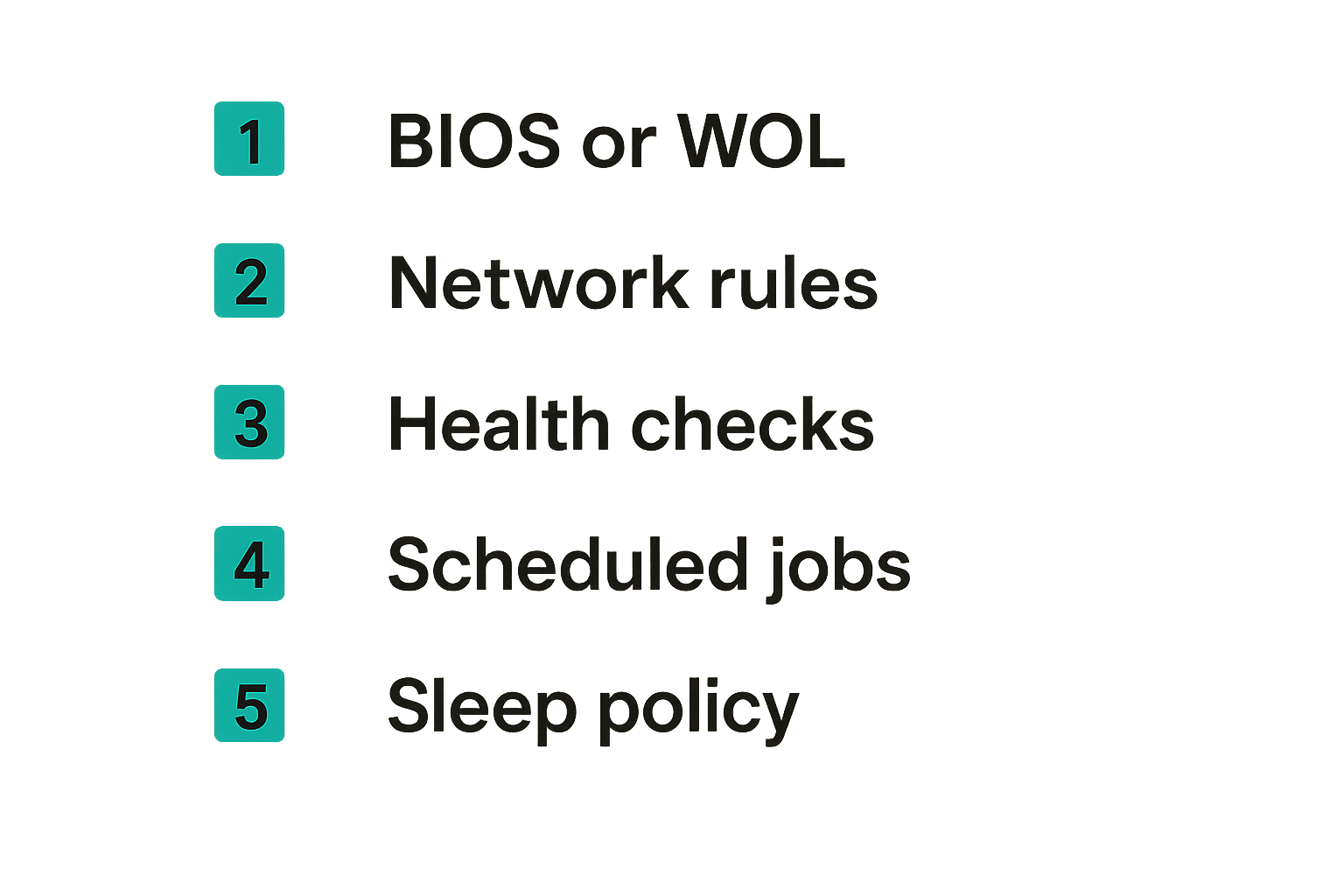
Do not build the clever version first. Build the observable version first.
- Inventory devices and dependencies. List MAC addresses, IPs, services, storage mounts, and owners.
- Enable one wake method per device. Start with wake-on-LAN for wired servers and scheduled RTC wake where needed.
- Add health checks. Verify apps, ports, storage, and metadata before user traffic.
- Create a small control plane. Use a home automation server, router script, or lightweight service as the decision point.
- Add one user flow. For example, wake media server from the living room dashboard.
- Add scheduled jobs. Guide refresh, library scan, backup, and legal torrent windows come after manual wake works.
- Add sleep policy. Only suspend after active streams, downloads, scans, and recordings are complete.
The order matters. If you automate sleep before you understand active work, you will interrupt users. If you automate downloads before you validate sources, you will create cleanup problems.
Example configuration pattern
The exact tooling varies, but the pattern should be readable. Keep wake targets, health checks, and sleep rules separate.
wake_targets:
  media_server:
    mac: aa:bb:cc:dd:ee:ff
    ip: 192.168.10.20
    wake_method: wol
    ready_checks:
      - tcp: 8096
      - path: /mnt/media
      - http: http://192.168.10.20:8096/health

policies:
  playback:
    target: media_server
    hold_minutes: 90
    require_checks: true

  guide_refresh:
    target: media_server
    schedule: 17:30
    hold_minutes: 45
    tasks:
      - refresh_playlist
      - refresh_epg
      - verify_channels

sleep_rules:
  media_server:
    allow_sleep_when:
      active_streams: 0
      active_downloads: 0
      active_scans: 0
    idle_minutes: 30
The value is not the syntax. The value is that the policy is explicit. You can explain why a machine woke and why it stayed awake.
Validation tests that catch real problems
Test the boring edges:
- Server asleep, user opens app.
- Server waking, user presses the button again.
- NAS wakes but mount fails.
- IPTV playlist refresh fails.
- Torrent job completes while media server is asleep.
- Power outage resets router lease.
- Phone moves from LAN to cellular.
- User starts playback during scheduled scan.
- Sleep timer fires during an active stream.
Related reading from our network: the workflow framing in software engineer jobs in 2026 is not about media, but the same ownership problem applies: if nobody owns the handoff, the workflow breaks.
What breaks in practice
Common failure modes
Most wake tech failures are not mysterious. They come from assumptions.
The first assumption is that Wi-Fi behaves like wired Ethernet. Many devices do not support reliable wake over Wi-Fi, and some routers do not forward broadcast packets across segments. Use wired connections for servers where possible.
The second assumption is that sleep is clean. Some USB disks do not remount correctly. Some apps start before network time sync. Some containers come up before storage. Add dependency checks instead of hoping boot order saves you.
The third assumption is that more automation means less work. Bad automation creates hidden state. A server wakes at night, fails a scan, sleeps again, and nobody knows why the library is stale.
What works
What works is boring and observable:
- One controller owns wake decisions.
- Every wake request has a reason.
- Every user-facing flow has a readiness check.
- Storage mounts are verified before scans.
- IPTV guides refresh before viewing windows.
- Legal torrent workflows use staging and review.
- Sleep is blocked by active streams and writes.
- Alerts are minimal, private, and useful.
A small always-on controller plus a wake-driven media server is often the best compromise. The controller stays quiet and low-power. The heavy box wakes only when needed.
What fails
What fails is cleverness without state:
- Every app sends its own magic packet.
- The TV client scans network shares directly.
- Unknown feeds trigger downloads automatically.
- Sleep timers ignore active jobs.
- Channel playback blocks the whole guide.
- Notifications leak titles and household behavior.
- Remote wake is exposed through weak port forwarding.
- Logs exist only on the machine that is asleep.
The practical question is not whether you can make the device wake. The practical question is whether the workflow remains understandable after three months of normal household use.
Where bittorrented.com fits
Use the browser as the low-friction control surface
A browser-based media entry point is useful because it reduces client sprawl. You still need proper ownership behind it, but users get one place to search, browse, or start a live workflow without installing a different control app on every screen.
For wake tech, that browser surface should do three things well: show whether the media stack is ready, route the user to the right workflow, and avoid pretending unavailable services are healthy. If the server is waking, say that. If the live playlist needs refresh, say that. If a source requires manual review, keep it manual.
Keep ownership clear between tools
bittorrented.com is for readers who want practical, up-to-date guidance on streaming services, torrents, IPTV, and home media tools. In a wake-driven architecture, it should sit in the workflow as a discovery and access surface, not as an excuse to remove ownership from the underlying stack.
Your controller owns wake. Your media server owns playback. Your storage owns persistence. Your torrent client owns legal, approved transfer jobs. Your IPTV workflow owns playlist and guide freshness. The browser should connect those flows cleanly.
That changes the conversation. Wake tech is no longer a random home lab trick. It becomes the thin operating layer that keeps a cord-cutting setup responsive, private, and manageable.
Try bittorrented.com
If your wake tech stack needs a cleaner entry point for streaming, torrents, IPTV, and home media workflows, Try bittorrented.com.