Doc streaming sounds simple until the stream fails five minutes into a long-form documentary, the IPTV channel guide is wrong, the torrent has no legal distribution rights, or the living room device refuses the codec your laptop played fine.
Teams think the problem is finding another app, index, playlist, or streaming page. The real problem is building a reliable media workflow: source selection, legal access, playback state, metadata, privacy, device support, and fallback behavior.
That changes the conversation. Doc streaming is not a definition problem. It is an architecture problem for cord cutters, IPTV viewers, torrent users, and home media hobbyists who want less friction and fewer sketchy shortcuts.
The practical question is: how do you stream documentaries and documentary-style media in 2026 without turning your setup into a pile of fragile links, broken playlists, duplicate files, and privacy risks?
Table of contents
- What doc streaming really means in 2026
- Doc streaming architecture: from discovery to playback
- Source strategy: paid, free, IPTV, and lawful torrents
- Playback workflow: why the UI is the last layer
- Metadata, search, and watch intent
- Privacy, safety, and network hygiene
- Automation and reliability for doc streaming
- IPTV and live documentary channels
- Storage, caching, and home media handoff
- Common failure modes in doc streaming setups
- Choosing a practical doc streaming stack for 2026
What doc streaming really means in 2026
More than a search box
A useful way to think about doc streaming is not as a category of sites. It is the path from intent to playback.
Someone wants to watch a documentary about history, science, music, politics, nature, crime, or a niche technical topic. They may start with a subscription service, a free ad-supported service, a public broadcaster, an IPTV playlist, a creator page, a legal torrent, or a home media server.
The mistake teams make is treating each of those as a separate world. In practice, the user just wants a trustworthy result that plays on the device in front of them, remembers progress, and does not create a support problem later.
That means doc streaming depends on boring layers:
- discovery and search
- source verification
- legal access rights
- metadata normalization
- playback compatibility
- network quality
- privacy controls
- progress tracking
- fallback options
Ignore those layers and the setup looks fine for a week. Then a playlist expires, a file transcodes badly, a device loses watch history, or a user clicks a result that should never have been presented.
Legal sources change the design
For torrent and IPTV users, the legal boundary matters. Torrents are a transport mechanism, not a permission slip. IPTV is a playlist format and delivery pattern, not proof that a channel is authorized. Doc streaming can include public-domain films, creator-distributed documentaries, open educational media, public broadcaster streams, licensed subscription catalogs, and legitimately provided live channels.
The architecture should make that distinction visible. Do not mix verified legal sources with random scraped listings and call it a library. That creates risk, degrades trust, and makes troubleshooting harder.
Practical rule: design doc streaming around rights and reliability first. Discovery speed is secondary if the result is unsafe, unlawful, or unstable.
Doc streaming architecture: from discovery to playback
The pipeline view
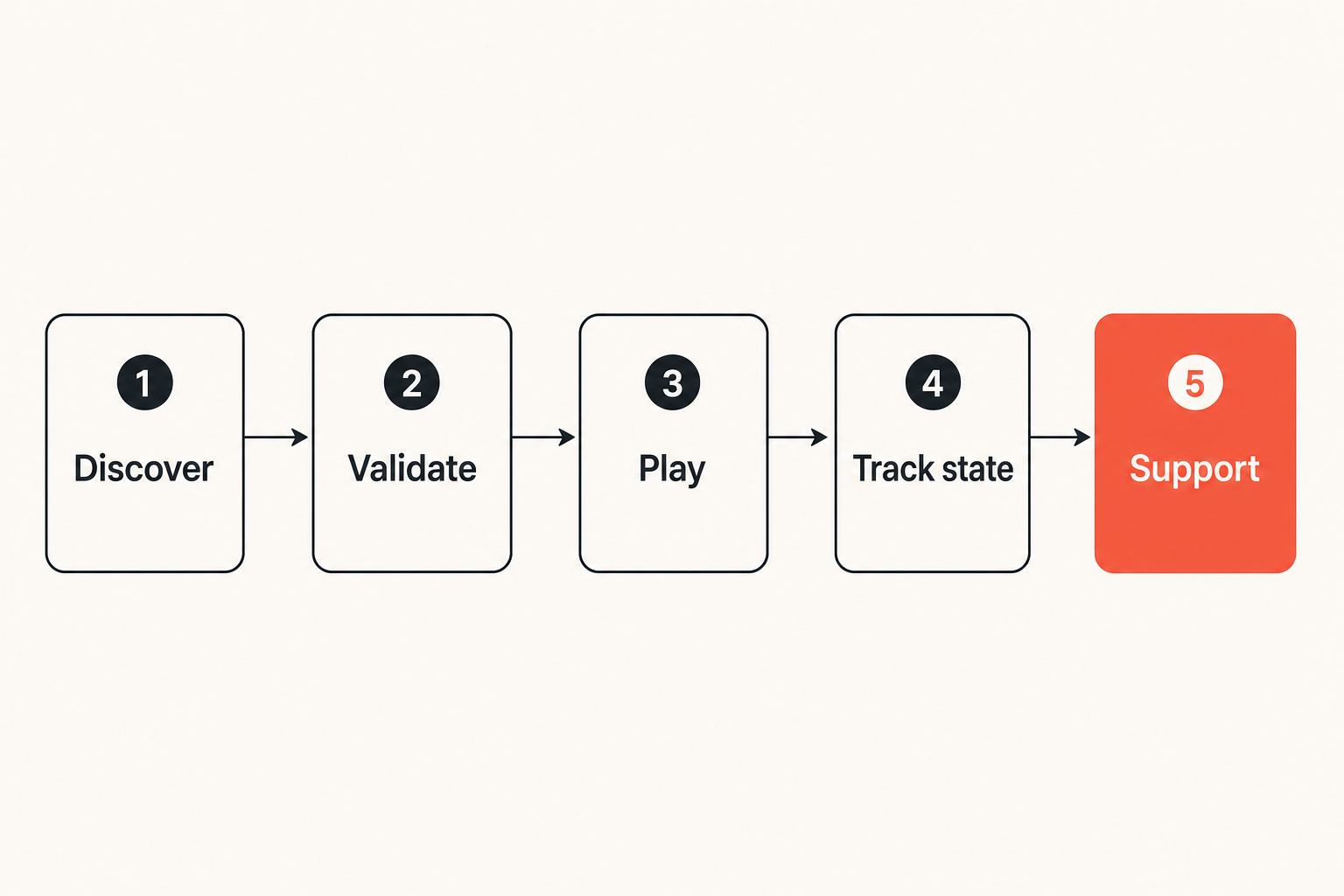
A doc streaming setup has a pipeline whether you admit it or not. The only question is whether it is explicit enough to debug.
The basic pipeline looks like this:
- User expresses intent: title, topic, channel, creator, collection, or live event.
- System searches eligible sources: subscriptions, free services, IPTV playlists, local library, lawful torrents, public archives.
- Source is validated: legal availability, stream health, metadata confidence, device compatibility.
- Playback starts: direct play, adaptive stream, remote stream, or local server playback.
- State is tracked: progress, favorites, failures, subtitles, quality, and device behavior.
- Support path exists: retry, fallback source, alternate device, cache, or remove broken entry.
The practical question is not whether you can find a link. The practical question is whether each step can fail safely.
Related reading from our network: Streaming SaaS architecture has similar ingest, delivery, and state problems, even when the audience and licensing model are different.
The minimum viable stack
For a home user or small media setup, the minimum viable stack is not huge. It needs to be intentional.
| Layer | What it does | Bad implementation | Better implementation |
|---|---|---|---|
| Source list | Defines where content can come from | Random bookmarks and pasted playlists | Curated services, verified feeds, lawful torrents |
| Metadata | Makes results searchable | Raw filenames and inconsistent titles | Normalized title, year, source, language, runtime |
| Player | Renders the media | One app expected to handle everything | Device-tested player with fallback path |
| State | Tracks progress and failures | Nothing remembered across devices | Watch state, resume point, error notes |
| Privacy | Controls exposure | Browser tabs, unknown scripts, public IP leakage | Separate profiles, DNS filtering, VPN where appropriate |
| Support | Fixes broken sessions | Restart everything | Layered troubleshooting checklist |
This is why the UI is not the system. A clean page can hide a messy backend. A plain interface can sit on top of a reliable workflow. For doc streaming, reliability comes from the layers underneath.
Source strategy: paid, free, IPTV, and lawful torrents
Match the source to the job
Not every source belongs in the same role. Subscription catalogs are good for licensed, mainstream documentaries. Public broadcasters are often good for current affairs, history, nature, and local programming. Free ad-supported services can be useful for older catalog material. Creator platforms are often the best source for independent documentaries. Lawful torrents can work for public-domain, open-license, or creator-distributed files. IPTV can help when the content is live or channel-based.
The mistake teams make is using one source type for everything. That creates bad incentives. If a subscription catalog does not have a title, users go hunting in unsafe places. If an IPTV playlist is treated like a stable VOD library, people get frustrated when channels disappear. If torrents are treated as anonymous content vending machines, legal and security problems follow.
A better approach is to assign each source a job:
- Use subscription services for licensed catalog access.
- Use broadcaster apps and sites for official episodes and regional programming.
- Use FAST services for legal ad-supported documentaries.
- Use creator pages for independent releases.
- Use lawful torrents only when distribution rights are clear.
- Use IPTV for live channels, not guaranteed archival access.
Avoid the gray-zone shortcut
Gray-zone streaming looks efficient until it becomes your default operating model. Then you inherit all the worst problems: takedowns, malware risk, misleading titles, broken subtitles, suspicious redirects, missing provenance, and no support path.
Practical rule: if you cannot explain why a source is authorized, do not automate around it.
For doc streaming, this rule is especially important because documentary content often overlaps with news, public affairs, archives, and independent releases. Some material is freely distributed by design. Some is region-limited. Some is licensed to a platform. Some is uploaded without permission. The transport method does not answer that question.
Playback workflow: why the UI is the last layer
State is the product
Users remember whether the documentary resumed correctly. They remember whether subtitles stayed in sync. They remember whether the TV app crashed. They rarely care which library, codec, proxy, or playlist parser caused the problem.
That means playback state is part of the product, even in a hobbyist setup.
A serious doc streaming workflow tracks:
- current position
- completed status
- last working source
- subtitle language and offset
- failed stream attempts
- preferred device
- quality selection
- whether playback required transcoding
This does not need to be enterprise software. It can be a media server, a player database, a watchlist app, or a simple structured note. The key is that the state exists somewhere other than memory.
Devices create edge cases
The same documentary may behave differently on a laptop, phone, smart TV, streaming stick, tablet, and browser. Codecs, subtitle formats, HDR handling, audio channels, and network buffering all vary.
What breaks in practice is assuming that successful playback on one device proves the stream is good. It proves only that one path worked once.
For a household, test the devices that matter:
- main TV
- travel laptop
- phone on cellular
- tablet on Wi-Fi
- secondary room streaming stick
If a source only works on one device through a fragile browser flow, do not classify it as reliable. It may still be usable, but it should not be treated as a primary path.
Metadata, search, and watch intent
Normalize titles before you automate
Documentary titles are messy. Some include subtitles. Some reuse the same title across years. Some are part of a series. Some are uploaded with festival names, episode numbers, language markers, or broadcaster tags.
If you automate before normalizing metadata, you create duplicate entries and bad search results.
A practical metadata record should include:
title: The Example Documentary
year: 2024
type: feature-documentary
source: public-broadcaster
rights_status: official-stream
language: en
subtitles:
  - en
  - es
runtime_minutes: 92
playback_status: verified
last_checked: 2026-08-07
You do not need this exact schema. You need the habit behind it: separate the title from the source, and separate availability from metadata confidence.
Related reading from our network: AI answer systems face a similar normalization problem when pages need to be discovered and cited, which is adjacent to how media libraries need clean entities instead of loose strings.
Build filters around real decisions
Filters should match decisions users actually make. Genre alone is not enough.
Better filters include:
- official source only
- available on devices I use
- has subtitles
- less than 60 minutes
- feature length
- series episode
- live now
- local cache available
- public-domain or open-license
- language
- region availability
The goal is not to build a museum catalog. The goal is to reduce the number of bad clicks. A smaller set of trustworthy results beats a huge list of uncertain ones.
Privacy, safety, and network hygiene
Separate privacy from anonymity theater
Privacy-aware doc streaming is not about pretending you are invisible. It is about reducing unnecessary exposure and avoiding unsafe paths.
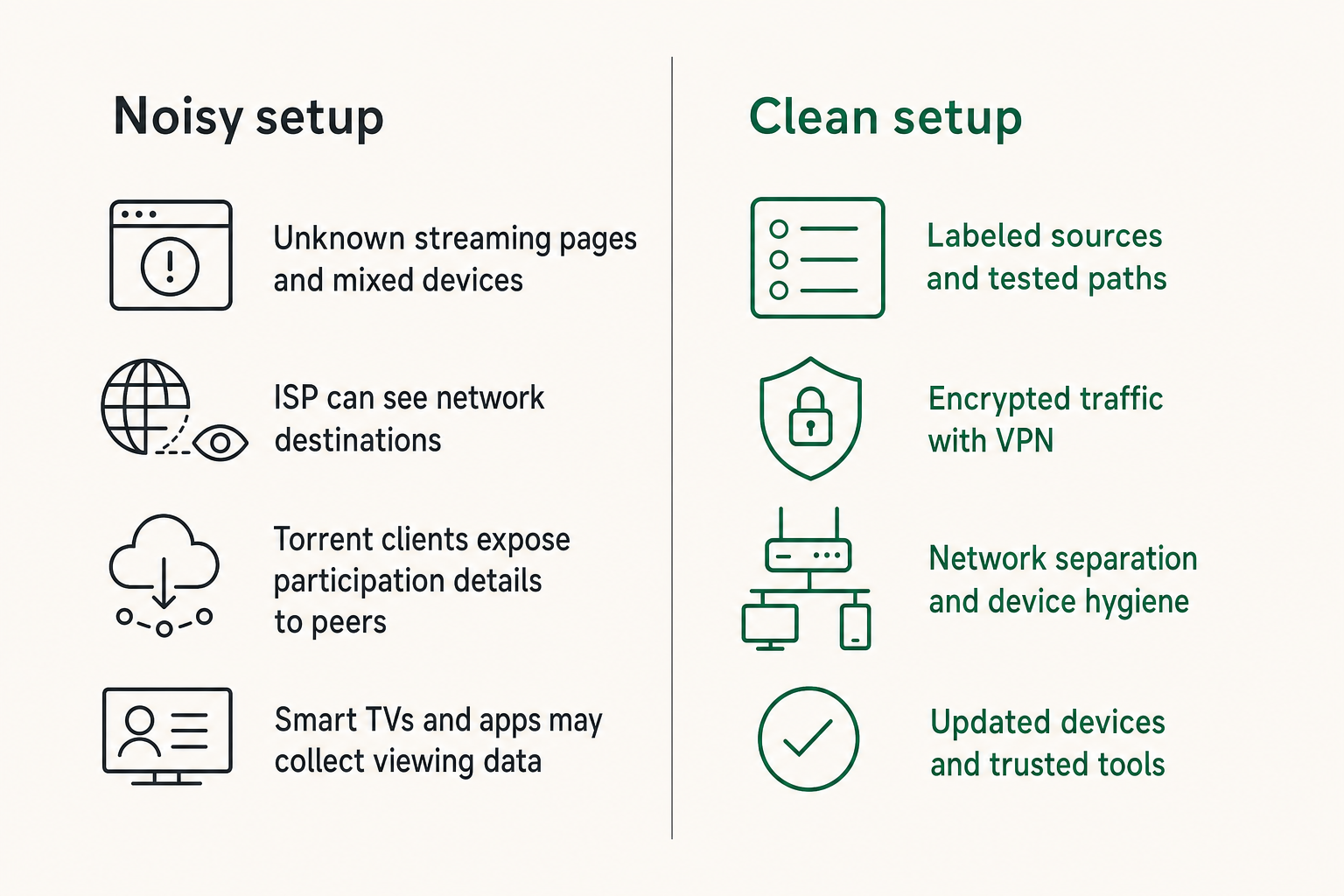
There are different concerns:
- Your ISP can see network destinations unless traffic is encrypted or routed through a VPN.
- Unknown streaming pages can run scripts, fingerprint browsers, or push malicious ads.
- Some IPTV lists include unstable or unauthorized endpoints.
- Torrent clients expose participation details to peers unless configured carefully.
- Smart TVs and apps may collect viewing data under their own policies.
These are separate problems. A VPN does not make a malicious site safe. A private browser window does not legalize a source. DNS filtering does not fix bad metadata. Good hygiene is layered.
Related reading from our network: OSINT workflows deal with similar provenance, permission, and audit tradeoffs, even though the use case is intelligence rather than home media.
Practical network controls
For a home setup, start with simple controls before chasing exotic tooling.
- Keep streaming devices and admin laptops updated.
- Use reputable DNS filtering if you frequently research media sources.
- Separate guest or test devices from your main personal devices where possible.
- Avoid installing unknown APKs, browser extensions, or player builds.
- Use a VPN where it fits your privacy model and local law.
- Do not enter subscription credentials into third-party sites.
- Disable UPnP if you do not need automatic port exposure.
- Review which media services are allowed to index local folders.
Practical rule: privacy controls should make normal viewing safer without forcing users into weird workarounds. If the control is too annoying, people bypass it.
Automation and reliability for doc streaming
A workflow you can actually maintain
Automation is useful only if it reduces repeat work without hiding risk. In doc streaming, automation should help with checking, organizing, and routing. It should not blindly ingest every result from the open web.
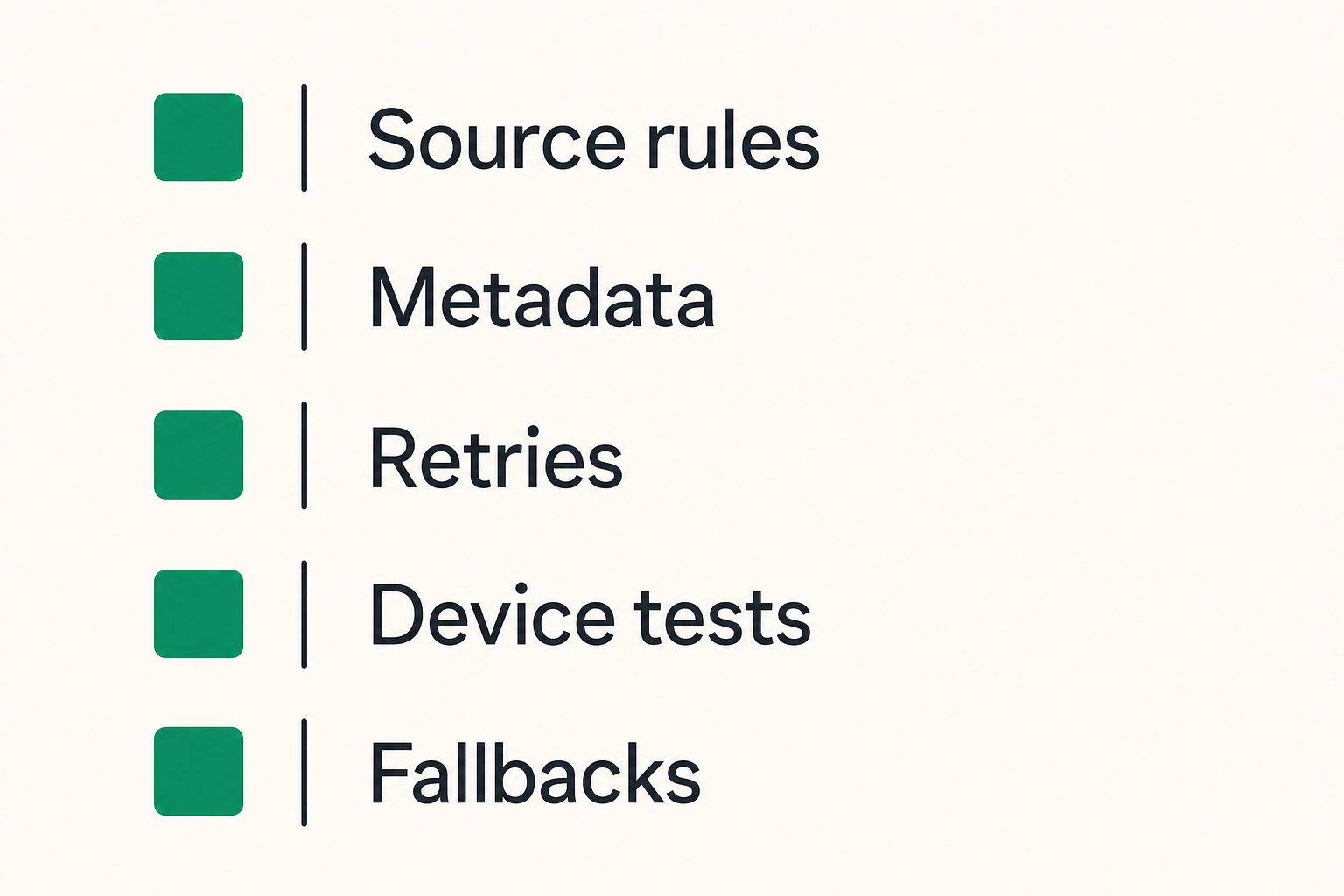
A maintainable workflow looks like this:
- Define allowed source categories: subscriptions, official broadcaster feeds, approved IPTV playlists, local files, and lawful torrent sources.
- Normalize metadata before adding an item to the main library.
- Validate playback on at least one primary device.
- Record failure reason if playback fails: source gone, codec issue, region restriction, subtitle problem, or network timeout.
- Prefer direct official playback when available.
- Cache locally only when rights and storage policy allow it.
- Re-check unstable sources on a schedule.
- Remove broken or unauthorized entries instead of burying them.
That sequence sounds conservative. It is also what prevents the library from turning into an abandoned link dump.
What works and what fails
What works:
- curated source lists
- explicit rights notes
- periodic playlist validation
- metadata cleanup before import
- device compatibility testing
- simple fallback paths
- logs for repeated failures
What fails:
- scraping everything and sorting it later
- treating IPTV as permanent VOD
- trusting file names as metadata
- using one device as the only test
- ignoring subtitle and audio formats
- mixing legal and unknown sources in the same view
- automating downloads without rights checks
The practical question is whether the workflow can be explained to another person. If only one hobbyist in the house knows why something works, the system is fragile.
IPTV and live documentary channels
Treat playlists as unstable inputs
IPTV can be useful for live documentary channels, public broadcasters, niche educational streams, and time-based programming. It can also be a mess. Playlists change, channel names drift, logos break, EPG data goes stale, and streams disappear.
If you use IPTV for doc streaming, treat playlists as inputs that must be validated, not as a library of permanent assets. The same applies to legal free playlists and paid providers. Stability still needs monitoring.
For readers who manage channel-based viewing, the live TV playlist workflow is most useful when you separate channel discovery from playback verification.
A practical IPTV checklist:
- Keep playlists labeled by provider and date.
- Remove duplicate channels instead of leaving clutter.
- Track which channels actually play.
- Validate guide data separately from stream availability.
- Keep backup sources for important live events.
- Do not combine unknown playlists with trusted ones without labels.
Guide data and catch-up expectations
Guide data creates expectations. If the guide says a documentary starts at 8:00 and the channel plays something else, the user blames the setup. If catch-up is listed but unavailable, the user blames the setup. If the channel name is wrong, search becomes unreliable.
This is why IPTV needs its own state:
- playlist source
- last validation time
- channel availability
- EPG source
- catch-up support
- region notes
- device compatibility
The mistake teams make is thinking an M3U file is the whole system. It is not. It is a routing table with varying quality.
Storage, caching, and home media handoff
When local caching helps
Local caching helps when the source is legal to store, the stream is unreliable, the household has repeated viewing needs, or the network is inconsistent. It does not help when rights are unclear or when the real problem is bad metadata.
For lawful torrents, public-domain collections, open educational media, and creator-distributed files, local storage can make doc streaming smoother. It also moves the problem into home media operations: disk health, naming, backups, transcoding, permissions, and remote access.
If your setup depends on machines waking for playback, the prior guide on wake tech for torrent, IPTV, and home media architecture is a useful companion because availability often fails before playback even begins.
Naming and retention rules
Naming rules are boring until search breaks. Keep them boring.
A simple pattern:
Documentaries/
  The Example Documentary (2024)/
    The Example Documentary (2024) - 1080p - official-source.mkv
    metadata.yml
    subtitles/
      en.srt
Retention rules matter too. Not everything deserves permanent storage. A good rule set might be:
- Keep public-domain and open-license titles if they are useful.
- Keep creator-distributed files according to the creator's terms.
- Do not cache streams where storage is not allowed.
- Delete failed partial downloads.
- Archive metadata separately from large files.
- Review rarely watched files before buying more storage.
Storage is not free just because disks are cheap. Every cached file creates maintenance work.
Common failure modes in doc streaming setups
What breaks in practice
Bad doc streaming systems usually fail in predictable ways.
The first failure is source rot. A bookmarked page, IPTV endpoint, or stream URL stops working. Nobody knows when it failed because nobody checks until movie night.
The second failure is metadata drift. The same title appears three times with different years, wrong artwork, or mismatched subtitles. Search results look full but trust drops.
The third failure is device mismatch. The stream plays on a desktop but not on the TV. Or subtitles render on one app but not another. Or audio is stereo on one device and silent on another.
The fourth failure is privacy leakage. Users chase a title through random sites, install something unnecessary, or expose a local server because remote access was configured in a hurry.
The fifth failure is ownership. Nobody knows whether the problem belongs to the playlist, the player, the router, the source, the media server, or the device.
Troubleshooting by layer
Troubleshoot in layers, not guesses.
| Symptom | Check first | Then check | Do not start with |
|---|---|---|---|
| Stream will not start | Source availability | DNS, VPN, region | Reinstalling every app |
| Plays on laptop, not TV | Codec and container | Subtitles, audio track | Buying a new router |
| IPTV channel wrong | EPG mapping | Playlist version | Blaming the player |
| Search duplicates | Metadata title and year | Folder naming | Deleting random files |
| Buffering | Local Wi-Fi and device | Source bitrate | Changing all privacy settings |
| Missing progress | Player profile | Server sync | Rebuilding the library |
Practical rule: when doc streaming fails, identify the layer before changing the tool. Tool swapping hides root causes.
A small log helps. It can be a spreadsheet or a note with fields like date, title, source, device, failure, and fix. The point is not bureaucracy. The point is avoiding the same investigation three times.
Choosing a practical doc streaming stack for 2026
Decision checklist
Choose tools based on the workflow you actually run.
If you mostly use subscription services, optimize discovery and watchlists. If you use IPTV, optimize playlist validation and guide data. If you maintain a home media library, optimize metadata, naming, backups, and device playback. If you use lawful torrents, optimize source verification, storage policy, and client safety.
A practical 2026 stack should answer these questions:
- Which sources are allowed?
- Which sources are official but region-limited?
- Which devices must work?
- Where is watch progress stored?
- How are subtitles handled?
- How are IPTV playlists validated?
- What gets cached locally?
- What is never cached?
- Who fixes broken entries?
- How are privacy controls applied without breaking normal viewing?
That changes the conversation from app collecting to workflow design.
When bittorrented.com fits
bittorrented.com is useful for readers who live at the intersection of streaming services, torrents, IPTV, and home media tools. The product fit is not hype. It is architectural: people need a clearer way to think about legal discovery, live channels, torrents as a transport, privacy-aware viewing, and practical media workflows.
Use it as a research and orientation layer, not as an excuse to ignore source rights or device testing. The best doc streaming setup still depends on your subscriptions, region, equipment, household habits, and legal access to the content.
The useful pattern is simple: discover carefully, verify sources, play on tested devices, track state, and keep the setup understandable.
Try bittorrented.com
bittorrented.com offers practical, up-to-date guidance on streaming services, torrents, IPTV, and home media tools for readers who want safer, cleaner doc streaming workflows.