A lot of home media setups fail before anyone watches anything. The app opens, the playlist imports, the torrent client runs, and then the real issues show up: buffering, broken metadata, duplicate files, bad subtitles, dead IPTV channels, confusing search results, and no clear way to tell what is legal, safe, or worth keeping.
That is where first tech matters. Not as a gadget category, and not as a vague “best apps” list. First tech is the first layer of decisions that determines whether your streaming, torrent, IPTV, and home media workflow is stable or constantly patched together.
Teams think the problem is choosing the right app. The real problem is designing the right operating model: where media comes from, how it is verified, how it is played, how privacy is handled, how failures are noticed, and who fixes what.
For cord cutters, torrent users, IPTV viewers, and media tech hobbyists in 2026, that changes the conversation. The practical question is not “what should I install?” It is “what should my setup make easy, safe, legal, and repeatable?”
Table of contents
- Why first tech is a workflow decision
- The first tech stack for a legal media setup
- Map sources before you map apps
- Build the playback path before the library
- Privacy, safety, and network boundaries
- IPTV and torrent workflows need different control loops
- Automation that helps instead of hiding failures
- Failure modes: what breaks in practice
- Implementation sequence for first tech in 2026
- Where bittorrented.com fits
Why first tech is a workflow decision
First tech sounds like a buying decision. In home media, it is closer to a systems decision. You are deciding what gets to be the starting point for everything else: source discovery, playback, storage, metadata, network access, privacy, support, and recovery.
The mistake teams make is starting with the most visible surface. For a media setup, that usually means the TV app, the IPTV player, the torrent client, or the media server dashboard. Those matter, but they sit downstream from more important decisions.
The app is not the architecture
A useful way to think about it is this: every home media workflow has four states.
- Discovery: finding legal streams, public-domain torrents, licensed IPTV channels, or your own local files.
- Acquisition or access: downloading, mounting, streaming, or indexing the content.
- Playback: getting the content to the screen with acceptable quality and control.
- Maintenance: updating playlists, removing broken items, fixing metadata, handling storage, and keeping the network safe.
If your first tech only solves one of those states, the rest becomes manual glue. That is why setups that look simple on day one often become fragile by month three.
Practical rule: choose your first tech based on the state it controls, not the interface it shows.
Define the job before the tool
Before choosing tools, write down the job. For most readers here, the job is not “watch everything for free.” That is both legally risky and operationally sloppy. A better job statement is:
- watch licensed streaming services without juggling unnecessary devices;
- manage personal media and backups cleanly;
- use legal torrents such as Linux ISOs, public-domain media, independent releases, and open archives;
- organize IPTV playlists you are authorized to use;
- keep privacy, safety, and household usability intact.
That changes the conversation. The first tech is whatever makes that workflow reliable without pretending the legal, privacy, and support issues do not exist.
The first tech stack for a legal media setup
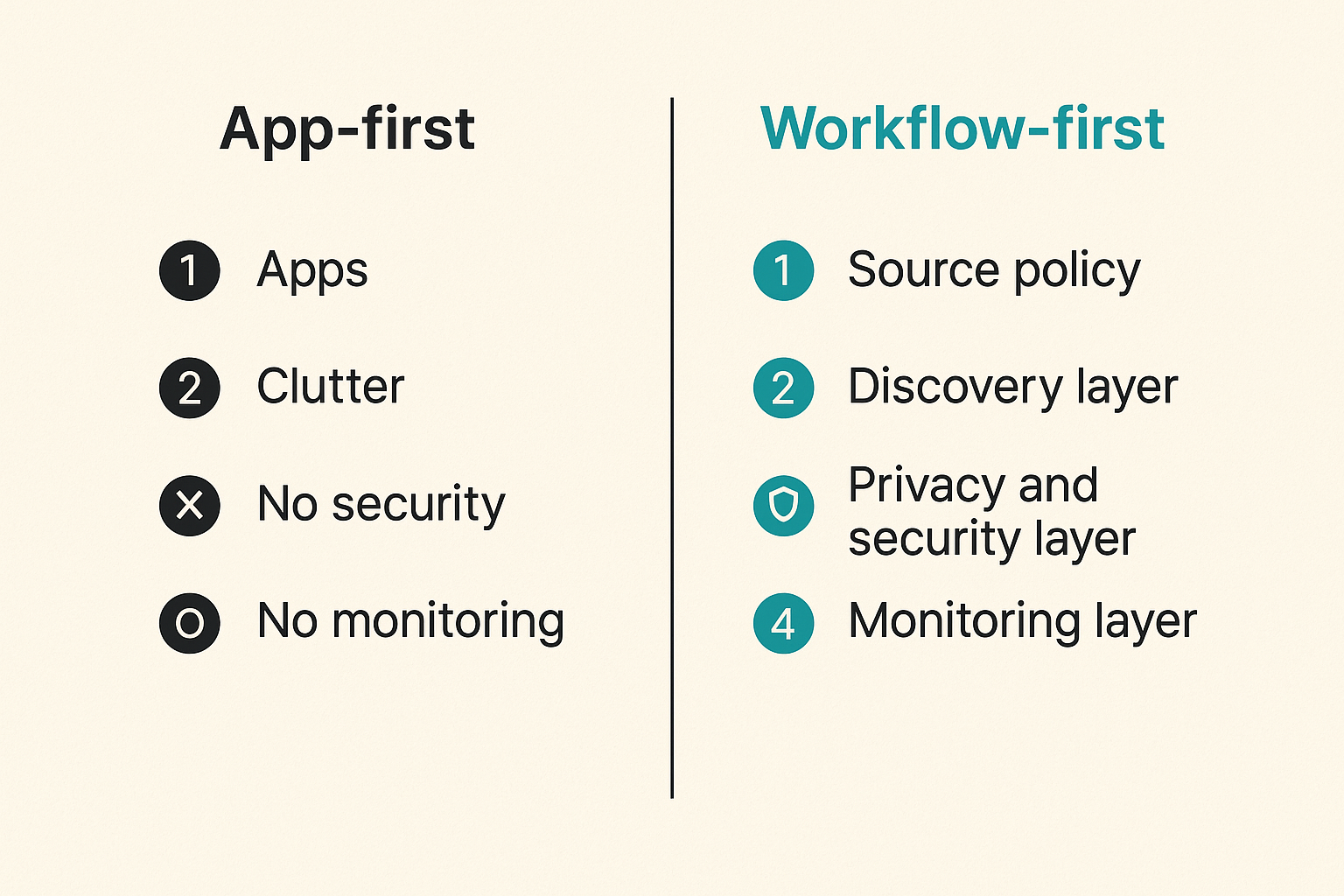
A practical first tech stack has layers. You can use different tools in each layer, but you should know what each layer is responsible for. Otherwise every problem looks like an app problem, even when it is a source, network, storage, or metadata problem.
Core layers to choose first
Start with these layers in this order:
- Source policy: what sources are allowed, blocked, or treated as untrusted.
- Discovery layer: how you find streams, public torrents, playlists, and local media.
- Download or access layer: torrent client, IPTV player, streaming app, file share, or media server.
- Storage layer: local disk, NAS, cloud backup, removable drive, or no storage for live streams.
- Playback layer: TV, browser, mobile app, media box, casting device, or dedicated player.
- Privacy and security layer: network segmentation, VPN where appropriate, DNS filtering, device permissions, and update discipline.
- Monitoring layer: logs, alerts, playlist checks, failed downloads, disk usage, and playback errors.
The order matters. If you pick a storage layout before deciding whether you are mostly streaming, archiving, or time-shifting your own recordings where legal, you will overbuild or underbuild. If you pick a player before understanding codecs and subtitles, you will blame the app for device limitations.
A simple comparison of setup styles
There is no universal best setup. The right first tech depends on the operating model.
| Setup style | Best fit | What works | What fails |
|---|---|---|---|
| Streaming-first | Cord cutters using licensed apps | Low maintenance, familiar UI, simple billing | Fragmented search, app switching, limited local control |
| IPTV-first | Viewers with authorized playlists | Live channel workflow, guide-style browsing | Broken channels, playlist drift, poor provider support |
| Torrent-assisted | Legal torrents and public archives | Strong for large files and resilient distribution | Requires source verification and storage management |
| Media-server-first | Personal libraries and backups | Central control, metadata, multi-device playback | More admin work, transcoding and storage complexity |
| Hybrid | Hobbyists combining several sources | Flexible and resilient | Easy to make messy without rules |
The practical answer for many users is hybrid, but hybrid only works when the boundaries are explicit. Use legal sources, label them, isolate risky experiments, and do not let one broken workflow contaminate the rest.
Related reading from our network: teams building local coordination systems face similar “first layer” tradeoffs, and this piece on coupon codes for local networks is a useful adjacent example of why infrastructure decisions matter more than the visible token or code.
Map sources before you map apps
Source mapping is the boring step that prevents most of the annoying problems. If you do not know where media comes from, you cannot make good decisions about trust, legality, storage, or playback.
Separate licensed streams, public torrents, and personal media
Do not dump everything into one mental bucket called “content.” Split sources into practical categories:
- Licensed subscriptions: Netflix-style services, sports packages, paid channels, rentals, purchases.
- Authorized IPTV playlists: provider-supplied playlists, workplace or campus streams, public broadcasters, legally distributed channels.
- Legal torrents: open-source software, public-domain films, independent releases, datasets, archives, and content you have permission to distribute.
- Personal media: home videos, ripped discs where allowed by your jurisdiction, recordings, backups, and owned files.
- Unknown or untrusted sources: anything you cannot verify, anything with suspicious packaging, and anything that asks you to disable basic protections.
What breaks in practice is not only copyright risk. Untrusted sources also create malware risk, mislabeled files, poisoned metadata, fake releases, and support chaos. If you cannot explain why a source is allowed in your setup, do not automate around it.
Practical rule: never automate ingestion from a source you would not be comfortable reviewing manually.
Search needs context, not just results
Search is where many setups get sloppy. A search box that returns everything can feel powerful, but it can also blur legal and trust boundaries.
If you are exploring torrents, make sure the workflow distinguishes legal public material from unknown uploads. A discovery tool should help you filter, inspect, and decide. For example, browsing DHT activity can be useful for understanding swarm behavior and availability, but it should be handled with source awareness; on BitTorrented, you can explore DHT torrent discovery as a discovery layer rather than treating every result as something to download.
For adjacent privacy thinking, Related reading from our network: coupon codes for encrypted messaging apps covers a different niche, but the same lesson applies here: convenience features can leak more than users expect if the trust model is not clear.
Build the playback path before the library
A library is only useful if playback works. Many users build an impressive folder structure, import thousands of items, and then discover that half the files stutter on the living-room TV.
Playback is a chain, not a button
Playback includes:
- source availability;
- network throughput;
- codec support;
- container support;
- subtitle rendering;
- audio format compatibility;
- remote-control behavior;
- resume state;
- user profiles;
- device updates.
The mistake teams make is testing playback on a powerful laptop and assuming the TV stick will behave the same way. It may not. A laptop can decode formats that a low-cost streaming device cannot. A browser may handle subtitles differently from a native TV app. A Wi-Fi mesh may look fast in a speed test and still struggle with high-bitrate local playback through one bad hop.
Transcoding, subtitles, and device limits
Transcoding is useful, but it is not magic. It moves the problem from the playback device to the server. That means CPU, GPU, heat, power, and configuration matter.
A practical test matrix looks like this:
- one low-bitrate file;
- one high-bitrate file;
- one file with embedded subtitles;
- one file with external subtitles;
- one multi-channel audio file;
- one IPTV channel during peak viewing time;
- one stream over Wi-Fi and one over wired Ethernet.
Run those tests before expanding the library. The goal is not perfection. The goal is knowing where the weak link is.
Privacy, safety, and network boundaries
Privacy in home media is not just “use a VPN.” Sometimes a VPN is appropriate. Sometimes it breaks streaming apps, hides useful diagnostics, or creates a false sense of safety. The better first tech decision is network boundary design.
Do not mix every device into one trust zone
A home media network often includes old TVs, cheap Android boxes, NAS devices, laptops, phones, game consoles, smart speakers, and experimental media tools. Treating all of them as equally trusted is lazy architecture.
Useful boundaries include:
- a main network for personal devices;
- an IoT or media-device network for TVs and boxes;
- a guest network for visitors;
- a restricted lab network for experiments;
- limited admin access to NAS and media servers;
- strong passwords and updates on anything exposing a dashboard.
Practical rule: if a device cannot receive timely updates, do not give it broad access to your personal files.
Private alerts beat public noise
Notifications are part of the workflow. You may want alerts for completed downloads, failed playlist refreshes, storage warnings, server health, or suspicious access attempts. Do not send sensitive media activity to random public channels or overly broad group chats.
Use private, minimal alerts. Send the event type and the required action, not a full list of filenames or private viewing habits. If you are designing household notifications, the same architecture applies as any privacy-aware messaging workflow: limit audience, reduce detail, and retain only what you need. For a deeper adjacent pattern, our prior guide on encrypted messaging streaming privacy architecture walks through private alerts, bots, and notification boundaries for media workflows.
IPTV and torrent workflows need different control loops
IPTV and torrents often sit next to each other in cord-cutter conversations, but operationally they are different systems. Treating them the same is how people end up with unreliable playback and unclear expectations.
IPTV is availability management
IPTV is about live access. The channel either loads now or it does not. The guide is current or it is not. The stream is authorized and stable or it creates support pain.
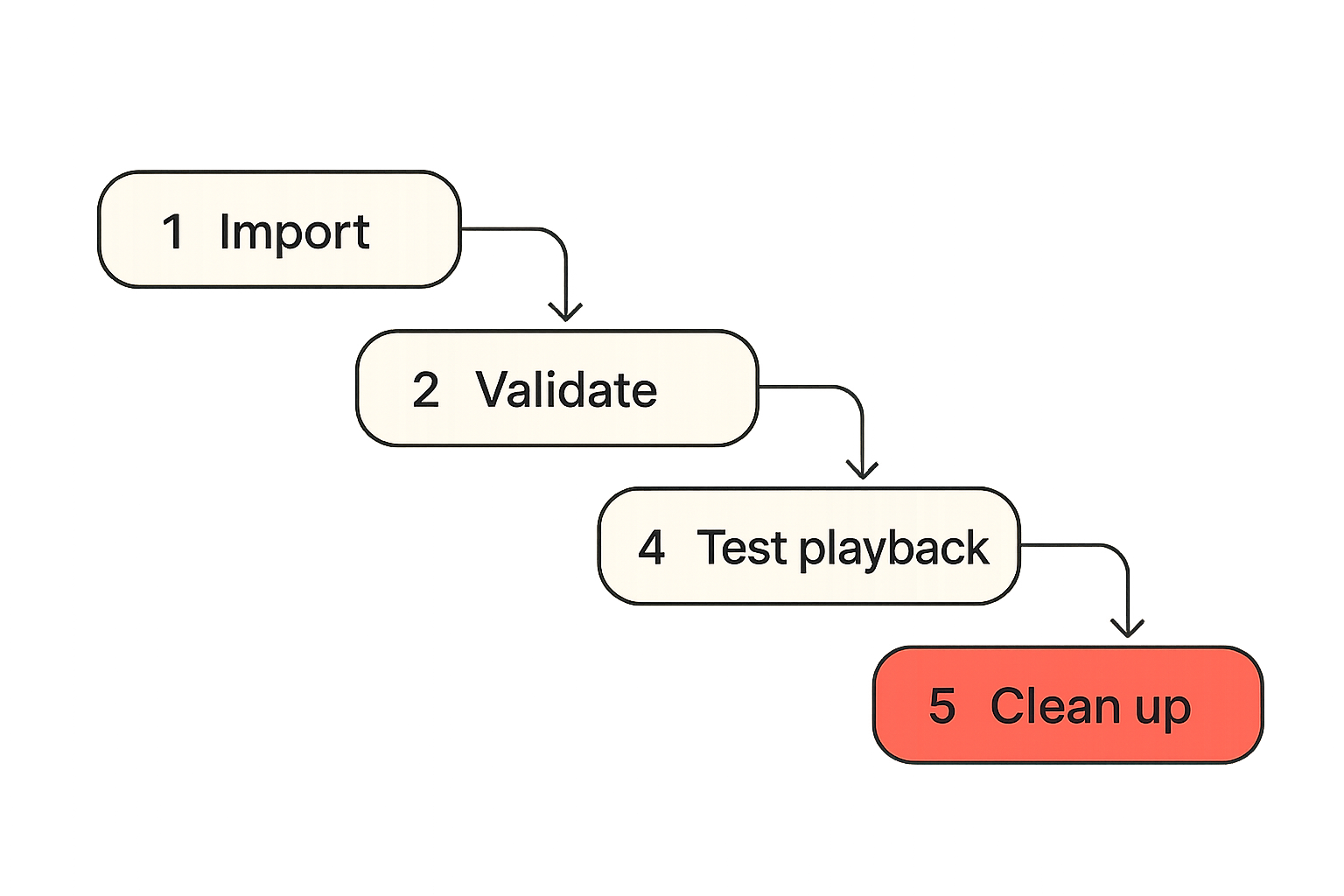
A useful IPTV control loop is:
- import an authorized playlist;
- validate channel reachability;
- normalize channel names and groups;
- attach or refresh EPG data;
- test playback on the actual devices;
- remove dead channels or mark them degraded.
If you use live playlists, keep the workflow explicit. For example, a live TV interface such as BitTorrented live TV is useful when the playlist and playback path are treated as managed components, not mystery inputs.
Torrents are integrity and lifecycle management
Torrent workflows are different. They are about metadata, swarm availability, file integrity, storage, seeding policy, and cleanup. For legal torrents, the operational questions are:
- is the torrent from a trusted or authorized source?
- are there enough peers or seeds?
- does the hash match the expected content?
- where will the completed files live?
- how long should you seed, if appropriate?
- when should the files be archived or deleted?
The practical question is not “torrent or stream?” It is “what state does this workflow need to manage?” IPTV manages live availability. Torrents manage distributed file acquisition and lifecycle.
Related reading from our network: remote viewing and control have their own support problems, and this piece on Samsung TV remote workflows for remote teams is a useful adjacent look at permissions, recovery, and screen-side operations.
Automation that helps instead of hiding failures
Automation is attractive because media chores are repetitive. Playlist refreshes, metadata matching, file moves, subtitle downloads, server restarts, and storage cleanup all feel like things a script should handle.
That is true, but only if automation exposes state.
Good automation makes state visible
Good automation has these properties:
- it logs what it changed;
- it separates successful, failed, and skipped actions;
- it can run safely more than once;
- it has a dry-run mode for risky changes;
- it avoids overwriting manually curated data without review;
- it sends minimal, private alerts when intervention is needed.
For example, a playlist checker should not simply delete every unreachable IPTV channel after one failed request. It should mark the channel as failed, record the timestamp, retry later, and only remove or hide it after a defined threshold.
Bad automation creates silent drift
Bad automation looks productive while slowly damaging the setup. Common examples:
- renaming files in a way that breaks existing metadata;
- moving incomplete downloads into the library;
- refreshing playlists without preserving custom groups;
- auto-downloading subtitles from untrusted sources;
- deleting files based on low disk space without retention rules;
- restarting services without capturing the original error.
What breaks in practice is trust. Once users stop trusting the automation, they work around it. Then the system has two sources of truth: the official workflow and the manual fixes nobody documented.
Failure modes: what breaks in practice
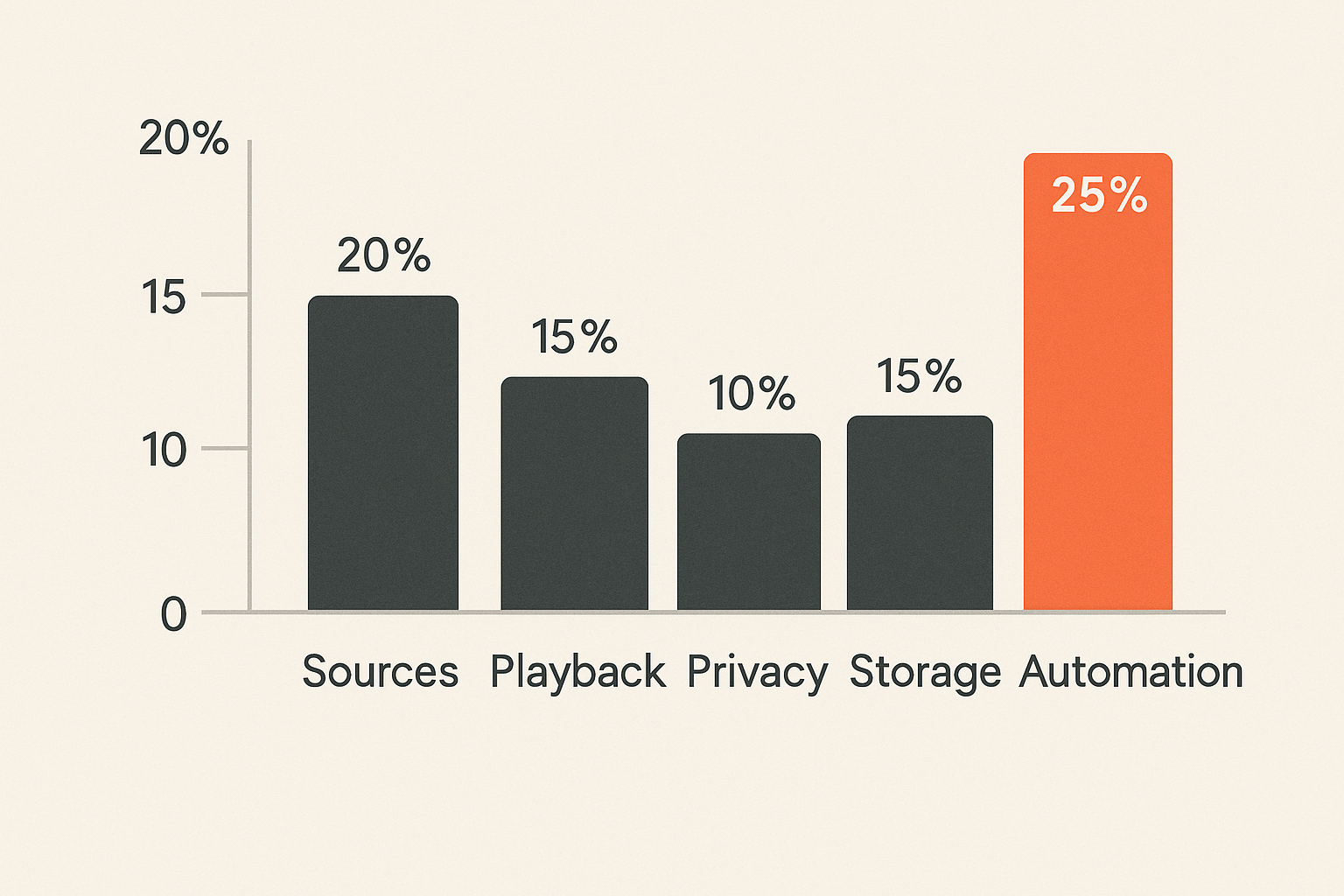
Most media setups do not fail all at once. They degrade. A playlist becomes 20% dead channels. A NAS fills up. A TV app stops receiving updates. A metadata agent starts mislabeling seasons. A torrent client keeps seeding files that were moved. Nobody notices until the evening someone actually wants to watch something.
The common breakpoints
Watch for these breakpoints:
- Unclear legality: users cannot tell which sources are licensed, public, personal, or unknown.
- No source labels: everything lands in the same library with no provenance.
- Weak device boundaries: old media devices can reach sensitive file shares.
- Unmanaged playlists: IPTV lists are imported once and never validated.
- Codec mismatch: files work on a computer but not on the main TV.
- Storage sprawl: downloads, backups, and libraries duplicate the same files.
- No recovery path: nobody knows how to rebuild the setup after a device dies.
The operational fix is not buying another app. It is assigning ownership to each layer, even if the “team” is just you and one family member who knows where the remote is.
What works and what fails
| Area | What works | What fails |
|---|---|---|
| Sources | Clear allowlist and labels | Treating all results as equal |
| IPTV | Scheduled validation and EPG checks | Assuming channels stay stable forever |
| Torrents | Legal-source review and lifecycle rules | Blind ingestion and permanent clutter |
| Privacy | Segmented devices and minimal alerts | One flat network for everything |
| Playback | Device-based test matrix | Testing only on a laptop |
| Automation | Idempotent jobs with logs | Silent scripts with destructive defaults |
| Support | Written recovery steps | Tribal knowledge and panic fixes |
Practical rule: if you cannot see the state of a media workflow, you do not control it.
Implementation sequence for first tech in 2026
This is the sequence I would use for a new setup or a rebuild. It is intentionally conservative. The goal is a stable base you can expand, not a weekend project that turns into permanent maintenance.
A practical rollout order
- Write a source policy. Define licensed services, authorized IPTV, legal torrent categories, personal media, and blocked sources.
- Choose the primary playback device. Optimize for the screen people actually use, not the device with the best spec sheet.
- Build the network boundary. Separate media and IoT devices where possible, lock down admin dashboards, and update firmware.
- Set up storage intentionally. Decide what is temporary, what is library content, what is backup, and what is disposable.
- Pick the discovery layer. Use search and browsing tools that help you inspect context, not just collect links.
- Configure IPTV validation. If you use IPTV, test playlists, EPG data, channel groups, and live playback on real devices.
- Configure legal torrent handling. Use trusted sources, verify metadata, set download locations, define seeding and cleanup rules.
- Test playback formats. Use a small matrix before importing or indexing large libraries.
- Add automation slowly. Automate checks before automating destructive actions.
- Document recovery. Save configuration notes, backup critical settings, and record how to rebuild the system.
This order prevents a common trap: building a beautiful interface over a messy backend.
Validation before expansion
Before adding more services, ask a few hard questions:
- Can I identify the source of every item in the library?
- Can I explain which devices can access storage?
- Can I recover if the media server dies?
- Can I tell whether an IPTV issue is provider-side, playlist-side, network-side, or device-side?
- Can I find failed jobs without reading five different dashboards?
- Can another household member use the setup without becoming an administrator?
If the answer is no, do not expand yet. Fix the workflow first.
Where bittorrented.com fits
A discovery and browsing layer should not pretend to be the whole system. It should help you find, inspect, and route media workflows while leaving the serious decisions visible: source trust, legality, playback, storage, and privacy.
When a discovery layer is useful
A discovery layer is useful when it helps you:
- browse streams, torrents, IPTV, or media categories without losing context;
- separate discovery from automatic downloading;
- inspect availability signals before taking action;
- move from search to playback intentionally;
- keep legal and privacy-aware use at the center of the workflow.
That is the role bittorrented.com is built around: practical, up-to-date guidance and tools for readers working with streaming services, torrents, IPTV, and home media systems. It fits best when you treat it as part of the first tech layer, not as a replacement for your source policy, network boundaries, or playback testing.
What not to outsource
Do not outsource judgment. No site, app, playlist, index, or media server can fully decide what is legal in your jurisdiction, what your household should trust, or what belongs on your network.
Keep these decisions local:
- what sources you allow;
- whether a torrent is legal for your use;
- whether an IPTV playlist is authorized;
- which devices can access private storage;
- how long logs and alerts are retained;
- when automation is allowed to delete or modify files.
First tech is the foundation. If you get that foundation right, the rest of the media stack becomes easier to reason about. If you skip it, every new app just adds another place for state to hide.
Try bittorrented.com
You are writing for readers who want practical, up-to-date guidance on streaming services, torrents, IPTV, and home media tools. Start with a safer, clearer first tech workflow at Try bittorrented.com.