Fubo streaming looks simple until the first big game buffers, the local channel is missing, or a household member asks why the bill climbed after the trial.
Teams think the problem is picking the cheapest live TV app. The real problem is building a reliable household media workflow around sports, local channels, DVR, devices, accounts, and support.
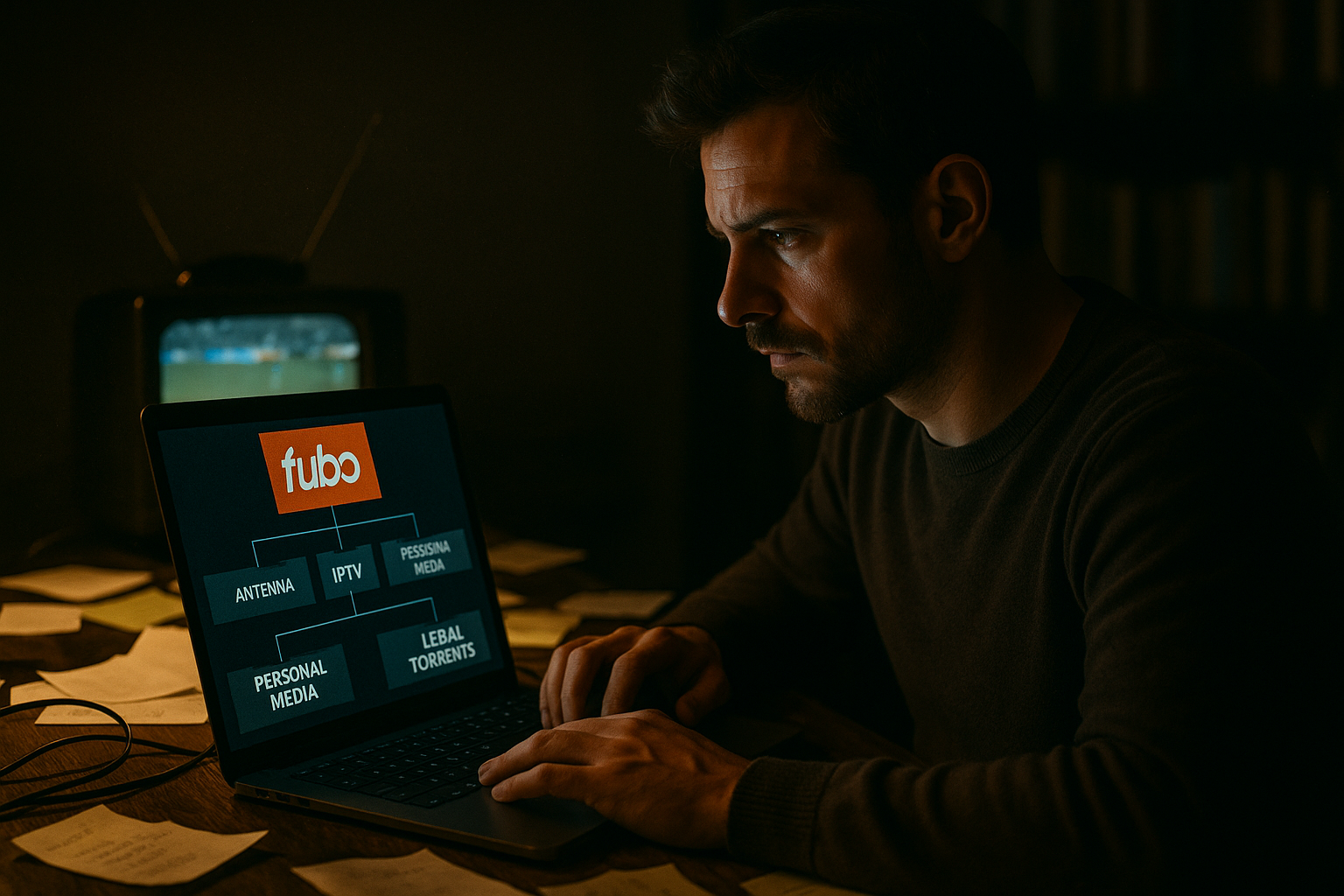
That changes the conversation. You are not just choosing Fubo against cable. You are deciding where paid live TV fits beside antenna, legal on-demand apps, IPTV playlists, torrent-based media libraries, and the devices already sitting under your TVs.
The practical question is not whether fubo streaming is good in the abstract. The practical question is whether it can carry the parts of your media stack that are time-sensitive, rights-sensitive, and family-sensitive without creating more operational pain than cable did.
Table of contents
- Fubo streaming is a workflow decision, not just an app choice
- Cost, channels, and sports coverage drive the first filter
- Device support is where the living room succeeds or fails
- Network and playback architecture matter more than the logo
- DVR, replays, and time shifting are operational features
- Comparing fubo streaming with IPTV and torrent workflows
- Privacy, accounts, and payment hygiene for streaming households
- Implementation workflow for evaluating fubo in 2026
- Common failure modes after switching to fubo streaming
- Product fit: using bittorrented.com around fubo streaming
Fubo streaming is a workflow decision, not just an app choice
The mistake teams make is treating fubo streaming as a replacement tile on the smart TV home screen. Remove cable box. Install app. Done.
That is how you get surprised.
A live TV service has to satisfy the same operational jobs cable used to handle quietly: channel rights, local affiliates, sports packages, DVR, authentication, device support, household profiles, billing, and support when something breaks five minutes before kickoff.
The problem cord cutters actually hit
Cord cutters usually start with cost. Fair. Cable bills are painful. But the first real production issue is not the monthly price. It is the gap between what the household thinks it watches and what it actually relies on.
A household may say it needs sports. In practice, that means:
- A specific local broadcast affiliate
- A specific regional sports network
- National games on ESPN, FS1, CBS, NBC, ABC, Fox, or league networks
- Spanish-language coverage for some events
- DVR for games that overlap with work or family schedules
- Enough concurrent streams for multiple rooms
Each item is a dependency. If one dependency is missing, the whole switch feels broken.
Practical rule: Do not evaluate fubo streaming by channel count. Evaluate it by the 20 events, shows, and channels your household would complain about losing.
Where fubo fits in a mixed media stack
A useful way to think about it is this: Fubo is best evaluated as the paid, licensed, live-TV layer in a broader home media architecture.
That broader stack may include:
- Fubo for live sports, cable-style channels, and cloud DVR
- Free ad-supported streaming apps for casual background content
- Legal digital purchases for movies you want to keep
- Public-domain or personally owned media served from a home library
- Antenna TV for local redundancy where reception is good
- IPTV playlists for legitimate live sources, community channels, or provider-supported streams
- Torrent tooling for legal Linux ISOs, public-domain media, open data, and other lawful content
The important boundary is legality and reliability. Fubo is not a magic replacement for every media source. It is a licensed service with rules, geographic restrictions, account limits, and rights windows. Treat those constraints as architecture, not annoyances.
Cost, channels, and sports coverage drive the first filter
Most fubo streaming decisions should start with a spreadsheet, not the app store.
That sounds boring. It is also how you avoid paying for three overlapping services because nobody checked whether the one channel that matters is available in your ZIP code.
Start with must-have events, not package names
Package names change. Add-ons change. Channel lineups change. Promotional pricing changes. Your household requirements change more slowly.
Build a simple matrix before the trial:
| Requirement | Example | How to verify | Risk if ignored |
|---|---|---|---|
| Local channels | ABC, CBS, Fox, NBC affiliate | Check by ZIP code inside provider signup | Missing local games or news |
| National sports | ESPN, FS1, NFL Network | Compare current plan lineup | Need extra app or package |
| Regional sports | Local NBA, NHL, MLB network | Confirm RSN availability and fees | Blacked-out home-team games |
| DVR | Record full games and overflow | Test recording and playback | Missed events during conflicts |
| Devices | Roku, Apple TV, Fire TV, phone | Install and test each one | Living room support pain |
| Concurrent use | 2-4 screens | Simulate real evening usage | Forced logouts or complaints |
The point is not to make the perfect spreadsheet. The point is to convert vague preference into testable acceptance criteria.
Practical rule: If you cannot name the channels or events that justify fubo streaming, you are not ready to judge the price.
Treat regional sports as a separate dependency
Regional sports networks are where many cord-cutting plans break. They are not just another line item in a channel list. They depend on geography, league rights, blackout rules, and provider agreements.
For some households, Fubo may be attractive because of sports orientation. For others, the missing regional network is a deal-breaker no matter how good the rest of the app feels.
Do this before canceling anything:
- Search availability using the exact home ZIP code.
- Check both the base plan and add-on requirements.
- Confirm whether the games you care about are live, replay-only, or blacked out.
- Test during an actual event, not only during off-hours.
- Keep the old service active until you verify one full weekend or game cycle.
What breaks in practice is timing. People test the interface on a Tuesday afternoon, then discover the real dependency during a Saturday night game.
Device support is where the living room succeeds or fails
Fubo can look fine on a phone and still fail the household. The primary user experience is usually the worst-maintained TV, the oldest streaming stick, or the smart TV app nobody updated.
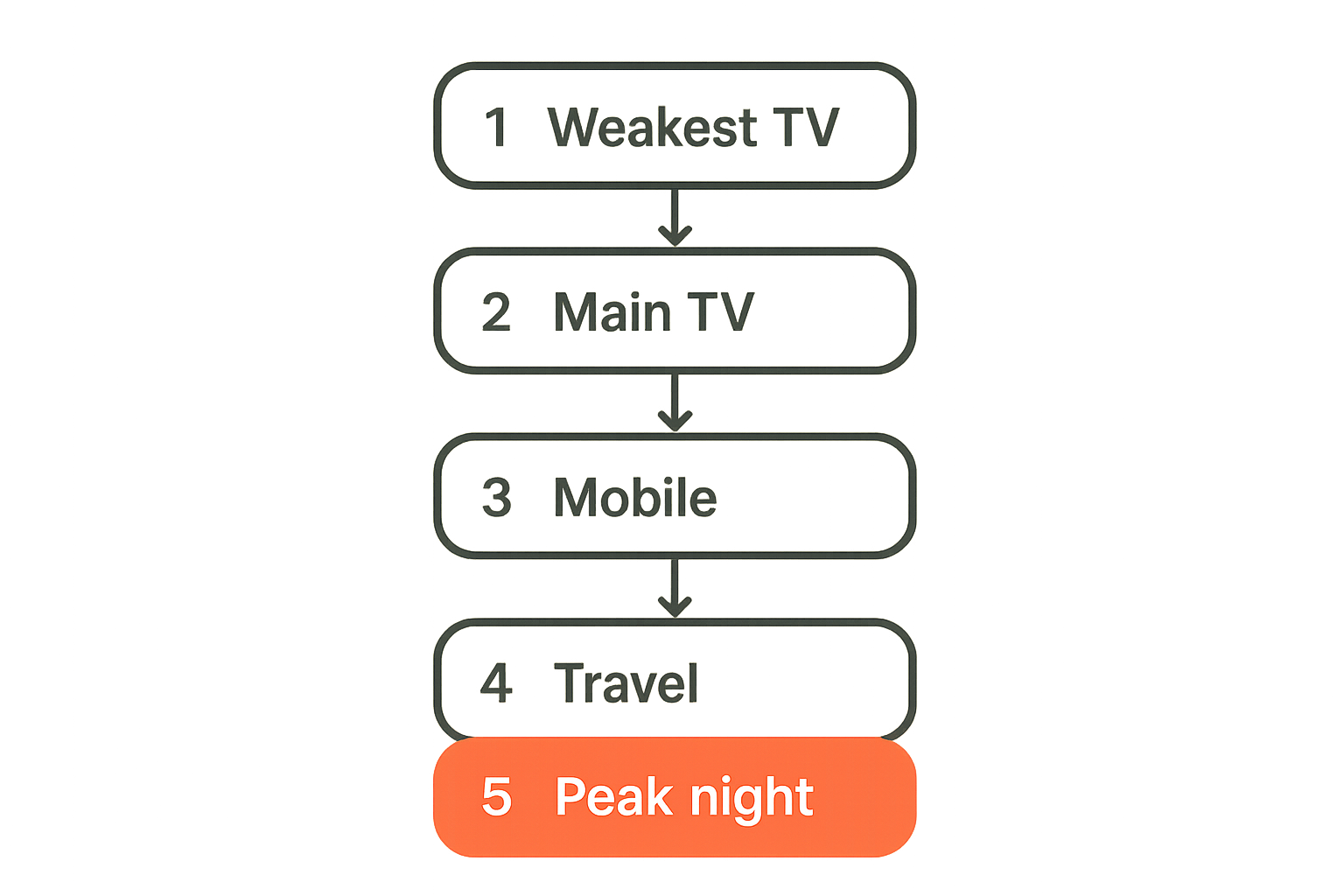
Test the weakest screen first
Do not start with the newest Apple TV or gaming console if the household usually watches in the bedroom on a five-year-old smart TV. Start with the weakest screen.
Test these behaviors:
- App launch time
- Channel guide responsiveness
- Fast-forward and rewind in DVR
- Resume playback after sleep
- Audio sync after pausing
- Closed captions
- Switching from live to DVR and back
- Remote control usability for non-technical users
A service can be technically supported and still operationally bad on a device. Supported means the app exists. Operational means people can use it without texting you every night.
Related reading from our network: teams dealing with private media processing face similar device and workflow tradeoffs in encrypted messaging video transcoding, especially when playback reliability depends on more than the file itself.
Account for travel, profiles, and concurrent streams
Streaming households are distributed now. Kids leave for college. Parents travel. Someone watches on a tablet from a hotel. Someone else expects the main TV to work at home.
Before you commit, understand:
- Home network rules
- Out-of-home streaming limits
- Profile behavior
- Simultaneous stream limits
- Password reset process
- Device removal process
- Whether travel affects local channels
The mistake teams make is assuming a streaming login behaves like a cable box. It does not. Account policy is part of the product. If you ignore it, support tickets become family text threads.
Network and playback architecture matter more than the logo
A live stream is less forgiving than a movie file. On-demand content can buffer ahead. Live sports cannot hide much delay, congestion, or packet loss.
Bandwidth is only one part of quality
Many households over-focus on download speed. A big speed-test number does not guarantee good fubo streaming performance.
You also need to watch:
- Wi-Fi signal quality near the TV
- Router CPU load during peak hours
- ISP congestion in the evening
- Bufferbloat under upload load
- DNS behavior with streaming apps
- Packet loss and jitter
- HDMI and display settings for high-motion sports
If the stream degrades only when someone uploads photos, joins a video call, or starts a game download, the issue may be queue management rather than raw bandwidth.
A practical baseline:
- Wire the main TV device with Ethernet if possible.
- If Wi-Fi is required, use 5 GHz or 6 GHz with strong signal.
- Reboot and update the streaming device before testing.
- Test during peak household usage, not a quiet afternoon.
- Watch a full live event, including halftime and postgame.
Practical rule: Test fubo streaming under the messiest normal conditions in your house. Clean lab tests do not predict game-night behavior.
Wi-Fi, DNS, and VPN choices can break playback
Privacy-aware users often run custom DNS, ad blockers, VPNs, or segmented home networks. Good. But streaming apps are sensitive to location, rights enforcement, and content delivery networks.
What works for general browsing can break licensed playback.
Common examples:
- VPN endpoint does not match expected region.
- DNS filter blocks telemetry or CDN domains required for playback.
- Pi-hole rules block ad or measurement domains that the app treats as mandatory.
- Guest Wi-Fi isolates casting targets.
- Router-level security features interfere with adaptive bitrate streams.
This is not an argument against privacy controls. It is an argument for testing them intentionally. Keep a documented allowlist for streaming devices rather than disabling protections across the whole network.
DVR, replays, and time shifting are operational features
Cloud DVR is not a checkbox. For sports-heavy households, DVR behavior changes whether fubo streaming feels like a cable replacement or a downgrade.
Cloud DVR changes how people watch sports
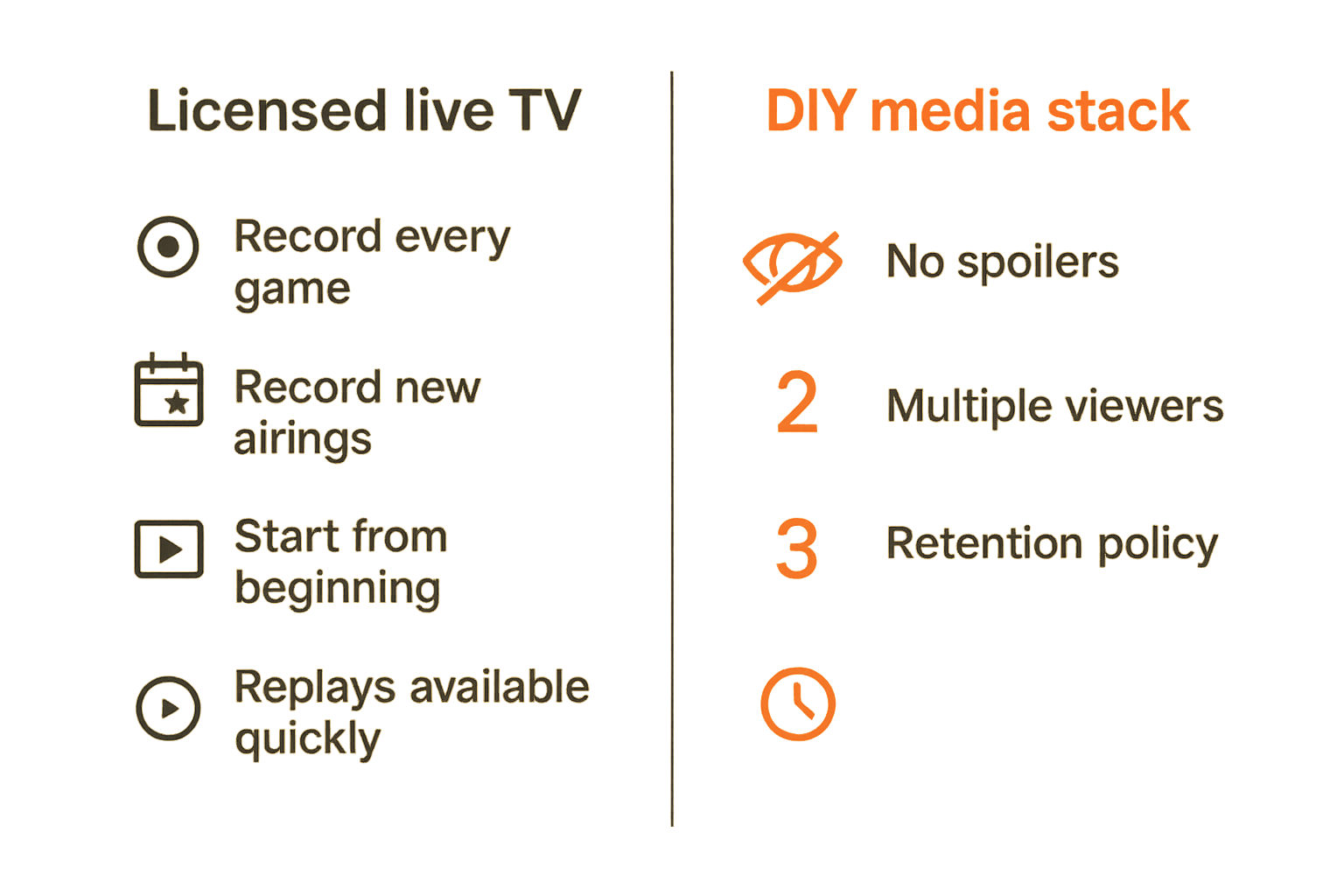
The important questions are operational:
- Can you record every game for a team?
- Can you record only new airings?
- Does recording extend automatically when games run long?
- Can you start from the beginning while the event is still live?
- Are spoilers visible in thumbnails or progress bars?
- How quickly are replays available?
- Can multiple people watch the same recording?
A DVR that works for sitcoms may be frustrating for sports. Games run long. Broadcast schedules shift. Overtime happens. Weather delays happen. Rights windows change.
The practical question is whether the DVR handles messy events gracefully.
Retention and rights limits need a household policy
Cloud DVR is not permanent ownership. It is time shifting inside a service account. Recordings may be subject to retention limits, plan limits, rights restrictions, and account status.
For households with large personal libraries, this distinction matters. A recording inside Fubo is not the same as a legally purchased download or a personally ripped disc stored on a NAS where local law allows it.
Set a simple policy:
- Fubo DVR is for short-term catch-up and live-event flexibility.
- Purchased media is for long-term access to favorite movies and shows.
- Personal media servers are for lawfully acquired files you control.
- Torrent clients are for legal content only, with attention to privacy and jurisdiction.
- IPTV playlists should come from legitimate providers or lawful public sources.
That policy prevents the stack from becoming a confused pile of half-owned access paths.
Comparing fubo streaming with IPTV and torrent workflows
Cord cutters and media hobbyists often compare Fubo, IPTV, torrents, and home servers as if they are interchangeable. They are not.
They solve different problems with different risk profiles.
What works with licensed streaming
Fubo works best when you need licensed, live, time-sensitive programming with low setup burden. Sports are the obvious case, but local news and cable-style channels fit too.
IPTV can be legitimate and useful when it comes from a provider, public broadcaster, venue, school, enterprise network, or lawful playlist source. If your stack includes live channel experimentation, a directory like BitTorrented live TV can help you think in terms of playlists and sources rather than pretending every stream has the same trust level.
Torrent workflows are different again. They are strongest for legal distribution of large files, open media, public-domain archives, software images, and data sets. They are not a substitute for rights-cleared live sports.
Here is the cleaner comparison:
| Workflow | Best use | Operational strength | Main risk |
|---|---|---|---|
| Fubo streaming | Licensed live TV and sports | Simple app, billing, DVR, rights clearance | Cost, blackouts, plan changes |
| Legitimate IPTV | Provider or public live channels | Flexible playlists and device options | Source trust and support variance |
| Personal media server | Owned or lawfully acquired library | Control, metadata, local access | Storage, backups, maintenance |
| Legal torrents | Public-domain, open, or authorized files | Efficient distribution | Misuse, malware, privacy exposure |
| Free ad-supported apps | Casual viewing | Low cost and easy access | Ads, catalog churn, lower control |
What fails when the stack is fragmented
Fragmentation is the silent cost of cord cutting.
One app has sports. Another has one show. Another has a movie rental. The antenna handles local news unless it rains. The home server has old favorites but not new releases. IPTV playlists work until a source changes. Someone forgets which login owns what.
What breaks in practice is support. Not technical support from a vendor. Household support.
Symptoms include:
- Duplicate subscriptions
- Forgotten trials converting to paid plans
- Conflicting watchlists
- Missing recordings
- Password resets during live events
- Devices with different app versions
- Confusion over legal versus questionable sources
A useful way to think about it is ownership. Every media source needs an owner, a purpose, and a failure plan. If nobody owns it, it will fail at the worst time.
Privacy, accounts, and payment hygiene for streaming households
Streaming accounts are not high-security infrastructure, but they still contain payment data, location signals, viewing history, email addresses, and household behavior.
That is enough to deserve basic hygiene.
Use compartmentalized identities without making support impossible
Use a dedicated email alias for streaming services. Use a password manager. Enable available account security features. Keep payment methods easy to monitor. Avoid sharing the main password casually.
But do not overcomplicate the setup so much that nobody can recover the account. The goal is controlled access, not self-inflicted lockout.
A practical account pattern:
- Dedicated email alias for streaming accounts
- Unique password stored in a family password manager vault
- Payment card with alerts enabled
- Documented cancellation date for trials
- Device list reviewed every few months
- One account owner responsible for plan changes
Related reading from our network: the same privacy pattern shows up in communication-heavy environments, and VA secure messaging privacy architecture is a useful adjacent example of balancing confidentiality with operational access.
Keep messages and media alerts private
Media households often run group chats for new releases, game reminders, IPTV changes, or home server alerts. That is convenient, but it can leak more than people realize: viewing habits, travel patterns, account screenshots, payment notices, and invite links.
If you coordinate media workflows through chat, use private groups, avoid posting credentials, and separate sensitive account alerts from casual watch recommendations. Our prior guide to encrypted messaging streaming privacy architecture covers that pattern in more depth for torrent, IPTV, and home media notifications.
The point is not paranoia. The point is keeping the operational layer clean. Streaming breaks less when credentials, alerts, and ownership are not scattered across random threads.
Implementation workflow for evaluating fubo in 2026
The best way to evaluate fubo streaming is to run it like a small migration project.
Not a corporate project. A household project. But the same principle applies: define requirements, test in production-like conditions, then cut over.
A seven-step evaluation sequence
Use this sequence before canceling cable or deleting other services:
Inventory current viewing. List the channels, teams, shows, and events watched over the last 30 days. Do not rely on memory alone if your current provider has watch history or bills with add-ons.
Mark hard dependencies. Separate must-have items from nice-to-have items. A must-have is something that would cause the household to reverse the switch.
Verify Fubo availability by location. Check local affiliates, regional sports, national sports, and add-ons using the actual home ZIP code.
Test every primary device. Install the app on the living room TV, bedroom TV, mobile devices, and any travel device that matters.
Simulate a normal busy night. Run multiple streams, upload traffic, gaming, and other household usage while watching a live event.
Test DVR and replay behavior. Record a live event, start it late, fast-forward, rewind, and check whether the recording handles overruns.
Review billing and cancellation paths. Confirm the plan, add-ons, taxes, fees, renewal date, and cancellation process before the trial ends.
That changes the conversation from opinion to evidence. You are no longer asking whether Fubo feels good after ten minutes. You are asking whether it survives your real operating environment.
Acceptance criteria before you cancel cable
Write down the pass/fail criteria before the trial starts.
Example:
- All must-have local channels are available.
- Home team games are available live for two consecutive test events.
- Main TV can stream a full game without repeated buffering.
- DVR can record and replay a live event acceptably.
- At least two concurrent screens work during peak evening usage.
- Monthly cost is lower than the current bundle after add-ons.
- The household knows where to watch each content type.
If any critical item fails, do not rationalize it away because the interface looks nicer than cable. The failure will not get less annoying after you cancel your fallback.
Common failure modes after switching to fubo streaming
Fubo streaming can work well for the right household. It can also disappoint when people ignore the boring parts.
The boring parts are where the real failures live.
Billing surprises and add-on drift
The first failure mode is financial drift. A household starts with a base plan, adds a sports package, adds another service for one missing show, keeps an old on-demand subscription, forgets a trial, and ends up near the old cable bill.
Controls are simple:
- Keep a subscription register.
- Record renewal dates.
- Review add-ons monthly during the first quarter.
- Use payment alerts.
- Cancel unused services immediately, not later.
- Compare total household media spend, not only Fubo spend.
Related reading from our network: even though the niche is different, encrypted messaging coupon codes and private deal sharing is a useful reminder that savings workflows need verification, privacy, and expiration tracking or they create more noise than value.
Sports blackouts, latency, and event gaps
The second failure mode is assuming streaming sports behaves exactly like cable or antenna.
Watch for:
- Blackouts based on league or regional rights
- Local channel differences by ZIP code
- Latency compared with cable, radio, or social media alerts
- Event overruns that affect DVR
- Alternate broadcasts on channels not included in your plan
- Login prompts during high-demand events
Latency is especially annoying for live sports. If a group chat spoils a goal before your stream shows it, the service may still be working technically but failing socially. Mute alerts during games or align everyone on the same viewing source when spoilers matter.
Practical rule: For live sports, success is not only picture quality. Success is rights coverage, timing, DVR behavior, and low household friction.
Product fit: using bittorrented.com around fubo streaming
Bittorrented.com is not a replacement for a licensed sports service. That distinction matters.
The useful role is different: helping media hobbyists think clearly about sources, formats, search, live channels, and safe workflows around legal streaming, torrents, IPTV, and home media tools.
Where a media directory helps
Fubo handles the paid live-TV layer. A media directory helps around the edges:
- Discovering lawful live TV and IPTV-style sources
- Understanding how torrent discovery works for legal content
- Separating source trust from playback convenience
- Comparing home media tools without pretending every source is equivalent
- Building a cleaner household map of what lives where
For readers who jump between streaming services, torrents, IPTV playlists, and local libraries, the operational win is clarity. You want fewer mystery links, fewer forgotten tools, and fewer unsupported assumptions.
When fubo should remain the paid source of truth
If the content is a live professional sports event, a current cable channel, or a rights-controlled broadcast, treat Fubo or another licensed provider as the source of truth. Do not try to patch rights-sensitive live TV with random streams. That path creates reliability, legal, security, and privacy problems.
Use the right tool for the job:
- Fubo for licensed live channels and sports where it fits your requirements
- Legitimate IPTV for lawful playlists and provider-backed streams
- Personal media tools for content you own or are allowed to store
- Torrent workflows only for legal, authorized, or public-domain content
- Privacy controls that protect the household without breaking playback
Fubo streaming is strongest when it is part of a deliberate system, not when it is expected to solve every media problem by itself.
Try bittorrented.com
You are writing for readers who want practical, up-to-date guidance on streaming services, torrents, IPTV, and home media tools. Try bittorrented.com for more practical guidance around fubo streaming, live TV, torrents, IPTV, and safer home media workflows.