Most home media problems look small until they break at the worst time. The IPTV playlist buffers during a live match. The movie file plays on one device but not another. The download finished, but nobody knows where it went. The NAS is full. The VPN kills discovery. The family blames the app.
Information technology sounds like an office term, but for cord cutters, torrent users, IPTV viewers, and media tech hobbyists, it is the difference between a pile of tools and a system that works.
Teams think the problem is choosing the best streaming app, torrent client, media server, or IPTV player. The real problem is architecture: how devices, networks, storage, identity, privacy, metadata, updates, and support fit together.
That changes the conversation. The practical question is not “what app should I install?” It is “what workflow lets me watch legal content reliably, recover when something breaks, and avoid creating privacy or security problems in the process?”
Table of contents
- Information technology is the operating layer for cord cutting
- Map the home media stack before buying more tools
- Build a legal and privacy-aware content workflow
- Design the network like a media delivery system
- Storage, metadata, and backups are the quiet failure point
- Automation should reduce support, not create mystery
- Information technology troubleshooting for streaming and IPTV
- What breaks when the setup is built badly
- A practical implementation sequence
- Where bittorrented.com fits in the workflow
Information technology is the operating layer for cord cutting

The app is only the visible part
The mistake teams make is treating home media as a shopping problem. They compare players, clients, subscriptions, boxes, VPNs, DNS services, and storage devices as if the winner will remove the need for operations.
It will not.
A streaming setup has the same basic layers as any small information technology environment:
- access: who can use what, from which device;
- network: how packets move across Wi-Fi, Ethernet, VPN, and ISP routing;
- storage: where files, playlists, metadata, and backups live;
- applications: IPTV players, media servers, torrent clients, indexers, browsers, and mobile apps;
- monitoring: how you know whether the problem is local, upstream, or device-specific;
- support: how normal users recover without opening five admin panels.
If any layer is unmanaged, the media experience becomes fragile. The problem shows up as buffering, missing files, duplicate libraries, expired playlists, broken subtitles, or “it worked yesterday.” The cause is usually lower in the stack.
Practical rule: If you cannot describe the path from source to screen, you do not have a media setup. You have a collection of apps.
Why 2026 home media setups need IT thinking
Cord cutting used to be simple: cancel cable, install a few apps, maybe add an antenna. In 2026, many homes have a mixed environment: paid streaming services, free legal channels, IPTV playlists, public-domain torrents, Linux ISOs, personal media libraries, smart TVs, tablets, travel devices, NAS boxes, mini PCs, and privacy tools.
That mix creates IT problems, even if nobody calls them IT problems.
For example, a VPN may protect one workflow but break casting. A cheap router may handle browsing but fail under multiple 4K streams. A playlist may work in one player because of forgiving parsing and fail in another because the EPG format is inconsistent. A torrent client may save files in a path the media server does not scan. A smart TV may support the container but not the audio codec.
The practical question is not whether you are “technical enough.” If you run a home media stack, you are already operating information technology. The only choice is whether you operate it deliberately.
Related reading from our network: builders working with rented infrastructure face similar routing and validation tradeoffs in IaaS in cloud computing, even though the home media version is smaller and messier.
Map the home media stack before buying more tools
Start with users, rooms, and rights
A useful way to think about it is to start from the viewing context, not the software. Who watches? Where? On what device? With what content rights? With what tolerance for troubleshooting?
Write a simple inventory:
| Layer | Practical question | Example decision |
|---|---|---|
| Users | Who needs access? | Adults, kids, guests, remote users |
| Rooms | Where is playback expected? | Living room, bedroom, office, travel |
| Devices | What hardware must work? | Smart TV, Apple TV, Android box, tablet, laptop |
| Sources | Where does content originate? | Paid services, legal IPTV, public-domain torrents, personal files |
| Controls | What must be restricted? | Mature content, admin panels, unknown playlists |
| Support | Who fixes problems? | One admin, shared household checklist |
This inventory prevents a common failure: optimizing for the admin while ignoring everyone else. A setup that only one person can operate is not resilient. It is a hobby project with a single point of failure.
The goal is not to remove experimentation. It is to keep experimentation away from the stable viewing path.
Separate sources from playback
Sources and playback should be loosely coupled. A torrent client should not be the library. An IPTV playlist should not be trusted just because it opens. A media server should not be the only copy of important configuration. A smart TV should not be the administrative control plane.
This separation matters because each layer changes at a different pace. Playlists expire. Apps update. Devices age. ISPs change routing. Storage fills. If every layer is fused together, one change breaks the whole system.
A better model looks like this:
- Source discovery happens in a controlled place.
- Content rights and legality are checked before use.
- Files or streams are normalized into known locations or playlists.
- Metadata is refreshed on a schedule.
- Playback devices consume from stable endpoints.
- Logs and errors are reviewed from a small number of places.
For broader context on how modern cord-cutting stacks combine streaming, IPTV, torrents, and home media devices, the earlier guide on world wide technology for home media is a useful companion.
Practical rule: Do not let the playback device become the source of truth. TVs and streaming sticks are clients, not infrastructure.
Build a legal and privacy-aware content workflow
Treat torrents as a distribution protocol
Torrenting is a protocol, not a license. That distinction matters. There are legitimate uses: public-domain films, open-source software, creator-distributed media, archival material, game patches, research data, and personal distribution with permission. There are also uses that create legal and security risk.
The mistake teams make is putting all torrents into one mental bucket. That leads to bad decisions in both directions: either fear of the protocol itself or casual use without checking rights.
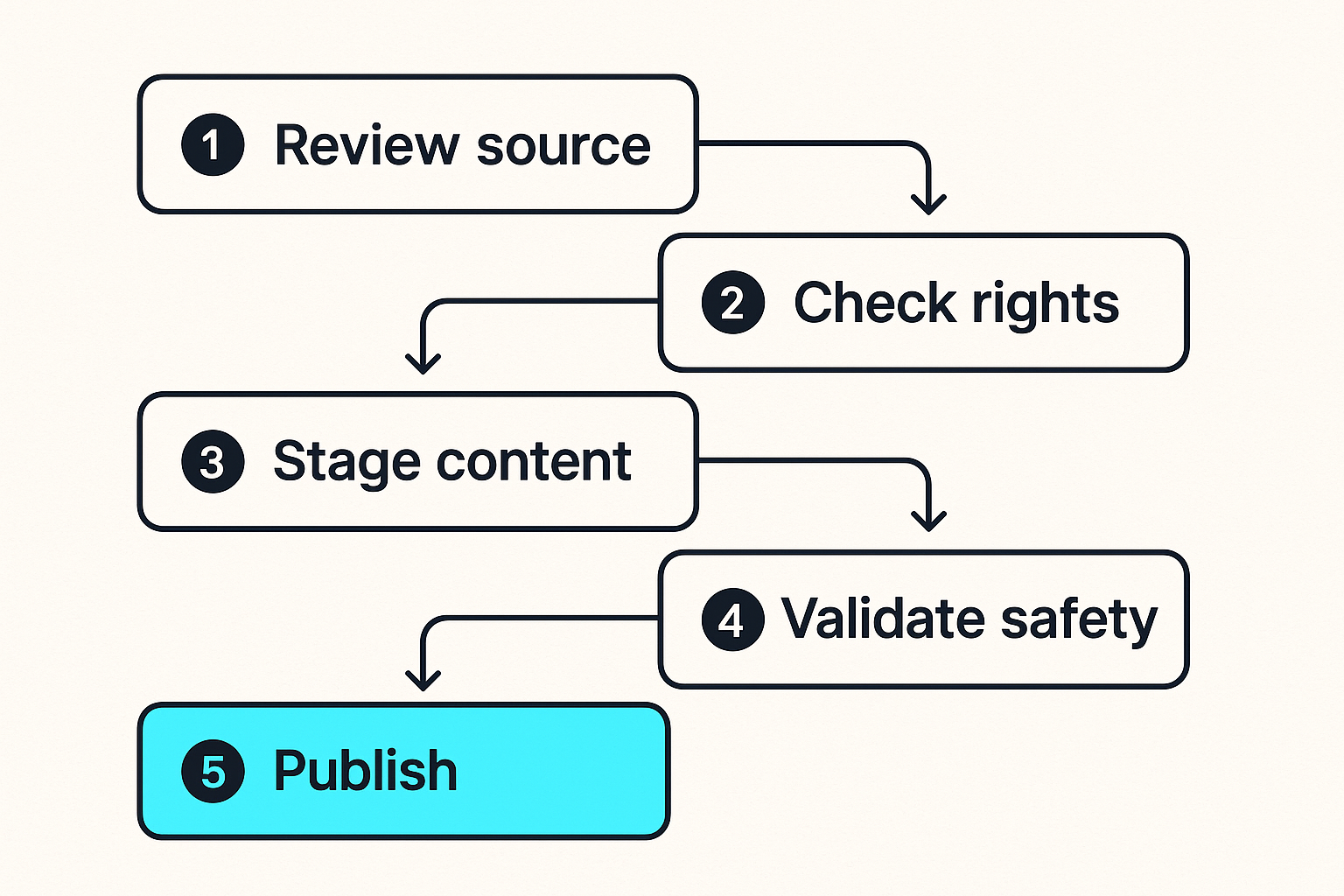
A practical workflow should include:
- source review before adding a torrent;
- separation between public discovery and private library storage;
- malware scanning where files are executable or packaged;
- clear labels for public-domain, licensed, personal, and unknown sources;
- deletion rules for incomplete, suspicious, or unneeded downloads;
- no automatic import into a family library until the content is verified.
If you browse public swarm metadata, treat it as untrusted input. A DHT index can help with discovery, but it is not a rights database, a safety guarantee, or a quality filter. When researching availability, keep the distinction clear between discovery and consumption; for example, browsing DHT torrents should still be followed by rights checks and safe handling before anything enters your media library.
Keep IPTV playlists auditable
IPTV has the same workflow problem. A playlist is easy to load, but hard to govern once it grows. Channels change. EPG mappings drift. Logos break. Providers disappear. Some playlists are legitimate and licensed; others are not. Some are free legal streams; others are opaque bundles with unclear rights.
What breaks in practice is trust. A household ends up with five playlist files, three expired URLs, duplicate channel names, and no idea which list is safe or current.
Use an auditable IPTV workflow:
- Keep playlists in versioned files or a controlled app, not scattered across devices.
- Label source, date added, provider, and expected channel categories.
- Remove channels that are broken, duplicated, or rights-unclear.
- Keep EPG URLs documented next to playlist URLs.
- Use a test device before pushing changes to the main TV.
- Avoid entering sensitive account credentials into unknown IPTV apps.
If live viewing is central to your setup, a stable place to test and organize channels matters more than constantly chasing new lists. A page like live TV playlists fits best as part of a controlled workflow, not as a replacement for playlist governance.
Related reading from our network: storage teams face a similar problem when public access is treated as a toggle instead of a workflow, as covered in security public storage.
Design the network like a media delivery system
Wi-Fi coverage is not the same as throughput
A strong Wi-Fi icon does not mean the network can deliver multiple high-bitrate streams. Home media is sensitive to sustained throughput, jitter, interference, roaming behavior, and device chipsets. A phone speed test near the router tells you very little about a smart TV behind a wall.
For media delivery, prioritize boring reliability:
- wire the main TV, NAS, mini PC, or server when possible;
- place mesh nodes where they have strong backhaul, not just where signal is weak;
- separate 2.4 GHz IoT noise from 5 GHz or 6 GHz media clients;
- avoid running the media server over weak Wi-Fi;
- test during real viewing hours, not at 2 a.m.;
- keep router firmware current, but avoid updating before a planned event.
A useful test is simple: play the highest-bitrate legal file or stream you expect to use, on the device that complains most, while another household member streams something else. If that fails, your stack is not ready, regardless of what the router app says.
Segment risky devices without breaking playback
Segmentation is where home information technology becomes real. Smart TVs, unknown Android boxes, random IPTV apps, and IoT devices should not have the same trust level as laptops, phones, NAS devices, and admin dashboards.
But aggressive segmentation can break discovery protocols like mDNS, DLNA, AirPlay, Chromecast, SMB browsing, and remote control apps. The answer is not “one flat network forever.” The answer is deliberate routing.
A practical home layout:
| Network zone | Devices | Access allowed | Access denied |
|---|---|---|---|
| Trusted | laptops, phones, admin PC | management, media, internet | unnecessary inbound from IoT |
| Media | TV boxes, smart TVs, consoles | media server, DNS, internet | NAS admin, router admin |
| IoT | speakers, cameras, appliances | internet, limited controller access | storage, admin panels |
| Guest | visitors | internet only | local devices |
Practical rule: Segment by consequence. If a device is cheap, rarely updated, or used for unknown apps, it should not be able to administer your storage or router.
The hard part is exceptions. Document them. If the living room TV needs access to a media server on port 32400 or a local IPTV proxy on a specific port, allow that path explicitly rather than flattening the whole network.
Storage, metadata, and backups are the quiet failure point
Use predictable naming and folders
Storage failures rarely start with disk death. They start with ambiguity. Files land in random folders. Naming varies by source. Subtitles sit next to the wrong release. The media server matches the wrong movie. A download folder becomes a permanent library. Nobody knows what can be deleted.
The practical fix is boring structure:
/media
  /movies
    /Movie Name (2024)
      Movie Name (2024).mkv
      Movie Name (2024).en.srt
  /tv
    /Show Name
      /Season 01
        Show Name - S01E01.mkv
  /music
  /books
  /incoming
  /review
  /archive
/config-backups
Keep incoming separate from review. Keep review separate from the library. Only verified, legal, correctly named content should move into the library path. This is not about perfection. It is about making the media server predictable.
Metadata should also be treated as operational data. Posters, descriptions, watch status, playlists, EPG mappings, and server settings take time to rebuild. If you treat them as disposable, you will eventually lose a weekend to reconfiguration.
Back up configuration before content
Many home media admins obsess over backing up terabytes of replaceable files while ignoring the small configuration files that make the system usable. That is backwards.
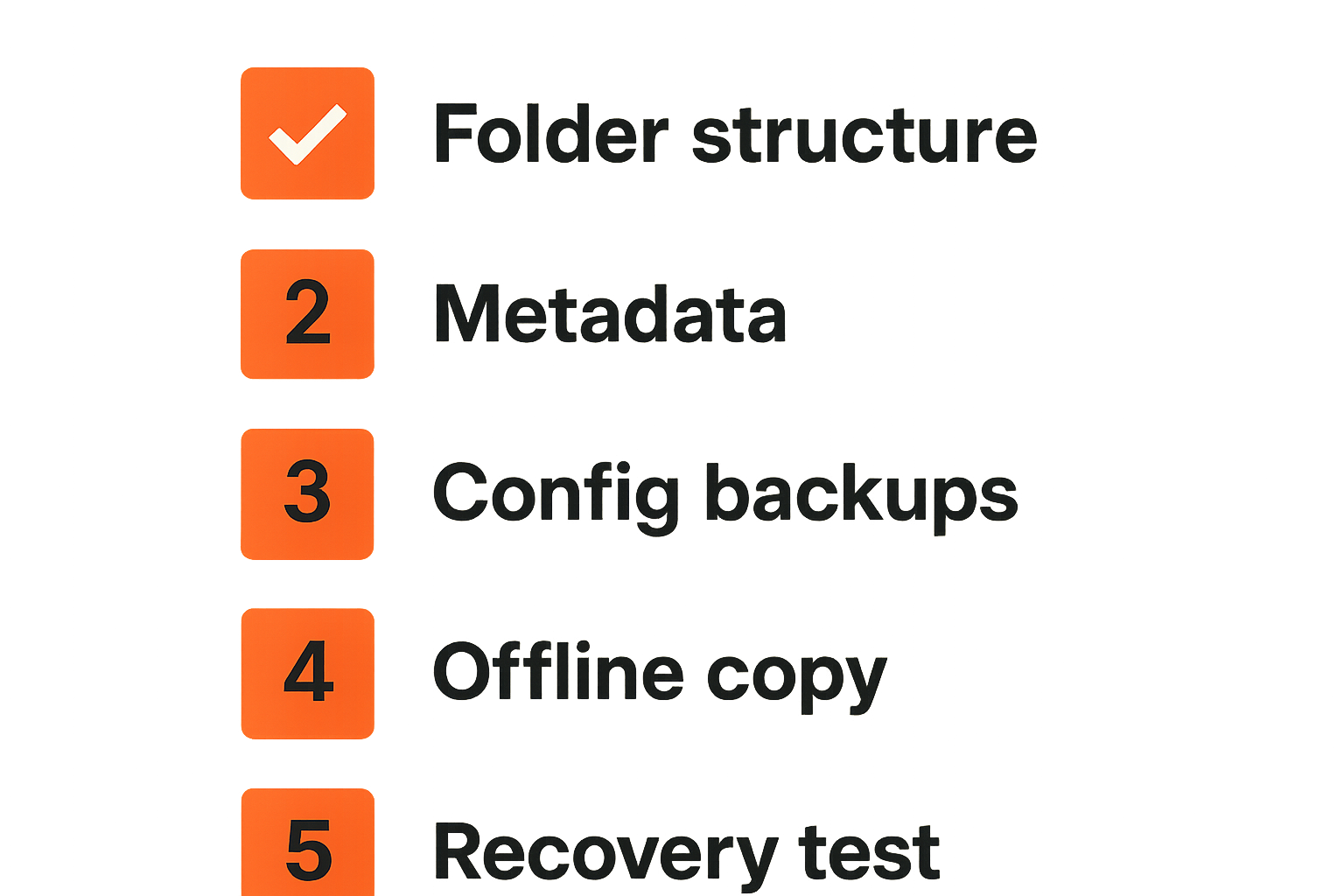
Back up in this order:
- router and DNS configuration;
- media server database and settings;
- IPTV playlist files and EPG mappings;
- torrent client settings and category paths;
- automation scripts and compose files;
- watch history and user profiles where practical;
- rare, personal, or hard-to-replace media;
- bulk content if budget allows.
The point is not that content is unimportant. The point is that configuration has high recovery value per gigabyte. A 200 MB backup can restore the workflow that makes 20 TB usable.
Use at least one offline or disconnected backup for critical configuration. Ransomware, accidental deletion, bad sync rules, and failed migrations are all more common than people want to admit.
Automation should reduce support, not create mystery
Automate the repeatable steps
Automation is useful when it removes predictable manual work. It is dangerous when it hides decisions you still need to make.
Good automation:
- moves reviewed files from staging to library;
- refreshes metadata on schedule;
- backs up configuration nightly;
- checks playlist availability;
- restarts a stuck container once, then alerts;
- labels downloads by source and category;
- deletes incomplete temporary files after a defined period.
Bad automation:
- imports unknown content directly into the family library;
- overwrites playlists without keeping history;
- deletes files based only on age;
- retries failed downloads forever;
- updates every container automatically with no rollback;
- hides errors in a log nobody reads.
The mistake teams make is confusing fewer clicks with lower operational cost. A workflow can have fewer clicks and more risk. The test is whether automation makes failures easier to understand.
Log enough to explain failures
You do not need enterprise observability for a living room. You do need enough information to answer basic questions:
- Did the stream fail locally or upstream?
- Did DNS resolution change?
- Did the VPN connect, disconnect, or route only some traffic?
- Did the file import run?
- Did the playlist refresh succeed?
- Did the disk fill?
- Did the app update before the issue started?
A small log folder, a dashboard, or even a weekly exported status file is often enough. The key is consistency. If every tool logs somewhere different and nobody knows where, troubleshooting becomes folklore.
Related reading from our network: local coordination systems have the same follow-up problem; the article on a supreme community operating system is not about media, but the coordination lesson applies to shared home tech workflows.
Information technology troubleshooting for streaming and IPTV
Use a fault tree instead of guessing
When playback fails, most people start changing things. They reboot the TV, change DNS, disable the VPN, reinstall the app, blame the ISP, and switch players. Sometimes that works. It also destroys evidence.
Use a fault tree:
- Does the internet work from another device?
- Does the same stream or file work on a wired device?
- Does a different stream or file work on the same player?
- Does local media work while remote streaming fails?
- Did anything update recently?
- Is storage full or unavailable?
- Is the VPN or DNS path different than normal?
- Are other users saturating the connection?
- Is the provider, playlist, or source unavailable upstream?
That sequence separates local device issues from network issues, source issues, and server issues. It also prevents the classic mistake: rebuilding the whole stack because one upstream playlist endpoint is down.
Measure the boring signals
The best troubleshooting signals are not glamorous. They are boring, repeatable, and close to the failure.
Track these:
| Signal | Why it matters | Tooling level |
|---|---|---|
| LAN latency | Reveals Wi-Fi or routing issues | router app, ping |
| Packet loss | Explains buffering despite high speed | ping, router stats |
| DNS response | Catches filtering or resolver failure | nslookup, dig |
| Disk free space | Prevents import and database failures | NAS dashboard |
| CPU load | Shows transcoding bottlenecks | server dashboard |
| Container uptime | Correlates restarts with complaints | Docker, system logs |
| Playlist status | Separates source failure from player failure | playlist checker |
Do not overbuild monitoring before you have stable naming, backups, and network basics. But do measure enough that the next failure is not a debate.
Practical rule: Troubleshooting should narrow the fault domain. If a step does not tell you what layer failed, it is probably just ritual.
What breaks when the setup is built badly
Common failure modes
Bad home media information technology tends to fail in predictable ways.
The most common failure modes are:
- Flat network risk: every TV box, app, guest phone, and NAS sits on the same network with broad access.
- Untrusted source import: unknown files or playlists are added directly to the main library.
- No configuration backups: the server can be rebuilt, but nobody remembers the settings.
- Codec mismatch: a device can see the file but cannot decode video, audio, or subtitles efficiently.
- Weak Wi-Fi assumptions: the router app shows “connected,” but sustained throughput collapses.
- Playlist sprawl: several IPTV lists exist with no owner, date, or rights context.
- VPN confusion: some traffic is protected, some bypasses, and discovery breaks unpredictably.
- Update drift: apps auto-update while containers, firmware, or plugins lag behind.
- Single-admin dependency: one person knows how everything works, and nobody else can recover playback.
What breaks in practice is not just entertainment. It is trust in the system. Once a setup is seen as unreliable, household users route around it. They buy duplicate subscriptions, use unsafe apps, or abandon the library entirely.
What works and what fails
A comparison makes the pattern clear:
| Area | What fails | What works |
|---|---|---|
| Discovery | Random links and unknown lists | documented sources with rights review |
| Torrents | Auto-import everything | stage, scan, verify, then import |
| IPTV | One giant mystery playlist | labeled playlists with EPG tracking |
| Network | One flat LAN | segmented zones with documented exceptions |
| Storage | Downloads folder as library | incoming, review, library, archive |
| Backups | Only bulk files | config first, then rare media |
| Updates | Auto-update everything blindly | maintenance window and rollback plan |
| Support | “Ask the admin” | short checklist and known-good tests |
The point is not to turn your home into a corporate IT department. The point is to borrow the parts of IT that reduce chaos: ownership, boundaries, logs, backups, and repeatable recovery.
A practical implementation sequence
The 10-step rollout
If you are rebuilding or cleaning up a home media environment, do not start by replacing everything. Start by making the current system observable and safe.
- Inventory devices, users, rooms, and content sources.
- Identify which content sources are licensed, public-domain, personal, or unknown.
- Create separate folders for incoming, review, library, archive, and config backups.
- Export router, media server, playlist, torrent client, and automation settings.
- Wire the highest-use media devices where possible.
- Create network zones for trusted, media, IoT, and guest devices.
- Move IPTV playlists into a documented location with source and date labels.
- Configure legal torrent workflows to stage files before library import.
- Add basic checks for disk space, playlist availability, DNS, and service uptime.
- Write a one-page recovery checklist for common failures.
This is the workflow version of information technology. It does not require a rack, a certification, or a giant budget. It requires making decisions explicit.
How to know the setup is ready
A setup is ready when normal failure does not create panic.
Use these readiness checks:
- A non-admin can open the main viewing app and find approved content.
- A failed playlist can be identified without testing every app.
- A new legal media file lands in review before the library.
- A router or server setting can be restored from backup.
- The main TV can stream during peak household usage.
- Guest devices cannot reach admin panels or storage shares.
- The admin knows which logs to check first.
- Updates can be delayed, tested, or rolled back.
If you cannot pass those checks, buying another app will not fix the real issue. It may only add another layer to troubleshoot.
Where bittorrented.com fits in the workflow
Use discovery without losing control
bittorrented.com is useful when you treat discovery, live TV, torrents, streaming, and home media tools as parts of a workflow rather than magic shortcuts. The site is built for readers who want practical, up-to-date guidance on streaming services, torrents, IPTV, and home media tools, with a focus on legal, safe, and privacy-aware use.
The product-fit is architectural: discovery and browsing should feed a controlled system. They should not bypass rights checks, source review, playlist hygiene, network boundaries, or storage rules.
That is the same information technology lesson running through the whole setup. The UI is not the system. The system is state, trust, routing, storage, playback, and recovery. When those pieces are designed, cord cutting becomes less fragile.
Use bittorrented.com as a practical reference point while you build that workflow: compare tools, understand tradeoffs, and keep your setup aligned with how people actually watch media in 2026.
Try bittorrented.com
You are writing for readers who want practical, up-to-date guidance on streaming services, torrents, IPTV, and home media tools. Try bittorrented.com.