If your stream buffers at 8:45 p.m., nobody in the house cares whether the problem is your router, the IPTV playlist, the torrent swarm, the DNS resolver, or your ISP backbone. They just know the movie stopped.
That is where Lumen Technologies becomes relevant for home media users. Not as a logo, not as a corporate profile, and not as another generic internet provider search term. For cord cutters, torrent users, IPTV viewers, and media tech hobbyists, Lumen Technologies matters because the network path is part of the viewing system.
Teams think the problem is bandwidth. The real problem is workflow visibility. If you cannot tell whether a failure is source-side, network-side, player-side, or policy-side, every fix becomes a superstition: change DNS, restart the router, install a VPN, blame the app, repeat.
The practical question is not, what is Lumen Technologies? The practical question is: if your home media setup depends on a Lumen-connected path, how do you design, test, and operate that setup so legal streaming, lawful IPTV, public-domain torrents, and local playback stay predictable in 2026?
Table of contents
- Why Lumen Technologies matters to home media workflows
- The practical architecture: source, network, player, proof
- ISP backbone vs VPN vs DNS vs CDN: what each actually changes
- IPTV and live TV: latency, jitter, and channel stability
- Torrents and DHT: availability, legality, and network behavior
- Privacy and security when your ISP path is visible
- Troubleshooting Lumen Technologies performance without guessing
- What works: a reliable home media network pattern
- What fails: common implementation mistakes
- Where bittorrented.com fits
- Closing checklist for Lumen Technologies users
Why Lumen Technologies matters to home media workflows
The network path is part of the app
A streaming app looks simple because the interface is simple. Click a channel, start a film, open a playlist, download a legal torrent, cast to the TV. But the actual path includes your device, Wi-Fi, router, DNS resolver, ISP last mile, upstream transit, content origin, CDN node, and sometimes a VPN or proxy layer.
That changes the conversation. Lumen Technologies is not just a billing relationship or a name you see in traceroute output. It can be part of the path between your home and the services you use. That path affects latency, packet loss, peering, route stability, and how quickly problems recover.
For home media, the pain usually appears as one of four symptoms:
- IPTV channels start quickly but freeze every few minutes.
- Torrents for legal content connect to peers slowly or stall after partial progress.
- Streaming apps work on one device but not another.
- A VPN fixes one service and breaks another.
The mistake teams make is treating those symptoms as content problems every time. Sometimes they are. Often, though, they are routing, buffering, DNS, device, or policy problems.
Practical rule: Do not troubleshoot a media workflow by brand name alone. Troubleshoot by path: source, resolver, route, transport, player, and proof.
Where Lumen fits without becoming the whole answer
Lumen Technologies operates network infrastructure that can touch consumer, enterprise, cloud, and transit paths. For a home user, the relevant detail is not the corporate structure. The useful question is whether a Lumen-related route is part of your practical delivery chain.
You might see Lumen directly as an internet provider in some markets, indirectly through upstream routing, or not at all. You might still run into Lumen-adjacent paths when a server, CDN, IPTV source, seedbox, or cloud host uses Lumen transit.
A useful way to think about it is this: your home media stack is not one network. It is several small networks stitched together. Lumen may control one segment. Your Wi-Fi controls another. Your VPN controls another. The media source controls another. If you blame only one segment, you miss the failure mode.
Related reading from our network: Streaming SaaS architecture has similar delivery-chain tradeoffs, especially around ingest, delivery, and the hidden systems behind a play button.
The practical architecture: source, network, player, proof
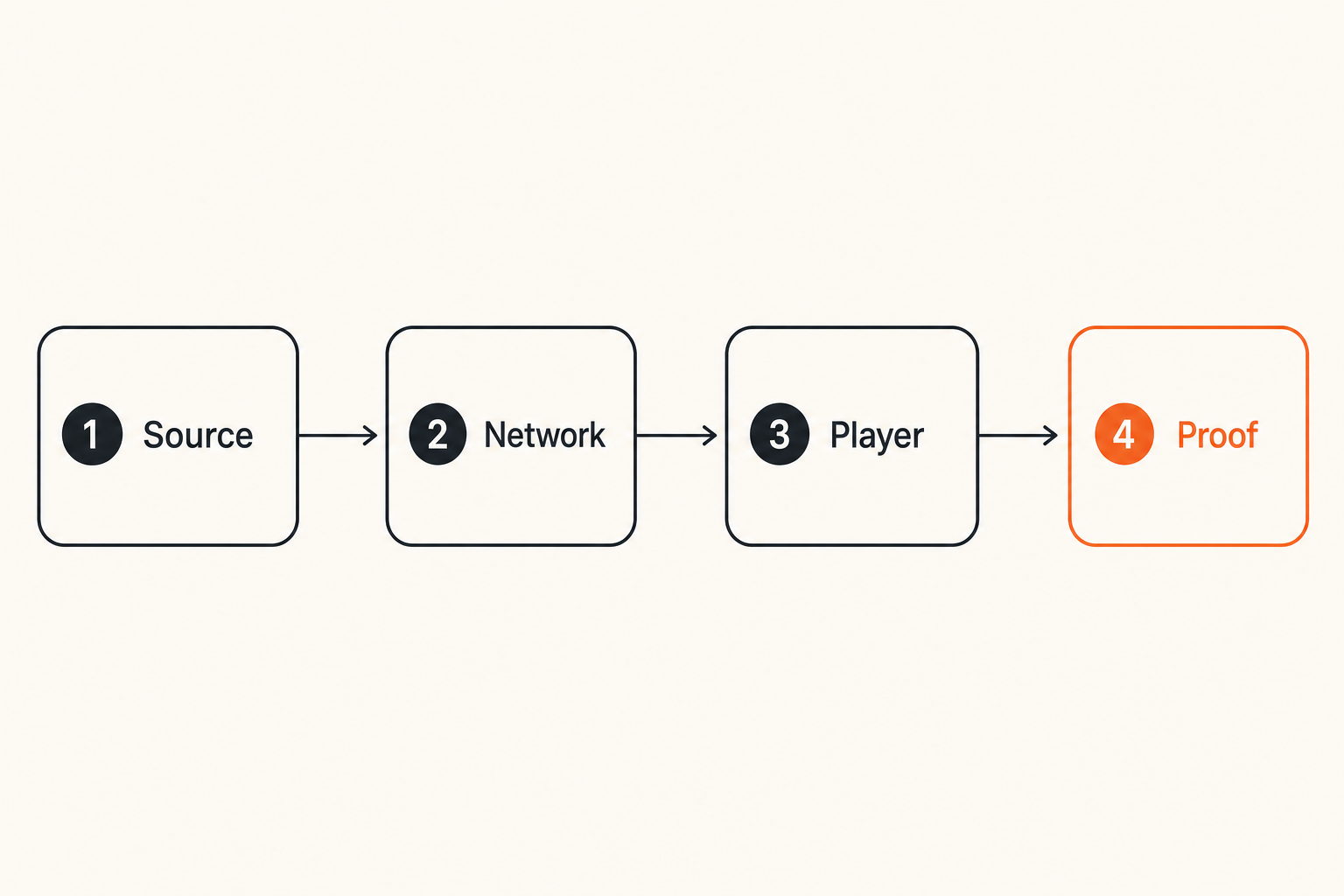
Four layers to map before changing providers
Before switching providers, buying a new router, or forcing everything through a VPN, map the workflow. You do not need an enterprise observability stack. You need a simple model that prevents random changes.
Use four layers:
- Source: the origin of the media. This may be a licensed streaming service, a lawful IPTV playlist, a public-domain torrent, a Linux ISO, a personal media server, or a local NAS.
- Network: DNS, ISP, Wi-Fi, Ethernet, VPN, routing, and peering.
- Player: app, codec support, buffer behavior, hardware decoding, storage speed, and operating system limits.
- Proof: logs, timestamps, screenshots, traceroutes, packet loss tests, torrent peer counts, and player error messages.
Most home media problems get misdiagnosed because the proof layer is missing. People remember that something buffered last night, but they do not know which channel, which device, which route, which DNS resolver, or whether the issue affected other services at the same time.
Practical rule: If you cannot reproduce a failure with a timestamp, device, source, and network path, you are not troubleshooting yet. You are guessing.
What to log when streams fail
You do not need to log everything. You need enough to compare failures across time.
A simple home media log can look like this:
Time: 2026-08-05 20:47
Device: living-room Android TV
Connection: Wi-Fi 5 GHz
Source type: legal IPTV playlist
App: IPTV player A
Symptom: video froze, audio continued 3 seconds, then reconnect
VPN: off
DNS: router default
Other services affected: no
Quick test: ping gateway stable, speed test normal, same channel failed on phone
That log is not fancy, but it separates local Wi-Fi from source instability faster than memory does. If the same channel fails on multiple devices while other streaming services work, the problem is likely not raw bandwidth. If every device has packet loss to the gateway, it is not Lumen, IPTV, or the app. It is your local network.
ISP backbone vs VPN vs DNS vs CDN: what each actually changes
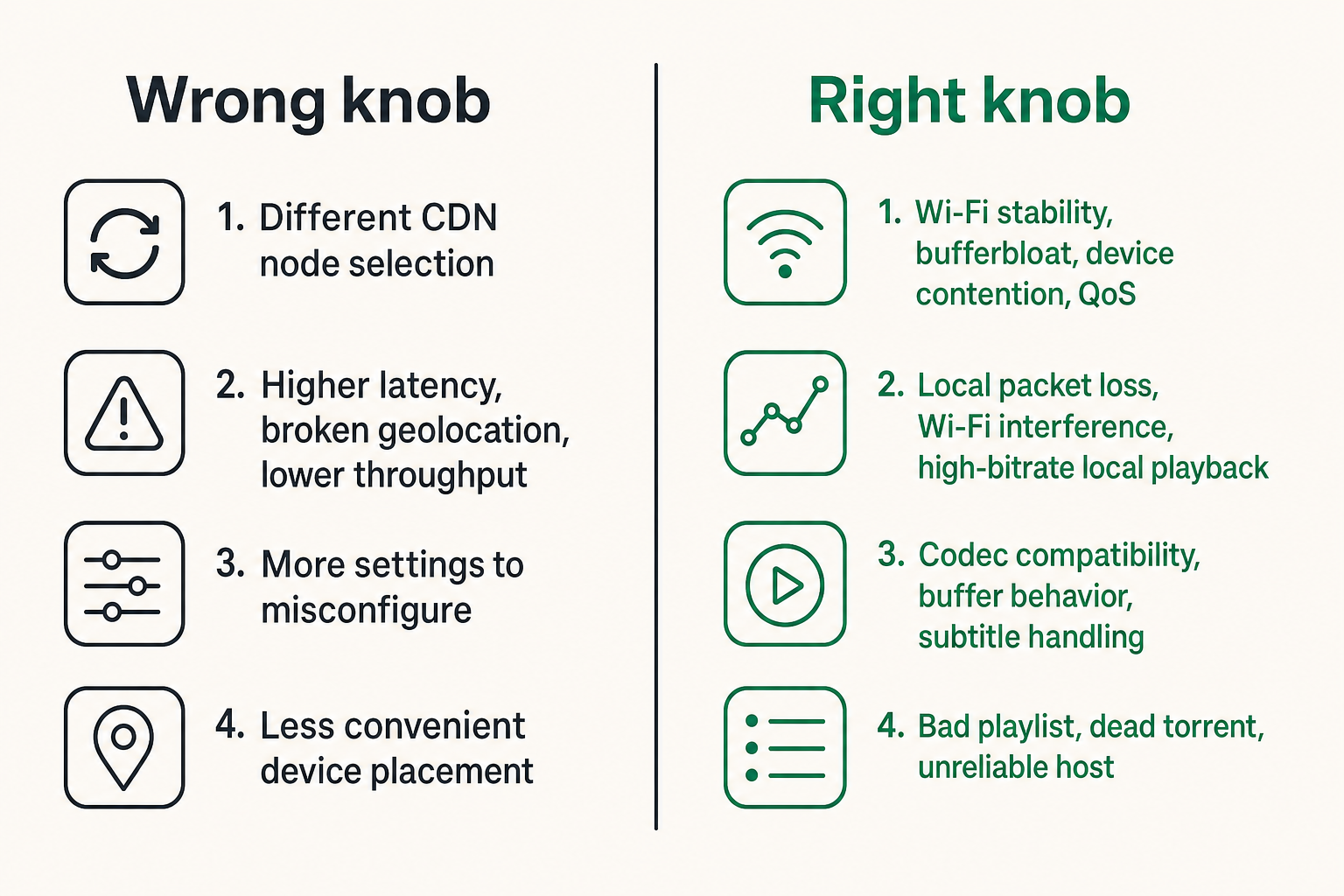
Comparison table for the common knobs
Home media users often reach for the same fixes: change DNS, enable VPN, reboot router, switch app, or blame the ISP. Each knob changes a different part of the chain.
| Knob | What it can improve | What it usually cannot fix | Common side effect |
|---|---|---|---|
| DNS resolver | Bad domain resolution, slow lookups, blocked or stale records | Congested video source, weak Wi-Fi, bad codecs | Different CDN node selection |
| VPN | Privacy from local network and ISP path, route changes, safer use on public Wi-Fi | Bad source quality, overloaded VPN exit, illegal content risk | Higher latency, broken geolocation, lower throughput |
| Router upgrade | Wi-Fi stability, bufferbloat, device contention, QoS | Upstream route congestion, bad IPTV playlist | More settings to misconfigure |
| Ethernet | Local packet loss, Wi-Fi interference, high-bitrate local playback | Remote server instability | Less convenient device placement |
| Different player | Codec compatibility, buffer behavior, subtitle handling | ISP-level congestion, dead peers | Inconsistent library behavior |
| Different source | Bad playlist, dead torrent, unreliable host | Home network problems | Requires legal and safety vetting |
The practical question is: which knob matches the symptom? If a local 4K file stutters from your NAS over Wi-Fi, a VPN will not help. If one IPTV channel fails and others work, a faster internet plan probably will not help. If every live stream drops during peak evening hours and traceroute latency jumps outside your home, then the ISP or upstream path becomes more relevant.
The mistake is stacking fixes blindly
What breaks in practice is fix stacking. A user changes DNS, enables a VPN, switches IPTV apps, increases buffer size, restarts the router, and then cannot tell which change helped or hurt.
Stacking is especially risky with Lumen Technologies or any ISP/backbone discussion because routing can change dynamically. A stream that fails at 8:30 may work at 9:10 without any local change. If you made five adjustments during that window, you learn almost nothing.
Use controlled changes:
- Change one variable at a time.
- Test the same source on two devices.
- Test one wired device if possible.
- Record whether VPN is on or off.
- Keep a baseline DNS resolver before experimenting.
Related reading from our network: content automation workflows face the same control problem: if every step changes at once, you lose accountability and cannot improve the system.
IPTV and live TV: latency, jitter, and channel stability
Playlist quality is not enough
IPTV is where home media architecture gets exposed quickly. A video-on-demand file can buffer ahead. A live channel has less room to hide network instability. Latency, jitter, packet loss, source reliability, player buffering, and device decoding all show up as freezes.
For lawful IPTV playlists, the source quality matters, but it is only one part of the workflow. A clean playlist can still behave badly on weak Wi-Fi. A stable network can still fail with an overloaded source. A good player can still struggle with unsupported codecs.
If you manage live playlists, keep source testing separate from playback testing. Use one known-good player as your baseline. Use one wired device when possible. Keep a short list of channels that you know are legitimate and stable, then use them for network comparison.
If you want a practical place to organize and test live channel workflows, the live channel experience on BitTorrented live TV is most useful when you treat it as part of a broader playback and network validation process, not as a replacement for your own judgment about legality and source quality.
Buffer strategy for live channels
Buffering is a tradeoff. More buffer can smooth jitter, but it adds delay. Less buffer feels live, but it exposes every network hiccup. For sports, news, and events, users notice delay. For background channels, they notice freezes more than latency.
A practical live TV setup usually has three profiles:
- Low latency: small buffer, wired device preferred, used for events where delay matters.
- Balanced: moderate buffer, good for daily viewing and mixed Wi-Fi conditions.
- Stability-first: larger buffer, useful for weaker sources or older devices.
The mistake teams make is applying the same buffer profile to every channel. That fails because every channel is not delivered the same way. Some sources segment cleanly. Some recover poorly. Some have inconsistent bitrate. The player needs enough flexibility to handle those differences without turning every playback session into manual tuning.
Practical rule: For live IPTV, optimize for stable recovery first, then reduce latency. A stream that is five seconds faster but freezes every three minutes is not better.
Torrents and DHT: availability, legality, and network behavior
Legal sources and safe swarms
Torrenting is a transport method, not a permission slip. The safe architecture starts with lawful content: open-source software, public-domain media, creator-approved releases, personal distribution, research data, or other content you have the right to download and share.
The network behavior is different from normal streaming. A torrent client talks to many peers, may upload as well as download, uses trackers or DHT, and can continue in the background. That makes it powerful for resilient distribution, but it also creates more visible network activity and more configuration risk.
For home media users, the best torrent workflow is explicit:
- Decide what content is legal to download and seed.
- Use a dedicated client profile or device.
- Set bandwidth limits so streaming apps remain usable.
- Keep completed content organized away from temporary downloads.
- Monitor ratio, peer count, and stalled jobs.
This is boring by design. Boring workflows are safer and easier to debug.
Why DHT visibility changes privacy decisions
DHT helps peers find each other without relying only on central trackers. That is useful for availability, but it also means your client may participate in a broader peer discovery network. Your IP address can be visible to peers in a swarm, and your ISP path can observe connection metadata even when it cannot inspect encrypted payloads in the same way.
That does not mean every torrent workflow requires panic. It means you should make privacy decisions deliberately. If you use DHT for lawful torrents, know when it is enabled, know which client is using it, and understand whether that traffic should run through a VPN or a separate network segment.
For users researching public swarm activity and legal torrent discovery, BitTorrented DHT browsing is best approached as a visibility tool: useful for understanding availability patterns, but not a substitute for verifying rights, source trust, and local laws.
Privacy and security when your ISP path is visible
What your provider can and cannot see
Your ISP or upstream network path can generally see connection metadata: destination IPs, timing, volume, and protocol characteristics. DNS choices may expose domain lookups unless you use encrypted DNS. HTTPS protects content in transit, but it does not make the existence of a connection invisible.
A VPN changes the visibility model. Your ISP sees an encrypted tunnel to the VPN provider. The destination sees the VPN exit. The VPN provider becomes a new trust point. That can be useful, especially on public Wi-Fi or for separating torrent traffic, but it is not magic.
The practical question is not whether VPNs are good or bad. The question is which trust boundary you are moving, and why.
For a Lumen Technologies path, the same logic applies as with any provider. Do not assume the provider is the only privacy issue. Apps, trackers, player telemetry, DNS resolvers, ad-supported streaming services, and IPTV sources can all expose data in different ways.
Sensible VPN and router rules
A sane home setup avoids all-or-nothing routing. Some traffic benefits from a VPN. Some traffic breaks because of it. Some streaming services enforce licensing by region and may block VPN exits. Some low-latency live streams perform worse through distant exits.
Consider a split approach:
Media TV devices: direct ISP path unless privacy need exists
Torrent client: VPN-only rule with kill switch
NAS and local playback: local network only, no VPN needed
Guest devices: isolated Wi-Fi network
DNS: router-controlled, documented resolver choice
Router-level rules are safer than relying on memory. If your torrent client should never use the direct ISP path, enforce that with firewall policy or client binding, not a sticky note.
Practical rule: Privacy controls should fail closed for sensitive workflows. If the VPN drops, the torrent client should stop rather than silently switching to the default route.
Troubleshooting Lumen Technologies performance without guessing
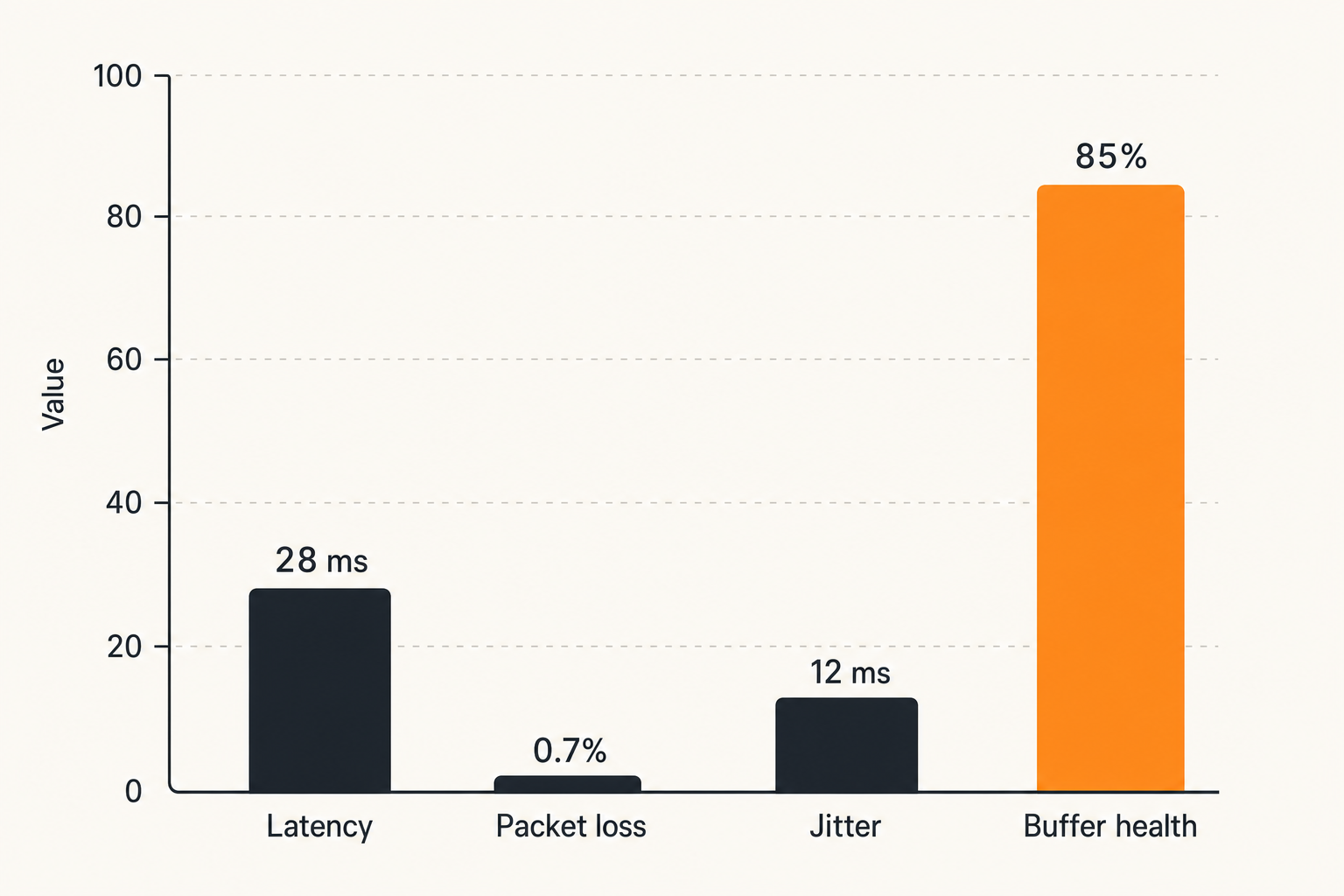
A numbered workflow for isolating faults
When someone says Lumen Technologies is slow, slow is not specific enough. Slow DNS? Slow first byte? High jitter? Packet loss? Bad route to one provider? Wi-Fi contention? Overloaded source?
Use this workflow before escalating or replacing equipment:
- Confirm the symptom. Write down the source, device, app, time, and exact failure.
- Test local network health. Ping your router from the playback device if possible. Check Wi-Fi signal and packet loss.
- Compare wired vs wireless. If wired works and Wi-Fi fails, stop blaming the ISP.
- Compare sources. Test a licensed streaming app, a known-good live channel, and a local file.
- Compare DNS. Try one documented alternate resolver, then revert if it does not help.
- Compare VPN off vs on. Use the same source and device. Do not change anything else.
- Check route behavior. Run traceroute or pathping to the affected host if you can identify it.
- Record peak-hour patterns. Evening congestion that repeats is different from random app failure.
- Escalate with evidence. Provider support is more useful when you can show timestamps, packet loss, and affected destinations.
This sequence keeps you from turning a one-hour problem into a weekend rebuild.
Metrics worth collecting at home
You do not need enterprise telemetry, but a few measurements help:
- Latency to router, DNS resolver, and common public endpoints.
- Packet loss over five-minute windows, not single pings.
- Jitter during live playback.
- Wi-Fi RSSI or signal quality for fixed media devices.
- Torrent peer count and stalled percentage for lawful downloads.
- Player buffer health if the app exposes it.
- Time-to-first-frame for IPTV channels.
The important part is consistency. Measure the same way each time. If you change tools constantly, you cannot compare results.
Related reading from our network: freelancers choosing platforms face a similar channel-stack problem: the issue is rarely one platform in isolation, but how the full path behaves under real use.
What works: a reliable home media network pattern
Router, DNS, cache, and device roles
A reliable home media network is not necessarily expensive. It is explicit. Each component has a role.
A useful pattern looks like this:
- Router: handles DHCP, firewall rules, DNS forwarding, and basic traffic shaping.
- Wired core: connects NAS, main TV device, desktop, and any always-on media server.
- Wi-Fi: serves mobile devices and secondary screens, not the most demanding fixed workloads.
- DNS: documented resolver choice, with a fallback you understand.
- Torrent client: isolated profile, bandwidth limits, VPN binding if required.
- IPTV player: baseline app with known buffer settings and codec support.
- Local library: organized folders, predictable naming, and backups.
For adjacent home automation and power-state planning, our earlier guide on wake tech for torrent, IPTV, and home media architecture is useful because network reliability is tied to whether the right devices are awake, reachable, and discoverable.
Automation that helps instead of hiding failures
Automation should reduce repetitive work, not hide broken systems. A script that restarts the player every time a stream freezes may make the symptom less visible, but it does not solve the source or network issue.
Good automation examples:
- Restart a known flaky legal IPTV source only after logging the failure.
- Pause torrent seeding during live sports if your uplink is limited.
- Alert when packet loss to the router exceeds a threshold.
- Move completed legal downloads into a scanned media folder.
- Run a nightly check against known-good test streams.
Bad automation examples:
- Reboot the router every night without knowing why.
- Randomly rotate DNS resolvers.
- Force every app through a VPN because one workflow needs it.
- Delete logs to save space before reviewing failures.
A useful way to think about it is that automation should preserve evidence. If it erases evidence, it makes the next outage harder.
What fails: common implementation mistakes
Over-optimizing speed tests
Speed tests are not useless. They are just incomplete. A 900 Mbps result does not prove your IPTV workflow is stable. A 100 Mbps result does not mean a 1080p stream should fail. Throughput is only one dimension.
Live media cares about consistency. Torrents care about peer availability, connection limits, and upload policy. Local playback cares about Wi-Fi stability, disk speed, and codec support. Streaming apps care about CDN selection, DRM, app state, and device performance.
What breaks in practice is when users upgrade bandwidth instead of fixing packet loss. They buy a faster plan, keep the same congested Wi-Fi channel, run the same overloaded player, and then wonder why the living-room TV still freezes.
If your Lumen Technologies connection tests fast but media fails, investigate:
- Bufferbloat under upload load.
- Weak Wi-Fi at the TV location.
- VPN exit congestion.
- Broken DNS-to-CDN mapping.
- Player codec fallback to software decoding.
- IPTV source instability.
Treating IPTV, torrents, and apps the same
IPTV, torrents, and subscription streaming apps use different operating models. Treating them the same creates bad rules.
IPTV live channels are sensitive to jitter and source continuity. Torrents are sensitive to peer count, client policy, and upload limits. Subscription apps are sensitive to account state, DRM, CDN delivery, and device certification. Local media is sensitive to LAN throughput and file compatibility.
One global fix rarely fits all four. A VPN might be appropriate for a dedicated torrent client handling lawful content, but it may degrade a licensed streaming app. A large buffer might help a live channel but make sports feel delayed. Aggressive QoS might protect video playback but starve uploads needed for healthy legal swarms.
The practical question is: what class of media is failing, and which part of its workflow is most likely to break?
Where bittorrented.com fits
Discovery is separate from playback
Discovery, playback, privacy, and network troubleshooting are different jobs. Mixing them together leads to bad decisions. A search interface can help you find media information. A player can render a stream. A router can shape traffic. A VPN can shift trust boundaries. None of those tools can decide whether a source is legal, safe, or reliable for you.
That separation matters for bittorrented.com readers because torrent and IPTV workflows sit close to legal and security boundaries. The responsible path is to use tools for visibility and organization while keeping rights verification, privacy choices, and local law in the decision loop.
bittorrented.com is built for readers who want practical, up-to-date guidance on streaming services, torrents, IPTV, and home media tools. The product fit is architectural: help users think in workflows, not magic buttons.
Use tools without outsourcing judgment
A good media workflow does not outsource judgment to an app. It makes judgment easier.
Use discovery tools to compare sources. Use IPTV tools to test channel behavior. Use torrent visibility to understand swarm availability for lawful content. Use network tools to identify whether your Lumen Technologies path, VPN, Wi-Fi, DNS, or player is part of the failure.
But keep the boundaries clear:
- Verify that you have rights to access and share content.
- Prefer official, licensed, public-domain, or creator-approved sources.
- Avoid unknown executables and suspicious media bundles.
- Keep media devices patched.
- Use privacy tools deliberately, not as a license to ignore risk.
The mistake teams make is chasing convenience until the workflow becomes un-auditable. That is how people end up with ten apps, three DNS changes, two VPN profiles, a mystery playlist, and no idea why the TV freezes.
Closing checklist for Lumen Technologies users
Decisions to make this week
If your home media setup touches Lumen Technologies directly or indirectly, do not start with a provider rant. Start with a map.
Use this checklist:
- Identify your main media classes: legal IPTV, licensed streaming apps, lawful torrents, local library, radio, or live events.
- Pick one baseline device and one baseline player.
- Wire the main TV device if possible.
- Document DNS and VPN settings.
- Separate torrent traffic from general streaming where appropriate.
- Set upload limits so torrents do not damage live playback.
- Test during peak hours and off-hours.
- Keep a simple failure log for two weeks.
- Change one variable at a time.
- Escalate ISP issues with evidence, not vague symptoms.
This is not about making your home feel like a data center. It is about removing guesswork from a system your household expects to work every night.
Final thought on Lumen Technologies
Lumen Technologies is one part of a larger media delivery chain. Sometimes the ISP or upstream route is the issue. Sometimes it is Wi-Fi, DNS, VPN configuration, IPTV source quality, torrent peer availability, or the player itself.
That changes the conversation. You do not need to worship the network diagram, but you do need one. The teams and households that get stable streaming in 2026 are not the ones with the most tools. They are the ones that know which tool owns which part of the workflow.
Use Lumen Technologies as a reason to think architecturally: source, network, player, proof. When those layers are visible, troubleshooting gets shorter, privacy choices get cleaner, and home media stops depending on superstition.
Try bittorrented.com
bittorrented.com is for readers who want practical, up-to-date guidance on streaming services, torrents, IPTV, and home media tools. Try bittorrented.com.